How Can Seniors Use ChatGPT for Everyday Jobs? A Gentle Step-by-Step Guide
Disclosure: this page contains Amazon affiliate links. As an Amazon Associate we earn from qualifying purchases, at no extra cost to you.
Picture a cup of tea, a puzzling letter on the kitchen table, and a patient helper who explains it one line at a time.
Welcome, kitchen-table trailblazer!
That helper can be ChatGPT, and the everyday jobs it does best are small ones: reading small print, explaining a bill, writing a birthday note, and giving a suspicious text a second look.
You don’t need anything new to start, though a bigger tablet screen on Amazon and an adjustable tablet stand make the words easier to read and keep your hands free.
Short answer: Seniors can use ChatGPT for everyday jobs by typing or saying a plain request: photograph a letter or bill and ask what it means, have answers read aloud, draft a note, or paste a suspicious message and ask whether it looks like a scam. Never share passwords or bank details, and check money calls by calling back.
| Everyday job | Which button | What to say | Leave out |
|---|---|---|---|
| Read small print | + then Add photos & files, or the camera | Read this label to me in big, simple words. | Medicine questions go to your pharmacist too |
| Explain a letter or bill | A photo of the page | Explain this letter in plain words. What do I need to do, and by when? | Cover account and policy numbers first |
| Write a card or note | Dictate (the microphone) | Help me write a short, warm birthday note to my granddaughter, who just started college. | Home address and phone number |
| Check a suspicious message | Paste the text, or a screenshot | Does this look like a scam? List the warning signs. | Don’t click the message’s links first |
| Plan an outing | Type, or Voice | Plan an easy afternoon at the art museum with benches and a quiet lunch spot nearby. | When your home will be empty |
| Learn something new | Voice (talk and listen) | Explain what a QR code is, like I’ve never seen one. | Nothing private needed |
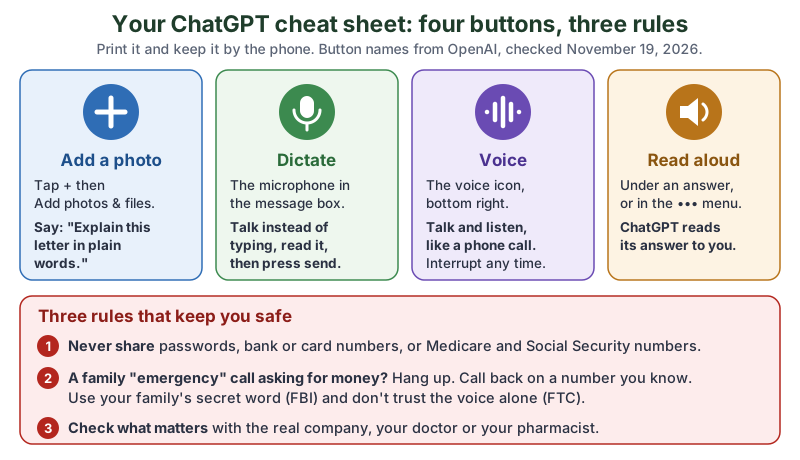
The same cheat sheet in plain text:
- Add a photo
- Tap +, then Add photos & files. Say:
Explain this letter in plain words.
- Dictate
- The microphone in the message box. Talk instead of typing, read what appeared, then press send.
- Voice
- The voice icon at the bottom right. Talk and listen, like a phone call. You can interrupt any time.
- Read aloud
- Under an answer, or in the ••• menu. ChatGPT reads its answer to you.
- Three rules
- 1) Never share passwords, bank or card numbers, or Medicare and Social Security numbers. 2) A family “emergency” call asking for money? Hang up and call back on a number you know; use your family’s secret word. 3) Check what matters with the real company, your doctor or your pharmacist.
What everyday jobs can ChatGPT do for older adults?
ChatGPT can do small, useful everyday jobs for older adults: read and explain paperwork, read answers out loud, help write letters and cards, give a suspicious message a second look, plan an outing, and explain new technology without making you feel silly for asking. You ask in plain words, by typing or by talking, and you can say shorter
, “simpler” or “say that again” as often as you like.
More older adults are trying it. In Pew Research Center’s report on AI use by age (June 17, 2026), 19% of adults 65 and older said they use ChatGPT, against 37% of adults 50 to 64. Pew says We surveyed 5,119 U.S. adults from Feb. 17 to 23, 2026.
For any AI chatbot, the figures were 23% at 65 and older and 42% at 50 to 64.
OpenAI is teaching it in person, too. From search excerpts of OpenAI’s Helping older adults use AI in everyday life (September 16, 2026; 403 to direct reads), OpenAI Academy and Older Adults Technology Services (OATS) from AARP ran free, in-person ChatGPT workshops aimed at 1,000 older adults in 10 U.S. cities, part of OATS’s Senior Planet program, with scam awareness built in.
What if you’ve never used ChatGPT before?
If you’ve never used ChatGPT, start with our first-chat guide for complete beginners: it shows how to find the real app, what the free plan includes and what the screen looks like. This page picks up from there with the everyday jobs. OpenAI’s plan comparison (read November 19, 2026) lists Limited voice chats
and Limited messages with uploads
on the Free plan, which is enough to try every job here.
How do you get ChatGPT to read small print or explain a letter?
To get ChatGPT to read small print or explain a letter, take or add a photo of it with the + button, then ask in plain words what it says and what you need to do. ChatGPT reads the text in the photo and answers in the chat.
- Lay the page flat in good light, with the whole page in view.
- Open ChatGPT and tap + next to the message box, then Add photos & files. OpenAI’s Image Inputs FAQ (read through search excerpts) gives that path and says image inputs work on Free and paid plans, with usage limits by plan. The phone apps also let you take a photo with the camera.
- Type or say your question, for example:
Read this to me in big, simple words. What is it about, and do I need to do anything? - Ask follow-ups:
What does ‘premium’ mean here?
,Say that more simply
, “What’s the deadline?”
For a letter with several pages, OpenAI’s ChatGPT release notes (October 1, 2026, read through search excerpts) describe a Scan option on iPhone: open the camera in ChatGPT, tap the three-dot menu and select Scan, and ChatGPT combines the pages into one PDF for your chat.
How do you ask ChatGPT to explain a bill or a form?
Ask ChatGPT to explain a bill or a form by photographing it with the account numbers covered, then asking what each part means and what, if anything, you need to do. These prompts are our own:
- What is this?
This is a letter I received. In plain words: who sent it, what is it about, and is there anything I need to do? - Bill line by line:
Explain each line on this bill in one short sentence. Which number is the amount I owe, and when is it due? - Form help:
I need to fill in this form. Explain what each box is asking for. Don't fill it in for me. - Questions to ask:
Write me three short questions to ask the company on the phone about this letter.
Treat the explanation as a helpful first read. For anything about money, medicine or benefits, call the company or office on the number printed on their official website or your card, not a number from an email or text.
How do you have ChatGPT read the answer out loud?
To have ChatGPT read an answer out loud, tap Read aloud under the answer, or in the more options menu (•••). OpenAI’s iOS and Android app FAQ (read through search excerpts) says the actions under a response can include Copy, Good response, Bad response, Read aloud, Share, and Try again.
To talk and listen with no reading at all, use ChatGPT Voice. OpenAI’s Voice feature page says to tap the voice icon in the bottom right
, and that You can interrupt anytime and ask ChatGPT to respond faster, slow down, add more detail, or keep it brief.
“Slow down, please” works just as you’d say it to a person. OpenAI’s Help Center (via search excerpts) says you can pick the voice you like under Settings > Voice.
How do you make ChatGPT’s words bigger and easier to see?
To make ChatGPT’s words bigger, turn up your phone’s or computer’s own text size (OpenAI’s Help Center points phone users to those settings) or zoom in on chatgpt.com in your browser. The ChatGPT app for Windows also has its own Text size setting. Here is every setting in one place:
| Where | What it does | How to turn it on | Source |
|---|---|---|---|
| iPhone and iPad | Bigger text | Settings > Accessibility > Display & Text Size > Larger Text, then drag the slider | Apple Support |
| Android phone | Bigger text, or everything bigger | Open Settings, search Font size (or Display size), move the slider; some steps need Android 13 and up | Android Accessibility Help |
| Windows 11 | Bigger text in every app | Windows + U (or Start > Settings > Accessibility) > Text size, drag the slider, select Apply | Microsoft Support |
| ChatGPT app for Windows | Zooms the whole app | Profile icon > Settings > General > Text size, select the plus button | OpenAI Help Center (search excerpts) |
| chatgpt.com in a browser | Zooms the page | Your browser’s zoom controls | OpenAI Help Center (search excerpts) |
| ChatGPT, any device | Listen instead of read | Read aloud under an answer or in the ••• menu | OpenAI Help Center (search excerpts) |
| ChatGPT, any device | Talk instead of type | Dictate (the microphone) for text you check first; Voice for a spoken conversation | OpenAI Prompting page; Voice feature page |
Apple’s font size page adds a fair warning: Making the text too large might make it hard to tap buttons or other functions within apps.
Try one step bigger at a time. Microsoft’s Make text and apps bigger page and Google’s Change text & display settings page have the Windows and Android steps in full.
If typing itself is the hard part, our guide to voice typing when your hands hurt covers the Dictate button and the free dictation built into every phone and computer.
Does a bigger screen help?
A bigger screen helps because bigger text still fits on it without endless scrolling. A tablet on a stand at eye level is easy on the neck and leaves both hands free for the letter you’re photographing. Browse tablets with a large screen on Amazon, and for small print away from the screen, lighted magnifying glasses. Check the maker’s page for screen size and which apps a tablet runs before you buy.
How can ChatGPT help you write a letter, card or note?
ChatGPT can help you write a letter, card or note by turning a few spoken sentences into a tidy draft in your own words, which you then read, change and send. OpenAI’s Prompting page says that with Dictate, ChatGPT transcribes your speech into the composer so you can review and edit it before sending the prompt.
These prompts are our own:
- Thank-you note:
Help me write a short thank-you note to my neighbour Ruth for bringing soup when I was ill. Warm and simple, four sentences, in my own plain words. - A letter to a company:
Write a polite letter asking my water company to explain why this month's bill is higher than usual. Keep it under 150 words. Leave a space for my account number. - A card for the grandchildren:
I'll tell you three things I love about my grandson. Turn them into a short birthday message that sounds like a grandparent, not a greeting card. - Keep it sounding like you:
Here is something I wrote last year. Write the new note in the same style.
For holiday cards, our Christmas card guide has a family-letter prompt and the 2026 mailing dates.
How do you use ChatGPT to check if a message is a scam?
To use ChatGPT to check if a message is a scam, paste the text (or add a screenshot) and ask whether it shows warning signs, without clicking any link or calling any number in it. Then check the claim yourself through the company’s official app, website or phone number. OpenAI Academy’s How to Spot Scam Messages with ChatGPT video page (September 17, 2026) puts it this way: Suspicious email or text? ChatGPT can serve as a second set of eyes.
Honestly, my favourite button on this whole page is Read aloud. There’s something lovely about a computer politely reading you the small print you’d normally squint at, with no hunt for your glasses required.
- Don’t click, reply or call yet. The same OpenAI Academy page says:
Never click a suspicious link or call a number included in the message.
- Copy the message text, or take a screenshot, and add it to ChatGPT.
- Ask (our own words):
Does this message look like a scam? List any warning signs, such as urgency, strange links, secrecy or requests for money or gift cards. Don't tell me it's safe unless you're sure. - Check it for real. OpenAI Academy says to
Verify the claim independently through an official app, website, phone number, or someone you trust.
The warning signs OpenAI Academy names are urgent language, unfamiliar links, unusual requests, and demands for money.
And it is clear about the limit: ChatGPT can help you notice warning signs, but it cannot guarantee that a message is safe.
What is the voice-clone “family emergency” scam?
The voice-clone family emergency scam is a call that sounds exactly like a grandchild or other relative in trouble, made with AI from a short clip of their real voice, asking you to send money fast and keep it secret. The FTC’s consumer alert of March 20, 2023 by Alvaro Puig explains what the scammer uses: a short audio clip of your family member’s voice
and a voice-cloning program
. Its advice: Don’t trust the voice. Call the person who supposedly contacted you and verify the story.
and Use a phone number you know is theirs.
The FTC’s newest alert, Grandpa, I need your help!
(November 18, 2026), adds video: If they ask you to join a video call, know that a person’s image can be faked, too.
Its first tip is Slow down.
followed by Hang up or tell the person you’ll call them right back.
It also says never to send money to anyone who insists you can only pay with a wire transfer, cryptocurrency, a payment app or a gift card.
- Agree on a family secret word. The FBI’s public service announcement I-120324-PSA (December 3, 2024) says:
Create a secret word or phrase with your family to verify their identity.
- Call back. Hang up and ring the relative on the number you already have, or another family member.
- Report it. Tell the FTC at ReportFraud.ftc.gov and the FBI at ic3.gov, even if you didn’t pay.
The FBI’s Internet Crime Complaint Center counted these calls in its 2025 report:
This type of scam also includes grandparent scams, or “distress” scams, in which voice cloning technology is used to mimic the sound of a loved one in distress. Victims claimed losses over $5 million in 2025 to distress scams.
Which scams cost people over 60 the most?
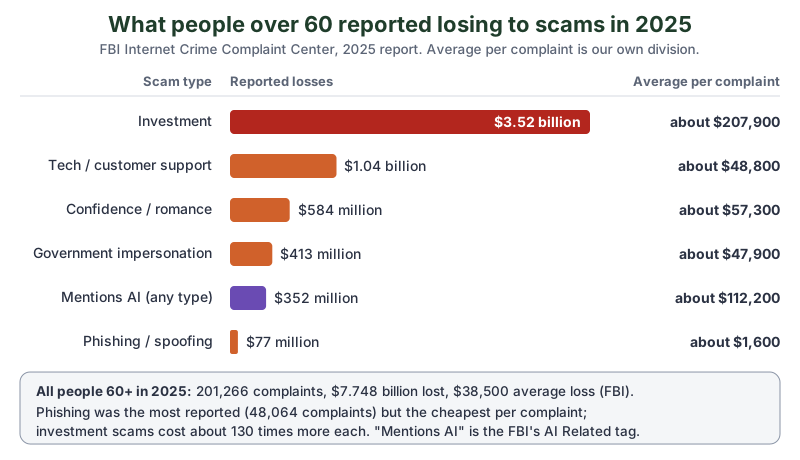
Investment scams cost people over 60 the most: $3.52 billion in 2025, according to the FBI Internet Crime Complaint Center’s 2025 annual report. People aged 60 and older filed 201,266 complaints and reported $7.748 billion in losses, an average loss of $38,500 (FBI). We divided each loss by its complaint count to show what one complaint cost on average:
| Scam type (FBI’s name) | Complaints from people 60+ | Reported losses | Average per complaint |
|---|---|---|---|
| Investment | 16,926 | $3,519,296,354 | about $207,900 |
| Tech/Customer Support | 21,333 | $1,040,730,043 | about $48,800 |
| Confidence/Romance | 10,188 | $584,032,745 | about $57,300 |
| Government Impersonation | 8,628 | $413,206,251 | about $47,900 |
| AI Related (a tag across types) | 3,143 | $352,496,231 | about $112,200 |
| Phishing/Spoofing | 48,064 | $77,020,936 | about $1,600 |
Two things stand out by our arithmetic. Phishing was the scam people over 60 reported most, but investment scams cost about 130 times more per complaint. And complaints from people over 60 were about 14% of all the FBI’s AI-related complaints (3,143 of 22,364) but about 39% of the AI-related losses ($352.5 million of $893.3 million). Pasting a too-good-to-be-true investment offer into ChatGPT and asking for warning signs costs nothing.
What should you never tell ChatGPT?
Never tell ChatGPT your passwords, bank or card numbers, PINs, Medicare or Social Security numbers, or other people’s private details. ChatGPT doesn’t need any of them to explain a letter or write a note, so cover account numbers before you take a photo, and leave them out when you type.
- Use the real ChatGPT. Only the official app or chatgpt.com, never a link from a text or an ad that promises
free AI for seniors
. - Keep a chat out of your history. Our beginner’s guide shows Temporary Chat and how to stop ChatGPT training on your chats.
- Health questions. ChatGPT can explain a word on a leaflet; your doctor or pharmacist decides what’s right for you.
How can family help an older relative use ChatGPT?
Family can help an older relative use ChatGPT best by sitting together for one short session, setting the text size, and practising one real job from start to finish. Our beginner’s guide has the full set-up checklist; this is the everyday-jobs version:
- Turn up the text size on their own phone or tablet, using the table above.
- Practise one real job together: a photo of a letter that came this week, then Read aloud.
- Print the cheat sheet above and keep it by the phone.
- Agree on the family secret word (the FBI’s advice) and say it out loud once, so everyone remembers.
- Promise to answer the
is this a scam?
call any time, with noyou should have known
afterwards.
What are the key numbers to remember?
The key numbers are how many older adults use ChatGPT, what scams cost people over 60, and the one-line rule that stops a voice-clone call. All five, with their sources:
- 19%
- Of U.S. adults 65 and older said they use ChatGPT in February 2026 (Pew Research Center, 5,119 adults surveyed).
- 201,266
- Complaints from people aged 60 and older to the FBI’s Internet Crime Complaint Center in 2025.
- $7.748 billion
- Reported losses for people 60 and older in 2025, an average of $38,500 (FBI IC3).
- Over $5 million
- Claimed losses to grandparent or “distress” scams that use voice cloning, in 2025 (FBI IC3).
- 1 secret word
- The FBI’s tip:
Create a secret word or phrase with your family to verify their identity.
What should you do next?
Pick one job and do it today: photograph the next confusing letter in the mailbox, cover the account number, and ask ChatGPT what it means and what you need to do. Then tap Read aloud. If your hands or eyes make typing tiring, try voice typing next, and the newsletter box below sends you each new tutorial.
Go try one job today: photograph the next confusing letter that lands in the mailbox and ask ChatGPT what it means. And tonight, pick a family secret word together over dinner. It might be the most useful silly word your family ever agrees on.
Sources and further reading
- How Americans’ opinions and use of AI differ by age (Pew Research Center, June 17, 2026) — 19% of adults 65+ use ChatGPT, 5,119 adults surveyed Feb 17-23, 2026; read Nov 19, 2026
- Helping older adults use AI in everyday life (OpenAI, September 16, 2026) — OpenAI Academy and OATS from AARP workshops; read through search excerpts
- ChatGPT plan comparison (OpenAI) — Free plan voice and uploads wording; read Nov 19, 2026, prices left out
- ChatGPT Image Inputs FAQ (OpenAI Help Center) — + > Add photos & files, Free and paid plans; read through search excerpts
- ChatGPT release notes (OpenAI Help Center) — Scan with the ChatGPT camera, October 1, 2026; read through search excerpts
- ChatGPT iOS and Android app FAQ (OpenAI Help Center) — Read aloud under a response; read through search excerpts
- Updating your visual experience on ChatGPT (OpenAI Help Center) — Windows app Text size, browser zoom; read through search excerpts
- ChatGPT Voice feature page (OpenAI) — voice icon in the bottom right, interrupt anytime; read Nov 19, 2026
- Prompting: Use voice dictation (OpenAI) — review and edit dictated text before sending; read Nov 19, 2026
- How to Spot Scam Messages with ChatGPT (OpenAI Academy, September 17, 2026) — second set of eyes, warning signs, cannot guarantee a message is safe; read Nov 19, 2026
- Scammers use AI to enhance their family emergency schemes (FTC consumer alert, March 20, 2023) — short audio clip, don’t trust the voice, call a number you know; read Nov 19, 2026
- "Grandpa, I need your help!" How to spot and avoid grandkid scams (FTC consumer alert, November 18, 2026) — fake video calls, slow down, hang up and call back, payment methods; read Nov 19, 2026
- Criminals Use Generative Artificial Intelligence to Facilitate Financial Fraud (FBI PSA I-120324-PSA, December 3, 2024) — family secret word or phrase; read Nov 19, 2026
- 2025 IC3 Annual Report (FBI Internet Crime Complaint Center) — 60+ complaints and losses by type, AI section, distress scams; read Nov 19, 2026
- ReportFraud.ftc.gov (FTC) — where to report a scam
- Change the font size on your iPhone, iPad, and iPod touch (Apple Support) — Larger Text; read Nov 19, 2026
- Change text & display settings (Android Accessibility Help) — Font size, Display size, Android 13 and up; read Nov 19, 2026
- Make text and apps bigger (Microsoft Support) — Windows 11 Text size; read through search excerpts
Questions and answers
Is ChatGPT safe for seniors to use?
ChatGPT is safe to use for everyday jobs when you use only the real app or chatgpt.com, never type passwords, bank or Medicare numbers, and check important answers with the company, your doctor or your pharmacist. OpenAI Academy says ChatGPT can help you notice a scam’s warning signs but cannot guarantee a message is safe.
Can ChatGPT read a letter out loud?
Yes. Add a photo of the letter with the + button (Add photos & files), ask ChatGPT to read or explain it in plain words, then tap Read aloud under the answer. Cover account numbers before you take the photo.
Can ChatGPT tell if a text message is a scam?
ChatGPT can point out warning signs such as urgent language, unfamiliar links, unusual requests and demands for money, which OpenAI Academy lists. It cannot guarantee a message is safe, so don’t click the message’s links; check through the company’s official app, website or phone number.
Is ChatGPT free for seniors?
There is no special seniors’ plan, but the Free plan covers everyday jobs. OpenAI’s plan comparison (checked November 19, 2026) lists limited voice chats and limited messages with uploads on the Free plan.
How do I make the text bigger in ChatGPT?
Turn up your device’s text size: Settings > Accessibility > Display & Text Size > Larger Text on iPhone, Font size in Android’s Settings, or Text size in Windows 11’s Accessibility settings. On chatgpt.com use your browser’s zoom; the ChatGPT app for Windows has its own Text size under Settings > General.