How Do You Make a Christmas Card With ChatGPT (That Still Looks Like Your Family)?
Disclosure: this page contains Amazon affiliate links. As an Amazon Associate we earn from qualifying purchases, at no extra cost to you.
Ooh, jingle-bell card designer, put the kettle on and find your favourite family photo, because we’re making this year’s card ourselves! This is the season when the fridge door fills up with other people’s families, and it’s a lovely one to join with a card you made yourself. If you plan to print at home, a pack of white card stock on Amazon and a box of A7 envelopes for 5x7 cards on Amazon are the two things to have ready before you start.
Short answer: To make a Christmas card with ChatGPT, attach your family photo and ask for a festive frame or background while keeping every face exactly the same, or let ChatGPT write the words for your usual photo card. Put greeting text in quotes, check the pixels for print, and mail First-Class by December 17, 2026.
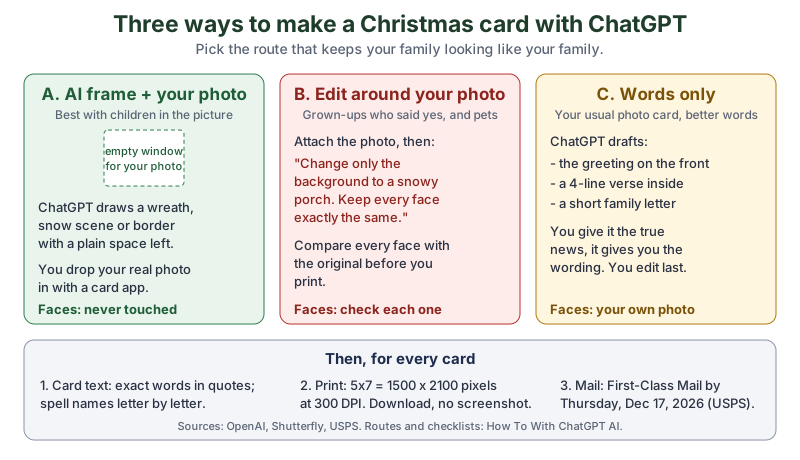
The same picture in plain text:
- A. AI frame + your photo
- ChatGPT draws a wreath, snow scene or border with a plain empty window. You place your real photo in that window with a card app. Faces are never edited. Best when children are in the photo.
- B. Edit around your photo
- Attach the photo and ask ChatGPT to change only the background, keeping every face exactly the same. For adults who said yes, and for pets. Compare each face with the original before printing.
- C. Words only
- ChatGPT drafts the greeting, a short verse and a family letter for your usual photo card. You give it the true news; you edit last.
- Every card
- Exact card text in quotes, family names spelled letter by letter; 1500 x 2100 pixels for a 5x7 at 300 DPI (Shutterfly); First-Class Mail by Thursday, December 17, 2026 (USPS).
What are the three ways to make a Christmas card with ChatGPT?
The three ways to make a Christmas card with ChatGPT are: let ChatGPT draw a festive frame around an empty space for your real photo, let ChatGPT change only the background of your photo, or use ChatGPT just for the words. The first way never touches anyone’s face, which is why we like it best for family cards.
| Way | What you give ChatGPT | What ChatGPT makes | Faces | Best for |
|---|---|---|---|---|
| A. AI frame + your photo | A prompt only, no photo | A Christmas frame or scene with an empty window | Never edited: your real photo goes in the window | Families with children, anyone who wants faces 100% real |
| B. Edit around your photo | Your photo plus a prompt | The same photo with a new festive background | Rebuilt with the picture, so check every one | Couples, adult families who all agreed, pets |
| C. Words only | Your true family news | A greeting, a verse, a family letter | Your usual photo, untouched | Anyone who already has a photo card they like |
You can mix them, too: a route A frame with a route C verse inside makes a card that’s both handmade and personal.
How do you keep your family’s faces real on an AI Christmas card?
To keep your family’s faces real on an AI Christmas card, either keep the photo out of ChatGPT entirely (route A) or tell ChatGPT, in so many words, that the people must not change (route B). OpenAI’s Image generation page gives the rule for any edit: When editing an existing image, say exactly what should change and what must stay the same.
The reason this matters: when ChatGPT edits a photo, it makes a new picture, so details can drift, and faces are the details everyone notices. A card goes to grandparents, old friends and the neighbours, so “almost like Dad” isn’t good enough.
What prompts make a Christmas frame with room for your photo?
Ask ChatGPT for the frame and tell it where to leave the space. OpenAI’s own example prompt for combining images asks ChatGPT to leave the upper-right corner clear for later copy
, and the same idea works for a photo window. These prompts are our own:
- Classic wreath:
Create a portrait-shaped Christmas card front, 5:7. A thick evergreen wreath with red berries and a gold ribbon fills the edges. Leave a plain white rectangle in the centre, taking up about half the card, for a family photo I will add myself. Soft daylight from the left. No people, no text. - Snowy window:
Create a 5:7 Christmas card front that looks like a frosted cottage window at night, with snow on the sill, warm lamplight and a candle on each side. The middle window pane is a plain white rectangle, left empty for my photo. No people, no text. - Paper-cut garland:
Create a 5:7 Christmas card front in a paper-cut style: layered white and red paper stars, pine branches and tiny houses along the top and bottom. Leave the middle third plain cream for a photo and a greeting I will add. No people, no text. - Your pet’s corner:
Using my uploaded photo of my dog, draw him as a small watercolour figure wearing a red scarf in the lower-left corner of a 5:7 Christmas card. Keep his markings and face the same. Leave the rest of the card a soft snowy background with an empty space in the centre.
Then open the frame in any app that layers pictures, such as your photo shop’s card designer, and place your real photo over the empty window. Your family’s faces stay exactly as the camera caught them.
How do you change only the background of your family photo?
To change only the background of your family photo, attach the photo and say that everything about the people stays the same. The OpenAI Image generation page’s own example prompt reads: Edit the attached image. Replace only the mug with a small potted plant. Preserve the person, desk layout, lighting, colors, crop, and every other detail exactly.
Here’s the same pattern for a card (our own wording):
Edit the attached photo for a Christmas card. Replace only the background with a snowy front porch with a wreath on the door and warm lights in the window. Preserve every person exactly: faces, skin tones, ages, hair, expressions, clothes and how they stand. Do not add text or change the crop.
- Attach the photo. OpenAI’s Image inputs page says to
Attach, paste, or drag an image into the ChatGPT web composer.
- Paste the prompt and send it.
- Hold the result next to the original and look at each face in turn: eyes, smile, skin, hair.
- If one face drifted, fix just that area. OpenAI’s Help Center article “Images in ChatGPT” (read through search excerpts) describes a Select tool that highlights the area you want to edit, plus Undo, Redo, Cancel and Save. Our photo-trend tutorial has fix-one-thing prompts for a face that comes out wrong.
OpenAI’s page also says to Use likenesses with care
and to confirm that you have permission to use their likeness.
For a family card that means asking each grown-up in the photo first. It’s a nice excuse for a group text anyway.
Should you upload photos of your children for an AI card?
Our advice is to keep children’s photos out of AI editing and use route A instead: ChatGPT makes the frame, and your real, unedited photo of the kids goes into it. That way the children’s faces are never sent to an AI model or remade by one. OpenAI is cautious here too: its system card for GPT-4o image generation (March 25, 2025) said that at launch, editing uploaded images of photorealistic children would not be allowed.
How do you get ChatGPT to spell the greeting and your family name right?
To get the greeting and your family name spelled right, put the exact words in quotation marks, spell an unusual name letter by letter, and say that no other text is allowed. OpenAI’s Image generation page puts it this way:
Keep in-image text short and specify it precisely. Put the exact text in quotation marks, preserve the capitalization you want, and describe its font style, size, color, and placement. For an uncommon name, spell out the letters when accuracy matters. State whether any other text is allowed.
A card greeting prompt in that style (our own):
Add only the words "Merry Christmas from the Kowalczyks" in deep red, elegant serif letters, centred in the top fifth of the card on one line. The family name is spelled K-O-W-A-L-C-Z-Y-K. Do not add any other text and do not change anything else in the image.
Read every letter before you print, out loud if it helps; the same OpenAI page says to review every word
for production-critical typography. If a long greeting keeps coming out wrong, leave the space empty and type the words yourself in the card app instead. Typed text always prints crisp.
Can ChatGPT write the message inside your Christmas card?
Yes, ChatGPT can write the message inside your Christmas card, and it does it best when you give it the real details: who the card is for, one or two true things from your year, and the tone you want. A card still matters to people. The Greeting Card Association’s 2020 fact sheet says Americans buy some 1.3 billion Christmas cards a year (boxed cards included), and that 60% say that receiving cards and letters in the mail
means more to me
than an email.
A verse prompt (our own):
Write 3 options for a 4-line Christmas verse for our family card. Warm and a little funny, not religious, no clichés like "magical season". True details to use: we moved to Ohio this spring, our son learned to ride a bike, and our cat Biscuit knocked the tree over twice. Keep each line under 10 words.
Pick one, then change any word that doesn’t sound like you. If the verse sounds too polished, our guide to making ChatGPT’s writing sound like you has the fixes.
How do you write a family Christmas letter with ChatGPT?
To write a family Christmas letter with ChatGPT, list your year’s real news as short notes, say how long the letter should be, and ask for a draft in your own voice. A prompt (our own):
Turn these notes into a one-page family Christmas letter, about 250 words, in a friendly, plain voice. One short paragraph per person, then a closing wish. Don't invent anything that isn't in my notes. Notes: [your notes here]
Can you make a Christmas card with ChatGPT for free?
Yes, you can make a Christmas card with ChatGPT on the Free plan, with lower image limits than the paid plans. OpenAI’s plan comparison at chatgpt.com/pricing (read November 15, 2026) lists:
- Free:
Limited image creation
- Go:
More image creation
- Plus:
More complex and accurate image creation
, plus image generation with Thinking - Pro:
Unlimited and faster image creation
Writing the verse and the letter (route C) is plain text, so it works on every plan. On Free, plan the card before you start making pictures, so your limited images go into the version you’ll actually print.
Will a ChatGPT image print sharp on a Christmas card?
A ChatGPT image at a typical size prints well on a small card, but it falls short of the 300 DPI that photo labs call ideal for a 5x7. Shutterfly’s photo prints guide (updated August 10, 2026) says For the best results, photos should ideally be printed at 300 DPI (dots per inch)
and lists 1500 x 2100 pixels for a 5x7. OpenAI’s image generation API guide lists 1024 x 1024 (square), 1536 x 1024 (landscape) and 1024 x 1536 (portrait) as recommended sizes. Here’s what those sizes give on common cards:
Honestly, my favourite tip on this whole page is the boring one: spell the family name letter by letter. Nothing says made with love
like getting your own surname right on 40 cards.
| Card (inches) | Pixels for 300 DPI | ChatGPT-size image used | Prints at about | Cropped off |
|---|---|---|---|---|
| 4 x 6 flat | 1200 x 1800 (Shutterfly) | 1024 x 1536 portrait | 256 pixels per inch | Nothing: same 2:3 shape |
| 4.25 x 5.5 folded (A2) | 1275 x 1650 (our 300 x inches) | 1024 x 1536 portrait | 241 pixels per inch | About 211 pixels of height |
| 5 x 7 flat or folded | 1500 x 2100 (Shutterfly) | 1024 x 1536 portrait | 205 pixels per inch | About 102 pixels of height |
| 5 x 5 square | 1500 x 1500 (our 300 x inches) | 1024 x 1024 square | 205 pixels per inch | Nothing: same shape |
For a 5x7 card, Shutterfly’s card help page lists a recommended resolution of 1152 x 864 pixels and says If a Low Resolution warning is displayed, the resolution of the photo is too low for the selected Card.
A 1024 x 1536 image is above that guideline. With route A, the faces come from your own phone photo anyway, which is usually much bigger.
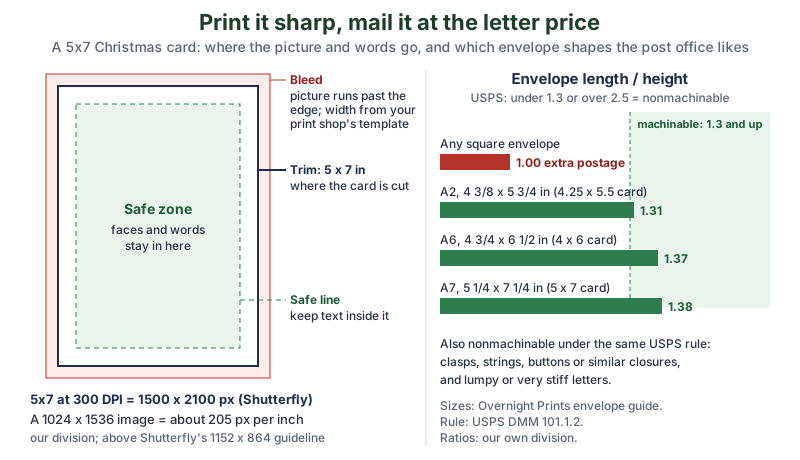
The same diagram in plain text: bleed (the picture runs past the cut line; width from your print shop’s template), trim at 5 x 7 inches, and a safe zone inside where faces and words stay. 300 DPI on a 5x7 = 1500 x 2100 pixels; a 1024 x 1536 image = about 205 pixels per inch. Envelope length divided by height: any square envelope 1.00 (extra postage), A2 1.31, A6 1.37, A7 1.38; USPS wants 1.3 to 2.5.
How do you check how many pixels your ChatGPT image has?
Download the image from ChatGPT (not a screenshot, which is usually smaller), then look at its size. On Windows, right-click the file, choose Properties and open the Details tab to see Dimensions. On a Mac, select the file in Finder, choose File > Get Info and look under More Info. Compare the numbers with the table above.
How do you get the right card shape from ChatGPT?
Say the shape in your prompt, such as “portrait-shaped, 5:7”, or change it afterwards. OpenAI’s Help Center article “Images in ChatGPT” (read through search excerpts) describes an aspect ratio picker and an Aspect ratio button that regenerates the image in a different shape. Because it regenerates the picture, pick the shape first and fix the faces after, not the other way round.
How do you print Christmas cards at home or at a photo shop?
To print Christmas cards at home, print one test on plain paper, then feed card stock your printer supports and fold along a scored line; to use a photo shop, upload the downloaded file into the shop’s own card template. Both routes work, and the template route takes care of bleed and trim for you.
- At home, folded 4.25 x 5.5 (A2): one letter-size sheet cut in half (5.5 x 8.5 inches) folds into one card, so each sheet makes two. That’s our own arithmetic.
- At home, folded 5 x 7 (A7): the open card is 10 x 7 inches, which fits on one letter-size sheet turned sideways, with a trim on two sides (our arithmetic).
- Card stock: check your printer’s manual for the heaviest paper it takes and which tray to use before you buy. Browse card stock on Amazon.
- A photo printer is handy for 4 x 6 flat cards and photo inserts. Browse 4x6 photo printers on Amazon, and check each maker’s page for the sizes it prints.
- At a photo shop: start from the shop’s card template, so its bleed and safe lines match the cards it cuts, and keep faces and words inside the safe line.
When should you mail Christmas cards in 2026?
Mail Christmas cards by Thursday, December 17, 2026, for expected delivery by Christmas in the U.S., according to the USPS’s recommended send-by dates. The USPS announced its 2026 holiday dates on , and its holiday shipping page lists:
- First-Class Mail, lower 48 states
- First-Class Mail, Alaska and Hawaii
- First-Class Mail to military APO/FPO/DPO addresses
- Cards abroad
- The page lists Wednesday, December 9, 2026 for First-Class Package International Service. It has no line for international letters, so we’d mail cards abroad by early December at the latest (our own suggestion).
The USPS adds: Actual delivery date may vary and is based on origin, destination, Post Office acceptance time, and other conditions.
Earlier is always kinder.
Which envelope fits your card, and do square cards cost more to mail?
A 5x7 card goes in an A7 envelope, and yes, a square card in a square envelope costs extra postage. The USPS Domestic Mail Manual, section 101.1.2 says a letter-size piece is nonmachinable (which means a surcharge) if it Has an aspect ratio (length divided by height) of less than 1.3 or more than 2.5.
The same list includes letters that have clasps, strings, buttons, or similar closure devices
, so save the ribbon bows for cards you hand over in person.
| Card | Envelope | Envelope size (inches) | Length / height | Within USPS 1.3 to 2.5? |
|---|---|---|---|---|
| 4.25 x 5.5 | A2 | 4 3/8 x 5 3/4 | 1.31 | Yes, just |
| 4 x 6 | A6 | 4 3/4 x 6 1/2 | 1.37 | Yes |
| 5 x 7 | A7 | 5 1/4 x 7 1/4 | 1.38 | Yes |
| Square | Square | Any | 1.00 | No: extra postage |
Overnight Prints’ envelope guide says the A7 is commonly paired with a 5 × 7-inch card.
Browse A7 envelopes on Amazon if you’re printing 5x7s at home.
Is it okay to send a Christmas card made with ChatGPT?
Yes, it’s okay to send a Christmas card made with ChatGPT, as long as the people in it agreed and the card doesn’t pretend something happened that didn’t. OpenAI’s Image generation page says credit is optional: You do not need to credit OpenAI for generated images, though you can explain how an asset was made when that context is useful.
A small line on the back such as Card art made with ChatGPT
is a friendly touch, and it keeps the story straight for whoever finds the card in a drawer in thirty years.
If you also post the card online, download the original file instead of taking a screenshot: OpenAI’s verify page explains that ChatGPT images carry Content Credentials, and our photo-trend guide covers how to label an AI picture when you post it.
- Route A frame: your real photo, nothing to explain.
- Route B edit: everyone in the photo said yes, and every face matches.
- Route C words: the news in the letter is true.
What should you do next?
This weekend, pick your route, make one frame or one background with the prompts above, and print a single test card on plain paper before you buy a box of card stock. Then put Thursday, December 17, 2026 on the calendar as your mail-by day. If ChatGPT is new to you, start with your very first ChatGPT chat, and if you’d like a throwback picture for the inside of the card, our photo trend prompts are a fun extra. The newsletter box below sends you each new tutorial.
Go make one test card this weekend and stand it up on the shelf for a day. If it still makes you smile on day two, print the rest and get them in the mail before December 17.
Sources and further reading
- Image generation (OpenAI) — what should change and what must stay the same, text in quotes and spelled-out names, leave a corner clear, likenesses, credit is optional; read Nov 15, 2026
- Image inputs (OpenAI) — attach, paste or drag an image; read Nov 15, 2026
- Image generation API guide (OpenAI developer docs) — recommended sizes 1024 x 1024, 1536 x 1024, 1024 x 1536; read Nov 15, 2026
- ChatGPT plan comparison (OpenAI) — image creation by plan; read Nov 15, 2026, prices left out
- Images in ChatGPT (OpenAI Help Center) — Select, Aspect ratio, Undo, Redo, Cancel, Save; read through search excerpts
- Data controls FAQ (OpenAI Help Center) — Improve the model for everyone; read through search excerpts
- Addendum to GPT-4o System Card: Native image generation (OpenAI, March 25, 2025) — no edits of uploaded photos of photorealistic children at launch
- Verify OpenAI-generated content (OpenAI) — Content Credentials on ChatGPT images
- Photo prints guide (Shutterfly, updated August 10, 2026) — 300 DPI ideal; 4x6 = 1200 x 1800, 5x7 = 1500 x 2100; read Nov 15, 2026
- Personalizing Cards (Shutterfly Help Center) — 5x7 card recommended resolution 1152 x 864, Low Resolution warning; read Nov 15, 2026
- Envelope sizes and dimensions guide (Overnight Prints, October 6, 2026) — A2, A6 and A7 sizes; read Nov 15, 2026
- Domestic Mail Manual 101: physical standards for retail letters (USPS) — 1.3 to 2.5 aspect ratio, closures; read Nov 15, 2026
- Postal Service Recommends 2026 Holiday Mailing and Shipping Dates (USPS, September 22, 2026) — First-Class Mail December 17; read Nov 15, 2026
- 2026 Holiday Shipping Deadlines (USPS) — Alaska and Hawaii, military and international dates, delivery-date note; read Nov 15, 2026
- Greeting Cards: Facts and Info to Know (Greeting Card Association, September 14, 2020) — 1.3 billion Christmas cards a year, 60% "means more to me"; read Nov 15, 2026
Questions and answers
Can ChatGPT make a Christmas card for free?
Yes. OpenAI’s plan comparison at chatgpt.com/pricing lists limited image creation on the Free plan, as of November 15, 2026, and writing a verse or letter works on every plan. Plan the card first so your free images go into the version you’ll print.
How do I make a Christmas card with my own photo in ChatGPT?
Either ask ChatGPT for a festive frame with an empty window and place your real photo in it yourself, or attach the photo and ask it to change only the background while keeping every face exactly the same. Compare each face with the original before printing.
Can ChatGPT write a Christmas card message?
Yes. Give it who the card is for, two or three true things from your year and the tone you want, and ask for a few short options. Then change any word that doesn’t sound like you.
What size should a Christmas card image be for printing?
Shutterfly lists 1500 x 2100 pixels for a 5x7 at its ideal 300 DPI, and a recommended resolution of 1152 x 864 for 5x7 cards. A 1024 x 1536 image prints a 5x7 at about 205 pixels per inch by our arithmetic, so check your downloaded file’s size.
When is the last day to mail Christmas cards in 2026?
The USPS recommends sending First-Class Mail by Thursday, December 17, 2026, for expected delivery by Christmas in the U.S., including Alaska and Hawaii. Military APO/FPO/DPO First-Class Mail should go by Wednesday, December 9, 2026.