
How Can ChatGPT Voice Typing Help When Typing Hurts or Spelling Is Hard?
Disclosure: this page contains Amazon affiliate links. As an Amazon Associate we earn from qualifying purchases, at no extra cost to you.
Ooh, keyboard-free champion, rest those hands on a warm mug, because today your voice gets to do the typing! If your knuckles ache by the third email, or spelling turns every message into a guessing game, your voice can do a lot of the typing for you. Every phone and computer already has a microphone to start with today, and if you dictate a lot, a USB headset with a microphone on Amazon or a desk USB microphone keeps the mic close and steady.
Short answer: ChatGPT voice typing lets you talk instead of type: select Dictate (the microphone) in ChatGPT’s message box, speak, then read and edit the text before sending. Every major device also has free built-in dictation, such as Windows key + H on Windows 11. Then ask ChatGPT to fix punctuation and spelling while keeping your words.
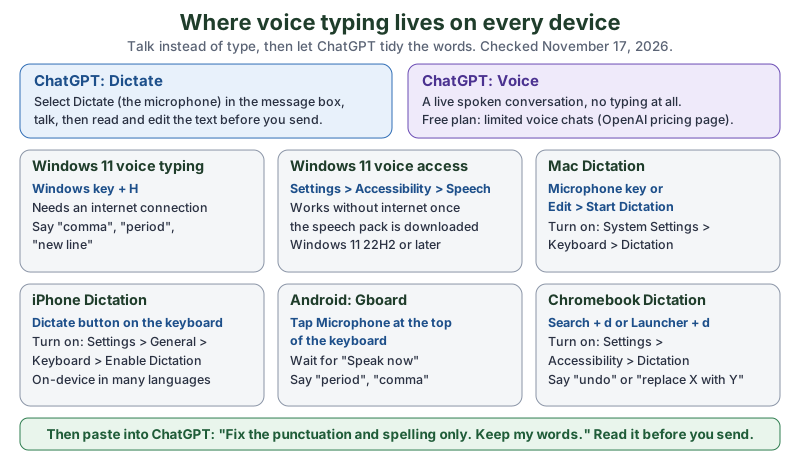
The same map in plain text:
- ChatGPT Dictate
- Select Dictate (the microphone) in the message box, talk, then review and edit the text before you send it.
- ChatGPT Voice
- A live spoken conversation. The Free plan lists
Limited voice chats
(chatgpt.com/pricing). - Windows 11
- Voice typing: Windows + H, needs internet. Voice access: Settings > Accessibility > Speech, works without internet once its speech pack is downloaded.
- Mac
- Microphone key, your Dictation shortcut, or Edit > Start Dictation. Turn it on in System Settings > Keyboard > Dictation.
- iPhone
- The Dictate button on the keyboard. Turn it on in Settings > General > Keyboard > Enable Dictation.
- Android (Gboard)
- Tap Microphone at the top of the keyboard and talk when you see “Speak now”.
- Chromebook
- Search + d or Launcher + d. Turn it on in Settings > Accessibility > Dictation.
What’s the difference between ChatGPT dictation and ChatGPT Voice?
ChatGPT dictation turns your speech into text you can edit before you send it, while ChatGPT Voice is a live spoken conversation where ChatGPT talks back. OpenAI’s ChatGPT Voice page puts it plainly: Use ChatGPT Voice for a live conversation with ChatGPT.
and Use voice dictation when you only want to turn speech into prompt text before sending it.
- Dictation (the Dictate microphone)
- You speak, ChatGPT types it into the message box, you fix anything, then you press send. Best when you want a written message, an email draft or a question you can check first.
- ChatGPT Voice
- You talk and ChatGPT answers out loud. OpenAI’s Voice feature page says to
tap the voice icon in the bottom right
and thatYou can interrupt anytime and ask ChatGPT to respond faster, slow down, add more detail, or keep it brief.
Best when you’d rather not read or type at all.
For people whose hands hurt, both help. For writing something you’ll send to another person, dictation is usually the better fit, because you see every word before it leaves.
How do you use voice typing in ChatGPT?
To use voice typing in ChatGPT, select Dictate (the microphone) in the message box, speak, and then read and edit the text before you send it. OpenAI’s Prompting page describes the desktop app this way: In the ChatGPT desktop app, select Dictate in the composer, then start talking.
It adds that ChatGPT transcribes your speech into the composer so you can review and edit it before sending the prompt.
(The composer is OpenAI’s word for the message box.)
- Open ChatGPT in the app or at chatgpt.com and click in the message box.
- Select Dictate, the microphone. OpenAI Academy’s Using voice resource (last updated May 29, 2026) says on the phone:
Tap the microphone icon in the text box and start speaking.
- Talk in normal sentences. Pausing to think is fine.
- Stop, then read what appeared. Fix any wrong word by tapping it, or by saying what’s wrong in your next message.
- Press send.
If the microphone does nothing on a computer, your browser or system may be blocking it. Allow the microphone for chatgpt.com in the browser, and check the microphone privacy settings in Windows or macOS.
Is ChatGPT voice typing free?
OpenAI’s plan comparison at chatgpt.com/pricing (read November 17, 2026) lists Voice on the Free plan as Limited voice chats
, with more on Go and Plus and Unlimited
on Pro. That page doesn’t list dictation as a paid feature at all. And the dictation built into your own phone or computer (below) is free whichever ChatGPT plan you’re on.
Which built-in dictation does your phone or computer have?
Every major phone and computer has free built-in dictation: voice typing and voice access on Windows 11, Dictation on Mac and iPhone, voice typing in Gboard on Android, and Dictation on Chromebooks. Device dictation types into any app, so you can talk into an email, a document or ChatGPT’s message box. Here is how each one starts, from the makers’ own pages:
| Device | How to start | Where to turn it on | Works without internet? | Punctuation |
|---|---|---|---|---|
| ChatGPT (any device) | Select Dictate (microphone) in the message box | Nothing to turn on | No: the audio goes to OpenAI’s models to be transcribed (Help Center, via search excerpts) | Ask ChatGPT to fix it afterwards |
| Windows 11 voice typing | Windows + H | Nothing to turn on; a working microphone and a text box | No: Microsoft says you need to be connected to the internet | Say comma, “period”, “new line”, or turn on Automatic punctuation |
| Windows 11 voice access | Speak once it’s running | Settings > Accessibility > Speech (Windows 11 22H2 and later) | Yes, after you download its speech pack | Spoken commands |
| Mac Dictation (macOS 27) | Microphone key, your Dictation shortcut, or Edit > Start Dictation | System Settings > Keyboard > Dictation | Keyboard settings shows whether your Mac processes it on the device | Auto-punctuation adds commas, periods and question marks |
| iPhone Dictation (iOS 27) | The Dictate button on the onscreen keyboard | Settings > General > Keyboard > Enable Dictation | Yes, in many languages (Apple) | Auto-Punctuation, or say exclamation point |
| Android (Gboard) | Tap Microphone at the top of the keyboard | Install Gboard | Not stated on Google’s page | Say period, “comma”, “new line” |
| Chromebook | Search + d or Launcher + d | Settings > Accessibility > Dictation | Not stated on Google’s page | Say comma, “period”, “question mark” |
How do you voice type on Windows 11?
To voice type on Windows 11, click in a text box and press Windows + H. Microsoft’s voice typing page says Press Windows key+H on a hardware keyboard
, and that To use voice typing, you’ll need to be connected to the internet, have a working microphone, and have your cursor in a text box.
Its settings include Automatic punctuation, which adds punctuation based on what you say. Microsoft’s page lists 46 languages for voice typing on Windows 11.
If you’d like to run the whole computer by voice, not just type, Windows 11 also has voice access. Microsoft’s Get started with voice access page says it lets everyone to control their PC and author text using only their voice
, without an internet connection, once you’ve downloaded the speech pack. It’s under Settings > Accessibility > Speech on Windows 11, version 22H2 and later.
How do you dictate on a Mac or iPhone?
On a Mac, turn on Dictation in System Settings > Keyboard > Dictation, then press the Microphone key, use your Dictation shortcut or choose Edit > Start Dictation. Apple’s Mac User Guide (macOS 27) says Dictation automatically inserts commas, periods, and question marks for you as you dictate
and Dictation stops automatically when no speech is detected for 30 seconds.
On a Mac with Apple silicon you can keep typing while you speak.
On an iPhone, turn on Settings > General > Keyboard > Enable Dictation, then tap the Dictate button on the keyboard. Apple’s iPhone User Guide (iOS 27) says Dictation is processed on your iPhone in many languages, and no internet connection is required.
To stop, tap the button again, say Stop dictation
, or stay quiet for 30 seconds.
How do you voice type on Android or a Chromebook?
On Android, Google’s Gboard Help says: At the top of your keyboard, tap Microphone.
When you see “Speak now”, talk. Gboard Help notes that some steps work only on Android 7.0 and up.
On a Chromebook, turn on Settings > Accessibility > Dictation (under Keyboard and text input
), then press Search + d or Launcher + d. Google’s Chromebook Help lists editing commands such as Delete the previous word
, “Undo” and Replace [word/phrase] with [word/phrase]
, which save a lot of hand work. Google says those newer commands work in English, French, German, Italian and Spanish.
How do you get ChatGPT to clean up dictated text?
To get ChatGPT to clean up dictated text, paste it in and ask it to fix punctuation and spelling only, keep your words, and list what it changed. Dictation often runs sentences together or mishears a name, and ChatGPT is good at the tidy-up while you stay in charge of what’s said. These prompts are our own:
- Tidy only:
Fix the punctuation, capital letters and obvious spelling mistakes in this dictated text. Keep my words and my order. Don't add anything. Then list every word you changed. - Split into paragraphs:
This is one long dictated message. Break it into short paragraphs where the topic changes. Don't change any words. - Names and places:
My dictation may have misheard these names: Siobhan, Dr. Nwosu, Poughkeepsie. Fix them wherever they appear. Change nothing else. - Make it an email:
Turn this dictated note into a short, polite email to my landlord about the broken heater. Keep my facts exactly. Under 120 words.
How do you stop ChatGPT from rewriting what you said?
Say so in the prompt, every time: “keep my words”, “don’t add anything” and list what you changed
. The list is the useful part, because you can glance at five changed words instead of rereading the whole message. If ChatGPT still smooths your writing into something that doesn’t sound like you, our guide to keeping ChatGPT’s writing in your own voice has fixes you can save in your custom instructions.
How much faster is talking than typing?
Talking was about three times faster than typing on a phone in a 2016 study by Sherry Ruan, Jacob O. Wobbrock, Kenny Liou, Andrew Ng and James Landay. Their paper on arXiv reports that the English input rate was 2.93 times faster (153 vs. 52 WPM)
on an Apple iPhone 6 Plus, and speech made fewer errors while people were entering text (5.30% vs. 11.22% corrected error rate). Speech did leave slightly more mistakes in the finished text (1.30% vs. 0.79%), which is why the read-it-before-you-send step matters.
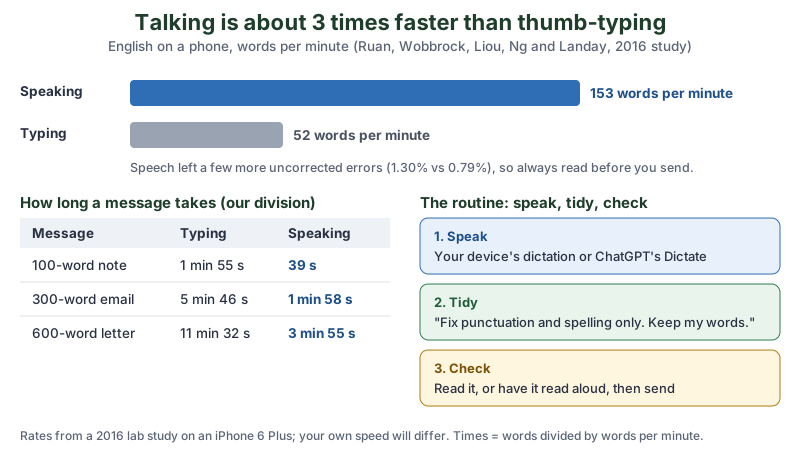
| Message | Typing at 52 WPM | Speaking at 153 WPM | Time saved |
|---|---|---|---|
| 100-word note | 1 min 55 s | 39 s | about 1 min 16 s |
| 300-word email | 5 min 46 s | 1 min 58 s | about 3 min 48 s |
| 600-word letter | 11 min 32 s | 3 min 55 s | about 7 min 37 s |
For someone whose fingers hurt, the minutes matter less than the taps. A 300-word email is a lot of key presses you don’t have to make.
How does voice typing help with arthritis or hand pain?
Voice typing helps with arthritis or hand pain by moving most of the writing from your fingers to your voice, so your hands only do the last small fixes. The Arthritis Foundation’s workplace guide says:
Honestly, my favourite moment in this whole guide is the list every word you changed
prompt. Five little words to check instead of a whole page to reread feels like a tiny gift to your fingers.
If arthritis in your hands makes it difficult to use a mouse and keyboard, voice recognition software can allow you to perform tasks like writing emails, creating documents and conducting online searches with less stress on your fingers, hands and wrists.
A lot of people are in this spot. The CDC’s MMWR report of October 13, 2023 says During 2019–2021, 21.2% of U.S. adults (53.2 million) reported diagnosed arthritis
, including 26.0% of adults aged 45-64 and 47.3% of adults 65 and older.
- Let ChatGPT do the fiddly fixes. Instead of moving the cursor to fix a comma, ask ChatGPT to tidy the whole thing with the “Tidy only” prompt above.
- Use spoken edits. Chromebook’s
Replace [word] with [word]
and Windows voice access commands save small, painful hand movements. - Talk the whole computer. Windows 11 voice access goes beyond typing: it lets you control the PC by voice.
- Answer by voice. ChatGPT Voice lets you ask and listen with no typing at all.
Voice typing works alongside whatever your doctor or occupational therapist suggests for your hands; if typing pain is new or getting worse, they’re the right people to ask. That’s our own suggestion.
How can ChatGPT help if you have dyslexia?
ChatGPT can help if you have dyslexia by letting you say what you mean instead of spelling it, then fixing the spelling, and by reading answers aloud or rewriting them in plainer words. The British Dyslexia Association’s definition begins: Dyslexia is a set of processing difficulties that affect the acquisition of reading and spelling.
Its workplace guide says Around 10% of people are dyslexic
and that Tools like speech-to-text, screen readers, mind-mapping and enhanced spellchecking support independence and confidence.
The International Dyslexia Association’s assistive technology fact sheet (read through search excerpts) lists speech-to-text and text-to-speech among its examples too.
Prompts that help (our own):
- Spelling without the rewrite:
Correct the spelling in this. Keep my words and my meaning. Show the corrected text, then a short list: my spelling, correct spelling. - Plainer answers:
From now on in this chat, answer in short sentences, plain everyday words, one idea per line. No long paragraphs. - One tricky word:
I think the word sounds like "nesessary" and means "needed". What is the right spelling? Spell it letter by letter. - Check a form before you send it:
Read this message back to me as a checklist of what it says, so I can make sure it says what I meant.
Voice typing and read-aloud are tools for getting the writing done. They sit alongside, not in place of, any reading support or teaching that’s helping you.
How do you have ChatGPT read an answer out loud?
Use Read aloud under ChatGPT’s answer. OpenAI’s iOS and Android app FAQ (read through search excerpts) says response actions sit in the buttons below a response or the more options menu (•••), and that they can include Copy, Good response, Bad response, Read aloud, Share, and Try again.
Listening to an answer while you read along is a good way to catch a word that looks right but isn’t.
Do you need a special microphone for voice typing?
No, you don’t need a special microphone for voice typing: Microsoft’s voice typing page only asks for a working microphone
, and the one built into your phone or laptop works. A headset or desk microphone helps when you dictate a lot, in a noisy room, or from across a desk. Our own rule of thumb:
- Phone or laptop mic: fine to start; hold the phone near your mouth and keep the TV down.
- Headset with a boom mic: the mic stays the same distance from your mouth every time, which suits long dictation. Browse USB headsets with a microphone on Amazon.
- Desk USB microphone: nothing on your head, good for a fixed desk. Browse USB microphones on Amazon.
Check the maker’s page for the computer and phone models a microphone works with before you buy.
Is ChatGPT dictation private?
ChatGPT dictation sends your recorded audio to OpenAI to be turned into text, and OpenAI’s Voice Dictation FAQ explains how long it keeps it and how to opt out of training. From search excerpts of OpenAI’s Voice Dictation FAQ (403 to direct reads):
- The recorded audio is sent to OpenAI’s models to be transcribed, and you can edit the text before sending.
- Dictation audio is kept for as long as the chat is in your chat history; when you delete the chat, OpenAI deletes the audio clip within 30 days, unless it needs to keep it for security or legal reasons.
- On a personal plan, OpenAI may train on dictation audio only if you chose to share audio. To stop that, go to Settings > Data controls and turn off Include your audio recordings, or turn off Improve the model for everyone.
If you’d rather your voice stay on your own device, use the device’s dictation instead and then paste the text into ChatGPT: Apple says iPhone dictation is processed on the iPhone in many languages, and Microsoft says Windows 11 voice access works without an internet connection.
What are the key voice typing facts to remember?
The key voice typing facts are the keyboard shortcuts, the speed difference and how long ChatGPT keeps dictation audio. All five, with their sources:
- 2.93 times
- How much faster English speech was than phone typing (153 vs. 52 words per minute) in Ruan et al.’s 2016 study.
- Windows + H
- Starts voice typing on Windows 11 (Microsoft); it needs an internet connection.
- 30 seconds
- Of silence, and Mac and iPhone Dictation stop on their own (Apple).
- 30 days
- After you delete a chat, OpenAI deletes its dictation audio within this time, with security and legal exceptions (OpenAI Help Center, via search excerpts).
- 53.2 million
- U.S. adults who reported diagnosed arthritis in 2019-2021, 21.2% of adults (CDC MMWR).
What should you do next?
Today, turn on your device’s dictation from the table above and say one short message you’d normally type: a text to a friend, or a question for ChatGPT. Then paste it into ChatGPT with the “Tidy only” prompt and read the list of changed words. If ChatGPT is new to you, start with your very first ChatGPT chat, and if there’s a holiday letter on your list this year, our Christmas card guide has a family-letter prompt that works well spoken out loud. The newsletter box below sends you each new tutorial.
Go say one short message out loud today and let ChatGPT tidy it. If it comes back sounding exactly like you, with every comma where it belongs, you’ve just found a way to write that doesn’t hurt.
Sources and further reading
- Prompting: Use voice dictation (OpenAI) — select Dictate in the composer, review and edit before sending; read Nov 17, 2026
- ChatGPT Voice (OpenAI) — Voice for a live conversation, dictation for prompt text; read Nov 17, 2026
- ChatGPT Voice feature page (OpenAI) — voice icon in the bottom right, interrupt anytime; read Nov 17, 2026
- ChatGPT plan comparison (OpenAI) — Voice by plan; read Nov 17, 2026, prices left out
- Using voice (OpenAI Academy, updated May 29, 2026) — tap the microphone icon in the text box; read Nov 17, 2026
- Voice Dictation FAQ (OpenAI Help Center) — audio sent to be transcribed, retention, data controls; read through search excerpts
- ChatGPT iOS and Android app FAQ (OpenAI Help Center) — response actions including Read aloud; read through search excerpts
- Use voice typing to talk instead of type on your PC (Microsoft Support) — Windows key + H, internet needed, Automatic punctuation, 46 languages; read Nov 17, 2026
- Get started with voice access (Microsoft Support) — control your PC and author text by voice without internet, Windows 11 22H2+; read Nov 17, 2026
- Dictate messages and documents on Mac (Apple Mac User Guide, macOS 27) — Microphone key, Auto-punctuation, 30-second stop; read Nov 17, 2026
- Dictate text on iPhone (Apple iPhone User Guide, iOS 27) — Enable Dictation, processed on iPhone, no internet required; read Nov 17, 2026
- Type with your voice (Gboard Help) — tap Microphone, spoken punctuation, Android 7.0 and up; read Nov 17, 2026
- Type text with your voice (Chromebook Help) — Search + d or Launcher + d, editing commands; read Nov 17, 2026
- Comparing Speech and Keyboard Text Entry for Short Messages in Two Languages on Touchscreen Phones (Ruan, Wobbrock, Liou, Ng, Landay) — 153 vs 52 WPM, 2.93 times faster; read Nov 17, 2026
- Prevalence of Diagnosed Arthritis, United States, 2019-2021 (CDC MMWR, October 13, 2023) — 53.2 million, 21.2% of adults; read Nov 17, 2026
- Adapt Your Workplace for Arthritis (Arthritis Foundation) — voice recognition software for hand arthritis; read Nov 17, 2026
- What is dyslexia? (British Dyslexia Association) — definition; read Nov 17, 2026
- Creating a dyslexia friendly workplace (British Dyslexia Association) — around 10% of people, speech-to-text among tools; read Nov 17, 2026
- How to Advocate for Assistive Technology Tools and Services (International Dyslexia Association) — speech-to-text and text-to-speech as assistive technology; read through search excerpts
Questions and answers
Does ChatGPT have voice typing?
Yes. Select Dictate, the microphone in ChatGPT’s message box, and speak. OpenAI’s Prompting page says ChatGPT transcribes your speech into the message box so you can review and edit it before sending.
Is ChatGPT voice to text free?
OpenAI’s plan comparison (checked November 17, 2026) lists limited voice chats on the Free plan and doesn’t list dictation as a paid feature. The dictation built into Windows, Mac, iPhone, Android and Chromebook is free on any plan.
What is the shortcut for voice typing on Windows 11?
Press Windows key + H with your cursor in a text box. Microsoft says voice typing needs an internet connection; Windows 11 voice access, under Settings > Accessibility > Speech, works without one once its speech pack is downloaded.
Can you use voice typing without internet?
Sometimes. Apple says iPhone dictation is processed on the iPhone in many languages with no internet needed, and Microsoft says Windows 11 voice access works offline. Windows voice typing needs internet, and ChatGPT’s own dictation sends the audio to OpenAI to transcribe.
Is voice typing good for dyslexia?
Many people with dyslexia find it helps. The British Dyslexia Association lists speech-to-text among tools that support independence and confidence. Pair it with ChatGPT’s spelling fixes and Read aloud, and check the text before sending.