How Do You Make Those Viral ChatGPT Photo Trends Like the 80s Look?
Disclosure: this page contains Amazon affiliate links. As an Amazon Associate we earn from qualifying purchases, at no extra cost to you.
Ooh, decade-hopping selfie star, grab your imaginary hairspray, because this one’s pure fun! Your whole feed suddenly looks like 1986, big hair and flash photos and all, and it’s a lovely one to try with your own picture. If one turns out good enough for the fridge, a compact photo printer on Amazon turns it into a real print you can hold.
Short answer: To make the viral 80s photo, attach a clear photo of yourself in ChatGPT with + > Add photos & files, then ask for a 1980s portrait that keeps your face, skin tone and age the same. Name the hair, clothes, backdrop, flash and film grain, fix one detail at a time, and label the result when you post.
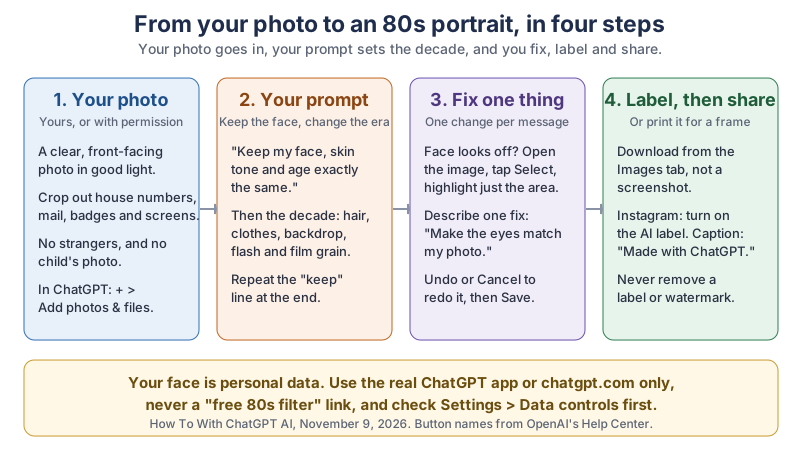
The same picture in plain text:
- 1. Your photo
- A clear, front-facing photo of yourself (or one you have permission to use) in good light. Crop out house numbers, mail, badges and screens. No strangers and no children. In ChatGPT: + > Add photos & files.
- 2. Your prompt
Keep my face, skin tone and age exactly the same.
Then the decade: hair, clothes, backdrop, flash and film grain. Repeat the “keep” line at the end.- 3. Fix one thing
- Face looks off? Open the image, tap Select, highlight just that area and describe one fix, such as
Make the eyes match my photo.
Undo or Cancel to redo a selection, then Save. - 4. Label, then share
- Download from the Images tab, not a screenshot. On Instagram, turn on the AI label and caption it “Made with ChatGPT.” Never remove a label or watermark.
- Privacy
- Your face is personal data. Use the real ChatGPT app or chatgpt.com only, never a “free 80s filter” link, and check Settings > Data controls first.
What are the viral ChatGPT photo trends?
The viral ChatGPT photo trends are short-lived waves where millions of people upload a photo and ask ChatGPT for the same kind of makeover, then pass the idea on. The first big wave came right after OpenAI launched GPT-4o image generation in ChatGPT on , and the newest, the 80s look, took off on Instagram in September 2026.
How big was the first wave? OpenAI’s chief operating officer at the time, Brad Lightcap, posted on X on :
very crazy first week for images in chatgpt — over 130M users have generated 700M+ (!) images since last tuesday
That works out to more than 5 images per person in a single week, on average (700 million divided by 130 million is about 5.4, our own arithmetic on his rounded numbers). People don’t make one picture; they make a few until one looks right, which is worth knowing before you start.
| Trend | Took off | Dated by | What people asked for | Our own prompt idea | Watch out for |
|---|---|---|---|---|---|
| Animated storybook portraits | Late March 2025 | PetaPixel, April 9, 2025 (as the first wave after the launch) | Photos redrawn in a famous animation studio’s style | Your family as a cosy watercolour picture-book page, in a style of its own | OpenAI says to ask for an original design, not an imitation of a specific artist |
| Boxed action figure (“starter pack”) | Early to mid April 2025 | PetaPixel, April 9, 2025; Fast Company, April 17, 2025 | You as a toy in blister packaging, with tiny accessories | Your hobby self in a box with the 3 things you’d pack for a perfect Saturday | Leave your employer’s name, badge and home out of the accessories |
| Job caricature | First week of February 2026 | Forbes, February 6, 2026 | A big-head cartoon of you and your job based on everything you know about me | Give ChatGPT 5 harmless facts yourself instead | The original prompt draws on what ChatGPT remembers about you |
| 80s flashback | Early September 2026 | Business Today, September 9, 2026 | Everyday photos remade as 1980s portraits, passed on with Instagram’s Add Yours sticker | A 1980s school picture-day portrait (our prompts below) | Keep the “keep my face” line; no strangers’ or children’s photos |
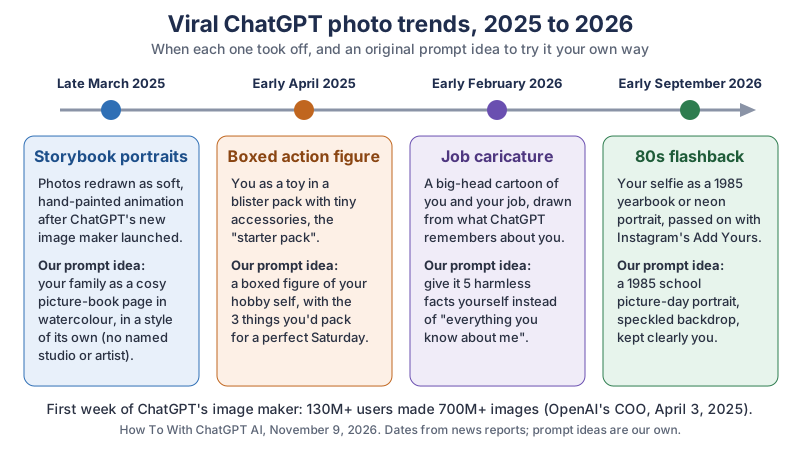
The same timeline in plain text: late March 2025, animated storybook portraits; early April 2025, the boxed action figure; early February 2026, the job caricature; early September 2026, the 80s flashback. First week of ChatGPT’s image maker: 130M+ users, 700M+ images (Brad Lightcap, April 3, 2025).
Where did the ChatGPT 80s photo trend come from?
The ChatGPT 80s photo trend spread on Instagram in early September 2026, when people started turning everyday photos into portraits that look like they were taken around 1985. Business Today reported on that the trend changes clothing, hairstyles, accessories, backgrounds, lighting and film texture while keeping the person recognisable, and that users use the platform’s “Add Yours” sticker to invite friends and followers to participate.
The same report sensibly suggests treating the picture as a creative interpretation rather than an authentic historical photograph.
How do you make the 80s photo in ChatGPT?
To make the 80s photo in ChatGPT, attach your photo, describe the 1980s look in plain words, and say clearly what must stay the same. OpenAI’s Image generation page gives the rule that matters most for faces: When editing an existing image, say exactly what should change and what must stay the same.
- Open ChatGPT on chatgpt.com or in the official app, and start a new chat.
- Attach your photo. OpenAI’s Help Center article
ChatGPT Image Inputs FAQ
(read through search excerpts) says to select the + icon and choose Add photos & files; you can also drag a picture into the message box or paste it. - Type one of the prompts below, or write your own: what to change (hair, clothes, backdrop, lighting, film look) and what to keep (face, skin tone, age, expression).
- Look closely at the result, especially the eyes, nose, smile and skin. Fix one thing at a time (next section).
- When you love it, open the image and select Save, or download it from Images, the library of your ChatGPT pictures.
Which photo works best for a ChatGPT 80s portrait?
A clear, front-facing photo of just you, in soft daylight, with your face filling a good part of the frame, gives ChatGPT the most to work with. Here’s our own checklist:
- Your face is sharp and not hidden by sunglasses, a hat brim or a hand.
- One person, unless everyone in the photo has said yes (more on that below).
- Nothing private in the background: crop out house numbers, street signs, mail, ID badges, school logos and screens.
- A normal phone photo is plenty. OpenAI’s Help Center article on uploading files (read through search excerpts) gives a limit of 20 MB per image, far more than a typical phone picture needs.
What 80s photo prompts can you try?
Here are five 80s photo prompts we wrote for this page. Each one names concrete details, because OpenAI’s Image generation page advises Prefer concrete visual language over broad reactions
(where the light comes from, not “beautiful lighting”), and each one ends by repeating the face line, because the same page says Repeat any requirement that must stay fixed.
- School picture day, 1985:
Using my uploaded photo, make a 1985 school picture-day portrait of me. Keep my face, skin tone, age and expression exactly the same. Give me feathered 80s hair, a collared shirt under a knit sweater, a speckled blue-grey studio backdrop, soft flash from the front, and the slightly warm colours of an old print. No modern objects or text. Keep my face exactly the same. - Living-room snapshot:
Using my uploaded photo, turn this into a 1984 living-room snapshot. Keep my face, skin tone and age exactly the same. Add wood-panelled walls, a patterned sofa, a direct on-camera flash with a hard shadow behind me, faded colours and visible film grain, printed with a thin white border. Keep my face exactly the same. - Arcade night:
Using my uploaded photo, place me in a 1980s video arcade at night. Keep my face, skin tone and age exactly the same. Light my face with pink and blue glow from the game cabinets on my left, give me a denim jacket covered in enamel pins, and add soft film grain. No real game names or logos. Keep my face exactly the same. - Roller rink:
Using my uploaded photo, make me a 1980s roller-rink photo. Keep my face, skin tone and age exactly the same. Add a shiny satin jacket, big hair, coloured disco-ball sparkles on the walls behind me, and the slightly blurry look of a 35mm camera flash in a dark room. Keep my face exactly the same. - Family album, with everyone’s okay:
Using this photo of my family (everyone in it is an adult and has agreed), turn it into a 1980s family-album print. Keep every person's face, skin tone and age exactly the same. Add 80s clothes and hair for each person, a backyard in summer light, faded colours and a soft white border. Keep every face exactly the same.
Want a little more of the real era? Add a small orange date stamp in the bottom corner. Want it to stay clearly “you”? Add do not slim, smooth or reshape my face.
How do you fix a face that comes out wrong?
Fix a face that comes out wrong by changing one thing at a time and telling ChatGPT exactly what to keep. OpenAI’s Image generation page says: Adjust one element at a time so the composition and other important details do not drift.
The page adds: You can also select a specific area of an image and describe the change for that area.
OpenAI’s Help Center article “Images in ChatGPT” (read through search excerpts) describes the editor. On the web, select the image in your chat or in Images, then:
- Select
- Highlight the area you want to change, such as the eyes or the mouth, then describe the change.
- Aspect ratio
- Regenerate the image in a different shape, handy for a print or a story.
- Undo / Redo
- Revise your highlighted selections.
- Cancel
- Start the edit over.
- Save
- Keep the version you’re happy with.
On mobile, the same article says you tap Select, size the brush with the slider, highlight the area, tap Next, and describe the change. It also warns that highlights are not always precise, and edits may extend beyond the area you selected.
Fix prompts that name one problem each (our own wording):
- Doesn’t look like you:
Make the eyes, nose and mouth match my original photo exactly. Change nothing else. - Too smooth or plastic:
Keep my natural skin texture, freckles and smile lines. Don't smooth my skin. - Older or younger than you:
Keep my age exactly as it is in my photo. - Wrong skin tone:
Match my skin tone to the original photo; the 80s colour grade should only change the background and clothes.
Do you need ChatGPT Plus for the photo trends?
No, you can make photo trend pictures on ChatGPT’s Free plan, with lower limits than the paid plans. OpenAI’s plan comparison at chatgpt.com/pricing (read November 9, 2026) lists:
- Free:
Limited image creation
- Go:
More image creation
- Plus:
More complex and accurate image creation
, plus image generation with Thinking - Pro:
Unlimited and faster image creation
OpenAI doesn’t publish an exact number of free images, so if you hit the limit, ChatGPT tells you when you can make more. Uploading a photo for ChatGPT to look at works on Free too: the Image Inputs FAQ (search excerpts) says image inputs are on Free and paid plans, with plan-specific limits.
The image maker itself is new this month. OpenAI’s Help Center article “Images in ChatGPT” (search excerpts) names the current version ChatGPT Images 2.6 and says it generates images faster and does a better job of keeping details consistent.
News coverage of OpenAI’s announcement, including TechRadar, dates it to , across all plans including Free.
Is it safe to upload your face to ChatGPT for a photo trend?
Uploading your own face to ChatGPT is a personal choice, and it’s safest when you use the official app or chatgpt.com, keep the background clean, and check your data controls first. Your face is personal data, just like your address.
Honestly, the best part of this trend is the hair. Nobody asks ChatGPT for “a little volume”. Everybody goes straight for the full 1985.
The February 2026 caricature trend is a good example of why it helps to give ChatGPT the facts yourself. Forbes reported on that most people used the prompt Create a caricature of me and my job based on everything you know about me
, and that the twist is seeing how well ChatGPT “knows” you from past chats. A picture you post publicly can show strangers what that memory holds. Write your own short list instead: Make a friendly caricature of me as a gardener who loves tomatoes, bad puns and my old bicycle.
Can you use a photo of your kids, a friend or a stranger?
Use a photo of another adult only when they’ve said yes, and leave children’s photos out of photo trends. OpenAI’s Image generation page puts it plainly: Use likenesses with care. When depicting a real person, provide a reference photo when appropriate and confirm that you have permission to use their likeness.
OpenAI is also stricter with children. Its system card for GPT-4o image generation (March 25, 2025) said that at launch, editing uploaded images of photorealistic children would not be allowed. Our rule is simpler and doesn’t depend on the current setting: a child can’t agree to their face being remade and posted, so the family 80s photo is a grown-ups-only game. Never use a stranger’s photo, and never make a picture meant to fool anyone about what really happened.
How do you label an AI photo when you post it?
Label an AI photo by turning on the platform’s own AI label when you post and saying so in your caption, such as “Made with ChatGPT.” Your ChatGPT image already carries hidden labels of its own: OpenAI’s Help Center article Provenance signals in OpenAI-generated content
(read through search excerpts) says images from ChatGPT carry Content Credentials, built on the open C2PA standard, and a SynthID watermark from Google DeepMind.
- Download, don’t screenshot. OpenAI’s verify page notes that Content Credentials rely on metadata and can be removed, and OpenAI’s developer docs say screenshots, cropping and format changes can erase or weaken these signals. Saving the original file keeps them intact.
- Instagram and Facebook. Meta’s post on labelling AI content (April 5, 2024, updated July 1, 2024) says Meta labels images when it detects
industry standard AI image indicators
or when people disclose that they’re uploading AI-generated content, and that it renamed the label from “Made with AI” to “AI info”. When you post, look for the AI label switch in the post’s options; menu names move between app versions. - Want a visible label? OpenAI’s provenance article says you can ask for one in your prompt, for example
add a small "AI image" note in the bottom corner.
Never crop out, paint over or strip a label or watermark. It’s the honest way to share, and your friends will still love the hair.
How do you turn your 80s photo into a real print?
To print your 80s photo, download the original file from ChatGPT, regenerate it in a print-friendly shape with the editor’s Aspect ratio control if needed, and print it at home or at a photo counter. A real print is the nicest way to share a throwback with a parent or grandparent who isn’t on Instagram.
- A photo printer. Small instant and dye-sublimation printers print phone-sized photos straight from your phone. Browse compact photo printers on Amazon, and check each maker’s page for the print sizes it supports.
- A frame. An 80s portrait looks right in a simple wood or brass-coloured frame. Browse 5x7 picture frames on Amazon.
- A photo album. If your family makes one of each decade, a slip-in album keeps them together. Browse 4x6 photo albums on Amazon.
If you print one for someone else, a small note on the back such as made with ChatGPT, 2026
keeps the story straight for whoever finds it in a drawer in thirty years.
What should you do next?
Tonight, pick one clear photo of yourself, try the school picture-day prompt, and fix one detail at a time until it looks like you. If you’re new to ChatGPT, start with your very first ChatGPT chat; for a caption that sounds like you, see how to make ChatGPT sound like you; and if you’d rather make a throwback video, here’s how to edit videos with ChatGPT. The newsletter box below sends you each new tutorial, and we’ll add the next big photo trend to the list above when it arrives.
Go make your throwback tonight and show it to someone who was actually there in the 80s. If they laugh and say that’s exactly what we looked like
, print it and frame it.
Sources and further reading
- Image generation (OpenAI) — what must stay the same, one element at a time, select an area, likenesses, original designs; read Nov 9, 2026
- ChatGPT plan comparison (OpenAI) — image creation by plan; read Nov 9, 2026, prices left out
- Images in ChatGPT (OpenAI Help Center) — ChatGPT Images 2.6, editor buttons Select, Aspect ratio, Undo, Redo, Cancel, Save; read through search excerpts
- ChatGPT Image Inputs FAQ (OpenAI Help Center) — + > Add photos & files, Free and paid plans; read through search excerpts
- Uploading files and audio to ChatGPT (OpenAI Help Center) — 20 MB per image; read through search excerpts
- Provenance signals in OpenAI-generated content (OpenAI Help Center) — Content Credentials (C2PA) and SynthID, visible labels on request; read through search excerpts
- Verify OpenAI-generated content (OpenAI) — metadata can be removed
- Content provenance (OpenAI developer docs) — screenshots, cropping and format changes can erase or weaken provenance signals; read through search excerpts
- Addendum to GPT-4o System Card: Native image generation (OpenAI, March 25, 2025) — no edits of uploaded photos of photorealistic children at launch
- Data controls FAQ (OpenAI Help Center) — Improve the model for everyone; read through search excerpts
- Brad Lightcap on X (April 3, 2025) — 130M+ users, 700M+ images in the first week
- ChatGPT Can Turn You Into a Toy Action Figure (PetaPixel, April 9, 2025) — the action figure trend, after the animated-style wave
- The AI starter pack trend is taking over LinkedIn and TikTok (Fast Company, April 17, 2025) — the starter pack wave
- ChatGPT Trend Turns People Into Caricatures (Forbes, February 6, 2026) — the caricature prompt and the memory twist
- Instagram 80s photo trend goes viral (Business Today, September 9, 2026) — the 80s trend, the Add Yours sticker; read Nov 9, 2026
- Our Approach to Labeling AI-Generated Content and Manipulated Media (Meta, April 5, 2024, updated July 1, 2024) — AI image indicators, self-disclosure, the "AI info" label; read Nov 9, 2026
- ChatGPT Images 2.6 is here (TechRadar, November 2026) — release date and plans
Questions and answers
What is the ChatGPT 80s photo prompt?
There isn’t one official prompt; people share their own. The ones that work ask ChatGPT to keep your face, skin tone and age exactly the same, then describe the 1980s details: hair, clothes, backdrop, flash and film grain. Our five original 80s prompts are in the section above.
Can I make the 80s AI photo trend for free?
Yes. OpenAI’s plan comparison at chatgpt.com/pricing lists limited image creation on the Free plan, and photo uploads work on Free too. Paid plans list more image creation, as of November 9, 2026.
Why does ChatGPT change my face?
Image editing rebuilds the whole picture, so details can drift. Tell ChatGPT exactly what must stay the same, repeat that line at the end of the prompt, and fix one thing at a time with the Select tool, as OpenAI’s Image generation page advises.
Is it safe to upload my photo to ChatGPT?
Use only the official ChatGPT app or chatgpt.com, crop out anything that shows where you live or work, and check Settings > Data controls. Only upload photos of other people if they agree, and leave children’s photos out.
Do I have to label AI photos on Instagram?
It’s the honest thing to do, and Instagram has a switch for it. Meta says it labels images when it detects industry-standard AI indicators, which ChatGPT images carry, or when you disclose them. Add “Made with ChatGPT” to your caption too.