How Do You Make Animated Shorts With Claude?
Disclosure: this page contains Amazon affiliate links. As an Amazon Associate we earn from qualifying purchases, at no extra cost to you.
Ooh, cartoons — this one makes me want to doodle in the margins, story-spinning animator! Say you’ve watched those animated Shorts where a little character goes on a big adventure in under a minute, and you’d love to make your own with Claude. Good news: the parts are free or close to it, and the most important one is a story only you can tell. For the voice, a USB microphone (Amazon search) makes a bigger difference than any fancy software.
Short answer: You make an animated Short with Claude by writing your own story, having Claude build each scene as a three.js animation in a vertical 9:16 web page, recording that page to video, then adding your voice and captions. Claude writes the animation code; the story, the characters and the final choices stay yours.
What is the workflow for making an animated Short with Claude?
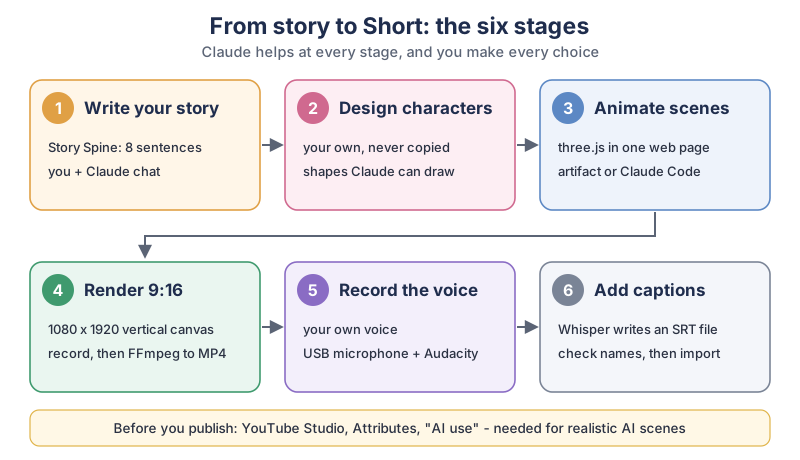
The workflow has six stages: story, characters, animated scenes, a vertical render, a voice-over and captions. Claude helps at every stage, mostly by writing words and code, and you decide what stays.
The six stages in plain text:
- Write your story. Eight sentences on the Story Spine, worked out with Claude in a chat.
- Design characters. Your own characters, never copied, described as shapes Claude can draw.
- Animate scenes. three.js in one web page, made as a Claude artifact or with Claude Code.
- Render 9:16. A 1080 x 1920 vertical canvas, recorded in the browser, then converted to MP4 with FFmpeg.
- Record the voice. Your own voice, a USB microphone and Audacity.
- Add captions. Whisper writes an SRT file; you check the names and import it.
Before you publish, check YouTube Studio’s “AI use” setting under Attributes, which YouTube asks for when a video shows realistic AI scenes.
What do you need to make an animated Short with Claude?
You need a Claude account, a computer with a web browser, and three free tools: three.js, FFmpeg and Audacity. The Free Claude plan covers the chat and the artifacts; Claude Code is optional and needs a paid plan. Here’s what each stage uses:
| Stage | Tool | Free option | Claude plan needed |
|---|---|---|---|
| 1. Story | Claude chat and the Story Spine | Chat is in Claude’s Free plan | Free or higher |
| 2. Characters | Claude chat and your own sketches | Chat is in Claude’s Free plan | Free or higher |
| 3. Scenes | three.js in a Claude artifact | three.js is MIT-licensed; artifacts are on the Free plan | Free or higher (Claude Code: Pro or higher) |
| 4. Render | Your browser’s MediaRecorder, then FFmpeg | Built into web browsers; FFmpeg is free, open-source software | None |
| 5. Voice | Your voice, a USB microphone, Audacity | Audacity is free and open source | None |
| 6. Captions | OpenAI Whisper on your own computer | Whisper’s code and models are MIT-licensed | None |
| 7. Publish | YouTube Studio and its “AI use” setting | Free with a YouTube channel | None |
The plan details come from claude.com/pricing, which lists Create Artifacts
in the Free plan and shows Claude Code as included from Pro up, and from Anthropic’s artifacts help page, which says Artifacts are available on Free, Pro, Max, Ultra, Team, and Enterprise plans
. For the full picture of which plan includes Claude Code, see our guide to running Claude Code for free on your own computer.
How do you write a story for a 60-second animated Short?
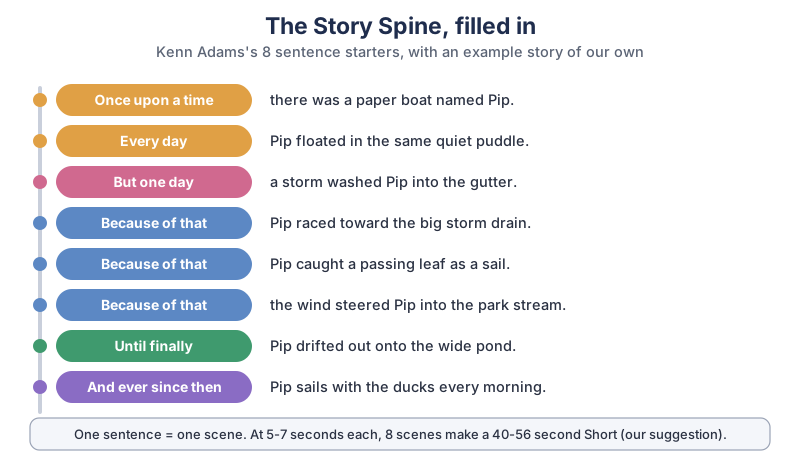
Use the Story Spine: eight sentence starters that turn any idea into a beginning, a middle and an end. Story is what keeps people watching past the first few seconds, so this stage deserves the most care, and Claude is a great brainstorming partner for it.
The Story Spine was created by Kenn Adams, a playwright and the artistic director of Synergy Theater in Walnut Creek, California. He explained it in NPR’s interview Meet the creator of the Story Spine
, published June 23, 2026:
I invented the Story Spine, which is an eight-sentence exercise. And the beginning of the sentences are preplanned, and then the remaining part of the sentences are improvised or created by the storyteller.
Adams lists the starters as once upon a time, every day, but one day, because of that, because of that, because of that, until finally, and ever since then.
In the same interview he says Rebecca Stockley, an improv teacher who learned the Story Spine in his workshop, got hired by Pixar to teach improvisation to their writers
and taught it there.
The example story in plain text, one sentence per scene:
- Once upon a time, there was a paper boat named Pip.
- Every day, Pip floated in the same quiet puddle.
- But one day, a storm washed Pip into the gutter.
- Because of that, Pip raced toward the big storm drain.
- Because of that, Pip caught a passing leaf as a sail.
- Because of that, the wind steered Pip into the park stream.
- Until finally, Pip drifted out onto the wide pond.
- And ever since then, Pip sails with the ducks every morning.
Bring your own idea to Claude and ask for a few versions, then pick and rewrite the one you like. A prompt to start with:
Help me write a 45-second animated story using the Story Spine:
Once upon a time, Every day, But one day, Because of that (three times),
Until finally, And ever since then.
My idea: [your idea in one line].
Give me 3 different versions, one sentence per line, in simple words.
Each sentence must be something we can SEE happen, not just a feeling.
How long should an animated Short be?
A YouTube Short can be up to 3 minutes long. YouTube Help’s page on uploading Shorts says Up to 3 minutes
and asks for a video With a square or vertical aspect ratio
. Our suggestion for a first Short is much shorter: one scene per Story Spine sentence at 5 to 7 seconds each, so 8 scenes come to 40 to 56 seconds. That’s short enough to finish in a weekend.
How do you make your own characters with Claude?
Describe your character to Claude in a few plain words, then ask for a “character sheet” made of simple shapes and exact colors, so the character looks the same in every scene. Simple shapes (spheres, boxes, cylinders and cones) are easy for three.js to draw and easy for you to tweak.
Here is my main character: [name], a [what it is].
Looks: [2-3 details: colors, shape, one special feature].
Turn this into a character sheet I can build in three.js from simple
shapes (spheres, boxes, cylinders, cones). Give every color as a hex
code and every size in the same units, so it looks the same in every scene.
Keep the sheet in a text file and paste it into every new scene request. A sketch on paper helps too: you can describe it to Claude part by part.
Why shouldn’t you copy a popular channel’s characters?
Your own characters are yours to use, while a copied cartoon belongs to someone else, and YouTube’s monetization rules also look for channels that repeat a template. YouTube’s channel monetization policies list, among the things not allowed, Videos where characters are put in the same situation over and over again with the same outcome
. So make your own characters, and give each Short a new story, not the same joke with a new color.
How do you animate the scenes with three.js?
Ask Claude for a single-page website that uses three.js to animate one scene, built from your character sheet. three.js describes itself on its GitHub page as a JavaScript 3D Library
, released under the MIT license, so it runs in any modern web browser and costs nothing. Claude can show the page right in the chat as an artifact.
Start with one scene, not all eight:
Make a single-page website that uses three.js to animate scene 1 of my story:
"[the sentence]".
Use my character sheet above. Draw on a 1080 by 1920 vertical canvas,
scaled down to fit my screen. The scene lasts 6 seconds, then holds still.
Add a Play button that restarts it, and a Record button that uses
canvas.captureStream() and MediaRecorder to save the 6 seconds as a video file.
Watch it, then ask for changes in plain words: make Pip bob on the water
, slow the rain down
, the camera should start close and pull back
. When every scene works, ask Claude to put all eight in one page that plays them in order, so you can record the whole Short in one go.
How do you turn on artifacts in Claude?
Artifacts are turned on in Settings, under Capabilities. Anthropic’s artifacts help page says they require Cloud code execution and file creation
, called Create and edit files
in the updated Settings layout, to be turned on in Settings > Capabilities
on the Free, Pro, Max and Ultra plans. The same page describes an artifact as anything Claude makes for you that you’d put in front of someone
, including single-page websites, and says you can view the code, copy the content, or download it
from the artifact panel. Download the page and open the file in your own browser for recording.
What does Claude Code add?
Claude Code works in a folder on your computer, which helps once a Short has many scenes and files. Anthropic’s Claude Code overview calls it an agentic coding tool that reads your codebase, edits files, runs commands, and integrates with your development tools.
For an animated Short, that means each scene can live in its own file, your character sheet sits next to them, and Claude Code can write and run the FFmpeg commands below after you approve them. It needs Pro or a higher plan. Keep it in Manual mode so it asks before each change; our Android TV tutorial shows a settings file you can reuse.
How do you turn the animation into a 9:16 vertical video?
You record the animation in your browser, then convert the recording to an MP4 file with FFmpeg. Your web browser can already record a canvas: MDN’s captureStream page says captureStream() returns a stream containing a real-time video capture of the canvas’s contents
, and MDN’s MediaRecorder page says MediaRecorder provides functionality to easily record media.
That’s what the Record button in the prompt above uses.
I’ll be honest, I adore that the fanciest part of this whole thing is eight plain sentences. A paper boat with a good “because of that” beats a million shiny pixels.
A canvas of 1080 by 1920 pixels is 9:16, the usual vertical shape for Shorts. That size is our suggestion; YouTube’s Shorts page only asks for square or vertical. Browsers often save the recording as a WebM file, so convert it with FFmpeg, which its makers call the leading multimedia framework
. This command joins your video and your voice track into one MP4:
ffmpeg -i short.webm -i voice.wav -c:v libx264 -pix_fmt yuv420p -r 30 -c:a aac -shortest short.mp4If the recording stutters, ask Claude to simplify the scene or record at a smaller canvas first. Play the MP4 through once before you upload it.
How do you add a voice-over to an animated Short?
Record your own voice reading the eight sentences, with a USB microphone and Audacity, and export it as a WAV file. Audacity’s site calls it the world’s most popular free software for recording and editing audio
and says it Runs on all major operating systems – Windows, MacOS and Linux.
A quiet room with soft things around you (a closet full of clothes works) helps more than you’d think.
Tip: if you record the voice before the final render, you can tell Claude how long each line takes and ask it to set each scene’s length to match. Your voice is also what makes a faceless channel feel like a person is there.
How do you add captions to an animated Short?
Run OpenAI’s Whisper on your finished MP4 to get an SRT caption file, check the names, then import it into your editor or upload it with the video. Whisper’s README calls it a general-purpose speech recognition model
and says its code and model weights are released under the MIT License.
Our Claude Code video editing tutorial walks through the Whisper command, the SRT clean-up prompt and importing captions into CapCut or DaVinci Resolve. Character names like “Pip” trip up speech tools, so read the captions through once.
Do you have to label an animated Short as AI on YouTube?
Usually not for a cartoon that is clearly not real, but yes if it shows realistic scenes that didn’t happen. YouTube Help’s page on disclosing GenAI content says Creators must disclose GenAI content that:
Makes a real person appear to say or do something they didn’t do.
Alters footage of a real event or place.
Generates a realistic scene that didn’t actually occur.
Creates music that’s the main focus of the video.
The same page says Creators don’t need to disclose non-realistic content that’s made with AI, or edits to realistic content that are minor.
Its examples that don’t need a label include Someone riding a unicorn through a fantastical world
, Caption creation
, Idea generation
, using generative AI to help with a video outline, script, thumbnail, title, or infographic
, and Cloning one’s own voice to create voice overs or dubs
. The setting is in YouTube Studio during upload: in the Attributes section, under “AI use”, you choose Yes or No. If an AI tool made your background music, note that music which is the main focus of a video is on the must-disclose list.
Can an AI-made animated Shorts channel earn money?
YouTube’s monetization rules don’t ban AI, but they do turn away mass-produced, look-alike videos, and nobody can promise a channel will earn. YouTube’s channel monetization policies say videos must Not be mass-produced, generic, repetitive, or manipulative
, and the list of what isn’t allowed includes AI-generated content made with generic or unoriginal templates giving the impression of mass production without adding the creator’s original, authentic insights or perspective
. The page’s changelog says that on July 15, 2025, YouTube renamed this policy from “repetitious content” to “inauthentic content”. A fresh story, your own characters and your own voice in every Short is the honest way to stay on the right side of it.
What gear helps you make animated Shorts?
A decent microphone and somewhere safe to keep your files matter most; the animation itself runs on any recent computer with a web browser.
- A USB microphone. Browse USB microphones on Amazon. It plugs straight into your computer and Audacity, with no mixer needed.
- A pop filter. Browse microphone pop filters on Amazon. It softens the hard “p” and “b” sounds when you speak close to the microphone.
- Closed-back headphones. Browse closed-back headphones on Amazon, so you can hear your recording clearly without it leaking back into the microphone.
- An external SSD. Browse external SSD drives on Amazon to keep your project folders, recordings and finished Shorts backed up in one more place.
What should you make first?
Make one 45-second Short this week: one character, one Story Spine, eight scenes. Write the eight sentences with Claude tonight, build scene 1 as an artifact tomorrow, and keep going one scene at a time. Your first one won’t be perfect, and that’s fine, because the second one will be better. When you want to tighten the edit, our guide to editing video with Claude Code helps, and the newsletter box below brings new Claude tutorials as we write them.
Go spin one tiny story tonight, give it a character only you could dream up, and enjoy watching it move for the very first time. Pip says hi.
Sources and further reading
- What are artifacts and how do I use them? (Claude Help Center) — plans, the Capabilities setting, download; checked Nov 7, 2026
- Plans and pricing (Claude) — Free plan features, Claude Code by plan
- Claude Code overview (Anthropic) — what Claude Code does
- three.js on GitHub — JavaScript 3D library, MIT license
- HTMLCanvasElement: captureStream() (MDN) — recording a canvas
- MediaRecorder (MDN) — saving the recording
- About FFmpeg — converting and joining video and audio
- Audacity — free, open-source audio recording
- Whisper (OpenAI, GitHub) — speech recognition, MIT License
- Upload YouTube Shorts (YouTube Help) — up to 3 minutes, square or vertical
- Disclosing use of GenAI content (YouTube Help) — what needs the AI use label
- YouTube channel monetization policies (YouTube Help) — generic or repetitive content; July 15, 2025 rename
- Meet the creator of the Story Spine (NPR, via WAMC) — Kenn Adams interview, June 23, 2026
Questions and answers
Can Claude make animations?
Yes, by writing the code for them. Claude can make a single-page website as an artifact that draws and moves shapes with three.js, and Anthropic’s help page says artifacts are available on every plan, including Free. Your browser plays the animation and can record it to a video file.
Is three.js free to use?
Yes. three.js is a JavaScript 3D library released under the MIT license, according to its GitHub page. It runs in any modern web browser, so you don’t need to install anything to play a three.js animation.
Do you have to disclose AI on YouTube Shorts?
Only for certain content. YouTube Help says creators must disclose AI content that makes a real person seem to say or do something, alters real footage, shows a realistic scene that didn’t happen, or creates music that’s the main focus. Clearly unrealistic animation, AI-written scripts and captions don’t need a label.
How long can a YouTube Short be?
Up to 3 minutes, with a square or vertical aspect ratio, according to YouTube Help’s page on uploading Shorts. A vertical 9:16 video, such as 1080 by 1920 pixels, fits the Shorts screen.
Can you make money from AI animated Shorts?
YouTube’s monetization policies don’t ban AI, but they rule out mass-produced, repetitive or templated videos without the creator’s own original input. No one can promise a channel will earn. A new story, your own characters and your own voice in each Short is the honest approach.