Which Claude Mods Are Worth Installing, and How Do You Add One?
Disclosure: this page contains Amazon affiliate links. As an Amazon Associate we earn from qualifying purchases, at no extra cost to you.
Ooh, mods — this is where Claude Code starts to feel like your own, fearless toolbox tinkerer! Say you’ve used Claude Code for a few weeks and you keep wishing it showed you one more thing: how full the conversation is, what a risky command would delete, or which files it just changed. Mods let you add exactly that, and a wide screen gives the new panes room to breathe: browse ultrawide monitors on Amazon if your laptop screen already feels crowded.
Short answer: A Claude mod is worth installing when it fixes a problem you actually have, comes from an author you can check, and passes claude plugin validate without surprises. You add one inside Claude Code with /plugin install name@marketplace, choose a scope, then run /reload-plugins. Mods need Claude Code v2.1.287 or later.
What is a Claude mod?
A Claude mod is a Claude Code plugin with code that runs inside Claude Code and changes how it looks and behaves. Anthropic’s Mods overview says A mod is a plugin that changes how Claude Code looks and behaves.
A mod is made of JavaScript or TypeScript functions that Claude Code calls when something happens, such as a tool call, a prompt you send, or a part of the screen being drawn.
According to Anthropic’s Mods overview, a Claude Code mod can:
- Draw its own interface: a pane beside the transcript or a band above the prompt, with tabs, buttons and text fields.
- Restyle Claude Code itself: a tool call’s row, the spinner, or the dialog Claude asks questions in. Anthropic says a mod can’t change the permission prompt.
- Step into a tool call: hold it while it asks you a question, answer it without running the tool, or send a request to a different model.
- Add a /command: one that runs your code at once, even while Claude is working.
Mods are a Claude Code feature. Anthropic’s “Where mods run” table lists the Claude Code CLI in a terminal, the Code tab of the Claude Desktop app and the VS Code extension; a regular chat at claude.ai isn’t on that list.
How is a mod different from a skill, a settings hook or an MCP server?
A mod runs inside Claude Code, while a settings hook, a skill and an MCP server each work from outside it. That’s why only a mod can draw on the screen. Anthropic’s comparison table in the Mods overview puts it like this:
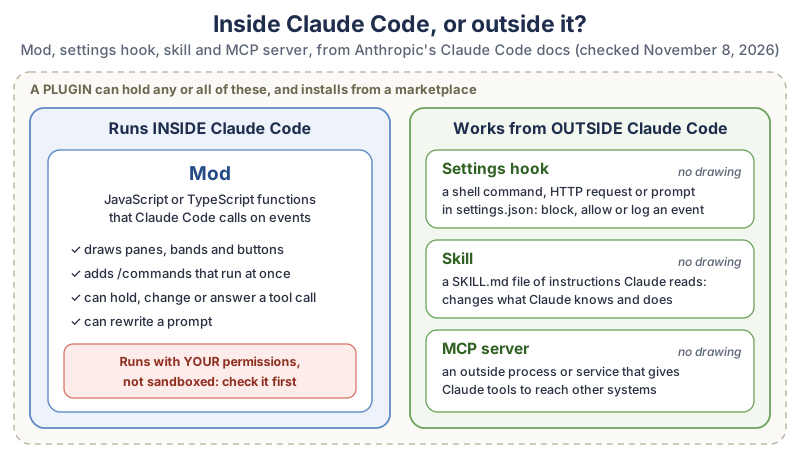
The comparison in plain text, from Anthropic’s Mods overview:
| Kind | What it is | Can it draw on screen? | What you write | Pick it when |
|---|---|---|---|---|
| Mod | Functions in a plugin that Claude Code calls in its own process | Yes | JavaScript or TypeScript | You want a pane, a band above the prompt, a custom command, or to rewrite an event |
| Settings hook | A shell command, HTTP request or prompt run on a lifecycle event | No | A script and a settings.json entry | You want to block, allow or log an event with a script you already have |
| Skill | A SKILL.md file of instructions Claude reads | No | Markdown | You keep pasting the same instructions into chat |
| MCP server | An outside process or service that gives Claude tools | No | A server in any language | Claude needs to reach an outside system |
A plugin can hold all four, so one plugin can carry a mod, a skill and an MCP server together.
Do you already have some Claude mods?
Yes. Some of Claude Code’s own features are mods, such as the /diff pane. Run /plugin, press Tab to reach the Installed tab, and look under Built-in. Anthropic’s Mods overview lists cc-plugin-diff (the /diff pane), cc-plugin-agents-md (loads AGENTS.md as project instructions) and cc-plugin-you-should-know (a side agent’s notes above the prompt, off until you turn it on), among others. You can’t uninstall a built-in mod, and the source of several of them is public in the mods folder of Anthropic’s Claude Code repository, which makes them good reading if you’re curious how a mod is built.
What do you need before you install a Claude mod?
You need Claude Code v2.1.287 or later in the terminal, or v2.1.286 or later in the Desktop app’s Code tab, and a Claude plan that includes Claude Code. Mods are on by default from those versions, so there’s no switch to flip.
- Check your version. In a terminal, run
claude --version. In the Desktop app, start a local session in the Code tab, type/statusand read the Claude Code row. - Check your plan. On claude.com/pricing, the comparison table on November 8, 2026 showed Claude Code on Pro and higher plans, not on Free. Our guide to running Claude Code with a free open model explains the other route people ask about.
- VS Code. Anthropic’s docs say the VS Code extension draws what a mod draws from extension version 2.1.299.
How do you install a Claude Code mod?
A Claude Code mod installs like any plugin: add the author’s marketplace, run /plugin install with the plugin’s name and the marketplace’s name, pick a scope, and reload. Anthropic’s Mods overview gives the pattern as /plugin install token-chart@your-org inside a session, or claude plugin install token-chart@your-org in your shell.
The steps from Anthropic’s Install and manage plugins page, inside a Claude Code session:
- Add the marketplace (skip this for Anthropic’s official one, which Claude Code adds for you):
/plugin marketplace add owner/repo. Claude Code printsSuccessfully added marketplace: <name>. - Open the mod’s details:
/plugin install name@marketplace. In a session this doesn’t install right away; it opens the details pane so you can read the Will install list first. - Choose a scope: Install for you (every project on this computer), Install for all collaborators on this repository, or Install for you, in this repo only.
- Reload if the summary says
Run /reload-plugins to apply. - Check it loaded: run
/plugin. A dim line under the tabs gives the count and names, such as1 mod active · first-mod.
Here’s a real example from the README of Flightdeck, a community mod by scasella that draws an agent dashboard, as its author gives it:
/plugin marketplace add scasella/claude-flightdeck
/plugin install flightdeck@claude-flightdeck
/reload-plugins
/flightdeck
In the Desktop app’s Code tab, click the + button next to the prompt box and choose Add plugins instead; in VS Code, type /plugins to open Manage plugins.
How do you try a mod for one session without installing it?
Clone the mod’s repository and start Claude Code with --plugin-dir pointed at the mod’s folder; it loads for that one session and nothing is installed. Anthropic’s sample mods in the claude-code-playground repository show exactly this in their README:
git clone https://github.com/anthropics/claude-code-playground.git
cd claude-code-playground/claude-code/mods
claude --plugin-dir ./token-weather
Anthropic says the repository shares these samples as they are, without support
, so read them like any other code before you load one.
How do you check a Claude mod is safe before you install it?
Check who published it, read its code, list what it does with claude plugin validate, and try it for one session before you install it. A mod isn’t sandboxed, so these few minutes matter more than for a skill. Anthropic’s own warning on the Mods overview is plain:
A mod is code that runs with your permissions. It can read and write your files, start processes, and make network requests. Install mods only from authors and marketplaces you trust.
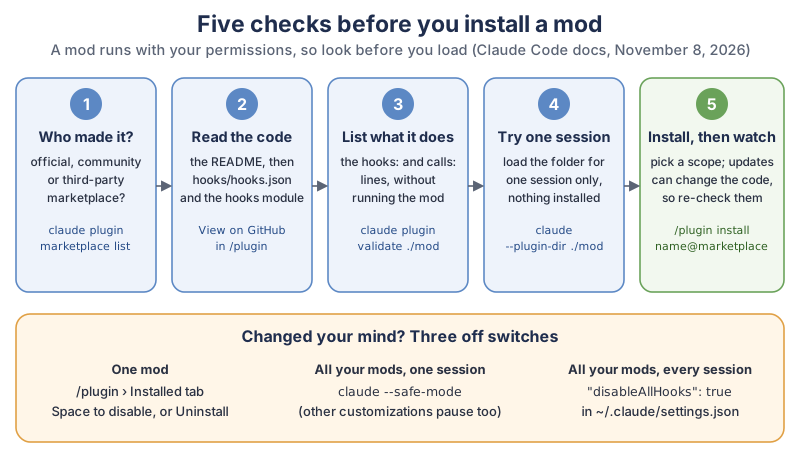
The five checks in the diagram, in plain text:
- Who made it? Run
claude plugin marketplace listto see where each marketplace came from. Anthropic’s Plugin security and trust page splits marketplaces into official (such asclaude-plugins-official), community (claude-community) and third-party, which is every other one, and says Claude Code only accepts the official and community names fromgithub.com/anthropics/repositories. - Read the code. In
/plugin, choose View on GitHub or Open homepage, then read the README,hooks/hooks.jsonand the file it points to. Good READMEs have awhat it can reach
section; Flightdeck’s and agent-usage-guard’s both do. - List what it does. Clone it and run
claude plugin validate ./some-mod, covered below. - Try one session.
claude --plugin-dir ./some-mod, as above. - Install, then watch updates. Anthropic says auto-update is off by default for community and third-party marketplaces, and that when it’s on,
the files you reviewed can change on disk.
What can a Claude mod reach on your computer?
Once a Claude mod loads, it can do almost anything your user account can do. Anthropic’s Mods overview lists that a mod can act on your machine as you (files, programs, network), read your secrets such as environment variables and settings files, see every prompt and tool call, rewrite a prompt or tool call, approve a tool call before you’re asked, and call a model on your plan or API key. Anthropic adds: Mods aren’t sandboxed.
If you turn on Claude Code’s sandbox, it isolates the Bash commands Claude runs, and a process a mod starts runs outside it.
How do you use claude plugin validate to see what a mod does?
Run claude plugin validate on the mod’s folder before you install it; it lists the events the mod handles and every action it asks Claude Code to do, without running the mod. Anthropic’s Create a mod page shows the output for its example mod:
claude plugin validate ./first-mod
  ❯ ./register.js hooks: session.start, tool.call, command.run{command=tally}, ui.render{component=Spinner}
  ❯ ./register.js calls: $.command.register, $.ui.invalidate

✔ Validation passed
Read the hooks: line for what the mod listens to and the calls: line for what it does. A mod that only draws a meter has no business making network requests or starting processes, so if the calls: line says it does, ask why before you install it. Anthropic’s docs explain that a hook can only reach outside its own code through these API calls, which is why the list is complete.
Which Claude mods are worth installing?
The Claude mods worth installing are the ones that solve a job you already struggle with: keeping an eye on context and usage, stopping risky commands, reviewing Claude’s edits, or long sessions. Start with one mod for one job, live with it for a week, and only then add another.
The everyday jobs people install mods for, with an example of each from our table below:
- See how full the conversation is: Anthropic’s sample
token-weatherdraws a forecast of your context window above the prompt. - Stop a scary command: Anthropic’s sample
blast-radiusholds commands such asrm -rfor a force push and shows what they would change, with Proceed and Cancel buttons. - Review what Claude changed: Anthropic’s sample
replay-theateradds/replayto step through the last turn’s file edits; the built-in/diffpane is already there. - Keep your plan’s usage in check: agent-usage-guard holds subagent fan-out and retry loops before they spend your usage.
- Make it look your way: claude-skins restyles tool rows and adds a usage band and themes.
What are the most popular Claude mods on GitHub?
Here’s our compiled table: Anthropic’s three sample mods, plus seven open-source community repositories tagged claude-code-mod on GitHub with an MIT licence, picked to cover different everyday jobs. GitHub stars show popularity, not safety or quality, and this isn’t a ranking.
| Mod | What it does | Made by | Licence | Last update | GitHub stars |
|---|---|---|---|---|---|
| token-weather | Draws a forecast of your context window above the prompt | Anthropic (sample) | Apache-2.0 | 346 (whole playground repo) | |
| blast-radius | Holds a risky shell command and shows what it would change, with Proceed and Cancel | Anthropic (sample) | Apache-2.0 | 346 (whole playground repo) | |
| replay-theater | Adds /replay to step through the last turn’s file edits, one diff at a time | Anthropic (sample) | Apache-2.0 | 346 (whole playground repo) | |
| claude-code-mods | A set of mods (live lines above the prompt, guards, panes and games), including mission-control for subagents | hamzafer | MIT | 453 | |
| effortless | Picks the reasoning effort for every prompt and shows it in a bar | HeyCubit | MIT | 331 | |
| claude-skins | Tool rows with icons, diff and table cards, a live usage band and switchable skins (/skin) | hellosverre | MIT | 271 | |
| Flightdeck | A live agent dashboard: context and cost, permission checks, subagents as cards | scasella | MIT | 247 | |
| claude-carbon | A local CO2 estimate of your sessions from token usage, with /carbon-panel | gwittebolle | MIT | 238 | |
| ctx-handoff | Hands off to a fresh conversation when context fills up, with a summary | cablate | MIT | 125 | |
| agent-usage-guard | Holds subagent fan-out, heavy-context prompts and retry loops before they spend your usage | rbartoli | MIT | 94 |
For Anthropic’s three samples, “last update” is the last change to that mod’s folder; for the community mods, it’s the last push to the repository. All three samples need Claude Code 2.1.287 or later, according to the claude-code-playground README. Before you install any of them, run the five checks above, because a popular mod still runs with your permissions.
How do you turn off or remove a Claude mod?
To switch off one Claude mod, open /plugin, go to the Installed tab, select it and press Space to disable it or choose Uninstall. Anthropic’s Mods overview gives two wider switches too:
Can I confess something? The command I love most on this whole page is the boring one, claude plugin validate. Two plain lines that tell you what a mod will do before it does anything — that’s my kind of magic trick.
- One mod
- Disable or uninstall its plugin from the Installed tab in
/plugin, or runclaude plugin disable name@marketplacein your shell. - Every installed mod, for one session
- Start Claude Code with
claude --safe-mode, which also turns off your other customizations for that session. - Every mod you installed, in every session
- Set
"disableAllHooks": truein~/.claude/settings.json. Your settings hooks and custom status line stop too.
To remove a mod you no longer trust, Anthropic’s Plugin security and trust page says to run claude plugin uninstall with the scope you installed it at. The plugin’s cached files stay under ~/.claude/plugins/cache/ for 14 days before a background sweep removes them, and you can delete that folder yourself straight away.
Can Claude write a mod for you?
Yes. Describe the mod you want in an interactive Claude Code session, and Claude writes it using a built-in skill called plugin-authoring, which you can also start yourself with /plugin-authoring. Anthropic’s Create a mod page uses this example request:
make a mod that shows the current git branch above the promptWhat happens next, from Anthropic’s Create a mod page:
- Claude writes the mod in the session’s mods folder,
~/.claude/dev-mods/followed by the session’s ID, and asks you to approve each file. - Claude Code asks whether to enable hot reloading. Enable for this session loads the mod when the turn ends; Not now leaves the files alone.
- Check the Installed tab in
/plugin, then try it and ask Claude for any change. - To keep the mod, copy its folder somewhere of your own, such as
~/mods/git-branch, and load it withclaude --plugin-dir ~/mods/git-branch. A mod Claude writes only loads in the session that made it.
A small mod you asked for yourself is often the safest mod of all, because you can read every line and you know exactly why it’s there. If you like building things with Claude Code, our game-making tutorial uses the same habit of small steps and Git save points.
Where do you find more Claude mods?
You find more Claude mods on the Discover tab of /plugin, on Anthropic’s Claude Marketplace website, in Anthropic’s community marketplace, and on GitHub under the claude-code-mod topic. Each place has a different level of review.
- Anthropic’s official marketplace,
claude-plugins-official, which Claude Code adds the first time you start an interactive terminal session. Anthropic’s marketplaces page says the web catalog marks some plugins Anthropic verified. - Anthropic’s community marketplace, for third-party plugins whose authors submitted them to Anthropic:
/plugin marketplace add anthropics/claude-plugins-community, then install with@claude-community. - GitHub. Many mods live in their authors’ own marketplaces. Anthropic says plainly that it
doesn’t review third-party marketplaces
. - Community catalogues. The awesome-claude-code-mods list by karanb192 reported 7,673 mods found in public GitHub repositories (last scanned November 7, 2026), with what Claude’s validator says each one can reach. Its README calls it
an independent scan, not an official Anthropic directory.
What gear helps when you use Claude Code mods?
Mods that draw panes and bands use screen space, so a wide monitor helps most, and a comfortable keyboard helps with all the slash commands.
- A wide screen. Browse ultrawide monitors on Amazon to keep a mod’s pane beside the transcript without squinting.
- A second monitor. Browse portable monitors on Amazon if you code on a laptop.
- A good keyboard. Browse mechanical keyboards on Amazon for long terminal sessions.
- A backup drive. Browse external SSD drives on Amazon to back up your projects before you let new code loose on them.
What should you do first with Claude mods?
Pick one annoyance from your Claude Code day, find one mod for it (or ask Claude to write it), run claude plugin validate, try it with --plugin-dir for a session, and install it only if you’d miss it. Our Android TV tutorial shows how a settings.json deny list keeps Claude Code careful, a nice partner to any guard mod, and the newsletter box below brings new Claude tutorials as we write them.
Go pick one little annoyance and give it a mod, then enjoy the first time Claude Code shows you something it never showed you before. Your terminal is about to get a personality.
Sources and further reading
- Mods overview (Claude Code docs, Anthropic) — what a mod is, trust, versions, on/off, built-in mods
- Create a mod (Claude Code docs, Anthropic) — plugin-authoring skill, dev-mods folder, claude plugin validate
- Install and manage plugins (Claude Code docs, Anthropic) — /plugin install, scopes, marketplaces, updates
- Plugin security and trust (Claude Code docs, Anthropic) — marketplace tiers, reviewing a plugin, uninstalling
- Anthropic’s marketplaces (Claude Code docs) — official and community marketplaces
- Claude Marketplace (Anthropic) — web catalog of plugins
- Plans and pricing (Claude) — Claude Code by plan; checked Nov 8, 2026
- claude-code-playground: sample mods (Anthropic on GitHub) — token-weather, blast-radius, replay-theater
- Claude Code repository: built-in mods (Anthropic on GitHub) — diff, agents-md, sec-default, telemetry
- claude-code-mod topic (GitHub) — community mods
- awesome-claude-code-mods (karanb192 on GitHub) — independent catalogue with access scan
- Flightdeck (scasella on GitHub) — install commands quoted
- agent-usage-guard (rbartoli on GitHub) — usage guard mod
Questions and answers
What are Claude Code mods?
Claude Code mods are plugins with JavaScript or TypeScript code that runs inside Claude Code and changes how it looks and behaves. A mod can draw panes and bands, add slash commands, and hold or change a tool call. Mods need Claude Code v2.1.287 or later and are on by default.
How do you install a Claude Code mod?
Add the author’s marketplace with /plugin marketplace add owner/repo, then run /plugin install name@marketplace inside Claude Code, choose a scope, and run /reload-plugins if asked. From your shell, claude plugin install name@marketplace does the same. Run /plugin to see a line such as 1 mod active.
Are Claude Code mods safe to install?
A Claude Code mod runs with your permissions and isn’t sandboxed, so it can read and write your files, start programs and make network requests. Anthropic says to install mods only from authors and marketplaces you trust. Read the code and run claude plugin validate before installing one.
What is the difference between a Claude mod, a plugin and a skill?
A plugin is the package you install from a marketplace, and it can hold mods, skills, hooks and MCP servers. A mod is code inside a plugin that runs in Claude Code and can draw on screen. A skill is a SKILL.md file of instructions that Claude reads.
Do Claude mods work in the Claude desktop app?
Yes, in the Code tab of the Claude Desktop app, from Claude Code v2.1.286, except in WSL sessions. Mods also run in the Claude Code terminal and the VS Code extension. They aren’t part of a regular chat at claude.ai.