
How Do You Make a Video Game With Claude Code, Even in Roblox Studio?
Disclosure: this page contains Amazon affiliate links. As an Amazon Associate we earn from qualifying purchases, at no extra cost to you.
Oh, a game of your very own — grab a snack and a controller, pixel-world builder! Say you’ve watched someone build a whole game with Claude in an hour and thought, I want to make one too.
You can, and the best part is that the game can be entirely yours: your idea, your characters, your rules. A computer that runs Roblox Studio or a game engine is all you need to start, and when you’re ready for more power, browse gaming laptops on Amazon and a PC game controller for playtesting.
Short answer: You make a game with Claude Code by starting from your own small idea, asking Claude Code to build one playable loop, then playtesting and fixing it in small steps, saving after each one that works. In Roblox Studio, turn on Studio’s built-in MCP server so Claude Code can read, edit and playtest your place.
What are the steps to make a game with Claude Code?
Making a game with Claude Code takes five steps: pick your own idea, build one core loop, playtest it, fix and polish in small changes, then publish. Claude Code writes and edits the code; you decide what the game is and whether it’s fun.
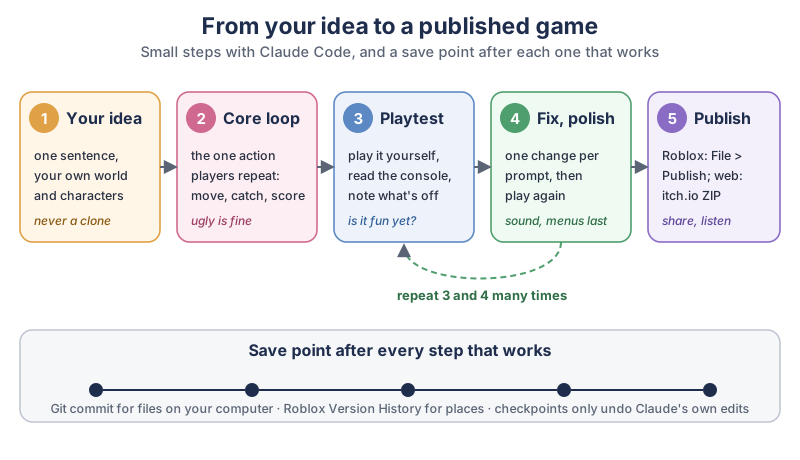
The five steps in plain text:
- Your idea. One sentence, with your own world and characters, never a copy of someone else’s game.
- Core loop. The one action players repeat, such as move, catch and score. It can look ugly at first.
- Playtest. Play the game yourself, read the console output, and write down what feels off.
- Fix and polish. One change per prompt, then play again. Steps 3 and 4 repeat many times. Sound and menus come last.
- Publish. In Roblox Studio, File > Publish; for a web game, a ZIP on itch.io.
Under all five steps runs a row of save points: a Git commit for files on your computer, Roblox’s Version History for a Roblox place, and Claude Code’s checkpoints, which only undo Claude’s own file edits.
Why should you make your own game instead of cloning a famous one?
Your own game is yours to publish, share and keep improving, while a copy of a famous game uses characters, art, music and levels that belong to someone else. Videos of AI “cloning” well-known games get lots of views, but a clone is a dead end the moment you want to put it online.
Roblox spells this out in its Community Standards, under “Intellectual Property Violations”: We expect you to respect the intellectual property rights of others,
and Roblox will remove infringing content upon receiving a valid copyright or trademark takedown request from a rights holder.
The same page adds that Roblox may also proactively delete or archive assets if we suspect that the content may be infringing on someone’s intellectual property rights.
There’s a happier reason too: a new idea is what makes people want to play. Borrow a genre (a platformer, a tower defense, a racing game) as much as you like, since a genre is a kind of game, not somebody’s game. Then fill it with your own world. Ask Claude to help you find it:
I want to make a small game of my own. My idea in one line: [your idea].
Help me find the core loop: the one action the player repeats.
Give me 3 options, each in 2 sentences: what the player does,
what makes it harder over time, and how a round ends.
Use only new names, characters and places - nothing from existing games.
What is a core loop, and why build it first?
A core loop is the one action a player repeats over and over, and building it first gets you something playable in an evening instead of a giant plan that never runs. Here’s our own example: a lighthouse keeper catches falling stars in a bucket before they hit the sea. The player moves left and right, each caught star adds a point, every ten catches the stars fall faster, and three missed stars end the night. That’s the whole game for version one. No title screen, no shop, no story yet. When the loop is fun with plain blocks and circles, everything you add later makes it better; when it isn’t fun, no amount of polish will save it.
Which game engine works best with Claude Code?
Claude Code works best where a game’s code and scenes are plain text files it can read and edit, or where the engine offers an official connection, like Roblox Studio’s built-in MCP server. Phaser, Godot and Paper plugins are text all the way through; Roblox Studio connects live; Unity can save scenes as text; Unreal’s Blueprints are visual node graphs in the editor.
| Engine | Language | How Claude Code reaches the game | Where you can publish |
|---|---|---|---|
| Roblox Studio | Luau | Live, through Studio’s built-in MCP server (scripts, objects, playtests) | Roblox, with File > Publish |
| Godot 4.7 | GDScript (or C#) | Text files: scripts plus TSCN scenes, which Godot calls mostly human-readable | Your own builds, and the web with HTML5 export (not for C# projects in Godot 4) |
| Unity 6.3 LTS | C# | Text files: C# scripts, and scenes in Unity’s text-based YAML format | Your own builds, made from the Unity Editor |
| Unreal Engine 5.8 | C++ and Blueprints | C++ files are text; Blueprints are node graphs edited inside Unreal Editor | Your own builds, made from Unreal Editor |
| Phaser | JavaScript | Text files: the whole game is HTML and JavaScript in one folder | Any website, or itch.io as an HTML game |
| Paper (Minecraft plugin) | Java | Text files: Java code, a Gradle build and plugin.yml | Your own Paper server for Minecraft: Java Edition |
The sources behind each row: luau.org calls Luau a small, fast, and embeddable programming language based on Lua with a gradual type system.
Godot’s TSCN file format page says Unlike binary SCN files, TSCN files have the advantage of being mostly human-readable and easy for version control systems to manage
, and Godot’s site says the engine is released under the permissive MIT license
. Unity’s text-based scene files page says Unity provides a text-based format for scene data, in addition to the default binary format.
Epic’s Blueprints page describes a node-based interface to create gameplay elements from within Unreal Editor.
And Phaser’s GitHub page calls it a fun, free and fast 2D game framework for making HTML5 games for desktop and mobile web browsers
, under the MIT license.
Claude Code itself needs a paid plan: the comparison table on claude.com/pricing shows Claude Code as “No” on Free and “Yes” on Pro, Max and Ultra. Our guide to running Claude Code with a free open model on your own computer explains the other route and its limits.
How do you connect Claude Code to Roblox Studio?
You turn on Roblox Studio’s built-in MCP server in the Assistant panel, then switch on Claude Code under Quick connect. Roblox’s Studio MCP docs (last updated November 6, 2026) say the server is built into Roblox Studio
and that once connected, your AI client can interact directly with your open Studio session, exploring the data model, writing scripts, running Luau code, and testing your game in play mode.
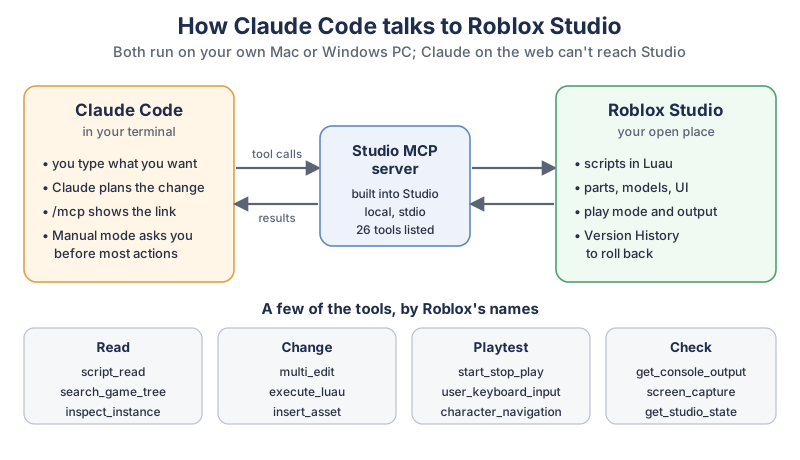
The connection in plain text: Claude Code (in your terminal) sends tool calls to the Studio MCP server (built into Studio, running locally over stdio, 26 tools listed in Roblox’s docs on November 7, 2026), which works on your open place and sends results back. A few of the tools, grouped:
- Read
- script_read, search_game_tree, inspect_instance
- Change
- multi_edit, execute_luau, insert_asset
- Playtest
- start_stop_play, user_keyboard_input, character_navigation
- Check
- get_console_output, screen_capture, get_studio_state
The steps, from Roblox’s docs:
- Install the latest version of Roblox Studio and Claude Code on your Mac or Windows PC.
- In Studio, open Assistant, click … > Manage MCP Servers, and turn on Enable Studio as MCP server. (Roblox’s plugin README shows the newer path as … > Settings > MCP Servers.)
- Expand Quick connect and turn on Claude Code. If it isn’t in the list, the docs say to install it and restart Roblox Studio.
- Restart Claude Code and type
/mcpto see the connection. In Studio, a green indicator shows how many clients are connected.
There’s also an official plugin. The Roblox Studio agent plugin on GitHub calls itself Roblox’s official plugin for AI assistants
and says, for Claude Code: run
The README adds that claude.ai on the web can’t connect to Studio, so this works from Claude Code or Cowork in the Claude desktop app./plugin, search for Roblox Studio, and install it.
What can Claude Code do inside Roblox Studio?
Through the built-in MCP server, Claude Code can read and edit scripts, inspect and insert objects, run Luau code, start and stop playtests, press keys as a player, and read the output log. Roblox announced the playtest part in its DevForum post Assistant Updates: Studio Built-in MCP Server and Playtest Automation
on March 5, 2026:
The MCP Server is now built into Studio with no additional setup required. Assistant can start and stop playtests and simulate player input, enabling an end-to-end loop where it can reproduce issues, validate fixes, and iterate autonomously.
The same post is clear about who’s in charge: You’re ultimately responsible for what ends up in your game. It’s a best practice to review any generated scripts before you hit publish.
What should you ask Claude Code first in Roblox Studio?
Ask Claude Code to look before it builds: describe the place, then plan the core loop, then build one piece at a time. A first prompt:
Look at my open Roblox place and tell me what's in it. Don't change anything yet.
Then plan (don't build) this game: [your core loop in 2-3 sentences].
List the scripts and parts you'd add, where each one goes,
and how we'll playtest each piece.
When the plan looks right, go one step at a time: Build step 1 only. Then start a playtest, read the output for errors, stop the playtest and tell me what happened.
Claude Code’s permission modes page says Plan mode tells Claude to research and propose changes without making them
, which is a good fit for that first look.
How do you make a web game with Claude Code?
Make a folder, open Claude Code in it, and ask for a Phaser game in an index.html file plus a few JavaScript files. A web game is plain text from top to bottom, so Claude Code can read every line of it, and anyone with a browser can play the result.
Make a small browser game with Phaser in this folder: index.html plus a js folder.
The game: [your core loop in 2-3 sentences].
Use simple shapes and colors, no outside images.
Keyboard: left and right arrows. Show the score in the top corner.
Before you write code, list the files you'll create and how I run the game.
To play it on your own computer, a small local web server is enough; Python’s built-in one runs with python3 -m http.server 8000 in the game folder, then you open http://localhost:8000 in your browser. If you’d rather use a full engine, Godot’s web export page says HTML5 export allows publishing games made in Godot Engine to the browser.
Can Claude Code make a Minecraft server plugin?
Yes: a Minecraft plugin for a Paper server is a Java project made of text files, which is exactly what Claude Code works with. You run the Paper server on your own computer, add your plugin, and join from Minecraft: Java Edition to test it.
Can I tell you my favorite part? The moment a plain grey block does exactly what you told it to, and you play it “one more time” for the eleventh time. That’s how you know the loop is working.
PaperMC’s project setup guide says The Paper team uses Gradle as its build system
, that the plugin’s main class is the one that extends JavaPlugin, and that The
Paper’s getting started page says resources directory is where you will place your plugin’s plugin.yml file.Paper requires at least Java 25 to run
and gives this short start command, run in the server’s folder with your downloaded file’s name in place of paper.jar:
java -Xms4G -Xmx4G -jar paper.jar --noguiA prompt for Claude Code, in an empty folder:
Set up a Paper plugin project here, following docs.papermc.io's project setup
(Gradle with the Kotlin DSL, plugin.yml in resources).
The plugin: [one small idea, e.g. a /sparkle command that gives the player a firework].
Explain each file in one sentence, then tell me how to build the JAR
and where to put it on my local test server.
Keep the first plugin tiny, one command or one event, and test it on your own server before anyone else joins.
How do you test your game and undo mistakes?
Play your game after every change, and save a Git commit every time something works, so any mistake is one command away from undone. Claude Code’s checkpoints help too, but they are a short-term safety net, not your history.
Git describes itself as a free and open source distributed version control system
. Ask Claude Code to set it up in your game folder, or type it yourself:
git init
git add -A
git commit -m "core loop works: catch stars, score goes up"
After that, commit after every step that plays well. If a change breaks the game and you haven’t committed it, git restore . throws away every change since your last commit. Anthropic’s checkpointing page has a section titled Not a replacement for version control
that says: Checkpoints are designed for quick, session-level recovery. For permanent version history and collaboration, continue using version control, such as Git, for commits, branches, and long-term history.
It also says A file that only Bash commands changed isn’t tracked and stays as it is.
While you learn, keep Claude Code in Manual mode. The permission modes page says In Manual mode, Claude Code stops and asks you before most actions that edit files, run shell commands, or reach the network.
When Claude Code adds an MCP server, the MCP page asks you to Verify you trust each server before connecting it.
How do you roll back a Roblox place?
Roblox keeps saved versions of every place, so you can roll back from the Creator Dashboard. Roblox’s game settings docs say Roblox automatically retains saved versions of each place for version control and backup purposes. You can access Version History in the Creator Dashboard to revert to a previously saved version of any place within a game.
Save or publish before each bigger Claude Code request, and you’ll always have a clean version to return to.
How do you publish a game you made with Claude Code?
On Roblox you publish from Studio with File > Publish; a web game goes on itch.io as a ZIP file with an index.html inside. Publishing doesn’t need Claude at all, it’s your game going out into the world.
- Roblox. Roblox’s publishing docs say to
navigate to File > Publish
, fill in the Game details window, andClick the Save button.
Who can play is set later in the Creator Dashboard under Publish settings > Manage Audience. - A web game on itch.io. itch.io’s HTML5 docs say to
Upload a ZIP file that contains all your project’s files, including an
index.htmlfile that will be your game’s entry point. - A Paper plugin. It lives on your own server; share the server with friends you trust before you think about anything bigger.
Read every script once before you publish, as Roblox suggests, and play the published version yourself start to finish.
What computer and gear help you make games with Claude Code?
Claude Code itself runs in a terminal and needs little power, but Roblox Studio, Godot, Unity and Unreal all run better on a computer with a good graphics card and plenty of memory. A controller and a second screen make playtesting much more comfortable.
- A gaming laptop. Browse gaming laptops on Amazon if your current computer struggles with Roblox Studio or a 3D engine.
- A game controller. Browse PC game controllers on Amazon to test how your game feels with a gamepad, not just a keyboard.
- A portable monitor. Browse portable monitors on Amazon, so the game runs on one screen while Claude Code and the console sit on the other.
- An external SSD. Browse external SSD drives on Amazon for one more backup of your game folders.
What should you build first?
Build one core loop this weekend: one idea, one action, plain shapes. Write your idea in one sentence tonight, ask Claude to find the loop, and have something playable by Sunday, saved with a Git commit or a Roblox version. Your first game will be small, and that’s exactly right. If you love stories as much as games, our animated Shorts tutorial shows the Story Spine, a handy way to give your game world a beginning, a middle and an end, and the newsletter box below brings new Claude tutorials as we write them.
Go make one small, silly, wonderful loop this weekend, and enjoy being the very first person to ever play it. I’ll be cheering for your falling stars.
Sources and further reading
- Connect to the Roblox Studio MCP server (Roblox Creator Hub) — setup steps, Quick connect, tools; last updated Nov 6, 2026
- Assistant Updates: Studio Built-in MCP Server and Playtest Automation (Roblox DevForum) — March 5, 2026
- Roblox Studio agent plugin (Roblox, GitHub) — installing in Claude Code, what is sent where
- Create and publish games and places (Roblox Creator Hub) — File > Publish, Manage Audience
- Game settings (Roblox Creator Hub) — Version History
- Roblox Community Standards — intellectual property
- Luau — Roblox’s scripting language
- Connect Claude Code to tools via MCP (Anthropic) — trusting servers
- Checkpointing (Claude Code docs) — not a replacement for version control
- Permission modes (Claude Code docs) — Manual mode, plan mode
- Plans and pricing (Claude) — Claude Code by plan; checked Nov 7, 2026
- TSCN file format (Godot 4.7 docs) — human-readable scenes
- Exporting for the Web (Godot 4.7 docs) — HTML5 export
- Godot license — MIT
- Text-based scene files (Unity 6.3 LTS manual) — YAML scenes and version control
- Blueprint Visual Scripting (Unreal Engine 5.8 docs) — node-based gameplay scripting
- Phaser on GitHub — 2D HTML5 game framework, MIT license
- Paper plugin project setup (PaperMC docs) — Gradle, JavaPlugin, plugin.yml
- Getting started with Paper (PaperMC docs) — Java 25, start command; updated Sep 18, 2026
- Uploading HTML5 games (itch.io docs) — ZIP with index.html
- Git — free, open-source version control
Questions and answers
Can Claude Code make a Roblox game?
Yes. Roblox Studio has a built-in MCP server, and Roblox’s docs list Claude Code among the clients you can switch on under Quick connect. Once connected, Claude Code can read and edit Luau scripts, run code and start playtests in your open place, and you review every change.
Is Claude Code free?
No. The comparison table on claude.com/pricing shows Claude Code as not included in the Free plan and included in Pro, Max and Ultra. Some people connect Claude Code to a free open model on their own computer instead, with real limits, which our guide to running Claude Code for free explains.
What programming language does Roblox use?
Roblox uses Luau. Luau’s official site describes it as a small, fast and embeddable programming language based on Lua with a gradual type system. Claude Code can read and write Luau scripts in Roblox Studio through Studio’s MCP server.
Can AI make a whole game by itself?
AI can write most of the code and, in Roblox Studio, even run playtests and read the errors, but you still decide what the game is and whether it’s fun. Roblox’s own announcement says creators are ultimately responsible for what ends up in their game and should review generated scripts before publishing.
Can you copy an existing game with AI?
You can borrow a genre, but not another game’s characters, art, music or levels, which belong to their owners. Roblox’s Community Standards ask creators to respect intellectual property and say Roblox removes infringing content after a valid takedown request. Your own idea is the one you can publish and keep.