
How Do You Make a PDF With Claude That People Will Buy?
Disclosure: this page contains Amazon affiliate links. As an Amazon Associate we earn from qualifying purchases, at no extra cost to you.
Ooh, turning what you know into something people can hold — welcome, printable-making go-getter! Say you’ve spent years getting good at something — keeping a garden alive through August, planning a kid’s birthday on a small budget, running a tidy home office — and friends keep asking you how you do it. That know-how can become a PDF, and Claude can help you shape it, lay it out and export it. Printing one proof copy on paper catches mistakes a screen hides, so if you need one, browse laser printers on Amazon.
Short answer: You make a PDF people will buy by putting your own know-how in it: pick a topic you really know, let Claude help outline, edit and lay it out, then use Export > PDF in Claude Docs. Check every fact, say how AI was used, and follow each marketplace’s AI rules. Nobody can promise sales.
Can you sell a PDF you made with Claude?
Yes, you can sell a PDF you made with Claude’s help, as long as you follow the rules of the place you sell it. Each marketplace has its own AI rules: Etsy wants AI use disclosed and doesn’t allow AI-generated instructions, Amazon KDP wants AI-generated text disclosed, and Gumroad’s prohibited list has no AI-content rule but bans get-rich-quick schemes.
Who owns a PDF that Claude helped you make?
Anthropic gives you whatever rights it has in Claude’s output. Section 4 of Anthropic’s Consumer Terms of Service (effective October 8, 2025) says: Subject to your compliance with our Terms, we assign to you all of our right, title, and interest—if any—in Outputs.
Notice the “if any”: whether the text can be protected by copyright at all is a separate question, which the copyright section below answers from the US Copyright Office’s own report.
Can you really make money online with Claude?
Some people sell digital products, but no one can honestly promise you’ll make money with Claude or any AI tool. The Federal Trade Commission’s Operation AI Comply, announced September 25, 2024, went after businesses that claimed AI tools would bring people income through online stores.
Using AI tools to trick, mislead, or defraud people is illegal.
What should your PDF be about?
Your PDF should be about something you know better than most people, because your experience is what a buyer can’t get by asking a chatbot. Claude can make almost any topic look tidy; only you can make it true and useful.
Good starting questions:
- What do people ask you about? The question your friends, coworkers or customers keep asking is a topic with proven interest.
- What have you done many times? A routine you’ve repeated for years has details a beginner would never guess.
- What did you wish you had when you started? A checklist or planner you would have bought for yourself.
- Is it small enough? A focused 10-page worksheet on one job often helps more than a 200-page “everything” guide.
Which kinds of PDFs fit the marketplaces’ rules?
Planners, trackers, worksheets, checklists, printable cards and workbooks you design yourself all fit Etsy’s Designed by a seller
category, which Etsy Help says includes digital downloads and “seller-prompted AI creations”. How-to content is where you need care: Etsy Help lists AI-generated functional instructions, such as craft patterns, recipes, and instructions
among the things it doesn’t allow, so on Etsy the steps in a guide, pattern or recipe PDF should be written by you.
How do you plan the PDF with Claude?
Plan the PDF by giving Claude your topic, your reader and what they should be able to do afterward, then ask for an outline you can keep, cut and reorder. You make the decisions; Claude helps you see the shape.
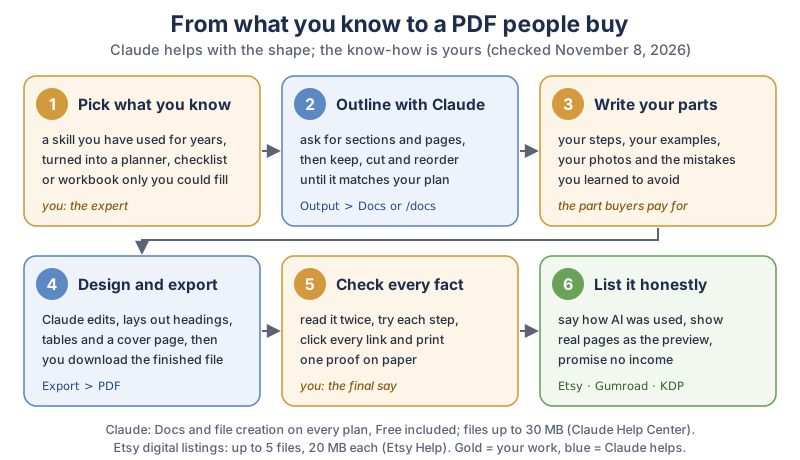
The six steps in the diagram, in plain text:
- Pick what you know: a skill turned into a planner, checklist or workbook only you could fill.
- Outline with Claude: ask for sections and pages in a doc (Output > Docs, or start your message with
/docs). - Write your parts: your steps, examples, photos and the mistakes you learned to avoid.
- Design and export: Claude helps with headings, tables and a cover page, then Export > PDF.
- Check every fact: read it twice, try each step, click every link and print one proof.
- List it honestly: say how AI was used, show real pages as the preview, and promise no income.
What prompt helps Claude outline a PDF?
A good outline prompt tells Claude who the reader is, what they’ll get, and what you’ll write yourself. Here’s one you can change to fit:
I'm making a 12-page printable PDF called "Balcony Tomatoes: A Season Planner".
The reader is a beginner with a small apartment balcony.
I will write all the growing advice myself from my own experience.
Please suggest an outline: page titles, what goes on each page,
and which pages should be fill-in planners or checklists.
Don't write the advice. Ask me 5 questions about my experience first.
Asking Claude to question you first is a nice trick: the answers you type become your raw material, and you’ll often remember details you’d have left out.
How do you make a PDF that’s worth paying for?
A PDF is worth paying for when it saves the buyer time or mistakes they couldn’t easily avoid alone, and that comes from your real experience. Fill each page with things only you know: the exact order you do things in, the numbers that worked for you, the photos you took, the mistakes that cost you a season.
- Use real examples: a filled-in sample page next to each blank planner page shows buyers how to use it.
- Keep it doable: one clear result per page beats a wall of text.
- Add your own photos or drawings: they make the PDF yours, and they show buyers what they’re getting.
- Let Claude polish, not invent: ask it to tighten your sentences, fix spelling and suggest a clearer order.
Does it matter whether you or Claude wrote the words?
Yes. Who wrote the words decides which rules apply. Amazon KDP’s Content Guidelines define AI-generated content as text, images, or translations created by an AI-based tool
, even after you edit it a lot, and call content you wrote yourself that an AI tool helped edit, refine, error-check, or otherwise improve
AI-assisted.
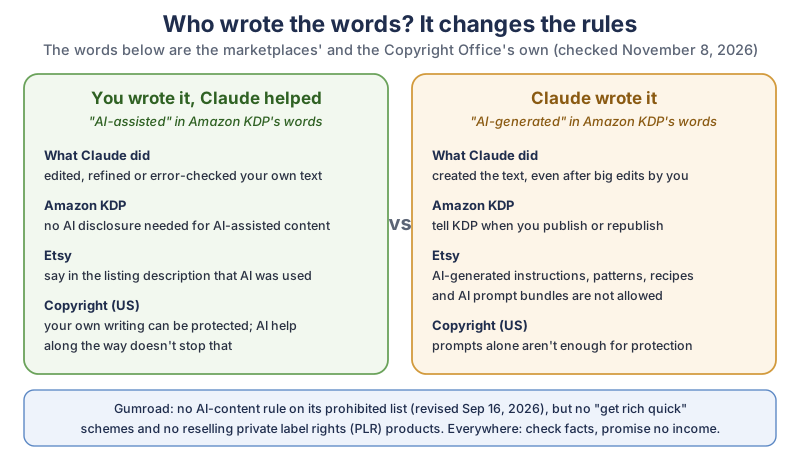
The comparison in the diagram, in plain text:
| Source | You wrote it, Claude helped (AI-assisted) | Claude wrote it (AI-generated) |
|---|---|---|
| Amazon KDP | No AI disclosure needed | Tell KDP when you publish or republish |
| Etsy | Say in the listing description that AI was used | AI-generated instructions, patterns, recipes and AI prompt bundles aren’t allowed |
| US Copyright Office | Your own writing can be protected; AI help doesn’t stop that | Prompts alone aren’t enough for protection |
| Gumroad | No AI-content rule on its prohibited list; get-rich-quick schemes and reselling private label rights (PLR) products are banned | |
How do you make the PDF in Claude?
You can make the PDF in Claude in two ways: write it as a Claude Doc and choose Export > PDF, or ask Claude to create a PDF file and download it from the chat. Both work on the Free plan, according to the Claude Help Center on November 8, 2026.
How do you export a Claude Doc as a PDF?
The Claude Help Center’s Get started with Claude Docs page describes Docs as living documents
saved to your account, and gives these steps:
- Start a doc: ask Claude for a doc in any conversation, start your message with
/docs, or choose Output and then Docs in the message box. You can also pick a Docs template on the Artifacts tab. - Edit it: click into the doc and type (it saves on its own), or ask Claude for changes in the chat. You can select text, leave a comment and mention
@Claudein it to ask for an edit. - Export it: click Export and choose PDF (.pdf). Word (.docx), Markdown (.md) and Google Docs are there too.
Docs is the comfortable route for text-heavy PDFs such as guides and workbooks, because you can type straight into the page.
How do you ask Claude to create a PDF file?
Turn on file creation, then ask Claude for a PDF with the layout you want, and download the file from the conversation. The Help Center’s Create and edit files with Claude page says Claude creates Excel spreadsheets (.xlsx), PowerPoint presentations (.pptx), Word documents (.docx), and PDF files.
- Open Settings > Capabilities and turn on Code execution and file creation (called Create and edit files in the updated Settings layout). On a Team or Enterprise plan, an owner manages this in Organization settings > Capabilities.
- Describe the PDF: page size, fonts, colours, a cover page, and which pages are fill-in tables or checklists.
- Download the file Claude makes from the conversation, open it, and ask for fixes until it looks right.
The file route suits layout-heavy printables like planners with grids and boxes. The Help Center notes that file creation draws from your plan’s usage limits and uses more of them than a normal chat.
Which Claude plan do you need to make a PDF?
Any plan works. The Claude Help Center says file creation is available to all Claude users (Free, Pro, Max, Ultra, Team and Enterprise) on the web, Claude Desktop and Claude Mobile, and that Claude Docs is available on the same plans and on by default. Paid plans give you more usage, which helps if you redo a long PDF many times.
How big can the PDF file be?
Claude’s limit is 30 MB per file for uploads and downloads, according to the Help Center, while Etsy’s How to Manage Your Digital Listings page allows up to five files of up to 20 MB each per listing. So a PDF straight from Claude can be too big for Etsy: aim for under 20 MB, or split a big workbook into two files.
- Shrink big photos before you add them; they’re usually what makes a PDF heavy.
- Name the file well first: Etsy says buyers see the same file name and you can’t rename it after uploading; names are limited to 70 letters, numbers, periods, underscores or hyphens.
How do you check a PDF made with Claude before you sell it?
Read every page yourself, test every step and number, click every link, and print one proof. Claude can make mistakes that sound confident, and Section 4 of Anthropic’s Consumer Terms says You should not rely on any Outputs or Actions without independently confirming their accuracy.
Here’s what I love about this one: the fanciest part of the whole PDF isn’t the layout or the cover, it’s the little mistake you made years ago and now get to save a stranger from. That’s the page people remember.
- Read it out loud once. Clumsy sentences and missing words jump out when you hear them.
- Check every fact and number against a source you trust, or against what you’ve done yourself.
- Try every step as if you were the buyer.
- Click every link in the exported PDF, not only in the doc.
- Print one proof to check margins, fill-in spaces and colours on paper.
- Ask a friend who fits your reader to try it and tell you where they got stuck.
Where can you sell a PDF made with Claude, and what are the AI rules?
Etsy, Gumroad and Amazon KDP are three common places, and each has different AI rules and different fees. Etsy has the strictest AI rules for instructions, KDP asks you to disclose AI-generated content, and Gumroad’s prohibited list doesn’t single out AI-made products.
How do Etsy, Gumroad and Amazon KDP compare for AI-made PDFs?
Here’s our compiled table, from each marketplace’s own pages. It lists the kinds of fees, not the amounts; each fee page has the current numbers.
| Marketplace | AI-made products | Disclosure | Not allowed (AI and related) | Kinds of fees | PDF files |
|---|---|---|---|---|---|
| Etsy | Allowed with your own creative input (Designed by a seller) | Required in the listing description | Bot-generated content; AI-generated functional instructions (craft patterns, recipes, instructions); AI prompt bundles | A listing fee per listing (even if it doesn’t sell), a transaction fee on each sale, and payment processing | Up to 5 files per listing, 20 MB each; PDF supported |
| Gumroad | No AI-content rule on the prohibited list | No AI disclosure rule found on the prohibited or pricing pages | Selling AI services or tool access; reselling PLR products; get-rich-quick schemes; deceptive marketing | No monthly fee; a fee per sale, higher when buyers find you through Gumroad’s Discover marketplace | See Gumroad Help for current limits |
| Amazon KDP | Allowed; you must check it meets all content guidelines | Required for AI-generated text, images or translations; not for AI-assisted | Misleading descriptions; content typically disappointing to customers; copyrighted content that’s freely available on the web | You earn a royalty on each sale; of the two eBook royalty options, the higher one subtracts a delivery cost based on file size | PDF accepted for eBooks in some languages; PDF required for paperback interiors with bleed |
A few details from the same pages are worth knowing before you choose.
What does Etsy say about AI-made digital downloads?
Etsy Help says sellers must disclose within their listing description if an item is created with the use of AI
, and that sellers may use their own original prompts with AI tools to create products. Its examples of allowed items are a fantasy scene from a seller’s own prompt and a custom AI pet portrait. Etsy’s page doesn’t spell out how much AI editing turns your own instructions into “AI-generated” ones; if your PDF teaches steps, write the steps yourself and ask Etsy support if you’re unsure.
What does Gumroad say about selling a Claude-made PDF?
Gumroad’s prohibited products page, last revised September 16, 2026, doesn’t list AI-made files as a problem. It does prohibit selling access to AI tools, chatbots or generation services, reselling private label rights products, “get rich quick” schemes and deceptive marketing. Gumroad’s pricing page says it doesn’t charge a monthly fee and handles sales tax as the merchant of record from January 1, 2025.
Can you publish a PDF made with Claude on Amazon KDP?
Yes, with disclosure if Claude wrote the text. KDP’s Content Guidelines say We require you to inform us of AI-generated content (text, images, or translations) when you publish a new book
, and also when you edit and republish one. KDP’s eBook formats page accepts Word, EPUB and PDF among others, with PDF limited to certain languages, and KDP’s paperback guidelines require a PDF when artwork runs to the edge of the page.
What does copyright mean for a PDF made with Claude?
In the US, the parts of your PDF that you wrote, arranged or creatively changed can be protected by copyright, but text Claude produced from your prompts alone can’t. That’s the conclusion of the US Copyright Office’s Copyright and Artificial Intelligence, Part 2: Copyrightability report, published January 29, 2025.
- Prompts alone aren’t enough. The Office says protection doesn’t extend to
the mere provision of prompts
with today’s tools. - AI help doesn’t cancel your work. The report says using AI to assist in creating a work, or including AI material in a larger human-made work, doesn’t bar copyright for the human parts.
- Registering it? The Office’s registration guidance (88 Fed. Reg. 16,190, March 16, 2023) says applicants
have a duty to disclose the inclusion of AI-generated content in a work submitted for registration
, and that AI-generated content that is more than de minimis should be explicitly excluded from the application.
Register of Copyrights Shira Perlmutter summed it up in the Office’s announcement: our conclusions turn on the centrality of human creativity to copyright
. It’s one more reason the best PDF is mostly you. And whatever you sell, only use text, photos and fonts you have the right to use; KDP, for example, won’t accept copyrighted content that’s freely available on the web.
How do you write an honest listing for a PDF made with Claude?
An honest listing says what the buyer gets, how AI was used, and what it can’t promise. A plain disclosure line is enough, for example:
I wrote every tip in this planner from 8 seasons of growing tomatoes on my balcony.
I used Claude, an AI assistant, to help with the outline, proofreading and page layout.- Show real pages. Use images of actual pages from the PDF so buyers see exactly what they’ll download.
- Say the format: page count, page size, PDF, and whether it’s meant for printing or for a tablet.
- Make no income or result promises.
Helps you plan your season
is honest;guaranteed to double your harvest
isn’t, and never promise buyers they’ll make money. - Never buy or fake reviews. Let real buyers speak for the PDF.
Want a short promo video for the listing? Our guide to making motion graphics with Claude shows how to animate a title card.
What gear helps when you make PDFs to sell?
A printer for proofs is the one tool that pays off most, because paper shows problems a screen hides. The rest is nice to have.
- A printer for proofs: browse laser printers on Amazon, or color inkjet printers on Amazon if your pages use a lot of colour.
- Good paper for test prints: browse heavier printer paper on Amazon to see how a planner feels in a buyer’s hands.
- A book on the business side: browse books on selling digital products on Amazon for pricing, taxes and customer service.
- A backup drive: browse external SSD drives on Amazon so your source files and photos are safe.
What should you do first?
This week, write down the one question people most often ask you, then start a Claude Doc with /docs and ask Claude for a 5-page outline that answers it, with five questions about your experience first. Write your answers, export a PDF, print it, and see how it feels. If you’d like to tell the story behind your PDF in a short video, our animated Shorts tutorial walks through it, and the newsletter box below brings new Claude tutorials as we write them.
Go open a doc, answer Claude’s five questions, and enjoy holding that first printed proof in your hands. It’s a small, wonderful thing to make something useful out of what you already know.
Sources and further reading
- Get started with Claude Docs (Claude Help Center) — plans, /docs, Output > Docs, Export > PDF
- Create and edit files with Claude (Claude Help Center) — every plan, Settings > Capabilities, PDF files, 30 MB, usage limits
- Consumer Terms of Service (Anthropic) — effective Oct 8, 2025; section 4 on outputs
- What Can I Sell on Etsy? (Etsy Help) — AI disclosure, functional instructions, prompt bundles; edited Oct 22, 2026
- Etsy Fee Basics (Etsy Help) — listing, transaction and payment processing fees
- How to Manage Your Digital Listings (Etsy Help) — 5 files, 20 MB each, file names
- Prohibited products (Gumroad) — revised Sep 16, 2026
- Pricing (Gumroad) — fee types, no monthly fee
- Content Guidelines (Amazon KDP) — AI-generated vs AI-assisted, disclosure
- Supported eBook formats (Amazon KDP) — PDF and other formats
- eBook Royalties (Amazon KDP) — two royalty options, delivery costs
- Copyright and Artificial Intelligence (US Copyright Office) — Part 2 report, Jan 29, 2025
- Copyright Office releases Part 2 report (NewsNet 1060) — Register Shira Perlmutter quote
- Works Containing Material Generated by AI (Federal Register) — 88 Fed. Reg. 16,190, Mar 16, 2023
- FTC Announces Crackdown on Deceptive AI Claims and Schemes (FTC) — Operation AI Comply, Sep 25, 2024
Questions and answers
Can you sell PDFs made with Claude?
Yes, if you follow the rules of the place you sell. Anthropic’s Consumer Terms assign you whatever rights it has in Claude’s output. Etsy requires you to disclose AI use and doesn’t allow AI-generated instructions, patterns or recipes, and Amazon KDP requires you to disclose AI-generated text.
Can Claude make a PDF on the free plan?
Yes. The Claude Help Center says file creation and Claude Docs are available on every plan, Free included. Write a Claude Doc and choose Export > PDF, or turn on Code execution and file creation in Settings > Capabilities and ask Claude for a PDF file.
Do you have to disclose AI on Etsy?
Yes. Etsy Help says sellers must disclose within their listing description if an item is created with the use of AI. A plain line saying what you made yourself and what the AI helped with is clear and honest.
Can you sell AI-generated ebooks on Amazon?
Amazon KDP allows them, but you must tell KDP about AI-generated text, images or translations when you publish or republish a book. Content you wrote yourself that AI only edited or error-checked counts as AI-assisted and doesn’t need disclosure.
Can you copyright a book written with AI?
In the US, only the human-authored parts can be protected. The US Copyright Office’s January 2025 report says prompts alone aren’t enough, but your own writing, and your creative selection and changes, can still be protected even if AI helped.