How Do You Make Motion Graphics With Claude?
Disclosure: this page contains Amazon affiliate links. As an Amazon Associate we earn from qualifying purchases, at no extra cost to you.
Ooh, things that slide, bounce and sparkle — come on in, keyframe conjurer! Say you need a short animated intro for your channel, or a 10-second promo for your shop’s opening hours, and you don’t own a single piece of animation software. Claude can build it from a few plain sentences, and a good screen makes the job far more pleasant: browse 4K monitors for video editing on Amazon and drawing tablets on Amazon if you like sketching your own shapes first.
Short answer: You make motion graphics with Claude by describing a short animation (who will watch it, where it plays, how long it runs) and letting Claude build it as code. On a Team or Enterprise plan, Claude Motion exports an MP4 for you. On Free or Pro, ask for an animated artifact and screen-record it, or use Claude Code with Remotion.
What is Claude Motion?
Claude Motion is Anthropic’s beta feature that turns your own content (text, numbers, charts, shapes and images) into a short animation that plays like a video. Anthropic announced it on , in a post titled Build live dashboards and animate explainers with Claude
.
Claude Motion works differently from AI video generators. The Claude Help Center’s Get started with Claude Motion
page says An animation is an artifact made from the Motion template
, and that Claude builds it as code that animates the text, charts, shapes, and images in it.
Anthropic’s announcement puts the difference plainly:
It doesn’t use a video generation model, so there’s no generated footage and no AI-generated people.
That’s good news for motion graphics. Because a Claude Motion animation is code, the help page says you can change one detail, like a word, a number, or the timing, and the rest stays as it was.
The examples Anthropic gives are work-shaped: a 30-second explainer from a quarterly report, an animated chart for a board deck, a product walkthrough for new customers.
Which Claude plans can make motion graphics?
Claude Motion itself is a beta on Team and Enterprise plans only, but every Claude plan can make animations another way. Animated artifacts work on every plan, Free included, and Claude Code with Remotion works on Pro and up.
The Claude Help Center’s artifacts page says The Motion template is in beta on Team and Enterprise plans. It’s on by default on Team plans and off on Enterprise plans until an owner turns it on.
The same page says Artifacts are available on Free, Pro, Max, Ultra, Team, and Enterprise plans, and in Claude Code on every plan that includes Claude Code.
On claude.com/pricing, the comparison table on November 8, 2026 showed “Claude Motion (beta)” as No on Free, Pro, Max and Ultra and Yes on Team and Enterprise, and Claude Code as No on Free and Yes from Pro upward.
| Route | Claude plans | Where you prompt | How you change it | What you export | Size and frame rate |
|---|---|---|---|---|---|
| Claude Motion (beta) | Team, Enterprise | Any chat (Output > Motion), or a Motion template in the Artifacts tab | Ask Claude, or adjust it in the editor | MP4 with Export, or a Share link | Not listed on Anthropic’s help page |
| Animated artifact | Free, Pro, Max, Ultra, Team, Enterprise | Any chat | Ask Claude to change the code | A screen recording (Mac Screenshot app or Windows Snipping Tool) | What your screen shows; ask for the size in the prompt |
| Claude Code + Remotion | Pro, Max, Ultra, Team, Enterprise | Claude Code in a Remotion project folder | Ask Claude Code, or edit the React code | A video file from npx remotion render (H.264 by default) | You set width, height, fps and durationInFrames |
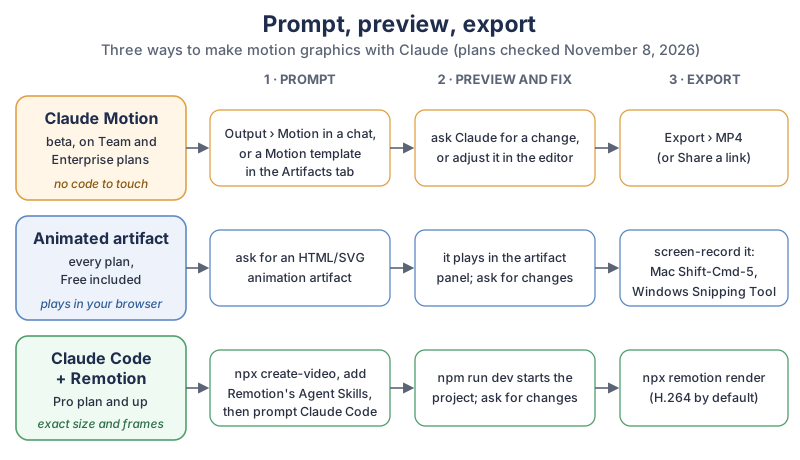
The three routes in the diagram, in plain text:
- Claude Motion (Team and Enterprise): prompt with Output > Motion or a Motion template, preview and fix by asking Claude or in the editor, then Export > MP4.
- Animated artifact (every plan, Free included): ask for an HTML or SVG animation artifact, watch it play in the artifact panel, then screen-record it with Shift-Command-5 on a Mac or the Snipping Tool on Windows.
- Claude Code + Remotion (Pro and up): create the project with
npx create-video, add Remotion’s Agent Skills, start it withnpm run dev, prompt Claude Code, then render withnpx remotion render.
How do you make your first animation with Claude Motion?
You ask for an animation in any chat, or pick a Motion template in the Artifacts tab, and describe who will watch it, where it will play and how long it should be. Claude builds it, you watch the preview, and you ask for changes until it’s right.
Where do you find Claude Motion?
The Claude Help Center’s Claude Motion page gives two ways in:
- From a chat. Ask Claude for an animation in any chat. The page adds:
You can also select “Output” in the message box and choose “Motion.”
- From the Artifacts tab. Go to the Artifacts tab, select a Motion template, then describe the animation you want.
On an Enterprise plan, Claude Motion stays off until an owner turns it on in Organization settings > Artifacts; the help page says owners there can also limit it to specific groups with custom roles. Every animation you make is saved in the Artifacts tab, so you can come back to it from any conversation.
What should your first Claude Motion prompt say?
Your first Claude Motion prompt should name the audience, the place it plays and the length, and attach your own material, because the help page’s tip is to Say who will watch it, where it will play, and roughly how long it should be.
Here’s our own example for a small bakery, written to work in all three routes:
Make a 10-second animation for my bakery's Instagram Story (vertical, 9:16).
Who watches: neighbors who follow us. Where: Instagram Stories.
Scenes:
1. (0-2 s) Our logo (attached) fades in and grows slightly.
2. (2-5 s) "Fresh sourdough every morning" slides in, one word at a time.
3. (5-8 s) "Open 7 am to 2 pm, Tuesday to Sunday" appears under a little sun icon.
4. (8-10 s) Our web address, holding still so people can read it.
Colors: background #FFF8EE, text #3B2A1A, accent #E07A2F. Font: a friendly rounded sans-serif.
Gentle easing, nothing flashy. No people, no photos except the logo.
How do you keep your brand colors and timing right?
Give Claude your exact colors as hex codes, name your font style, attach your logo, and write every scene’s length in seconds. Exact numbers leave Claude nothing to guess, and the animation looks like yours instead of a template.
A few habits that help, our own suggestions from how code-built animation works:
- Hex codes, not color names. “#E07A2F” is one color; “warm orange” is hundreds.
- Seconds per scene. Scene lengths that add up to the total stop Claude from rushing the ending.
- Hold time for reading. Leave text on screen still for at least a moment after it arrives, so people can read it.
- Your own files. Anthropic’s help page says to
Attach the report, data, or images you want Claude to use, so the animation is built from your own content.
How many frames is a 10-second animation?
A 10-second animation at 30 frames per second (fps) is 300 frames, because frames = seconds × frame rate. Frame counts matter most in Remotion, where Remotion’s Composition page describes durationInFrames as How many frames the composition should be long
and fps as At how many frames the composition should be rendered.
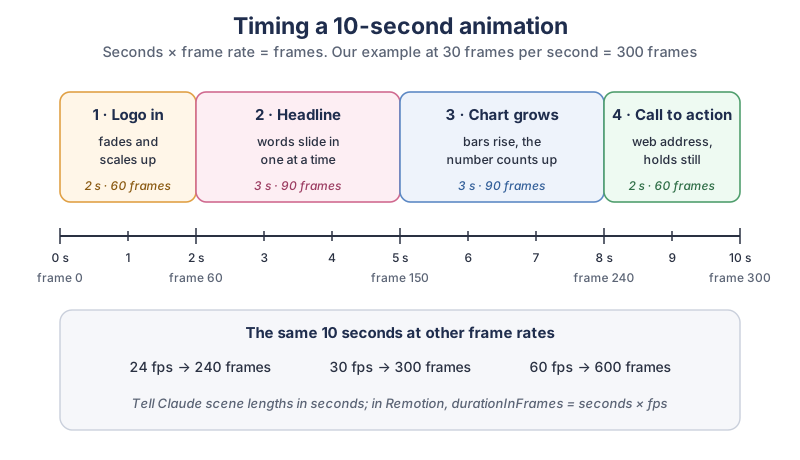
Our example storyboard in plain text: scene 1 (logo in) runs 0-2 seconds, frames 0-60; scene 2 (headline) runs 2-5 seconds, frames 60-150; scene 3 (chart grows) runs 5-8 seconds, frames 150-240; scene 4 (call to action) runs 8-10 seconds, frames 240-300. The full table:
| Length | 24 fps | 30 fps | 60 fps |
|---|---|---|---|
| 5 seconds | 120 frames | 150 frames | 300 frames |
| 10 seconds | 240 frames | 300 frames | 600 frames |
| 15 seconds | 360 frames | 450 frames | 900 frames |
| 30 seconds | 720 frames | 900 frames | 1,800 frames |
Remotion’s own example on the Composition page is a 1080 × 1080 square at 30 fps lasting 3 * 30 frames, which is 3 seconds. Claude Motion’s help page lists no frame rate or size, so in Claude Motion you describe length in seconds and Claude handles the frames.
How do you make motion graphics on the Free or Pro plan?
On Free, Pro, Max or Ultra, ask Claude for an animation as an artifact (an HTML or SVG page that plays in the artifact panel), then screen-record it. Artifacts are on every plan; the artifacts help page says they need Cloud code execution and file creation (called Create and edit files in the newer layout) turned on in Settings > Capabilities.
Use the bakery prompt above with a few extra lines at the end, so the artifact is easy to record:
Build this as an artifact: one HTML page with SVG and CSS animation.
Make the animation area exactly 1080 x 1920 pixels, scaled to fit the window.
Play once automatically, then hold on the last frame.
Put a small Replay button outside the animation area, so I can record a clean take.
Our animated Shorts tutorial shows a fancier version of this route with three.js scenes and a recording made inside the browser.
How do you record an animated artifact as a video?
You record an animated artifact with the screen recorder already on your computer: the Screenshot app on a Mac, or the Snipping Tool on Windows 11. Make the browser window large, click Replay, and record just the animation area.
- Mac. Apple Support’s screen recording page (published September 14, 2026) says to press Shift-Command-5 to open the Screenshot toolbar, choose Record Selected Portion, then
click the Record button in the Screenshot toolbar.
To stop recording, click the Stop button in the menu bar, or press Command-Control-Esc (Escape).
Apple says recordings are saved to your desktop by default. - Windows 11. Microsoft Support’s Snipping Tool page says
To capture a video snip, open Snipping Tool, select the Record button, then select New, or press Windows logo key + Shift + R.
ThenSelect the area of the screen you wish to record, then select Start
, and select Stop when you’re done.
Trim the extra second at each end in any video editor, and you have a clip ready to post.
How do you make motion graphics with Claude Code and Remotion?
You create a Remotion project, add Remotion’s Agent Skills, start the project, and then prompt Claude Code to write the animation in React; Remotion renders it into a video file with the exact size and frame rate you set. Remotion’s homepage sums itself up as Make videos programmatically
, and Claude Code needs a Pro plan or higher.
Here’s the bit that makes me grin: a whole animation, and you can change one word in it without breaking a single other thing. Try doing that with a pair of scissors and a filmstrip.
The steps on Remotion’s Prompting videos with coding agents
page, which says you first need a coding agent like Claude Code and Node.js:
- Create a blank project:
npx create-video --yes --blank my-video, thencd my-video. - Install Remotion’s Agent Skills:
npx remotion skills add. Remotion’s Agent Skills page says the skillsdefine best practices for working in Remotion projects.
- Start the project:
npm run dev. - In a second terminal window,
cd my-videoand start Claude Code withclaude. Remotion’s page then says:You can now prompt a video!
A first prompt for Claude Code, using the timing from the frame table:
Make a composition called BakeryStory: 1080 x 1920, fps 30, durationInFrames 300.
Four scenes: logo in (frames 0-60), headline words slide in (60-150),
opening hours with a sun icon (150-240), web address holds still (240-300).
Colors #FFF8EE, #3B2A1A, #E07A2F. Use my logo from public/logo.png.
Explain which file each scene lives in before you write the code.How do you render a Remotion animation to MP4?
You render with Remotion’s command line: npx remotion render followed by the composition’s ID and, if you like, an output path. Remotion’s render page shows npx remotion render HelloWorld, and the CLI reference says If you don’t supply
and that without an output location the video goes into the --codec, it will use the H.264 encoderout folder. For our example:
npx remotion render BakeryStory out/bakery-story.mp4How do you fix an animation that comes out wrong?
Ask for one specific change at a time, in plain words with numbers, and leave the rest alone. Because Claude’s animations are code, a targeted request changes just that part; Anthropic’s help page gives Slow down the second scene
and Change the Q3 number to 18%
as examples.
Common problems and the kind of request that fixes them (our own suggestions):
- Everything feels rushed
Make scene 2 last 4 seconds instead of 3, and hold the last line still for 1 second.
- Text runs off the edge
Keep all text inside a margin of 80 pixels on every side, and shrink the headline to fit.
- Colors look off
Use only these colors: #FFF8EE, #3B2A1A, #E07A2F. Remove every other color.
- Movement looks stiff
Use ease-in-out on every movement, and no element moves faster than half the screen per second.
- Too much happening
Only one thing moves at a time. Remove the background particles.
In Claude Motion you can also adjust the animation yourself in the editor. In Claude Code, commit your project with Git before bigger changes, as our game-making tutorial explains, so any change is easy to undo.
How do you export a Claude animation as an MP4 video?
In Claude Motion, click Export and choose MP4. With an animated artifact you screen-record it, and with Remotion you run npx remotion render.
The Claude Motion help page says: To download an animation, click “Export” and choose MP4. Animations start private to you. To share one, open it and click “Share.”
The help page also notes that Claude Motion counts toward your plan’s usage limits, and that longer or more complex animations use more of your limit than a typical message, so short drafts first is a kind habit for your quota.
How do you add music or a voiceover to a Claude animation?
Add sound after you export: put the MP4 in a video editor and lay your music or voice under it. Anthropic’s Claude Motion help page doesn’t describe adding audio, and Anthropic’s announcement says that When you want to take it further, open it in Adobe, Descript, HeyGen, Higgsfield, invideo, Luma AI, or Runway
.
- Music that’s safe to use. YouTube Help’s Audio Library page says
In the Audio Library in YouTube Studio, you can find royalty-free production music and sound effects to use in your videos.
Sign in to YouTube Studio and pick Audio library from the left menu. If a track has a Creative Commons license, YouTube says you must credit the artist in your video’s description. - Your own voice. A USB microphone and a quiet room do most of the work.
- Captions and cuts. Our video-editing tutorial with Claude Code covers transcripts, captions and joining clips.
What screen and gear help with motion graphics?
Motion graphics are about small details, so a large, sharp monitor helps you spot a word that clips or a color that’s off. A drawing tablet is handy for sketching your own shapes and icons to animate.
- A 4K monitor. Browse 4K monitors for video editing on Amazon to see vertical and widescreen frames at full size.
- A drawing tablet. Browse drawing tablets on Amazon to draw your own logo marks and icons, so every part of the animation is yours.
- A USB microphone. Browse USB microphones on Amazon for voiceovers.
- An external SSD. Browse external SSD drives on Amazon to keep your exports and project folders backed up.
What should you animate first?
Animate one 10-second piece this week: four scenes, three colors, one message. Write the scenes in seconds, pick the route your plan includes, and fix one thing per prompt until you’re happy. If you’d like to tell a story next, our animated Shorts tutorial takes the same skills into characters and a plot, and the newsletter box below brings new Claude tutorials as we write them.
Go make ten little seconds that move exactly the way you pictured them, and enjoy pressing play on your very own intro. I’d watch it twice.
Sources and further reading
- Build live dashboards and animate explainers with Claude (Anthropic) — Claude Motion announcement, October 8, 2026
- Get started with Claude Motion (Claude Help Center) — creating, editing, Export > MP4, usage, admin settings
- What are artifacts and how do I use them? (Claude Help Center) — plans, Motion template, Settings > Capabilities
- Plans and pricing (Claude) — Claude Motion and Claude Code by plan; checked Nov 8, 2026
- Remotion — make videos programmatically
- Prompting videos with coding agents (Remotion docs) — create-video, skills, npm run dev, claude
- Agent Skills (Remotion docs) — best practices for AI agents
- Composition (Remotion docs) — width, height, fps, durationInFrames
- Render your video (Remotion docs) — npx remotion render
- npx remotion render (Remotion CLI reference) — H.264 by default, out folder
- License FAQ (Remotion docs) — who can use the Free License
- How to record the screen on Mac (Apple Support) — Shift-Command-5; published Sep 14, 2026
- Use Snipping Tool to capture screenshots (Microsoft Support) — video snips on Windows 11
- Use music and sound effects from the Audio Library (YouTube Help) — royalty-free music, attribution
Questions and answers
What is Claude Motion?
Claude Motion is Anthropic’s beta feature for turning your own content into short animations, announced on October 8, 2026. Claude builds each animation as code that moves text, charts, shapes and images, and you can export it as an MP4. It doesn’t use a video generation model, so it doesn’t make realistic footage or people.
Is Claude Motion free?
No. Claude Motion is in beta on Team and Enterprise plans, and claude.com/pricing showed it as not included in Free, Pro, Max or Ultra on November 8, 2026. On those plans you can still make animated artifacts and screen-record them, and Pro and up can use Claude Code with Remotion.
Can Claude make videos?
Claude can make animated videos built from code, not filmed or AI-generated footage. Claude Motion on Team and Enterprise plans exports animations as MP4 files, and on other plans Claude can build animations as artifacts or as Remotion projects in Claude Code that render to video.
How do I export a Claude animation as an MP4?
In Claude Motion, open the animation, click Export and choose MP4. For an animated artifact, record it with your computer’s screen recorder, such as Shift-Command-5 on a Mac or the Snipping Tool on Windows 11. For a Remotion project, run npx remotion render with the composition’s ID.
Is Remotion free to use?
Remotion is free for individuals, for personal or commercial use, for teams and companies of up to 3 people, and for non-profits, according to Remotion’s license FAQ. Larger companies need Remotion’s Company License.