How Do You Make Stickman Animation Videos With Claude for Free?
Disclosure: this page contains Amazon affiliate links. As an Amazon Associate we earn from qualifying purchases, at no extra cost to you.
Ooh, little line people with big feelings — grab a pencil you won’t need, stick-figure storyteller! Picture a stick figure who wakes up one morning and can only walk backwards. Silly, right? That’s the whole charm of stickman cartoons: a “What if…?” question, a few lines and a voice telling the story. Claude can help with the script, the figure and the movement, and you can do every step without paying. Your voice carries the video, so if you’d like a cleaner sound, browse USB microphones on Amazon.
Short answer: You can make a stickman animation video for free: ask Claude on the Free plan for a What If script and shot list, have it draw a jointed stick figure as an artifact and animate each shot, screen-record the scenes, then add your own voice and export an MP4 in Google Vids, which any Google Account can use.
What’s free and what needs a paid plan for a stickman video?
Every step of a stickman video has a free way on November 8, 2026: Claude’s Free plan for the script and the drawings, an animated artifact you screen-record, and Google Vids’ basic features with your own recorded voice. Paid plans add more usage, Claude Code, Claude Motion and more AI features in Google Vids.
Which tools are free at each step?
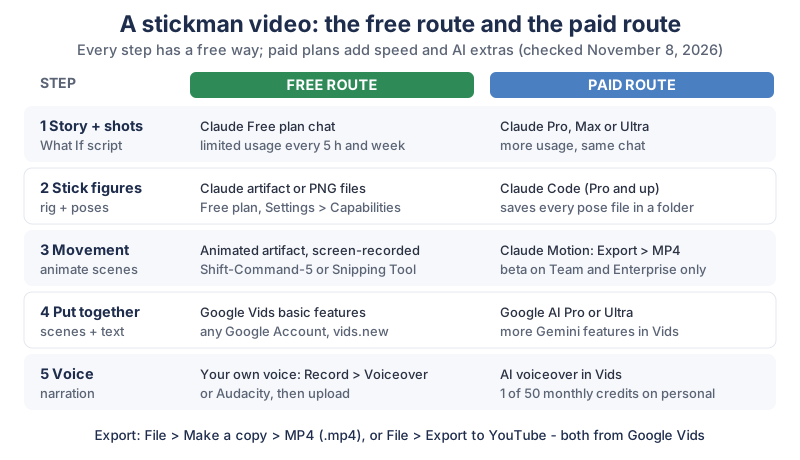
Here’s our compiled table of each step, the free way and the paid way. It names plans, not prices; each maker’s page has the current prices.
| Step | Free route | What the free route needs | Paid route | Plan for the paid route |
|---|---|---|---|---|
| 1. Script and shot list | Chat with Claude | Claude Free plan (limited usage every 5 hours and every week) | Same chat with more room for rewrites | Claude Pro, Max or Ultra |
| 2. Stick figure and poses | An artifact, or PNG files Claude makes | Code execution and file creation on in Settings > Capabilities | Claude Code saves every pose file in a project folder | Claude Pro and up (Claude Code isn’t on Free) |
| 3. Movement | An animated artifact you screen-record | Shift-Command-5 on a Mac, or Snipping Tool on Windows 11 | Claude Motion, then Export > MP4 | Team or Enterprise (beta) |
| 4. Putting it together | Google Vids basic features | Any Google Account | More Gemini features in Vids | Google AI Pro or Ultra |
| 5. Voice | Your own voice, recorded in Vids or Audacity | A microphone | An AI voiceover in Vids | 1 credit each from a personal account’s 50 a month; unlimited on Google AI Pro and Ultra |
| 6. Export | File > Make a copy > MP4 (.mp4), or File > Export to YouTube | Google Vids | Same | - |
What can Claude’s Free plan do for a stickman video?
Claude’s Free plan can write the script and make the drawings and the animation as artifacts. claude.com/pricing lists “Create Artifacts” and Search the web, create files, and run code
for Free, with limited usage every 5 hours and every week, and shows Claude Code and Claude Motion as not included on Free. The Claude Help Center’s artifacts page says Artifacts are available on Free, Pro, Max, Ultra, Team, and Enterprise plans
, and that they need Cloud code execution and file creation (called Create and edit files in the updated layout) turned on in Settings > Capabilities.
Is Google Vids free to use?
Google Vids’ basic features are free with a personal Google Account, and its AI features use a monthly allowance. Google’s Vids availability page says You can use basic Google Vids features with your Google Account
, and that Personal Google accounts can have 50 credits per month
, resetting on the first of each month. On that page an AI voiceover costs 1 credit and “Help me create” costs 5 credits for a personal account. Many Vids AI features are only in English for now, the page adds.
How do you write a stickman story with Claude?
Write a stickman story with Claude by giving it one What If question, the length, and the one thing your stick figure wants, then asking for a short script split into shots. A What If question works because it’s a whole plot in one line: a normal world, one strange change, and what happens because of it.
- Pick a small What If:
What if you could only walk backwards?
is easier to animate thanWhat if the Moon disappeared?
- Keep it to about 60 seconds: six shots of about ten seconds each is plenty for a first video.
- Write it in your own words: let Claude suggest, then change lines until they sound like you. Your jokes are what make the channel yours.
What prompt makes a script and shot list?
A good prompt asks Claude for the narration and the action of each shot side by side, so you know exactly which poses to draw. Here’s one you can change:
Help me write a 60-second stickman cartoon called "What if you could only walk backwards?"
It's narrated by me, in a friendly, funny voice. One stick figure named Dot.
Give me a table with 6 shots: shot number, seconds, the narration line,
what Dot does, and the 2-4 key poses Dot needs in that shot.
Keep the narration short enough to read slowly in 60 seconds.
Ask me 3 questions about the ending before you write it.
Read the narration out loud with a stopwatch before you draw anything. If it runs long, ask Claude to cut lines, not to speed up the voice.
What does a 60-second What If shot list look like?
Here’s our own example, not a script from anywhere else, so you can see the shape:
| Shot | Seconds | What Dot does | Key poses |
|---|---|---|---|
| 1 | 0-10 | Wakes up, stretches, steps forward and goes backwards | lying, stretch, step, surprised |
| 2 | 10-20 | Tries the stairs, backwards | walk back, wobble, grab rail |
| 3 | 20-30 | Backs into a coffee shop, orders by pointing over a shoulder | walk back, point, shrug |
| 4 | 30-40 | Plays soccer and scores, backwards | run back, kick, jump |
| 5 | 40-50 | Everyone starts copying Dot | walk back, wave, laugh |
| 6 | 50-60 | Next morning, Dot can only walk sideways | lying, step, surprised |
How do you draw stick figures with Claude?
Draw stick figures with Claude by asking for one jointed figure, a rig, and then making every pose by changing the joint angles. Drawing each pose from scratch makes the arms and legs change length from shot to shot; a rig keeps your character the same in every frame.
How does a stick figure rig work?
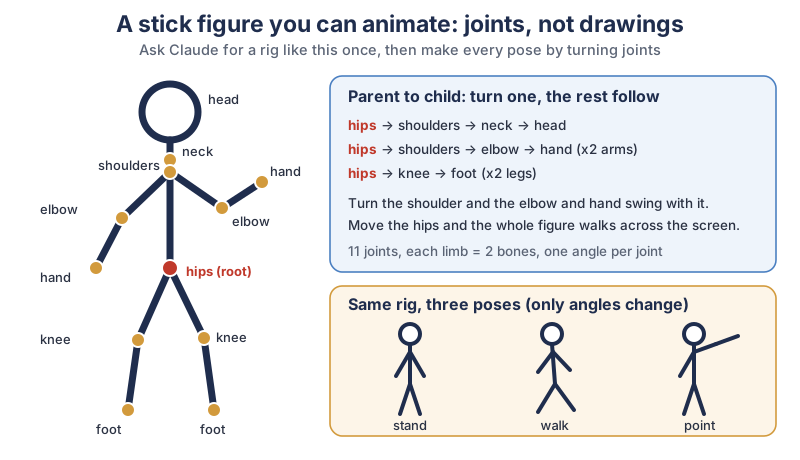
A stick figure rig is a set of joints linked parent to child, so turning one joint moves everything attached below it. The rig in the diagram, in plain text:
- Root: the hips. Moving the hips moves the whole figure across the screen.
- Body and head: hips to shoulders to neck to head.
- Arms (two): shoulders to elbow to hand.
- Legs (two): hips to knee to foot.
- In total: 11 joints, each arm and leg made of 2 bones, and one angle per joint.
Ask for it like this:
Make an SVG stick figure as an artifact, in a 1080 x 1920 portrait frame.
Thick round black lines, a circle head, white background.
Build it as a rig: hips are the root; shoulders, neck, head; each arm is
shoulder > elbow > hand; each leg is hip > knee > foot.
Put each joint in its own named group so I can set its angle.
Add sliders so I can turn each joint and see the pose change.
How do you save stickman poses as images?
Ask Claude to save each pose as a PNG file, because Google Vids takes PNG, JPEG and GIF images but doesn’t list SVG. Google’s Get started with Google Vids page lists the image types as PNG, JPEG, or GIF
. With file creation turned on, a request like Save the stand, walk, point and shrug poses as 1080 x 1920 PNG files with a white background
gives you files to download from the chat. Name them by shot and pose, like shot3-point.png, so they’re easy to find later.
How do you make the stick figure move?
Make the stick figure move by asking Claude for an animated artifact that glides the rig from one key pose to the next, then recording it from your screen. Claude’s code draws the in-between frames, so you only decide the key poses and how long each one takes.
Animate the rig for shot 3 of my table (10 seconds):
Dot walks backwards into the frame for 4 seconds, stops, points over
the left shoulder for 3 seconds, then shrugs for 3 seconds.
Ease between poses. Add a Play button and a full-screen button.
Keep the same line thickness and white background as before.
One shot per artifact keeps fixes small: make the shrug slower
changes one scene and leaves the others alone. If you’d rather render the animation with code on your own computer, our guide to motion graphics with Claude covers Remotion with Claude Code (Pro and up) and Claude Motion (Team and Enterprise).
How do you record the animation from your screen?
Play the artifact full screen and record it with your computer’s own screen recorder. Apple Support says to press Shift-Command-5 on a Mac and choose Record Selected Portion; Microsoft Support describes video snips in the Snipping Tool on Windows 11. Record a second of stillness before and after each shot, so you have room to trim. Google Vids accepts MP4, QuickTime, OGG and WebM clips, so the Mac’s QuickTime file and Windows’ MP4 both work.
How many frames does a 60-second stickman video need?
A 60-second video at 24 frames per second has 1,440 frames, but with a rig you only design the key poses and the computer draws the rest. Here’s our small calculation:
| How you animate | Frames per second | Frames in 60 seconds | Poses you design |
|---|---|---|---|
| Drawing every frame | 24 | 1,440 | 1,440 |
| Drawing “on twos” (each drawing held 2 frames) | 24 | 1,440 | 720 |
| A rig with key poses (6 shots, about 4 poses each) | 30 | 1,800 | about 24 |
How do you put the stickman video together in Google Vids?
Put the video together in Google Vids by starting a Portrait video, uploading your recorded scenes in order, adding your voice and any titles, then exporting an MP4. Google Vids runs in the browser, and Google’s help page says you currently can’t edit or comment in Vids in Safari, so use another browser such as Chrome.
Can I tell you the bit that makes me grin? Eleven tiny dots on a stick man, and suddenly he can shrug. A shrug! From a circle and some lines. That’s the moment it stops being a drawing and starts being a character.
What are the steps in Google Vids?
The steps below come from Google’s Get started with Google Vids and Add images, GIFs, or video clips to a video pages:
- Start a video: type
vids.newin your browser’s address bar, and choose Portrait for a vertical Short (or Landscape for a regular video). - Add your scenes: in the start menu select Upload, or later click Insert > Uploads, and add your recorded shots and pose images. You can also drag and drop them in.
- Put them in order and trim the still second at each end.
- Add text such as the What If question as a title on the first scene.
- Add your voice (see the next section).
- Export: click File > Make a copy > MP4 (.mp4) to download it, or File > Export to YouTube.
The limits are roomy for a short cartoon. Google’s Vids limits page says For each video, you can add up to 50 video and 50 audio objects
, and the getting-started page says Vids videos can be up to 30 minutes long.
Can you use a free video editor instead of Google Vids?
Yes. Any free editor that takes video clips and an audio track works, such as Shotcut, which is free and open source, or the free version of DaVinci Resolve. Want Claude Code to do the cutting? Our guide to editing video with Claude Code shows how.
How do you add a voice to a stickman video for free?
The free way to add a voice is to record your own, either in Google Vids or in Audacity. Your own voice is free, it’s yours, and it gives a stickman channel a personality that’s hard to copy.
How do you record your own narration?
- In Google Vids: Google’s voiceover help page says to select Record in the start menu, choose Voiceover under Recording options, then click Start recording.
- In Audacity: Audacity is free, open-source audio software that runs on all major operating systems. Record, cut the stumbles, export an MP3 or WAV, then add it in Vids with Insert > Upload. Google’s Add audio page lists MP3, WAV, M4A, FLAC and OGG among the audio types.
- Record in a quiet, soft room: a closet full of clothes beats a kitchen with hard walls.
Can Google Vids make an AI voiceover?
Yes. In Vids you click Voiceover on the right, type a plain-text script of up to 2,500 characters, choose a voice and click Insert voiceover. Google’s availability page lists an AI voiceover at 1 credit for a personal account, out of 50 credits a month, while the voiceover help page says the feature requires an eligible Google Workspace or Google AI plan
. If your account doesn’t offer it, your own recording is the sure free route.
Do you have to label a stickman video made with AI on YouTube?
Usually not, because a stick-figure cartoon is clearly not real. YouTube Help’s page on disclosing GenAI content says Creators don’t need to disclose non-realistic content that’s made with AI, or edits to realistic content that are minor.
Its examples that don’t need a label include using AI for a script or idea generation; a label is needed for realistic content, such as a real person seeming to say something they didn’t. The setting is in YouTube Studio’s Attributes section, under “AI use”.
Earning is a separate question, and nobody can promise a stickman channel will make money. YouTube’s channel monetization policies say videos must Not be mass-produced, generic, repetitive, or manipulative
. A new story every time, your own character and your own voice are the honest way to make each video worth watching. Our animated Shorts tutorial goes deeper on story and YouTube’s rules.
What gear helps with stickman videos?
A decent microphone helps most, because in a stickman video the voice does most of the work. The rest is nice to have.
- A microphone: browse USB microphones on Amazon, and pop filters on Amazon to soften hard “p” sounds.
- Headphones for editing: browse closed-back headphones on Amazon to hear every click and breath in your narration.
- A drawing tablet: browse drawing tablets on Amazon if you want to sketch your own backgrounds or a hand-drawn title.
What should you make first?
Tonight, write one What If question, ask Claude for the six-shot table, and animate just shot 1. Record it, drop it into Google Vids with vids.new, read your first line into the microphone, and export it. One finished 10-second scene teaches you the whole route; the other five shots go faster after that. The newsletter box below brings new Claude tutorials as we write them.
Go ask one silly What If tonight, give Dot (or whoever you dream up) ten seconds of glory, and enjoy hearing your own voice tell the story. I’ll be laughing at the backwards soccer goal.
Sources and further reading
- Plans and pricing (Claude) — Free plan features; Claude Code and Claude Motion by plan; checked Nov 8, 2026
- What are artifacts and how do I use them? (Claude Help Center) — every plan, Settings > Capabilities
- Get started with Claude Motion (Claude Help Center) — beta on Team and Enterprise, Export > MP4
- Learn about availability of Gemini features in Google Vids (Google) — basic features with a Google Account, 50 credits a month
- Get started with Google Vids (Google) — vids.new, Portrait, file types, 30 minutes, Safari, export
- Add images, GIFs, or video clips to a video (Google) — Insert > Uploads, video types
- Add audio to a video in Google Vids (Google) — audio types, upload
- Create voiceovers with AI in Google Vids (Google) — Record > Voiceover, AI voiceover, 2,500 characters
- Google Vids storage, object and version history limits (Google) — 50 video and 50 audio objects
- Google Vids posts (Google Workspace Updates blog) — what’s new for personal accounts
- How to record the screen on Mac (Apple Support) — Shift-Command-5
- Use Snipping Tool to capture screenshots (Microsoft Support) — video snips on Windows 11
- Audacity — free, open-source audio recording
- Shotcut — free, open-source video editor
- DaVinci Resolve (Blackmagic Design) — free and Studio versions
- Disclosing use of GenAI content (YouTube Help) — non-realistic content; checked Nov 7, 2026
- YouTube channel monetization policies (YouTube Help) — inauthentic content; checked Nov 7, 2026
Questions and answers
How do you make stickman animation with AI for free?
Ask Claude on the Free plan for a What If script and a shot list, have it draw a jointed stick figure as an artifact and animate each shot, then screen-record the scenes. Put them together with your own recorded voice in Google Vids, whose basic features any Google Account can use, and export an MP4.
Can Claude make animations?
Yes. Claude can make animated artifacts, small web pages that move, on every plan including Free, according to the Claude Help Center. Claude Motion, which exports animations as MP4 video, is a beta on Team and Enterprise plans only, as of November 8, 2026.
Is Google Vids free?
Its basic features are. Google says you can use basic Google Vids features with your Google Account, and personal accounts get 50 credits a month for AI features such as AI voiceovers (1 credit each). Google AI Pro and Ultra plans include more.
What app do people use for stickman animation?
Many tools work, from drawing apps to video editors. A free route is Claude for the script and the stick figure, an animated artifact for the movement, and Google Vids, Shotcut or the free DaVinci Resolve to put it together with your voice.
Do I need to disclose AI in a stickman video on YouTube?
Usually not. YouTube Help says creators don’t need to disclose non-realistic content made with AI, and a stick-figure cartoon is clearly not real. AI help with the script doesn’t need a label either; realistic scenes or a real person’s likeness do.