What’s New in Claude 2.0, and How Do You Use It Step by Step?
Disclosure: this page contains Amazon affiliate links. As an Amazon Associate we earn from qualifying purchases, at no extra cost to you.
Ooh, a fresh coat of paint on Claude — come on in, new-button explorer! Picture this: you open Claude one morning and the Chat and Cowork switch is gone, there’s a new Output button in the message box, and the sidebar has grown a couple of new tabs. Then a video calls it “Claude 2.0”. Here’s what actually changed, where each new thing lives and how to try it. The new desktop panes like room to spread out, so if your laptop screen feels cramped, browse portable monitors on Amazon.
Short answer: There’s no official “Claude 2.0”: Anthropic’s release notes don’t use that name, and Claude 2 was a 2023 model. Creators gave the nickname to the Claude updates of September to November 2026: chat and Cowork merged into one conversation, Docs, Slides and Design artifacts on every plan, Dashboards and Motion betas, new 5.5 models and Claude Duet.
Is “Claude 2.0” an official Claude release?
No. “Claude 2.0” is a nickname from creator videos, not a product name Anthropic uses. We searched Anthropic’s Claude release notes and claude.com/pricing on November 9, 2026, and neither page says Claude 2.0
. What the videos describe is real, though: a run of Claude app updates between September 1 and November 5, 2026 that changed how the Claude app looks and works.
What did Anthropic actually release between September and November 2026?
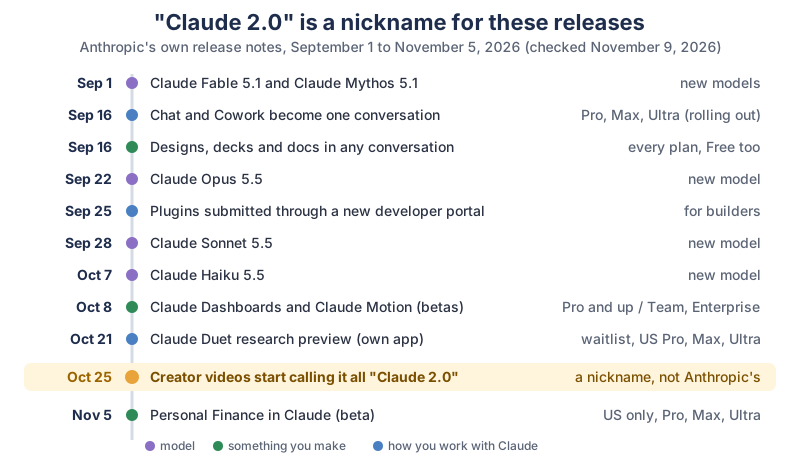
Anthropic shipped new models, a merged chat and Cowork experience, new kinds of artifacts and two new beta products in those nine weeks. The timeline in the picture, as plain text (dates from Anthropic’s release notes and posts):
| Date (2026) | Release | Who gets it |
|---|---|---|
| Claude Fable 5.1 and Claude Mythos 5.1 (models) | New model; access depends on your plan | |
| Claude Cowork comes to every conversation | Pro, Max and Ultra, rolling out; Team (beta) and Enterprise when turned on | |
| Designs, decks and docs in any conversation (Claude Design, Slides, Docs) | Every plan, Free included | |
| Claude Opus 5.5 (model) | New model; access depends on your plan | |
| Plugins submitted to the Claude directory through a developer portal | Plugin builders | |
| Claude Sonnet 5.5 (model) | New model; access depends on your plan | |
| Claude Haiku 5.5 (model) | New model; access depends on your plan | |
| Claude Dashboards and Claude Motion (betas) | Dashboards: Pro and up; Motion: Team and Enterprise | |
| Claude Duet research preview, a separate app | Waitlist, starting with US Pro, Max and Ultra | |
| Creator videos start calling it all “Claude 2.0” | A nickname, not Anthropic’s name | |
| Personal Finance in Claude (beta) | Pro, Max and Ultra, US only |
Wasn’t there already a Claude 2?
Yes. Claude 2 was a model Anthropic announced on . Anthropic’s Claude 2 announcement opens with We are pleased to announce Claude 2, our new model.
That’s one reason “Claude 2.0” confuses people: the 2026 changes are app features, and the models people use now carry names like Claude Opus 5.5.
How do chat and Cowork work together in one conversation?
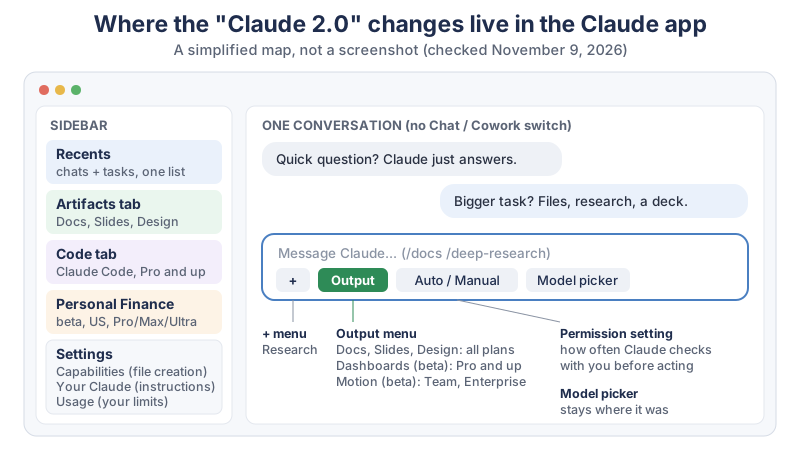
In the new Claude experience there’s no Chat or Cowork switch: you type in one conversation and Claude decides which tools to use. A quick question gets a quick answer, and a bigger job, like research, a report, a spreadsheet or a presentation, gets the longer treatment, files and all. The Claude Help Center’s Claude Cowork and chat are one Claude
page says the change removes the distinction between the two products
.
Your old chats, Cowork tasks, projects, connectors and skills carry over, according to the September 16, 2026 release note. Here’s a first thing to try in the new experience:
- Ask something small:
What’s a polite way to say no to a meeting?
Claude just answers. - Then ask something big in the same conversation:
Turn my notes below into a one-page summary I can download.
Claude makes a file you can open and download. - Look at the permission setting in the message box. Auto is the default on Pro, Max, Ultra and Team, and Manual is the default on Enterprise. Manual means Claude checks with you more often, which is a calm way to start.
How do you know if you have the new Claude experience?
If your message box still shows separate “Chat” and “Cowork” options, you don’t have the new experience yet. The Help Center says it’s rolling out gradually on web, desktop and mobile for Pro, Max and Ultra, that accounts on the same plan can get it at different times, and that you don’t need to do anything to turn it on. On Team it’s a beta that an admin turns on as Chat and Cowork unified, and Enterprise works the same way. Once your account has it, you can’t switch back to the separate options.
Where did Research, web search and your settings go?
A few things moved in the new experience. Per the Help Center page:
- Research
- Type
/deep-research, or click the + button below the chat input and choose Research. - Web search
- No toggle any more: Claude searches when it helps.
- Recents
- Quick chats and longer tasks share one list in Recents.
- Your instructions for Claude
- Settings > Your Claude (it was Settings > Account in the older layout).
- Files
- Storage folder in Settings; folders Claude can reach are listed under Trusted folders.
- Usage
- Settings > Usage. Tasks that search, run code or create files generally use more of your limits.
- Not changed
- The model picker and the Code tab stay where they were.
The page also lists what doesn’t work yet: adding files from GitHub, branching a conversation from an earlier point, and making files or running code in incognito chats, which open in the previous experience.
How do you make docs, slides and designs in Claude?
Ask for a document, a deck or a design in any conversation, or click Output in the message box and pick a template. Claude Docs, Claude Slides and Claude Design are on every plan, Free included, according to the Help Center’s artifacts page and claude.com/pricing. You can also open the Artifacts tab in the sidebar and start from a template there; everything you make is saved in that tab.
Artifacts need Cloud code execution and file creation turned on, in Settings > Capabilities on Free, Pro, Max and Ultra, or Organization settings > Capabilities on Team and Enterprise. The updated layout calls the setting Create and edit files.
How do you make and export a Claude Doc?
Start your message with /docs, or choose Output > Docs, and Claude asks a few questions before it drafts the doc on screen. The steps from the Help Center’s Get started with Claude Docs
page:
- Start: type
/docsand what you want, like/docs a packing list for a week at the beach with two kids
. - Answer Claude’s questions, then let it draft.
- Edit: click into the doc and type (changes save automatically), ask Claude in the chat, or select text, leave a comment and mention @Claude to ask for an edit there.
- Export: click Export and pick Word (.docx), PDF (.pdf), Markdown (.md) or Google Docs.
Want to turn a doc into something people buy? Our guide to making a PDF to sell with Claude goes through the whole route, with each marketplace’s AI rules.
What can you export each kind of artifact to?
Each artifact type has its own export list, per the Help Center’s artifacts page on November 9, 2026:
| Artifact | What it’s for | Plans | Export |
|---|---|---|---|
| Docs | Documents you write with Claude and edit in place | Every plan, Free included | Word, PDF, Markdown, Google Docs |
| Slides | Presentations | Every plan, Free included | PowerPoint, PDF, Google Slides |
| Design | Mockups, prototypes, one-pagers, landing pages | Every plan, Free included | .zip, PDF, PowerPoint, standalone HTML |
| Dashboards (beta) | Dashboards from data platforms or connected apps | Pro, Max, Ultra, Team, Enterprise | Share link (dashboards start private) |
| Motion (beta) | Animated explainers, charts and walkthroughs | Team and Enterprise | MP4 video |
What are Claude Dashboards and Claude Motion?
Claude Dashboards build live charts from your connected data, and Claude Motion turns an idea into an animated explainer you can export as an MP4. Anthropic released both as betas on , in its post Build live dashboards and animate explainers with Claude
.
- Dashboards (Pro and up): connect a data warehouse such as Amazon Redshift, BigQuery, ClickHouse, Databricks or Snowflake, or another app you’ve connected to Claude, such as Salesforce. Then ask for a dashboard, or choose Output > Dashboards. The Help Center’s Dashboards page says
Dashboards start private to you.
Click Share when you want others to see one. On Enterprise, an owner turns Dashboards on first in Organization settings > Artifacts. - Motion (Team and Enterprise): choose Output > Motion or a Motion template in the Artifacts tab, change it by asking Claude or in the editor, then Export > MP4. On Free, Pro, Max and Ultra, an animated artifact you screen-record gets you close; our motion graphics tutorial shows all three routes.
What’s new in the Claude desktop app for Claude Code?
The Claude desktop app’s Code tab now runs several Claude Code sessions side by side, with panes you can drag around, a built-in terminal and file editor, side chats and a session rail. Claude Code itself needs a Pro plan or higher, per claude.com/pricing. The Claude desktop app is available for macOS and Windows, and the download page says Claude Desktop for Linux is in beta and supports Ubuntu and Debian
.
From Anthropic’s Desktop application docs, the basics:
- Start a session: click + New (Cmd+N on a Mac, Ctrl+N on Windows). Above the prompt box, pick the environment, the project folder, the permission mode and the model.
- Pick where it runs: the environment selector lists Local, SSH and Cloud; on Windows a session can also run inside WSL 2.
- Keep experiments apart: turn on Worktree before you start, and the session gets its own Git worktree (it’s off by default).
- Switch sessions in the sidebar, or with Ctrl+Tab and Ctrl+Shift+Tab.
What are side chats, view modes and panes?
A side chat is a quick question on the side that doesn’t interrupt the main task: press Cmd+; on a Mac or Ctrl+; on Windows, or type /btw. Anthropic’s docs say side chats aren’t saved to disk. The other new pieces:
- View modes: Normal, Thinking and Verbose, from the session menu’s Transcript view or Ctrl+O. Verbose shows every tool call and step.
- Panes: chat, Changes (the diff), Browser, Terminal, Files, Plan and Background tasks, which you drag by their headers or pop out into their own window. Ctrl+` (the backtick key) opens the terminal.
- Session rail: the details panel with cards for the environment, changes, background tasks and Context, which shows how full the conversation is as a percentage. Show or hide it with Show session rail and Hide session rail.
How do you continue a desktop session from your phone?
Use Remote Control: in a local session in the desktop app’s Code tab, type /remote-control (or /rc), and the same session opens at claude.ai/code and in the Claude app on your phone. Anthropic’s Remote Control docs say it’s on Pro, Max, Ultra, Team and Enterprise plans, and on Team and Enterprise an Owner turns it on first. The steps:
- Type
/remote-controlin the session. - The first time, select Enable Remote Control in the confirmation dialog.
- On your phone, open the Claude app (or claude.ai/code in any browser) and find the session in the session list.
- To stop, run
/remote-controlagain.
Claude keeps running on your own computer the whole time, so the computer has to stay on and the session has to stay open.
Can you add mods to Claude Code in the desktop app?
Yes. Mods are Claude Code plugins with code that changes how Claude Code looks and behaves, such as a pane beside the transcript. Anthropic’s Mods overview says A mod is a plugin that changes how Claude Code looks and behaves.
Mods run with your permissions, so check them first; our guide to Claude mods worth installing has the version numbers, the install command and five safety checks.
Which new Claude models came out in the same weeks?
Five new models arrived in four releases in those weeks: Claude Fable 5.1 and Claude Mythos 5.1 (September 1), Claude Opus 5.5 (September 22), Claude Sonnet 5.5 (September 28) and Claude Haiku 5.5 (October 7), per the Claude release notes. The release notes say Opus 5.5 performs at the level of Claude Fable 5.1 on most work
, call Sonnet 5.5 a faster, lower-cost complement to Opus 5.5, and call Haiku 5.5 the fastest small model Anthropic has released. You pick a model in the model picker in the message box; which models you see depends on your plan.
Can I admit my favorite tiny change? Typing /docs and having Claude ask me questions before it writes a single word. It’s like a friend who checks what you meant before running off to help.
What are Claude Duet and Personal Finance in Claude?
Claude Duet and Personal Finance are the two newest betas, and both are for Pro, Max and Ultra in the US for now. Neither is required to use the rest of Claude.
- Claude Duet (October 21, 2026): a separate app where Claude works as a proactive agent: a morning brief, checks on your connected apps every few hours, and tasks you hand it. Anthropic’s Claude Duet post says it’s on iOS, Android and claude.ai by waitlist, and that before sending messages, making payments, signing documents or deleting anything,
It shows you exactly what it’s about to do and waits for your approval.
To get in line, click Join the waitlist on that page and wait for Anthropic’s email. - Personal Finance (November 5, 2026): link bank, credit card, loan and investment accounts through Plaid, see your balances and spending on one page, and ask Claude about them. Open Personal Finance from Claude’s sidebar to start. Anthropic’s Personal Finance post says
Access is read-only, and Personal Finance can’t move, manage, or invest your money.
It also says chats in the Personal Finance hub aren’t used to train Anthropic’s models, and you can unlink accounts at any time.
Which Claude plan do you need for each new feature?
The Free plan gets the new Docs, Slides and Design artifacts; almost everything else in the “Claude 2.0” wave needs Pro or higher, and Claude Motion needs Team or Enterprise. Here’s our compiled table. It names plans, not prices; claude.com/pricing has the current prices.
| Feature | Free | Pro, Max, Ultra | Team | Enterprise | Where to find it |
|---|---|---|---|---|---|
| Chat and Cowork in one conversation | Not listed | Yes, rolling out | Beta, admin turns on | When turned on | The message box (no mode switch) |
| Docs, Slides, Design | Yes | Yes | Yes | Yes (beta) | Output menu, Artifacts tab, /docs |
| Dashboards (beta) | No | Yes | Yes | Owner turns on | Output > Dashboards |
| Motion (beta) | No | No | Yes | Owner turns on | Output > Motion |
| Research | No | Yes | Yes | Yes | + > Research, or /deep-research |
| Claude Code in the desktop Code tab | No | Yes | Yes | Yes | Code tab in Claude Desktop |
| Remote Control | No | Yes | Owner turns on | Owner turns on | /remote-control in a Code session |
| Mods | No | Yes (with Claude Code) | Yes (with Claude Code) | Yes (with Claude Code) | Claude Code, /plugin install |
| Claude Duet (research preview) | Not listed | US waitlist | Not listed | Not listed | Separate app, Join the waitlist |
| Personal Finance (beta) | Not listed | US only | Not listed | Not listed | Personal Finance in the sidebar |
How many of the new features does each plan get?
Counting the 10 rows of our table, Free gets 1 of the 10 features, Pro, Max and Ultra get 9 of 10 (all but Motion; Duet and Personal Finance only in the US), and Team and Enterprise get 8 of 10 (all but Duet and Personal Finance, several after an owner or admin turns them on). That’s our own count from the table above, as of November 9, 2026. The usage differs too: claude.com/pricing lists Free with “Limited usage” every 5 hours and every week, and Max with “5x Pro usage”.
What gear makes the new Claude app nicer to use?
A bigger screen helps most, because the desktop app’s panes, side chats and session rail sit side by side. None of this is required; Claude runs in a web browser on any computer.
- A second screen: browse portable monitors on Amazon or 27-inch monitors on Amazon to keep the chat on one screen and the doc or code on the other.
- A computer for the desktop app: it runs on macOS, Windows and (in beta) Ubuntu and Debian Linux; browse laptops with 16GB of memory on Amazon if yours struggles with many tabs.
- A comfortable keyboard: the new shortcuts (Cmd+N, Cmd+;, Ctrl+O) are quicker on a good one; browse wireless keyboards on Amazon.
What should you try first in the new Claude?
Try three small things today. First, type /docs and ask for a one-page plan for something real this week, then click Export > PDF. Second, ask one quick question and one big task in the same conversation and watch Claude switch gears. Third, if you’re on Pro or higher and use Claude Code, open a side chat with /btw while a task runs. We’ll keep this page updated as Anthropic ships more; the newsletter box below tells you when it changes.
Go poke at one new button today, export something you made, and enjoy that little oh, it does that now?
moment. I’ll keep this page fresh as the next round of buttons shows up.
Sources and further reading
- Release notes (Claude Help Center) — September 1 to November 6, 2026 entries; checked Nov 9, 2026
- Claude Cowork and chat are one Claude (Claude Help Center) — rollout, Research, permissions, settings, limitations
- What are artifacts and how do I use them? (Claude Help Center) — Docs, Slides, Design, Dashboards, Motion; plans and exports
- Get started with Claude Docs (Claude Help Center) — /docs, @Claude comments, Export
- Get started with Claude Dashboards (Claude Help Center) — beta, Pro and up, data sources, Share
- Get started with Claude Motion (Claude Help Center) — beta on Team and Enterprise, Export > MP4
- Build live dashboards and animate explainers with Claude (Anthropic) — October 8, 2026
- Plans and pricing (Claude) — features by plan; checked Nov 9, 2026
- Download Claude (Claude) — macOS, Windows, Linux beta
- Desktop application (Claude Code docs, Anthropic) — sessions, environments, side chats, view modes, panes, session rail
- Remote Control (Claude Code docs, Anthropic) — plans, /remote-control
- Mods overview (Claude Code docs, Anthropic) — what a mod is
- Build plugins for Claude (Anthropic) — developer portal, September 25, 2026
- Claude Duet (Anthropic) — research preview, October 21, 2026
- Introducing Personal Finance in Claude (Anthropic) — beta, US, November 5, 2026
- Claude 2 (Anthropic) — the original Claude 2 model, July 11, 2023
Questions and answers
Is Claude 2.0 out?
There’s no product Anthropic calls Claude 2.0. The name comes from creator videos in late October 2026 about Claude’s September to November 2026 app updates. The original Claude 2 was a model Anthropic announced on July 11, 2023; today’s models include Claude Opus 5.5, Sonnet 5.5 and Haiku 5.5.
What is the new Claude update?
It’s a set of updates: chat and Cowork in one conversation (from September 16, 2026, rolling out on Pro, Max and Ultra), Docs, Slides and Design artifacts on every plan, Claude Dashboards and Claude Motion betas (October 8), new 5.5 models, the Claude Duet preview (October 21) and Personal Finance (November 5, US only).
Is the new Claude free?
Part of it is. Claude Docs, Slides and Design are on every plan, Free included, according to claude.com/pricing and the Claude Help Center. The merged chat and Cowork experience, Dashboards, Claude Code and Remote Control need Pro or higher, and Claude Motion needs Team or Enterprise.
Why don’t I have the new Claude experience?
Anthropic is rolling it out gradually, and accounts on the same plan can get it at different times; there’s nothing to turn on. If your message box still shows separate Chat and Cowork options, you don’t have it yet. On Team, an admin turns on Chat and Cowork unified.
What’s the difference between Claude chat and Cowork now?
In the new experience there’s no difference to choose: one conversation handles both. Claude answers quick questions directly and takes on longer work like research, reports, spreadsheets and presentations in the same chat. The Claude Help Center says the change removes the distinction between the two products.