How to Automate Client Intake for Insurance Brokers (Type It Once)
Hello to everyone whose new client just replied it’s all in the attachment
with a photo of last year’s dec page.
If a new commercial client is on the phone and your producer is typing notes into three windows at once, this guide is for you.
The client’s answers arrive in pieces: a few on the call, a photo of last year’s dec page by text, the loss runs a week later.
Then someone types the same name, FEIN, address and payroll into the agency management system, the ACORD forms and every carrier portal, one screen at a time.
Short answer: To automate client intake for insurance brokers, send the client one plain-language intake link, let AI vision read the documents they upload, such as dec pages, loss runs and last year’s application, and store every answer once in a master record. That record fills your AMS, the ACORD forms and carrier portals; a licensed broker reviews flagged fields.
- What gets automated
- The questions, the document reading, the missing-item reminders and the typing into your AMS, ACORD forms and carrier portals
- Top pain, by survey
- 74% of 702 independent agents named re-keying risk data into multiple carrier portals (Applied Systems, August 26, 2026)
- Typing per account
- About 16 to 48 minutes for 60 core fields across your AMS and one to five portals (our calculation below)
- AI reading cost
- About $0.19 to $0.27 to read a 25-page client document package with Claude Sonnet 5.5
- Who decides
- The licensed broker or account manager, on every flagged field and before every submission
Why does client intake take so long at an insurance brokerage?
Client intake takes long at a brokerage because the same facts arrive in scattered pieces and then get typed by hand into several systems that do not talk to each other.
Applied Systems surveyed 702 independent agents between April and May 2026 for its 2026 Agency-Carrier Connectivity Trends report. 74% named re-keying risk data into multiple carrier portals as their top pain point, and 90% had cut back business with a carrier over submission friction.
Commercial-heavy agencies felt it most. They re-key data at a 70% rate against 62% for personal lines agencies, and 49% of them still rely on email for submissions, while only 7% use dedicated submission capture software.
Commercial applications slow down when information arrives in pieces that teams must rekey.
What information does a commercial client intake need to collect?
A commercial client intake needs the business’s identity, operations, exposures, property, vehicles, prior insurance and loss history, because those answers feed the ACORD applications every carrier asks for.
The ACORD forms index lists the core commercial applications: the ACORD 125 commercial insurance application, the 126 general liability section, the 127 business auto section, the 130 workers compensation application and the 140 property section.
| Plain intake question | What it becomes | Usual ACORD form |
|---|---|---|
| What is the business’s legal name, any DBA, and its FEIN? | Named insured, entity type, FEIN | ACORD 125 |
| What does the business do, in your own words? | Description of operations, class code | ACORD 125 and 126 |
| What were last year’s sales and payroll, and how much went to subcontractors? | Exposure basis for rating | ACORD 126 and 130 |
| How many employees do what kind of work? | Payroll by class code, employee count | ACORD 130 |
| Where are your locations, and when were the buildings built and the roofs replaced? | Location schedule, construction, year built | ACORD 140 |
| Which vehicles and drivers do you use for work? | Vehicle schedule (VINs), driver list | ACORD 127 |
| Who insures you now, and when does each policy expire? | Prior carrier, premiums, expiration dates | ACORD 125 |
| Any claims in the last five years? | Loss history, backed by carrier loss runs | ACORD 125 |
Notice the left column. A business owner can answer every one of those questions, while very few can tell you what goes in an ACORD 125 box.
How many times does the same client data get typed?
The same core client data often gets typed once into the AMS and once more into every carrier portal you quote, which turns 60 fields into a few hundred keystrokes of copying.
| Where the data is typed | Field entries | Minutes at 8 seconds a field |
|---|---|---|
| AMS plus 1 carrier portal | 120 | 16 |
| AMS plus 3 carrier portals | 240 | 32 |
| AMS plus 5 carrier portals | 360 | 48 |
Assumptions: 60 core fields per account, our working count for name, FEIN, addresses, operations, sales, payroll, employees, locations, vehicles, prior carrier and losses. Each entry takes 8 seconds to find in notes or email and type. ACORD forms generated from the AMS add no typing here.
These are our working numbers, not a survey. Here’s the catch: at 15 new commercial accounts a month, the three-portal row alone adds up to 8 hours of typing, before follow-up calls and emails.
Should clients fill out ACORD forms themselves?
Usually not. Most business owners are not trained on ACORD forms, so a blank ACORD 125 sent by email tends to come back half filled, with answers in the wrong boxes.
Intake vendors such as AgencyAssist make the same point on their own pages: ask plain questions, then map the answers to ACORD fields afterward. Sending a PDF to download, fill, save and email back adds friction at every step.
The better pattern is a short online questionnaire that only asks what the agency does not know yet. A returning client sees last year’s answers and confirms or changes them, instead of starting over.
How does automated client intake work, step by step?
Automated client intake works by collecting the client’s answers and documents in one place, reading them into one master record with sources, and writing that record into the systems your team already uses.
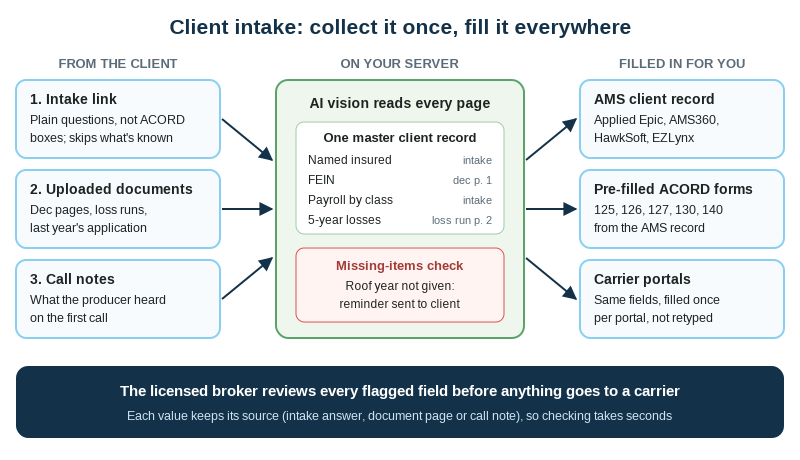
The diagram in text:
- Inputs from the client: an intake link with plain questions, uploaded documents (dec pages, loss runs, last year’s application) and the producer’s call notes
- On your server: AI vision reads every page into one master client record, with a source next to each field, such as
FEIN: dec p. 1
- A missing-items check spots gaps, such as a roof year nobody gave, and sends the client a reminder
- Outputs: the client record in Applied Epic, AMS360, HawkSoft or EZLynx, pre-filled ACORD 125, 126, 127, 130 and 140 forms, and carrier portal forms
- The licensed broker reviews every flagged field before anything goes to a carrier
The automated run, step by step:
- Trigger. A producer marks a new prospect in the AMS or CRM, and the client gets an intake link by email or text.
- Ask. The client answers plain questions, and the form skips anything already on file.
- Upload. The client adds dec pages, loss runs and last year’s application, by photo or PDF.
- Read. AI vision pulls fields from each document into the master record, with the page each value came from.
- Check. Rules flag conflicts, such as a FEIN on the dec page that differs from the intake answer, and list missing items.
- Remind. The client gets a short note listing only what is still missing.
- Review. The account manager opens each flag beside its source and confirms or corrects it.
- Write. Approved fields go into the AMS client record through its API or partner integration, and the ACORD forms generate from there.
Step 8 matters more than it looks. Vertafore’s AMS360 help on integrated applications says ACORD forms are built from policy detail already entered, and that data added on the form is not saved in the policy database and does not flow back to the policy data entry form.
So the record, not the form, should be filled first.
Can AI pre-fill an intake from the client’s dec pages and loss runs?
Yes. A vision-capable AI model can read a client’s dec pages, loss runs and last year’s application and pre-fill most of the intake, so the client only confirms values and answers what is new.
Anthropic’s PDF support for Claude sends the model an image of each page along with its text. That is why a phone photo of a dec page and a clean carrier PDF can be read the same way.
The prior policy is the richest single source. A dec page usually carries the named insured, mailing address, policy period, limits, premium and often the locations, while a loss run carries five years of claims with dates and amounts paid.
For the full mechanics of pulling fields from finished ACORD applications, see our guide on how to extract data from ACORD forms automatically.
What does an AI read of a client’s intake documents cost?
Reading a typical 25-page intake package costs roughly $0.19 to $0.27 in model fees at Anthropic’s public prices, by our calculation.
There is something lovely about a client record that fills itself in. Your team gets to spend the first call learning the business, instead of spelling the street name back three times.
Anthropic says each PDF page uses 1,500 to 3,000 text tokens and each page image at most 1,568 visual tokens. Anthropic’s pricing page lists Claude Sonnet 5.5 at $2 per million input tokens and $10 per million output tokens, with the Batch API at half those prices.
| Intake package | Pages | Input tokens | Standard cost | Batch API cost |
|---|---|---|---|---|
| Dec pages, one loss run, last year’s application | 25 | 76,700 to 114,200 | $0.19 to $0.27 | $0.10 to $0.13 |
| Several policies with five years of loss runs | 60 | 184,080 to 274,080 | $0.41 to $0.59 | $0.20 to $0.29 |
Assumptions: 3,068 to 4,568 tokens per page (text plus image) and about 4,000 output tokens of fields per package. Hosting, setup and your team’s review time come on top.
Which tools automate client intake for insurance brokers?
Several tools now cover parts of insurance client intake, and most of them stop at the edge of one system, so it helps to know where each one ends.
| Tool | What it does for intake | Where it stops |
|---|---|---|
| Applied Epic Collaboration Portal (formerly Indio) | Client-facing applications from more than 14,000 ACORD forms, carrier supplementals and agency questionnaires; AI AutoFill reads carrier documents such as dec pages | Built around Applied Epic; data exchanges both ways with Epic |
| Vertafore AMS360 integrated applications | ACORD forms pre-filled from policy detail already in AMS360 | Data typed on the form does not flow back to the policy record |
| HawkSoft HawkLink | Chrome extension that fills carrier website forms from HawkSoft data and learns new field mappings | Needs the data in HawkSoft first |
| EZLynx | Management system with a comparative rater, client self-service and commercial submissions | Works from the record kept in EZLynx |
| InsurGrid | Custom intake forms plus an AI ACORD form generator for ACORD 125, 126, 130, 140, 80 and 185 (launched July 20, 2026) | Agents review and download the PDFs |
| AgencyAssist | Plain-language intake by link or live with the agent, gap flags and a submission summary | Its FAQ says the outputs are not official ACORD forms |
A custom setup on your own server joins those pieces. It reads any document through AI vision, keeps client files in your control, and writes approved fields into the AMS you already pay for, whichever one that is.
How do you stop re-keying intake data into carrier portals?
You stop re-keying into carrier portals by making the AMS record complete first, then letting a portal-filling step copy those fields into each carrier’s form, while a person checks the result before submitting.
HawkSoft already works this way with HawkLink: the extension fills carrier website forms from HawkSoft data, and when a site is not mapped yet, a user maps a field once and HawkLink reuses it. Applied’s survey found carrier submission automation is the feature agents want most, at 79%.
- Fill the AMS record from the approved intake before opening any portal
- Use the carrier’s own upload or API where it exists, and portal filling where it does not
- Keep one mapping per carrier portal, reviewed when the carrier changes its screens
- Save a screenshot or PDF of every submitted portal form to the client record
How do you get clients to finish the intake and send documents?
Clients finish intake faster when they get one short link, a clear list of only what is missing, and a polite reminder on a schedule, instead of a long PDF and an open-ended email thread.
Every broker knows the reply that says the loss runs are in the other email
. An automated checklist removes the guessing: it knows which documents arrived, which fields are blank, and sends the client a note naming exactly the two things still needed.
- Day 0: intake link with a list of documents to upload
- Day 2: a reminder naming only the missing items
- Day 5: a text, and a task for the producer to call if nothing moved
- When complete: a thank-you note with the expected quote date
The schedule is yours to set. Around renewal season, a returning client’s link can open with last year’s answers already filled, so the reminder asks for a few confirmations, not a fresh application.
How do you keep client intake data secure?
Keep intake data secure by storing it in one controlled place, limiting who can open it, encrypting it in transit and at rest, and using AI providers whose terms say your documents are not used for training.
Intake files hold FEINs, payroll, sales, driver lists and loss history. The NAIC adopted its Insurance Data Security Model Law in 2017, and many states have enacted versions that require licensees to run an information security program; the NAIC’s brief tracks which states.
What does a licensed broker still check on an automated intake?
A licensed broker still checks every flagged field, every conflict between documents and answers, and the full application before it is signed and submitted, because the client’s signature and the broker’s advice both rest on it.
- Named insured and FEIN match on the intake, the dec page and the AMS record
- Description of operations matches what the producer heard on the call
- Payroll and sales figures are current, not last year’s copied forward
- Loss history matches the carrier loss runs, claim by claim
- Every application is signed by the client before binding
- The source documents are saved to the client record in the AMS
Start small: take your next five new commercial accounts, send each one intake link, and compare the finished AMS record with what your team would have typed by hand.
If the record arrives complete and the typing never happens, you will know how much of client intake for insurance brokers can be automated in your own office.
Pick one new commercial account next week, send it a single intake link, and see how much of the typing never has to happen.
Sources and further reading
- Applied Systems: 2026 Insurance Agency-Carrier Connectivity Trends survey (August 26, 2026)
- Applied Systems: Collaboration Portal, formerly Indio (applications, AutoFill)
- Vertafore: AMS360 help, Applications (Integrated)
- HawkSoft: HawkLink for Google Chrome
- EZLynx: management system
- Coverager: InsurGrid launches intake-to-ACORD workflow (July 20, 2026)
- AgencyAssist: commercial insurance intake software
- ACORD: Forms Index (ACORD 125, 126, 127, 130, 140)
- NAIC: Insurance Data Security Model Law brief and map
- Anthropic: PDF support (page image plus text, tokens per page)
- Anthropic: API pricing (Claude Sonnet 5.5, Batch API)
Questions and answers
Can I use AI to automate client intake for my insurance brokerage?
Yes. AI can send the client a plain-language intake form, read uploaded dec pages, loss runs and last year’s application with vision, and fill one master record that writes into your AMS, ACORD forms and carrier portals. A licensed broker should review every flagged field and the final application before submission.
What is the best way to collect information from new commercial insurance clients?
Send one online intake link with plain questions instead of a blank ACORD form, ask the client to upload last year’s dec pages and loss runs, and only ask for what you do not already have. Store the answers once, in the AMS record, and generate the ACORD forms from there.
Can I pre-fill ACORD forms from a client intake form?
Yes. Most agency management systems, including Applied Epic and AMS360, generate ACORD forms from the client and policy record. Fill that record from the approved intake first. In AMS360, data typed directly onto an integrated application does not flow back to the policy record.
How do I stop re-keying client data into carrier portals?
Complete the AMS record first, then use a portal-filling step such as HawkSoft’s HawkLink extension, a carrier upload or API, or a custom automation that copies the approved fields into each carrier’s form. A person checks each filled portal form before submitting.
How long does manual client intake take per commercial account?
By our calculation, typing 60 core client fields into an AMS and three carrier portals takes about 32 minutes, at 8 seconds per field, before follow-up calls and emails. With one portal it is about 16 minutes, and with five about 48 minutes.