
How to Compare Commercial Insurance Quotes in PDF Without Retyping
Hello to everyone with three carrier quotes open and a client waiting for the one-page answer.
If three carrier quotes just landed in your inbox and the client wants a recommendation by Friday, this guide is for you.
Each PDF arrived in its own layout. One carrier puts limits in a neat table on page 3, another writes them as a sentence, and the wholesaler sent a scan.
So the afternoon goes to copying numbers into a spreadsheet, and the important question gets the tired end of the day.
Short answer: To compare commercial insurance quotes in PDF, first confirm every carrier quoted the same exposures, then pull about 40 terms from each quote into one grid: limits, deductibles, total cost, forms, endorsements, exclusions and subjectivities, each with its page number. AI vision can read the PDFs and build that grid; a licensed broker checks every flagged difference.
- What you compare
- Limits, deductibles, premium, taxes and fees, form numbers, endorsements, exclusions, subjectivities, minimum earned premium
- Terms per quote
- About 40 on a general liability or package quote (our working count)
- Manual time
- About 40 to 80 minutes of copying for three quotes (our calculation below)
- AI model cost
- About $0.67 to $0.94 to read three 30-page quotes with Claude Sonnet 5.5
- Who decides
- The licensed broker or account manager, on every flagged line
Why are commercial insurance quote PDFs so hard to compare?
Commercial insurance quote PDFs are hard to compare because every carrier uses its own layout, wording and order, so the same term sits in a different place in each file.
Agents describe the same routine in public forums. They download quotes from carrier portals, receive others from a wholesaler, open each PDF of 20 to 40 pages, and copy premiums, limits, deductibles and sublimits into a spreadsheet before they can even start the proposal.
Three things make it slow. The premium is on page 1, but the forms schedule is near the back. The word Included
often stands in for an endorsement number. And a scanned quote cannot be searched with Ctrl+F at all.
How do you check that every carrier quoted the same risk?
Check the exposures before the price: the named insured, locations, class codes, payroll or sales figures, effective date and requested limits must match on every quote.
Do not compare prices until every quotation describes materially the same operation.
That advice was written for trucking, and it holds for every commercial line. A cheaper general liability quote is often cheaper because one location, one class code or a chunk of subcontracted payroll fell out of the submission.
- Named insured spelled the same, with every additional named insured listed
- Every location address on the schedule
- Same class codes and the same exposure basis (payroll, gross sales, square feet)
- Same policy period and effective date
- Same requested limits, so the premium difference means something
Where does each key term usually sit inside a commercial quote PDF?
Most commercial quote PDFs follow a loose pattern: a summary page up front, a premium breakdown, a forms and endorsements schedule near the back, and subjectivities wherever the carrier decided to put them.
| Term | Usual place in the quote | What to watch for |
|---|---|---|
| Carrier and paper | Page 1 header or summary | The exact underwriting company, and admitted or surplus lines status |
| Limits | Summary page or a limits table | Per-project or per-location aggregates that only appear by endorsement |
| Premium, taxes and fees | Premium breakdown page | Surplus lines tax, stamping fee, inspection and policy fees added separately |
| Deductibles | Summary page or each coverage part | Per claim versus per occurrence, and separate deductibles by peril |
| Base form | Forms schedule, often the last pages | Occurrence or claims-made, and the form edition date |
| Endorsements | Forms schedule | Form numbers listed without wording; the word “Included” without a number |
| Exclusions | Forms schedule, as exclusion endorsements | Designated work, classification limitation or professional services exclusions |
| Subjectivities | Anywhere, often a closing section | Signed applications, loss runs or inspections due before or after binding |
| Cancellation terms | Conditions or a note near the premium | Minimum earned premium, often on surplus lines quotes |
The forms schedule is the page that most often decides the comparison. Two quotes with the same headline limits can sit on different base forms with a different list of added exclusions.
How do you compare commercial insurance quotes side by side by hand?
By hand, the reliable method is one spreadsheet with one row per term, one column per carrier, and a page number next to every value you copy.
- Save every quote as a PDF in one client folder, named by carrier and date, including the wholesaler’s scans.
- Check the exposures on each quote against your submission, using the list above.
- Open your comparison template with the same rows every time: basics, limits, money, forms, endorsements, exclusions, conditions.
- Copy each value with its page number, for example
$2,500 per claim (p. 2)
, so anyone can check it later. - Write form numbers, not words.
Included
becomesCG 20 10
once you find the schedule line. - Mark the differences in color: missing, lower, higher, added exclusion.
- Have a second person spot-check five random cells against the PDFs before the proposal goes out.
Step 4 is the habit that saves you later. When a client asks why you recommended carrier B six months from now, the page number turns a long search into a ten-second answer.
Can Adobe Acrobat or Excel compare insurance quote PDFs for you?
Only partly. Adobe Acrobat compares two versions of the same document, and Excel can pull tables out of a PDF, but neither one understands that two carriers wrote the same coverage in different words.
Acrobat’s Compare Files tool asks for an older and a newer version of one file and reports what changed in text and images. That is useful for a carrier’s revised quote against its first one. It is not built for carrier A against carrier B, because almost every line differs.
Excel’s Power Query PDF connector Returns any tables found in a PDF file
, and Microsoft notes that multi-line rows may need cleaning. It helps with a carrier that prints limits in a real table. It cannot read a scan without a text layer or a limit written as a sentence.
| Tool | Good for | Falls short on |
|---|---|---|
| Adobe Acrobat Compare Files | Revised quote against the first version from the same carrier | Two carriers’ quotes with different layouts |
| Excel Power Query (Pdf.Tables) | Limits and premiums printed as real tables | Prose, scans, form numbers buried in schedules |
| Ctrl+F in a PDF reader | Finding one form number in a text PDF | Scanned pages, and anything you do not know to search for |
| AI vision model | Any layout, including scans, with page references | Needs a person to review flags; can misread blurry pages |
How long does it take to compare commercial insurance quotes by hand?
Copying alone takes roughly 40 to 80 minutes for three quotes, before anyone thinks about what the differences mean.
| Carrier quotes | Cells to fill (40 terms each) | Minutes at 20 seconds a cell | Minutes at 40 seconds a cell |
|---|---|---|---|
| 2 | 80 | 27 | 53 |
| 3 | 120 | 40 | 80 |
| 4 | 160 | 53 | 107 |
| 5 | 200 | 67 | 133 |
Assumptions: 40 terms per quote, our working count once each limit, fee, deductible, form and endorsement gets its own row, and 20 to 40 seconds to find one term in a 20 to 40 page PDF, type it and note its page.
Scans and prose layouts sit at the slow end. These are our working numbers, not a survey, so time your own team on one account.
Here’s the catch: at ten three-carrier accounts a week, the 40-minute figure alone adds up to about 29 hours a month of copying.
How does AI compare commercial insurance quotes in PDF form?
AI compares commercial quote PDFs by reading every page as an image plus its text, pulling each term into a fixed field with its page number, and lining the fields up in one grid that flags the differences.
There is a quiet relief in a grid where every number carries its page. Your team stops hunting through PDFs and starts talking about what the differences mean for the client.
Anthropic’s PDF support for Claude says the model receives an image of each page along with its text, which is why tables, sentences and scanned pages can all be read the same way.
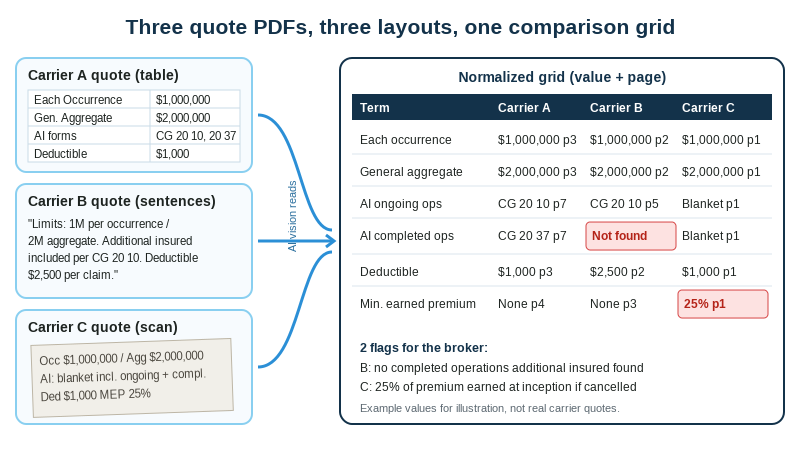
The diagram in text:
- Carrier A (table layout): $1,000,000 each occurrence, $2,000,000 aggregate, additional insured forms CG 20 10 and CG 20 37, $1,000 deductible
- Carrier B (written as sentences): 1M per occurrence, 2M aggregate, additional insured per CG 20 10 only, $2,500 deductible per claim
- Carrier C (scanned page): $1,000,000 and $2,000,000, blanket additional insured for ongoing and completed operations, $1,000 deductible, 25% minimum earned premium
- Flag 1: no completed operations additional insured found on Carrier B
- Flag 2: Carrier C keeps 25% of the premium as earned if the policy is cancelled
The automated run, step by step:
- Collect. A small service on your server watches the client folder or a shared inbox, including files pulled from carrier portals or Ivans Download.
- Read. Each quote PDF goes to the AI model in its own request, with a fixed list of the 40 fields to return.
- Normalize. Values are put into one format, as the next section shows.
- Compare. Simple rules flag a missing endorsement, a lower limit, a higher deductible, an added exclusion or a minimum earned premium.
- Review. The account manager opens each flag beside its source page and confirms or corrects it.
- Deliver. The approved grid becomes the client summary and is attached to the account in your AMS.
For the wider picture, including renewals and policy checking, see our guide to the automated insurance policy comparison tool.
What does normalizing quote data mean, and why does it matter?
Normalizing means writing every value in one format, so the grid can compare $1,000,000 with 1M, and “Included” with a real form number.
| What the quote PDF says | Normalized value |
|---|---|
| “1M / 2M” | Each occurrence $1,000,000; general aggregate $2,000,000 |
| “Additional insured: Included” | Form number from the schedule, or “not found” for a person to check |
Ded. $2,500 per claim | Deductible $2,500, basis: per claim |
| “MEP 25%” | Minimum earned premium 25% of the policy premium |
| “Fees: see attached” | Each fee as its own line, so the total cost is comparable |
The “not found” value is the most useful one in the grid. It never guesses a form number; it tells the account manager exactly which carrier to ask about.
What does it cost to compare quote PDFs with AI?
Reading three 30-page quotes costs roughly $0.67 to $0.94 in model fees at Anthropic’s public prices, by our calculation.
Anthropic says each PDF page uses 1,500 to 3,000 text tokens, and each page image uses at most 1,568 visual tokens. Anthropic’s pricing page lists Claude Sonnet 5.5 at $2 per million input tokens and $10 per million output tokens, and the Batch API at half those prices.
| Job | Pages | Input tokens | Standard cost | Batch API cost |
|---|---|---|---|---|
| One 30-page quote | 30 | 92,040 to 137,040 | $0.22 to $0.31 | $0.11 to $0.16 |
| Three quotes | 90 | 276,120 to 411,120 | $0.67 to $0.94 | $0.34 to $0.47 |
| Five quotes | 150 | 460,200 to 685,200 | $1.12 to $1.57 | $0.56 to $0.79 |
Assumptions: 3,068 to 4,568 tokens per page (text plus image), one request per quote, and about 4,000 output tokens of fields per quote. Hosting, setup and your team’s review time come on top. The comparison rules themselves run on the small field lists and cost next to nothing.
Which tools already compare commercial insurance quote PDFs?
A few vendors now sell quote comparison for commercial lines, and each draws its line in a different place.
- CompareBind: takes two to eight quotes for one client and returns a comparison PDF, an Excel matrix and a draft proposal. Its page says scanned pages without a text layer are not read, and that
Results are not verified by a person.
- Polly: builds branded digital proposals with side-by-side comparisons of up to four carriers per line, listed at $39 a month. Its page describes replacing static PDF proposals rather than reading carrier PDFs.
- CopyCat AI: compares carriers or a renewal against the expiring policy and says every number links to its source page.
- Your AMS: Applied Epic, AMS360 and HawkSoft store the quotes and policies, and offer APIs or partner integrations, but none of them reads three carriers’ PDFs into one grid on its own.
A custom setup on your own server fills the gaps those tools leave. It reads scans through AI vision, keeps client documents in your control, and writes the approved values back into your AMS instead of a separate app.
What should the comparison summary you send the client include?
The client summary should show the differences that change the client’s protection, in plain words, with the carrier PDFs attached as the real documents.
- One column per carrier, with the exact underwriting company and admitted or surplus lines status
- Total cost: premium plus every tax and fee, and any minimum earned premium
- Limits and deductibles, each with its basis (per claim, per occurrence, per location)
- Endorsement differences written out:
Carrier B does not include completed operations additional insured
- Added exclusions, in one plain sentence each
- Subjectivities the client must meet, with due dates
- A line saying the summary is not the policy, and the quotes and forms govern
What must a licensed broker still check on every comparison?
A licensed broker still checks every flagged line, every “not found” value and every recommendation, because the grid compares only what is written in the PDFs.
The grid does not know the client’s contracts, the carriers you never approached, or the claim the owner mentioned on the phone. Agents who tested AI tools in public forums report the risk plainly: a model can misread or invent a limit, which is why every value carries its page number.
- Every red flag opened beside its source page
- Every “not found” confirmed with the carrier or underwriter
- Additional insured and waiver rows checked against the client’s leases and subcontracts
- Exposure details matched to the submission on each quote
- The original quote PDFs saved to the client record in the AMS
Start small: take the last five accounts you compared by hand, run the same PDFs through an automated read, and compare its grid with your spreadsheet cell by cell.
If it catches what your team caught, in a fraction of the time, you will know whether comparing commercial insurance quotes in PDF still needs to be an afternoon job.
Run your next three-carrier comparison through an automated read beside your own sheet, and see which cells it fills before your coffee cools.
Sources and further reading
- Anthropic: PDF support (page image plus text, tokens per page)
- Anthropic: API pricing (Claude Sonnet 5.5, Batch API)
- Adobe: Compare two versions of a PDF file in Acrobat
- Microsoft Learn: Power Query PDF connector (Pdf.Tables)
- The Carrier Standard: Comparing commercial truck insurance quotes the right way
- CompareBind: compare carrier quotes side by side
- Polly: commercial insurance proposal software
- CopyCat AI: insurance proposal software for brokers
- Ivans: Ivans Download for agents
- Applied Systems: Applied Epic agency management system
- Vertafore: AMS360
- HawkSoft: API partners
Questions and answers
Can I use AI to compare commercial insurance quotes in PDF?
Yes. A vision-capable AI model can read each carrier’s quote PDF, including scans, pull limits, deductibles, forms, endorsements and fees into fixed fields with page numbers, and line them up in one grid. A licensed broker should review every flagged difference and every value the AI could not find.
Can Adobe Acrobat compare two carriers’ insurance quotes?
Not well. Acrobat’s Compare Files tool is built for two versions of the same document, such as a carrier’s revised quote against its first quote. Two different carriers use different layouts, so almost every line shows up as a change.
What should I compare first on commercial insurance quotes?
Compare the exposures first: named insured, locations, class codes, payroll or sales and effective dates. Once every quote describes the same risk, compare limits, total cost with fees, deductibles, endorsements, added exclusions, subjectivities and minimum earned premium.
Can I turn carrier quote PDFs into an Excel comparison?
Partly by hand or with Excel’s Power Query PDF connector, which pulls tables out of text-based PDFs. It cannot read scans or terms written as sentences. An AI read can fill a fixed Excel template from any layout, with page numbers for checking.
How long does it take to compare three commercial quotes?
By our calculation, copying about 40 terms from each of three quote PDFs takes roughly 40 to 80 minutes, at 20 to 40 seconds per term. Reviewing the differences and writing the proposal comes on top of that.