How to Extract Coverage Limits from Dec Pages Automatically
Hello to everyone scrolling to page seven of a carrier PDF to find one sublimit.
Every renewal season someone at the agency says the same thing: I just need the limits.
I spent a day with the public pages of the companies that build dec page readers, plus Vertafore’s AMS360 help and the ACORD forms index.
Three things stood out: no two carriers lay the page out alike, the sublimits sit in the endorsements, and your AMS has nowhere to read them from.
Short answer: To extract coverage limits from dec pages, a service watches your inbox, sends each carrier PDF or scan to an AI vision model, reads the declarations and the endorsement schedule, returns every limit as a labelled field with its page number, flags doubtful values for a person, and syncs the approved fields to your AMS.
- Files it reads
- Carrier dec pages and policy PDFs, scans, and phone photos
- Fields it returns
- Each occurrence, aggregates, deductibles, premium, sublimits, endorsement list
- Every value carries
- Its page number and a confidence level
- Who checks
- A CSR or account manager, only on flagged fields
What does it mean to extract coverage limits from a dec page?
Extracting coverage limits from a dec page means software reads the declarations page of a policy and writes each limit, deductible and premium as a separate data field instead of a number someone retypes.
Your AMS holds the policy record. The dec page is the carrier’s printed summary of it. Extraction reads that summary and fills the record, so the limits can be searched, compared and reported without opening a PDF.
Why does every carrier’s dec page look different?
Carriers format dec pages their own way, so a rule written for one carrier’s layout fails on the next.
No two carriers build a dec page the same way, and coverage schedules and endorsement riders shift with every policy.
That is why older template-based readers need a new template per carrier, and why a vision model that reads the page the way a person does is a better fit. Terms vary too: one carrier prints “Each Occurrence”, another prints a differently worded line for the same limit.
Which coverage limit fields should be captured from a commercial dec page?
Capture the fields your team looks up most often, one row per coverage part, because a commercial package carries a separate set of limits for each.
| Coverage part | Fields | Where they usually sit |
|---|---|---|
| General liability | Each occurrence, general aggregate, products-completed operations aggregate, personal and advertising injury, medical payments | Declarations |
| Commercial property | Building and contents limits per location, deductible, coinsurance | Declarations and location schedule |
| Business auto, workers comp, umbrella | Liability limit, per-accident and employer’s liability limits, umbrella each-occurrence limit | Declarations |
| Sublimits | Water backup, employee theft, cyber, pollution, mold | Endorsements |
| Every part | Policy number, named insured, policy period, premium, forms and endorsements list | First page and schedule of forms |
In short: the headline limits are on the dec page, and the limits that surprise people at claim time are in the endorsements.
Where do the sublimits hide on a dec page?
Sublimits hide in the endorsements, not in the headline limits, so a reader that stops after page one misses them.
Sublimits almost always sit inside endorsements rather than on the headline limits section.
Avanti’s example figures show why this matters: a $1,000,000 each-occurrence limit can sit beside a water damage and sewer backup sublimit in the $10,000 to $25,000 range, and employee theft in the same range. Those are the lines clients ask about after a loss.
So the extraction job has two passes: the declarations, then the schedule of forms and every endorsement it lists.
How do you extract coverage limits from dec pages, step by step?
An automated dec page reader follows four steps: catch the file, read both the dec page and the endorsements, label each limit, then check and sync.
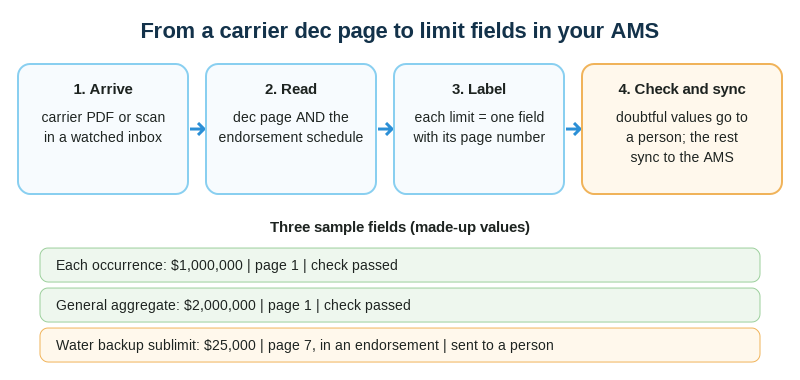
The diagram in text:
- Arrive: the carrier PDF, scan or photo lands in a watched inbox or folder
- Read: AI vision reads the dec page and the endorsement schedule
- Label: each each-occurrence limit, aggregate, deductible and sublimit becomes one field with its page number
- Check and sync: doubtful values go to a person, the rest sync to the AMS
The three sample fields are made-up values: $1,000,000 each occurrence on page 1 (passed), $2,000,000 general aggregate on page 1 (passed), and a $25,000 water backup sublimit on page 7, in an endorsement, sent to a person.
- Arrive. A small service on your own server watches one mailbox or folder and picks up every PDF or image.
- Read. Anthropic’s PDF support for Claude turns each page into an image plus its text, so tables and scans can be read.
- Label. Anthropic’s structured outputs make the reply follow a JSON schema you define, so every policy returns the same field names.
- Check. Rules test each field; anything failing goes to a review screen beside its source page.
- Sync. Approved fields are written to the policy record in your AMS.
How much does hand-reading dec pages cost an agency each month?
At a rough 12 minutes per policy, reading and keying limits for 60 policies a month takes 12 staff hours, about $420 at $35 an hour.
There is a calm in a policy record whose limits were filled in before anyone opened the PDF. Your team keeps the judgment about what is enough; the hunting simply stops being theirs.
| Dec pages a month | Minutes each | Hours a month | Cost at $35 an hour |
|---|---|---|---|
| 30 | 12 | 6.0 | $210 |
| 60 | 12 | 12.0 | $420 |
| 120 | 12 | 24.0 | $840 |
| 250 | 12 | 50.0 | $1,750 |
Assumptions: 12 minutes to find, read and key the limits and sublimits of one commercial policy, and $35 an hour as a rough loaded cost. These are our working figures, not a survey. Time a week of your own and replace them.
The bigger picture is the same one Applied Systems found in 2026: re-keying risk data was the top pain point, cited by 74% of 702 independent agents surveyed.
How do you stop a wrong limit from reaching the AMS?
Every extracted limit is checked by simple rules and traced to its page, and only failures reach a person.
- The aggregate is never lower than the each-occurrence limit
- Dollar values have the right digits (a $1,000,000 limit is not read as $100,000)
- The policy period is 12 months, or the field is flagged
- Every endorsement listed in the schedule of forms was actually read
- Low-confidence fields, such as a handwritten or faint scan, always go to a person
The review screen shows the value next to the page image, so a person confirms in seconds instead of searching the PDF.
Can the extracted limits go straight into Applied Epic, AMS360 or HawkSoft?
Yes, usually through each system’s import or partner interface, but plan for the AMS having no limits field you can paste into.
Carrier downloads such as Ivans Download bring in what carriers send electronically; a PDF dec page from a wholesaler or a new client’s prior carrier is outside that stream.
Vertafore’s help notes that ACORD application data does not flow back to the policy form, so the limits step is the one that fills that gap. The ACORD Forms Index lists the form numbers to map to.
Confirm the import route with your AMS vendor before you build.
What does a licensed person still decide?
A licensed person still decides whether a limit is adequate for the client, because extraction reports what the page says, not what the client needs.
The reader can tell you the water backup sublimit is $25,000. Whether that is enough for a restaurant with a basement kitchen is advice, and it belongs to your account manager. Automation gives that conversation its numbers sooner.
How we researched this
- Read in November 2026: Sensible’s declaration page extraction page, Avanti Group’s commercial declarations page guide, Vertafore’s AMS360 integrated ACORD applications help, the Applied Systems 2026 connectivity release, ACORD’s Forms Index, and Anthropic’s PDF support and structured outputs documentation.
- Searched for agent discussions of dec page reading; the results were vendor and educational pages, so no forum quotes are used.
- The cost table is our own arithmetic from stated assumptions.
- We did not install or test any dec page reader, and we did not test extraction accuracy.
Run five dec pages through an automated read beside your team, and see how many limits are listed before the first coffee refill.
Sources and further reading
- Sensible: Extract declaration pages to structured JSON (vendor)
- Avanti Group: How to Read a Commercial Declarations Page
- Vertafore: AMS360 help, Applications (Integrated)
- Ivans Download
- ACORD Forms Index
- Applied Systems: 2026 Agency-Carrier Connectivity Trends survey
- Anthropic: PDF support
- Anthropic: Structured outputs
Questions and answers
Can I use AI to extract coverage limits from dec pages?
Yes. An AI vision model can read a carrier dec page or scan and return each limit, deductible and premium as a labelled field with its page number. Your team should still check flagged values and the endorsement sublimits, and decide whether the limits suit the client.
Why are sublimits harder to extract than the main limits?
Sublimits usually sit in endorsements rather than on the headline limits section, according to Avanti Group. A reader must also work through the schedule of forms and every endorsement it lists.
Does my AMS already read dec pages?
Not from a PDF. Carrier downloads such as Ivans Download bring in electronic data, but a dec page that arrives as a PDF or scan still has to be read and keyed.
How much does it cost to read a dec page with AI?
Model cost is typically cents per policy at public API pricing, though it depends on page count. Your real cost is the review time on flagged fields, so measure it on a week of your own policies.
Will it work for every carrier’s layout?
A vision model reads the page rather than a fixed template, so new layouts usually work, but accuracy varies. Test it on your own carriers’ pages and keep the human check on low-confidence fields.