How to Automate Estate Planning Client Questionnaires
Hello, and welcome to everyone who has sent a twelve-page questionnaire on Friday and opened a half-empty one on Monday.
Every estate planning firm I read about describes the same Monday: the questionnaire went out on Friday and came back half empty.
I spent an afternoon on the vendors’ own pages and on four published workflow write-ups, to see what “automated” really covers.
Gavel was formerly called Documate, and Clio Draft was formerly called Lawyaw. Docuplete and Lawmatics each cover a different slice of the job.
None of them is a complete answer alone, and one of the sources I read says so outright.
Short answer: To automate estate planning client questionnaires, send the client a secure online form that saves progress, skips questions that do not apply and sends reminders. Read their uploaded documents with OCR, then push the answers into the matter and the drafting template. An attorney reviews the flagged gaps and the draft.
What does it mean to automate an estate planning client questionnaire?
Automating an estate planning questionnaire means the client types each fact once, in an online form, and software carries it into the matter and the document draft instead of staff retyping it.
Gavel’s estate planning page says firms can build questionnaires that clients fill in themselves
, and that a button then transforms the answers into completed documents.
- Online form
- Short sections, a progress bar, saved answers.
- Skip logic
- Questions about children appear only if the client has children.
- Reminders
- Text or email nudges for unfinished forms.
- Upload reading
- OCR labels the deed, statement or old will by type and date.
- Draft fill
- Answers flow into a will, trust or power of attorney template.
How does an automated estate planning intake work, step by step?
An automated estate planning intake runs in five steps: send the link, let the client answer, read the uploads, fill the matter and template, then let the attorney review the flagged gaps.
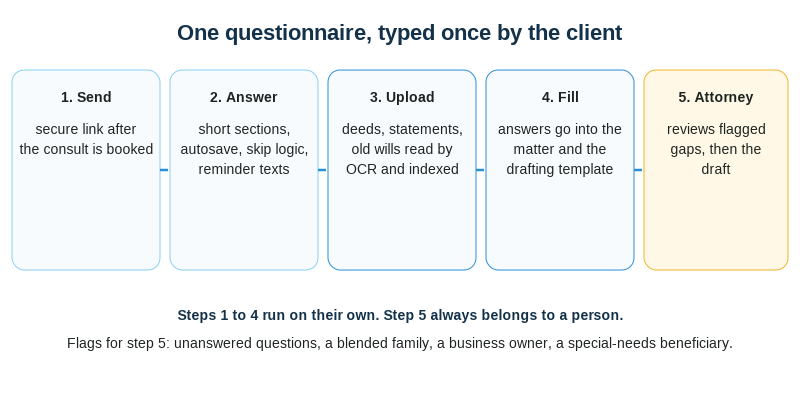
- Send. When the consultation is booked, the client gets a secure link, not an email attachment.
- Answer. The client works through short sections, and the form saves as they go.
- Upload. They add photos or PDFs of the deed, account statements, beneficiary forms and any old will.
- Fill. Your server writes the answers into the matter and the drafting template.
- Review. The attorney sees a list of unanswered or odd items first, then the draft.
The diagram’s text: send link, answer in sections, upload and OCR, fill matter and template, attorney review. Steps 1 to 4 run on their own.
This is the same front door as Clio client intake automation, with a longer form behind it.
Which software automates estate planning questionnaires?
Four kinds of tool cover the job: Gavel and Clio Draft turn questionnaires into drafts, Docuplete turns your own questionnaire PDF into a guided online form, and Lawmatics runs the intake and follow-up pipeline.
| Tool | Main job | What the maker’s page says |
|---|---|---|
| Gavel | Questionnaire to document | Client-filled questionnaires, question logic, client portals, a Clio integration, answers transferred to Word or PDF |
| Clio Draft | Matter data to wills, trusts, POAs | Clio matter information flows into documents without re-entry (from search summaries; the page blocked our reader) |
| Docuplete | Your PDF to an online form | Splits the questionnaire into sections, clients pause and resume, nudges for incomplete forms, e-signature, Google Drive and HubSpot sync |
| Lawmatics | Intake and follow-up | A legal CRM with questionnaires and automation; it complements a drafting engine rather than replacing one |
In one line: Gavel and Clio Draft draft, Docuplete collects, Lawmatics follows up. Which pair fits depends on whether your drafting already lives in Clio or in estate-planning software such as WealthCounsel.
LJR Dev’s estate planning workflow write-up describes the chain of intake form, Clio, then WealthDocx, so nobody re-keys the data.
What questions should an automated estate planning questionnaire ask?
An automated estate planning questionnaire should ask who the client is, who their family and chosen fiduciaries are, what they own, and what they want to happen, in that order, with skip logic hiding every question that does not apply.
- Family. Spouse, children and their ages, prior marriages, any beneficiary with special needs.
- People who act. Executor, successor trustee, agent under a power of attorney, healthcare agent, guardian for minors, each with a backup.
- Assets. Home and deed details, accounts and who is named as beneficiary, life insurance, retirement plans, a business.
- Wishes. Who gets what, at what age, and what happens if a beneficiary has died.
- Existing documents. Any will, trust or power of attorney already signed, and where the originals are.
Gavel’s page gives the pattern: ask for children’s names only if the client answers yes to having children. Do the same for a prior marriage, a business and a special-needs beneficiary.
What do you do when a client will not finish the questionnaire?
When a client will not finish the questionnaire, automate the nudge: save their progress, text a link to the unfinished section after two days, and tell the paralegal only when a week passes.
The reason clients stall is usually the form, not the client. A 12-page PDF about assets asks for numbers they have to go and find.
- Split the form into sections of five to ten questions.
- Allow
I don’t know yet
on asset values and flag it, instead of blocking the form. - Send a reminder with a link that opens at the section they left.
- After seven days, create a task for a person to call.
Docuplete’s template lists autosave, pause and resume, and incomplete-form nudges as features. Those three behaviors, in any tool, are what bring a client back.
Can the questionnaire read the deed and the old will for the client?
Yes, a secure upload step can read a deed, an old will and account statements with OCR, label each by type and date, and pre-fill matching questionnaire fields for the client to confirm.
This is the part the form tools above do not do. A client who photographs an old will saves typing the names of the executor and beneficiaries, and a statement shows who is named on the account.
- The client uploads photos or PDFs inside the questionnaire.
- OCR and AI vision read each page and label it: deed, will, statement, beneficiary form.
- Extracted names and dates appear as suggested answers, marked
from your upload, please confirm.
- Pages the software could not read go on the attorney’s flag list.
The sorting works as in a legal document indexing and summarization tool, aimed at a smaller packet.
How much paralegal time does an automated questionnaire save?
An automated questionnaire saves about 5 paralegal hours a month for a firm that opens 10 new plans, if retyping and chasing takes 40 minutes per plan and reviewing takes 10.
The kindest part of a questionnaire that saves itself is what the client feels: nobody has to start over, and nobody has to hunt for a pen to finish the asset page.
| New plans a month | Manual, 40 min each | Automated, 10 min review | Hours saved | Wages saved |
|---|---|---|---|---|
| 5 | 3.3 h, $101 | 0.8 h, $25 | 2.5 h | $76 |
| 10 | 6.7 h, $202 | 1.7 h, $50 | 5 h | $151 |
| 20 | 13.3 h, $403 | 3.3 h, $101 | 10 h | $302 |
Our 40 manual minutes are an assumption, not a measurement: about 20 to retype roughly 120 answers into the matter, 10 to enter the same facts into the template, and 10 for chasing missing pages.
The wage comes from the BLS Occupational Outlook Handbook: paralegals and legal assistants earned a median $62,890 a year, or $30.24 an hour, in 2025. Use your own minutes.
Should the client or the attorney fill in the estate planning questionnaire?
The sources disagree: vendors say clients can fill in the questionnaire themselves, while at least one attorney-written checklist exists to avoid problems that come from clients filling in forms alone.
| Source | Position |
|---|---|
| Gavel | Clients fill in questionnaires themselves; the page also notes an attorney can complete them |
| Clio’s tools blog, as summarized in search | Client questionnaires make the process more convenient for clients |
| One search-listed review | Clio Draft questionnaires are primarily attorney-facing |
| An attorney-completed checklist from a state practice guide | Meant to be filled out by the attorney, to avoid client-form problems |
Our answer: let the client fill in the facts they know (names, dates, accounts) and keep the choices that carry legal consequences for the consultation. Beneficiary conditions and trust terms are the attorney’s conversation, not a dropdown.
Is an online estate planning questionnaire safe and ethical?
An online estate planning questionnaire is acceptable when the firm uses a secure, access-controlled form, collects only what it needs, and supervises the vendor, because ABA Model Rules 1.6, 1.18 and 5.3 still apply.
ABA Model Rule 1.6(c) asks lawyers to make reasonable efforts to prevent unauthorized access to client information. A questionnaire holds account numbers and family details, so link the client to a secure portal, never to an email attachment.
Rule 5.3 makes the firm responsible for supervising vendors. Your state bar’s version is the one that binds you.
What still needs an attorney in an automated questionnaire?
An automated questionnaire still needs an attorney to review blended-family answers, decide on trust terms, check flagged documents, confirm the draft and handle any capacity concern.
- Family complexity. Prior marriages, estranged children and special-needs beneficiaries.
- Choices. Who inherits when, and who serves as trustee.
- Flagged uploads. A blurry deed, a missing page, an old will the OCR half read.
- The draft. Every generated document is a first draft for attorney review.
- Capacity or pressure. Anything in the answers or the call that worries your team.
Everything else, from the link to the reminder to the pre-filled fields, can run on its own.
How should a small estate firm start automating its questionnaire?
A small estate firm should start with its existing questionnaire turned into one online form, then add reminders, the upload step and the draft fill one week at a time.
- Week 1. Turn your current questionnaire into a sectioned online form and send it to the next three clients.
- Week 2. Add skip logic and the reminder text.
- Week 3. Add the secure upload and the OCR labels.
- Week 4. Fill the matter and the template from the answers, and count minutes saved.
Before you start, write down today’s numbers: new plans a month, minutes per plan and how many questionnaires never came back. If a new client calls at night, an after hours legal intake answering service can send the link before they hang up.
How we researched this
- Read Gavel’s estate planning page and Docuplete’s estate planning questionnaire template on November 29, 2026.
- Clio’s virtual estate planning tools blog returned an error to our reader, so we used search-result summaries of it, of Lawmatics, Clio Draft, LJR Dev’s workflow write-up and a solo attorney’s Substack, and say so in the text.
- Our Reddit search returned no relevant threads, so we make no claim about what Reddit says.
- The time calculation uses stated assumptions and the BLS 2025 median paralegal wage. We did not test any of these tools or build an integration for this article, and we list no prices because we did not verify them.
Let the form collect the facts, keep the judgment with your attorney, and see what your team does with the hours it stops spending on retyping.
Sources and further reading
- Gavel: estate planning document automation
- Docuplete: automated estate planning questionnaire template for lawyers
- Clio blog: essential tools for virtual estate planning attorneys
- Lawmatics: legal CRM and intake automation
- LJR Dev: estate planning workflow, intake to Clio to WealthDocx
- A Different Practice: 5 tasks every solo could automate
- U.S. Bureau of Labor Statistics: Paralegals and Legal Assistants, pay
- ABA Model Rule 1.6: confidentiality of information
- ABA Model Rule 5.3: responsibilities regarding nonlawyer assistance
Questions and answers
Can I use AI to automate estate planning client questionnaires?
Yes. AI can turn your questionnaire into a guided online form, read the deeds, wills and statements a client uploads, suggest answers for the client to confirm, and flag gaps. Tools such as Gavel can also fill document templates from the answers. An attorney should review every flagged item and every draft.
What software automates estate planning questionnaires?
Gavel (formerly Documate) builds client-filled questionnaires that fill documents. Clio Draft (formerly Lawyaw) fills wills, trusts and powers of attorney from Clio matter data. Docuplete turns your questionnaire PDF into a guided online form, and Lawmatics runs intake and follow-up. Many firms combine two of them.
How do I get clients to finish the estate planning questionnaire?
Split it into short sections, save progress automatically, allow an unknown answer on asset values, and send a reminder link that reopens at the unfinished section. After about a week without progress, create a task for a person to call. Docuplete lists autosave and incomplete-form nudges as features.
Can a client fill in an estate planning questionnaire without a lawyer?
Clients can supply facts such as names, dates and accounts. Gavel says clients can fill in questionnaires themselves, but choices with legal effect, such as trust terms and beneficiary conditions, belong in the attorney’s consultation. One attorney-completed checklist exists to avoid problems with client-filled forms.
Is it safe to collect estate planning information online?
It can be, with a secure access-controlled portal instead of email attachments, only the information needed, and supervision of the vendor. ABA Model Rule 1.6(c) asks for reasonable efforts to prevent unauthorized access, and Rule 5.3 covers nonlawyer vendors. Check your state bar’s version of each rule.