Clio Client Intake Automation: What Grow Does and What It Leaves Out
Hello, and welcome to everyone who has typed the same new client into Clio twice in one week.
If your firm runs on Clio and every new client still gets typed in twice, this guide is for you.
The inquiry comes in through the website, the phone or an email, and someone on your team rebuilds it inside Clio Grow by hand.
A week later, the same name, the same crash date and the same address get typed again into the new matter in Clio Manage.
Short answer: Clio client intake automation lives mostly in Clio Grow. Its Lead Inbox collects web, chat and call leads, its intake forms create the contact and matter, its automated workflows send forms and book consultations, and Grow AI screens and follows up. Clio Manage alone needs Zapier or the Clio API, and uploads still need a separate indexing step.
What is Clio client intake automation?
Clio client intake automation is the set of Clio Grow features that move a prospective client from first message to signed matter without staff retyping their details at each step.
Clio’s Clio Grow page sums it up as software that responds to inquiries, screens for fit and conflicts, books consultations, and turns good-fit leads into clients, 24/7.
In practice, that breaks into six pieces.
- Lead Inbox
- One list for web forms, chat, virtual receptionist and API leads.
- Intake forms
- Public forms on your site, or a link sent to one lead. Clio’s help pages describe templates under Set Up Clio Grow Intake Form Templates.
- Automated workflows
- Chained steps: send a form, change the status when it comes back, send a booking link.
- Conflict search
- Clio Grow searches across all of Clio for potential conflicts.
- Fee agreement e-signature
- Send the agreement, collect the signature and request payment.
- Grow AI
- Launched August 20, 2026: answers, screens, scores, books and nudges stalled leads.
For a personal injury, immigration or estate firm, the point is simple. The client types their facts once, and every later step reads them from Clio instead of from a sticky note.
Can Clio Manage automate client intake without Clio Grow?
Clio Manage cannot run full client intake on its own; public intake forms that create contacts and matters belong to Clio Grow, so a Manage-only firm connects a form tool through Zapier or the Clio API instead.
Clio’s announcement of public intake forms says they are for Clio Grow and Clio Suite customers. A submitted form creates a new contact and matter in Grow and places it in the Matter Pipeline column you chose.
| Route | What starts it | What it creates | What you maintain |
|---|---|---|---|
| Clio Grow, native | Public intake form, Lead Inbox lead, Quick Intake | Grow contact and matter, workflow steps, then a Manage matter on conversion | Form templates, email templates, matter statuses |
| Zapier with Clio Manage | A form tool such as Jotform or Google Forms | Find or Create Person Contact, Create Matter, Create Task, Upload Document to Matter | Each Zap, its field mapping and its task bill |
| Clio APIs, your own server | Any source: phone line, portal, chat | Grow inbox leads; Manage contacts, matters, tasks, documents | Code, OAuth tokens, webhook renewals, rate limits |
Zapier’s Clio app lists 12 triggers and 17 actions, including New Matter, Matter Status Updated and Upload Document to Matter. That is enough to build a simple Manage-only intake in an afternoon.
The catch is ownership. Every Zap becomes one more thing someone has to notice when it breaks.
How does an automated Clio intake work, step by step?
An automated Clio intake runs in six steps: the inquiry arrives, lands in the Lead Inbox, gets screened, receives an intake form, goes to the attorney for a decision and becomes a Clio Manage matter.
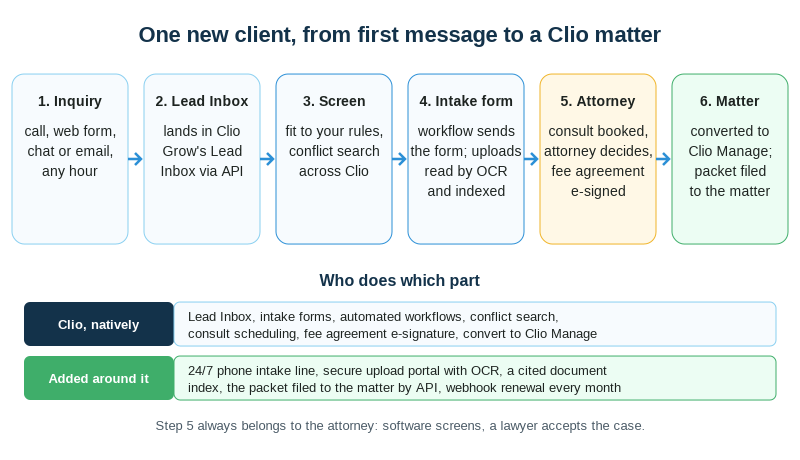
- Inquiry. A call, web form, chat or email arrives, often after hours.
- Lead Inbox. The lead lands in Clio Grow. Outside tools post it to the Lead Inbox API, which Clio’s developer docs say returns
201 Createdon success. - Screen. Grow AI or a staff member checks fit against your practice areas and locations, and runs the conflict search.
- Intake form. An automated workflow sends the form. When it comes back, the status changes and a booking link goes out.
- Attorney. The consultation happens, the attorney decides, and Grow sends the fee agreement for e-signature.
- Matter. The lead converts to Clio Manage with its details, and the documents are filed to the matter.
The diagram’s two rows as text. Clio, natively: Lead Inbox, intake forms, automated workflows, conflict search, consult scheduling, fee agreement e-signature and conversion to Clio Manage.
Added around it: a 24/7 phone intake line, a secure upload portal with OCR, a cited document index, the packet filed to the matter by API, and webhook renewal every month.
How do you set up automated workflows in Clio Grow?
You set up automated workflows in Clio Grow under Settings, then Automated workflows, by picking a template such as Rapid intake and choosing which steps run on their own.
Clio’s Clio Grow Automated Workflows help page describes Rapid intake as sending an intake form, then changing the matter’s status and booking a follow-up appointment once the client submits it.
- Create the pieces first. Workflow steps use your existing intake forms, email templates and matter statuses, so build those before the workflow.
- Write the send-form email. Clio’s email templates page covers templates for forms, documents and appointments.
- Open Settings, then Automated workflows. Choose a template, or New template if you already have one.
- Chain the steps. Form submitted changes the status; the status change sends the booking link.
- Set the public form’s landing spot. Each public form picks its Pipeline column, matter type, assigned user and confirmation sender.
- Apply it. On a matter’s Intake process subtab, add the workflow from the dropdown, then watch it in the Automated workflows section.
Clio’s newer help pages note a redesign that renamed some screens, such as Matters becoming Opportunities. If a menu name differs from this list, the setting usually sits one click away.
What should a Clio intake form ask for injury, immigration and estate matters?
A Clio intake form should ask only what the attorney needs to decide on a consultation: the matter type, the key date, the place, the other people involved for the conflict check, and any deadline.
- Personal injury. Date and place of the crash or fall, where treatment happened, the other driver or property owner, any insurer that has called, whether a police report exists, and whether another lawyer is involved.
- Immigration. The kind of matter (family petition, removal, visa, citizenship), the date on any notice, whether someone is detained, and the preferred language.
- Estate and probate. Who passed away and when, whether a will or trust exists, the caller’s relationship, the state and county, and any court date.
Use one form per practice area rather than one giant form with branches. An AI for Law Firms review of Clio Grow lists Limited conditional logic for complex intake needs
among user complaints.
That matches what users asked for in the December 18, 2025 Clio AMA on r/legaltech. One commenter wanted intake playbooks by practice area, with fields, emails and tasks bundled for PI, criminal, family and immigration.
How much does Clio intake automation cost?
Clio intake automation costs a Clio Grow subscription plus $25 for each client Grow AI helped sign, but Clio no longer publishes most plan prices, and the third-party price lists disagree with each other and even with themselves.
| Source | Plan names | Where Grow sits | Grow price |
|---|---|---|---|
| Legal AI Reviews (October 2026) | Starter, Core, Signature, Elite; only Starter priced, from $49 a user a month | Included in Elite | Add-on price not published |
| Hughey LLC comparison (September 22, 2025) | Not named | Sold as Grow | About $99 a month for one user, $399 and up for multi-user plans; its own FAQ says about $39 a user |
| LawNext (August 20, 2026) | Not covered | Grow AI on top of Grow | $25 per converted lead; first three free for current Grow customers |
LawNext reported that Grow AI charges only when it played a role in the hire: If Grow AI had no role in the hiring, there’s no charge.
Firms can also set a monthly spending target.
The fair way to compare is a written quote from Clio for your seat count, set against the hours your team spends on intake today.
How much paralegal time does Clio intake automation save?
Clio intake automation saves about 10 paralegal hours a month for a firm with 30 new inquiries, if manual handling takes 25 minutes per inquiry and the automated version needs 5 minutes of review.
The nicest part of an intake that runs on its own is how the first call with the attorney changes. The facts are already there, so the conversation can start with the person instead of the spelling of their name.
| New inquiries a month | Manual, 25 min each | Automated, 5 min review | Hours saved | Wages saved |
|---|---|---|---|---|
| 15 | 6.25 h, $189 | 1.25 h, $38 | 5 h | $151 |
| 30 | 12.5 h, $378 | 2.5 h, $76 | 10 h | $302 |
| 60 | 25 h, $756 | 5 h, $151 | 20 h | $605 |
Our 25 manual minutes are an assumption, not a measurement: 4 to retype the lead, 2 for the conflict search, 4 to send the form and two reminders, 5 to copy key facts into the matter, 4 to agree a consultation time and 6 to set up the Manage matter.
The wage comes from the BLS Occupational Outlook Handbook: paralegals and legal assistants earned a median $62,890 a year, or $30.24 an hour, in 2025. Swap in your own minutes and your own wage.
What does Clio’s intake automation leave out?
Clio’s intake automation leaves out three handoffs: sorting the documents a new client uploads, smooth automation between Clio Grow and Clio Manage, and keeping custom integrations alive.
The handoff gap comes straight from users. In the r/legaltech AMA, one commenter wrote that automations across Grow and Manage should be more
Clio’s CEO replied that the 2026 focus was unifying communications across the two.if X then Y
without Zapier.
- Documents. Intake collects files, but nothing in Grow reads a 40-page hospital discharge or a stack of USCIS notices and labels each page by type and date.
- Webhooks expire. Clio’s webhooks guide says a webhook defaults to 3 days after creation, with a 31-day maximum. An integration nobody renews goes quiet within a month.
- Rate limits. Clio’s rate limits page sets a default of 50 requests per minute during peak hours, with a 429 error and a Retry-After header beyond it.
- Legacy endpoints. Clio calls the token-based Lead Inbox endpoint
a legacy approach to integrating with Clio Grow
and points new builds to the Clio Platform API.
The rate limit matters more than it looks. Filing a records packet split into 120 documents, each with an index note, means 240 requests, which takes at least about 5 minutes at the peak default. A good integration queues that work instead of failing halfway.
How do you get intake documents into the right Clio matter?
You get intake documents into the right Clio matter by sending uploads through a secure portal that reads and indexes them, then filing the indexed packet to the matter when Clio Manage reports it was created.
- Upload. The intake form’s thank-you page and the reminder text link to a secure portal for photos and PDFs.
- Read. OCR and AI vision read each page, split the packet into documents and label each one by type, date and person.
- Wait for the matter. A Clio Manage webhook on the matter model fires when the converted matter is created.
- File. The server uploads each document and a one-page index to that matter, then creates a review task for the paralegal.
That index is the first page of the case. For injury files it later feeds the medical chronology, and our guide to a legal document indexing and summarization tool explains the sorting step in detail.
For calls that arrive at night, an after hours legal intake answering service can post each caller to the Lead Inbox, so the phone joins the same path as the web form.
What ethics rules apply to automated client intake in Clio?
Automated client intake in Clio falls under ABA Model Rule 1.18 for prospective clients and Model Rule 5.3 for nonlawyer assistance, so forms and AI agents should collect only what is needed for a conflict check and a decision.
The ABA’s Comment [4] to Rule 1.18 says a lawyer should limit the initial consultation to only such information as reasonably appears necessary for that purpose.
On a web form, that means names, dates and places before the long story box.
Model Rule 5.3 makes the firm responsible for supervising outside help, which covers an AI agent and any integration vendor. Your state bar’s version of each rule is the one that binds you.
What still needs a person in an automated Clio intake?
An automated Clio intake still needs a person to clear conflict hits, accept or decline the case, handle urgent deadlines, review the fee agreement and check flagged documents.
- Conflict hits. The search finds names; a person decides whether a match is a real conflict.
- Accepting the case. Screening scores help, but the attorney signs off before any fee agreement goes out.
- Deadlines. A hearing date, a detention or a statute running soon goes to a person the same day.
- The fee agreement. The right template, the right contingency or flat fee, the right client name.
- Flagged pages. Blurry photos, missing pages and dates the OCR could not read.
Everything else, from the first email to the booking link to the reminder about an unsigned agreement, can run on its own.
How should a small firm start automating Clio intake?
A small firm should start automating Clio intake with one public intake form for its busiest practice area, then add the workflow, the phone line and the document step one week at a time.
- Week 1. Build one practice-area form and its email templates; point the website form at Clio Grow.
- Week 2. Turn on a Rapid intake workflow and watch every lead it touches.
- Week 3. Connect the phone line and the upload portal to the Lead Inbox.
- Week 4. File the indexed packet to each new matter, and count the minutes your team no longer spends retyping.
Before you start, write down today’s numbers: new inquiries a month, minutes per inquiry and how many leads never got an intake form. Those three numbers make the month-end comparison honest.
If the counts don’t move, change the form or the workflow before adding more. If they do, the client types their story once, and your team reads it instead of retyping it.
How we researched this
- Read Clio’s Clio Grow product page and the Clio Help Center listings for automated workflows, intake form templates and email templates on November 28, 2026. Clio’s help center and pricing page block automated readers, so we relied on their published summaries and say so.
- Read Clio’s developer documentation on the Lead Inbox API, Clio Manage webhooks and rate limits, and Zapier’s Clio integration page, the same day.
- Read LawNext’s August 20, 2026 report on Grow AI pricing and the December 18, 2025 Clio AMA on r/legaltech for user feedback, paraphrased without usernames.
- Compared two third-party Clio pricing reports, which disagree, and set them side by side instead of picking one. Read an AI for Law Firms review of Clio Grow for user complaints.
- Our time calculation uses stated assumptions and the BLS 2025 median paralegal wage. We did not test Clio Grow or build an integration for this article.
Let the client type their story once, keep the decisions with your attorney, and see what your team does with the hours that used to go to retyping.
Sources and further reading
- Clio: Clio Grow client intake and CRM software
- Clio Help Center: Clio Grow Automated Workflows
- Clio Help Center: Set Up Clio Grow Intake Form Templates
- Clio Help Center: Clio Grow emails, communication templates and sequences
- Clio Developer Docs: Lead Inbox API endpoint
- Clio Developer Docs: Clio Manage webhooks
- Clio Developer Docs: Clio Manage API rate limits
- Zapier: Clio integrations, triggers and actions
- LawNext: Clio launches Grow AI with 24/7 intake agents
- r/legaltech: Clio AMA (December 18, 2025)
- Legal AI Reviews: Clio pricing 2026 (October 2026 update)
- Hughey LLC: Lawmatics vs Clio Grow (September 22, 2025)
- AI for Law Firms: Clio Grow review (2026)
- Clio blog: public intake forms for Clio Grow
- U.S. Bureau of Labor Statistics: Paralegals and Legal Assistants, pay
- ABA Model Rule 1.18, Comment: duties to prospective client
- ABA Model Rule 5.3: responsibilities regarding nonlawyer assistance
Questions and answers
Can I use AI to automate client intake in Clio?
Yes. Clio’s Grow AI, launched August 20, 2026, answers new inquiries, screens them against your criteria, runs conflict checks, books consultations and follows up on unfinished forms and unsigned agreements. It costs $25 per converted lead where it played a role. An attorney should still accept each case and review the fee agreement.
Does Clio Manage have intake forms without Clio Grow?
Public intake forms that automatically create a contact and matter belong to Clio Grow and Clio Suite. A firm on Clio Manage alone can connect a form tool such as Jotform or Google Forms through Zapier, which offers Find or Create Person Contact and Create Matter actions, or through the Clio API.
How do I send website leads into Clio Grow automatically?
Embed a Clio Grow public intake form on your site, or post each submission to the Clio Grow Lead Inbox API. Clio’s developer docs list the fields as first name, last name, email, phone, message, referring URL and source, and a successful post returns 201 Created. Clio calls the token-based endpoint legacy and recommends its Platform API.
Does Clio Grow create a matter in Clio Manage automatically?
When a lead becomes a client, Clio Grow converts it into a Clio Manage matter and carries over the details collected during intake. LawNext reported that Grow AI moves won matters into Clio Manage with contact history, documents and billing information. Indexing the documents inside the matter is a separate step.
How much does Clio Grow cost in 2026?
Clio publishes only its entry plan price, from $49 per user a month, and quotes the rest. Legal AI Reviews (October 2026) says Grow is included in the top Elite plan; an older 2025 comparison put Grow near $99 a month for one user. Grow AI adds $25 per converted lead. Ask Clio for a written quote.