Automated Medical Record Retrieval Follow-Up: Stop Chasing Providers
Hello, and welcome to everyone who has re-faxed the same records request three times and then found the invoice sitting in the general inbox.
Picture Monday morning with a list of every records request that needs attention today, and nothing else.
In most small personal injury and disability practices, a paralegal still keeps that list in their head, a spreadsheet or a stack of sticky notes.
The request itself took two minutes to send. The chasing afterwards, the calls, re-faxes, invoices and rejected forms, is what eats the week.
Short answer: Automated medical record retrieval follow up means software tracks every open records request, nudges the provider on a schedule tied to the legal deadline, reads whatever comes back (records, bills, an invoice, a rejection or a no-records letter), updates the case file, and hands only payments, signatures, phone escalations and subpoena decisions to a person.
What is automated medical record retrieval follow up?
Automated medical record retrieval follow up is a scheduled process that checks every open records request each day and takes the next step without anyone remembering to.
- What it watches
- Each request’s provider, request type (HIPAA authorization or patient access request), date sent, deadline and status
- What it does
- Sends status checks and reminders, reads incoming faxes and portal files, and updates the case file
- What it hands to people
- Invoice approval, a new signature, a phone escalation and the decision to subpoena
- Where it lives
- Inside or beside your case management system, such as the CasePeer Medical Treatment tab or the Filevine Medical tab
Think of it as the assistant who never forgets a request is three weeks old. It does not replace the paralegal who knows which clinic answers the phone after lunch.
Why do medical records requests stall?
Medical records requests usually stall for one of five reasons, and only one of them is a provider simply ignoring you.
- The authorization was rejected. Under 45 CFR 164.508(b)(2), an authorization is not valid if
The authorization has not been filled out completely
, if its expiration date has passed, or if it was revoked. The rejection letter often arrives by mail, days later. - An invoice is waiting for payment. Many release-of-information vendors hold the records until a prepayment invoice is paid, and the invoice lands in a general inbox.
- The request went to the wrong custodian. A hospital, its physician group and its billing office often keep separate records, so one request covers only part of the care.
- Only part of the file arrived. Notes come without bills, or bills without imaging, and nobody notices until the demand is being drafted.
- Nobody answered. The fax went through, and the provider never acted on it.
Here’s the catch: a phone call fixes only the fifth reason. The first four need someone to read a letter, pay an invoice or send a new form, which is exactly the reading and sorting software now does well.
How long does a provider have to send medical records?
A HIPAA covered provider has 30 days to act on a patient’s access request today, with one 30-day extension, and 15 calendar days from July 19, 2027.
The new deadline comes from the HIPAA Privacy Rule final rule published at 91 FR 74848 on November 19, 2026. Its new text for 45 CFR 164.524(b)(2) says a covered entity must act as soon as practicable, but no later than 15 calendar days after receipt of the request
.
That clock is not the one most law firm requests run on. A request sent with a signed HIPAA authorization has no federal deadline at all, because 45 CFR 164.502 lists authorization disclosures as permitted, and only disclosures to the individual under 164.524 as required.
| Request type | Deadline | Extension | What it means for follow-up |
|---|---|---|---|
| Patient access request, copy to the patient (HIPAA, today) | 30 days after receipt | One, up to 30 days, with a written reason | Escalate on day 31, or day 61 if a written extension came |
| Patient access request, from July 19, 2027 | As soon as practicable, no later than 15 calendar days | One, up to 30 days, written notice within the first 15 | Escalate on day 16 unless an extension notice arrived |
| Patient directs an electronic EHR copy to the firm (right of access to direct) | Same as the access request: 30 days, then 15 from July 19, 2027 | Same | Covers electronic copies from the electronic health record only |
| Firm sends a signed HIPAA authorization | No federal deadline | Not applicable | Follow up on your own schedule; state law may add a deadline |
| California attorney request before suit (Evid. Code 1158) | Records available within five days of the authorization | None stated | Escalate on day 6; the provider may owe enforcement costs |
| California patient copy request (Health and Safety Code 123110) | Copies transmitted within 15 days | None stated | Escalate on day 16 |
The right to direct a copy to the firm is narrow on purpose. After Ciox Health v. Azar (D.D.C., January 23, 2020), the rule’s preamble limits it to PHI that is both in an electronic health record and in a designated record set
, so paper charts still need an authorization.
California’s Evidence Code 1158 says a provider that misses the five days may be liable for reasonable expenses, including attorney’s fees, to enforce it. It also caps copying at ten cents ($0.10) per page for standard reproduction
plus $16 an hour of clerical time.
Where do the summaries of the new HIPAA rule disagree?
Summaries of the November 2026 HIPAA rule disagree on its dates, and the Federal Register settles it: effective January 19, 2027, compliance by July 19, 2027.
- Defensorum counts 240 days from publication and gives January 18 and July 17, 2027.
- Davis Wright Tremaine gives January 19 and July 19, 2027, which matches the rule’s own DATES section.
- HHS FAQ 2033 still describes fee limits for copies sent to a third party, under a note that anything vacated by Ciox is rescinded. In practice, the patient-rate fee limit applies only to the patient’s own copy.
So until July 19, 2027, build the follow-up schedule on 30 days. Set the switch to 15 days on that date in the software, not in someone’s memory.
How does automated follow-up on medical records requests work?
Automated follow-up works in six steps: log the request, compute its deadline, nudge on schedule, read what comes back, check completeness, and escalate what is stuck.
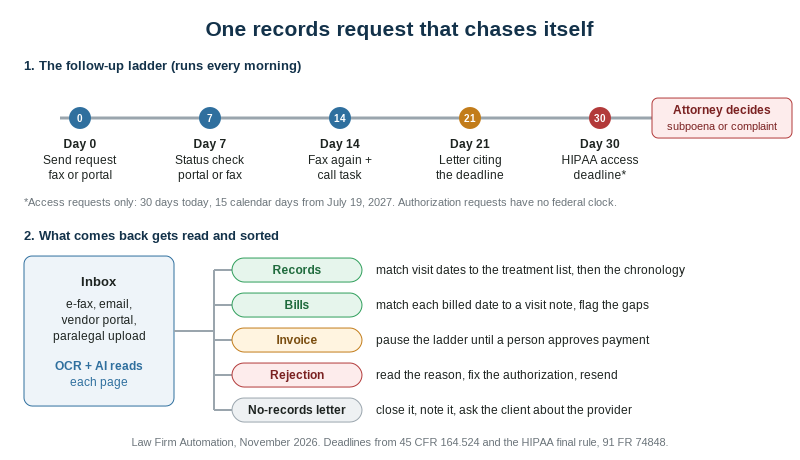
- Log. Each request is a row: client, provider, request type, items asked for (records, bills, imaging), date sent and how it was sent.
- Compute the deadline. The request type picks the clock from the table above: 30 days, 15 days from July 19, 2027, five days under California’s 1158, or none for an authorization.
- Nudge on schedule. A daily job checks each row and sends the next touch: a portal status check, a re-fax with the original request attached, or a call task for a person.
- Read what comes back. OCR or a vision AI model reads every incoming fax, email attachment and portal file, matches it to the request and labels it.
- Check completeness. Dates of service in the records are compared with the treatment dates your client gave at intake, and every bill with a visit note.
- Escalate. Requests past their deadline go to the attorney with a draft letter citing the rule, and a subpoena stays the attorney’s call.
The diagram’s ladder reads: day 0 send by fax or portal, day 7 status check, day 14 re-fax and call task, day 21 a letter citing the deadline, day 30 the HIPAA access deadline (15 days from July 19, 2027), then the attorney decides on a subpoena or complaint.
Its sorter reads: records go to the date match and the chronology, bills are matched to visit notes, an invoice pauses the ladder until a person approves payment, a rejection gets a corrected authorization, and a no-records letter closes the request with a note.
Paralegals can also drop scanned packets into the same secure upload portal, so mailed records join the same check. New clients reach the same file through an after hours legal intake answering service that collects the provider list on the first call.
How often should you follow up on a medical records request?
Follow up on a medical records request about every seven days, and let the request type decide when the reminder becomes an escalation.
| Day | Authorization request (no federal clock) | Patient access request (30 days today) | California 1158 request (5 days) |
|---|---|---|---|
| 0 | Send by fax or vendor portal | Send, signed by the client | Present the authorization |
| 3 | Confirm receipt | Confirm receipt | Status check |
| 6 | Nothing yet | Nothing yet | Letter citing 1158(d) for attorney review |
| 7 | Status check | Status check | Call task |
| 14 | Re-fax plus call task | Re-fax plus call task | Attorney decides next step |
| 21 | Second call task, check for an invoice | Reminder letter naming the day 30 deadline | Already with the attorney |
| 31 | Attorney review: subpoena or new route | Escalation letter, or wait to day 60 if extended in writing | Already with the attorney |
From July 19, 2027, the access request column compresses: confirm on day 3, remind on day 10 and escalate on day 16 unless a written extension notice arrived in the first 15 days.
One honest limit: a sample ladder is a starting point. Some clinics answer only by phone, and a good system lets your paralegal mark a provider as “call first” once.
What happens when records, an invoice or a rejection arrives?
When anything arrives from a provider, the system reads it, decides which of five kinds of document it is, and takes the matching next step.
| What arrives | How it is recognized | What happens next | Person needed? |
|---|---|---|---|
| Medical records | Visit notes, reports, a records certification | Filed to the case, dates of service extracted, compared with the treatment list | Only if dates are missing |
| Itemized bills | CMS-1500 or UB-04 forms, ledgers | Each billed date matched to a visit note, totals added to the damages sheet | Only for a mismatch |
| Invoice or prepayment notice | Amount due, invoice number, “payment required” | Ladder paused, invoice sent for approval, reference saved | Yes, to approve payment |
| Rejection | ”Unable to process”, a list of reasons | Reason read, corrected authorization drafted, sent to the client for signature | Client signature |
| No-records letter | ”No records found” or patient not seen at this facility | Request closed with a note, intake checked for a different location or name | A quick look |
The reading step is the same technology used to extract dates from medical records PDF files. Anthropic’s Claude PDF support reads each page as text and as an image, so a stamped invoice or a handwritten rejection reason can be labelled.
Keep a confidence rule. If the system is not sure whether a page is a bill or an invoice, it asks a person instead of guessing, because paying a bill by mistake is a bad afternoon.
Which tools already automate records retrieval follow-up?
Personal injury case management systems now track records requests and connect to retrieval services that do the chasing for you, while a custom pipeline covers the gaps.
The quiet win of a request list that chases itself is that nothing goes silent unnoticed. Every request has a next step and a date, so nobody has to remember which clinic was waiting on what.
| Tool | What it does for follow-up | What it leaves to you |
|---|---|---|
| CasePeer | Tracks billing and records requests side by side, lists requested but not received items, and says it can Automate follow-ups for outstanding documents; integrates Records on Time, MoveDocs and Multus Medical | Reading what arrives and checking completeness |
| Filevine with a retrieval partner | Requests start from the Medical tab through partners such as Codes Health (announced July 13, 2026), Records on Time and Arctrieval, with records returned to the matter | Picking a partner, paying per request, the completeness check |
| Arctrieval | Sends HIPAA right of access requests under 45 CFR 164.524 and says its users typically receive 90% of records within 30 days | Client signatures; the 90% figure is the vendor’s own |
| Datavant Smart Request | Lets legal and copy service users request, track, retrieve and pay for records across Datavant’s network; a Partner Gateway is offered above 100 requests a month | Providers outside Datavant’s network |
A custom pipeline earns its place where these stop: one ladder across every vendor and every direct-to-clinic fax, the inbox sorter above, and the link from a complete records set to medical chronology software for personal injury.
Plenty of firms simply need a smarter list, not a new vendor. If your case system already logs the date a request was sent, the ladder can be built on top of it.
How many paralegal hours does records follow-up take?
Following up on 250 open medical records requests by hand takes about 50 paralegal hours a month if each request gets two six-minute touches.
| Open requests | Hours by hand | Wage cost by hand | Hours with automation | Wage cost with automation |
|---|---|---|---|---|
| 100 | 20 | $605 | 4 | $121 |
| 250 | 50 | $1,512 | 10 | $302 |
| 500 | 100 | $3,024 | 20 | $605 |
Assumptions: two follow-up touches a month per open request (about every two weeks), six minutes per touch to find the request, check a portal or send a fax, and write a note. Hold music can make a single call much longer, so six minutes is the gentle case.
Wages use the US median paralegal pay of $30.24 an hour from the Bureau of Labor Statistics (May 2025), without benefits. The automated column assumes one touch in five still needs a person: a call, an invoice approval or a signature.
The hours are only half the cost. A request nobody looked at for six weeks delays the chronology and the demand behind it, which is why the automate demand letter drafting step can only start once the records are complete.
How do you know a medical records set is complete?
A medical records set is complete when every provider on the treatment list has sent records and bills that cover every date your client was seen.
- Every provider the client named at intake has a request, and every request has a final status.
- The first and last dates of service in the records match the treatment dates the client reported.
- Every billed date of service has a visit note, and every visit note has a bill.
- Imaging reports are present, and the images themselves were requested if the attorney wants them.
- Hospital stays include both the facility records and the separate physician group’s records.
- Each records set has its certification or affidavit if your state’s evidence rules call for one.
- Any gap of 30 days or more between visits is listed for the attorney, not filled in by the software.
What still needs a person in records retrieval?
A person still approves every payment, collects every new signature, makes the calls the schedule flags, and decides on subpoenas or complaints.
The client signs every authorization and access request. Software can fill the form from the intake answers and send it for e-signature, but it cannot sign.
The records are health information about your client. Ask any vendor in writing where files are stored, how long they are kept and whether they are used for training; the chronology software guide covers ABA Formal Opinion 512 and client consent.
What does a sensible first month look like?
A sensible first month runs the ladder on the requests you already have open, while your team keeps following up as usual.
- Week 1: export every open request with its provider, type and date sent, and mark which ones are authorizations and which are access requests.
- Week 2: run the daily ladder in shadow mode, producing a
who to nudge today
list without sending anything. - Week 3: turn on status checks and re-faxes for providers that use a portal or fax, and the inbox sorter for everything that comes back.
- Week 4: compare the list with what your paralegals did by hand, and count the stuck requests each side found.
Put a reminder in the system for July 19, 2027, when access requests move to the 15-day clock.
If the ladder finds the stuck requests before your team does, it has earned its place, and Friday afternoons can go back to the work only a paralegal can do.
How we researched this
- Read the HIPAA rules at 45 CFR 164.502, 164.508 and 164.524 on the Cornell Legal Information Institute, and the text of the November 19, 2026 final rule (91 FR 74848, document 2026-23429) from GovInfo, on November 28, 2026.
- Compared four summaries of that rule (Davis Wright Tremaine, Defensorum, HIT Consultant, HHS’s announcement) and found two different compliance dates; the rule’s own DATES section decided it.
- Read the Ciox Health v. Azar coverage and HHS FAQ 2033 on fees, and California Evidence Code 1158 and Health and Safety Code 123110 for a state with shorter clocks.
- Read the product pages of CasePeer, Filevine’s retrieval integrations, Arctrieval, Codes Health’s Filevine announcement and Datavant Smart Request. Vendor speed claims are labelled as the vendor’s own.
- Searched for paralegal discussions on Reddit; our search tools returned no usable threads, so the stall reasons come from the regulations, vendor documents and published personal injury job duties instead.
- Our time calculation uses stated assumptions and the BLS 2025 median paralegal wage. We did not test any of these products for this article.
Let the schedule do the nudging, keep the calls and the judgment with your team, and see how much lighter the follow-up list feels next Friday.
Sources and further reading
- Federal Register, 91 FR 74848 (November 19, 2026): HIPAA Privacy Rule changes to support coordinated care and individual engagement
- 45 CFR 164.524: access of individuals to protected health information
- 45 CFR 164.508: uses and disclosures for which an authorization is required
- 45 CFR 164.502: permitted and required uses and disclosures
- HHS FAQ 2033: fee limitations and the Ciox Health v. Azar order
- Davis Wright Tremaine: HHS finalizes HIPAA rule on access and NPP changes (November 2026)
- Defensorum: HIPAA Privacy Rule 2026 update
- California Evidence Code section 1158
- California Health and Safety Code section 123110
- CasePeer: medical records management software for personal injury
- Filevine: record retrieval solutions
- Filevine: partnership with Codes Health (July 13, 2026)
- Filevine: Arctrieval integration
- Datavant: Smart Request
- Anthropic: Claude PDF support
- BLS: paralegals and legal assistants, median pay
Questions and answers
Can I use AI to follow up on medical records requests automatically?
Yes. Software can track every open medical records request, send status checks and re-faxes on a schedule tied to the deadline, and use OCR or a vision AI model to sort what comes back into records, bills, invoices, rejections and no-records letters. A person still approves payments, collects signatures and decides on subpoenas.
How long does a hospital have to send medical records to a lawyer?
Under HIPAA, a records request sent with the client’s authorization has no federal deadline. A patient access request must be acted on within 30 days, plus one 30-day extension, and within 15 calendar days from July 19, 2027. Some states set shorter clocks, such as five days under California Evidence Code 1158 before a lawsuit.
Does the new HIPAA 15-day rule apply to law firm requests?
Only to access requests. The final rule published November 19, 2026 applies the 15-calendar-day limit to a patient’s access request and to a patient’s direction to send an electronic EHR copy to a designated person, such as the firm. A request made under a HIPAA authorization is still not covered. Compliance begins July 19, 2027.
What should I do if a medical provider ignores a records request?
First check for a reason: a rejected authorization, an unpaid invoice or a request sent to the wrong custodian. Then re-send with a letter citing the deadline that applies. Past the deadline, the attorney can choose a subpoena, a state law remedy such as California Evidence Code 1158, or a complaint to HHS for a missed access request.
Is a HIPAA access request better than an authorization for a law firm?
It can be faster, because an access request carries a federal deadline and an authorization does not. But since Ciox Health v. Azar, the client can direct a copy to the firm only for electronic records in an electronic health record, and the patient-rate fee limit applies only to the client’s own copy. Paper charts still need an authorization.