Automate BOM Extraction from PDF Drawings (Parts Lists to Quote Rows)
Every assembly RFQ seems to hide a parts list in the corner, and somebody always has to retype it.
Every assembly RFQ I read about ends with the same chore: someone retypes the parts list.
I spent an afternoon with the ASME Y14.34 standard page, the PDF limits in Anthropic’s documentation and the sample output on Aginera’s public BOM page to see how this chore is really being automated.
Three details stood out. ASME Y14.34 treats the parts list, the “bill of materials” and the “stock list” as the same thing under different names. Aginera’s own sample skips from item 8 straight to item 10. And Werk24 lists BOM among the fields it reads from a title block.
Short answer: To automate BOM extraction from PDF drawings, a program watches the estimating inbox, finds the parts list table on each sheet, reads every row into item number, part number, description, material and quantity, runs checks such as missing item numbers and odd quantities, and hands the rows to an estimator to confirm before they reach the quote sheet.
What does it mean to automate BOM extraction from a PDF drawing?
It means the table printed on the drawing becomes rows in a spreadsheet or quote sheet without anyone retyping it.
ASME’s Y14.34 Associated Lists standard defines a parts list as a tabulation of the parts and bulk materials in an item, and notes it is also called a list of materials, bill of materials, stock list or item list. A shop receives it as pixels or vector text inside a PDF.
Extraction turns those pixels into data your quoting steps can use. Our guide to how to extract dimensions from engineering drawings PDF files covers the same idea for the views. This one covers the table.
What is in a parts list, and which columns often go missing?
A typical parts list holds a find number, a quantity, a part number and a description, and many add material and a revision.
| Column | Usually there? | What the quote uses it for |
|---|---|---|
| Item (find) number | Yes, matches the balloons on the views | Ties a row to a part on the drawing |
| Quantity per assembly | Yes | Multiplied by the order quantity for material and run time |
| Part number | Yes, or “N/A” for raw stock | Matches a part to its own drawing or your item master |
| Description | Yes | Tells made parts from purchased hardware |
| Material or spec | Often, not always | Drives the stock price; if blank, the part’s own drawing holds it |
| Revision | Sometimes | Stops you quoting the old part |
Table compiled by Machine Shop Automation from the Y14.34 description and typical parts lists, November 28, 2026. Your customers’ formats will differ, which is why a ten-print test comes before any trust.
How does BOM extraction from a PDF drawing work, step by step?
It follows the same four steps a careful estimator follows, only faster.
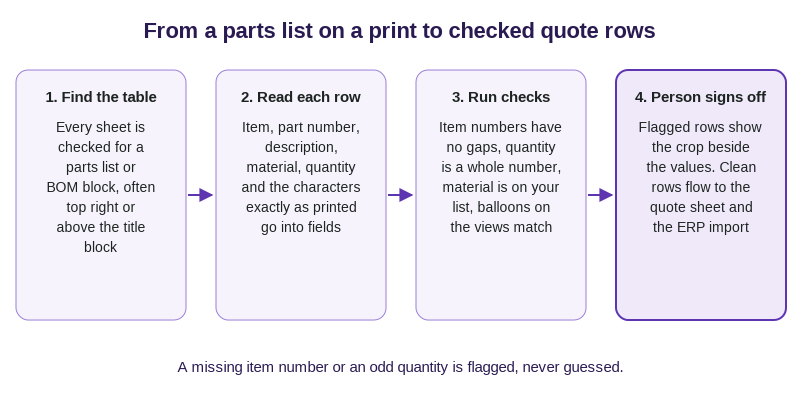
- Find the table. The program opens each attachment from the RFQ email and looks for a parts list block, often near the title block.
- Read each row. Item, part number, description, material and quantity go into separate fields, with the text exactly as printed kept alongside.
- Run checks. Item numbers must run without gaps, quantities must be whole numbers, and materials should be on your own list.
- Sign off. Flagged rows appear beside a crop of the print. Clean rows flow on to the quote sheet.
Our guide to machine shop RFQ automation shows the inbox side: how the attachment gets logged and routed before step 1 begins.
Is a vector PDF easier to read than a scanned drawing?
Yes. A vector PDF carries its text as characters, so the table can be read exactly, while a scan must be read as a picture.
Aginera’s public page says it reads vector PDFs from their text layer, which it calls exact and free, and reads scanned or flattened sheets with AI vision, one call per page. That split is common across tools.
Anthropic’s PDF support documentation says Claude can read the text and the page images, and that each page is processed as an image. It also warns that dense pages with small fonts and complex tables can fill the context window before the page limit.
What if the parts list continues across several sheets?
The reader must merge the sheets into one list and flag any duplicate or missing item number, because a table that continues is the easiest place to lose a row.
Large assemblies often put the parts list on its own sheet, or split it across two. ASME Y14.34 separates an integral parts list, which is part of the drawing, from a separate parts list that is its own document and can be revised on its own, so one RFQ may hold both.
Aginera says its tool flags potential cross-sheet duplicates instead of resolving them. That is the right habit: show a human the clash.
The drawing set also changes the size of the job, a point our guide on speeding up manufacturing quote turnaround comes back to.
How accurate does BOM extraction have to be to be useful?
Row accuracy matters less than whether every row is right, because one wrong or missing row can change the quote.
The vendors we read publish no measured accuracy rate for BOM tables. Aginera’s page says it gives confidence scores for human review and does not give a percentage. So here is our own arithmetic.
| Per-row accuracy | 10-row BOM | 25-row BOM | 60-row BOM |
|---|---|---|---|
| 99% | 90.4% | 77.8% | 54.7% |
| 98% | 81.7% | 60.3% | 29.8% |
| 95% | 59.9% | 27.7% | 4.6% |
Assumptions: rows fail independently, which real errors do not exactly follow, and the rates are examples, not anyone’s measured results. The shape is the point: long BOMs need row-level checks, not a general trust in a good average.
Which tools can extract a BOM from a PDF drawing?
There are three kinds: a BOM-reading service, a drawing API, and a general AI model you wrap in your own checks.
The best BOM reader is a careful one. It copies the table, says plainly which row it doubts, and leaves the make-or-buy calls to the person who knows the machines.
| Option | What it says it does | Worth knowing |
|---|---|---|
| Aginera | Transcribes the printed table line by line into a spreadsheet; vector PDFs from the text layer, scans with AI vision | Built for plans and pipe spools; confidence scores for review; no accuracy rate published |
| Werk24 | Returns title block data including material, tolerances and BOM | Listed at 1.25 euros per page pay as you go or 590 euros a month |
| Claude PDF support | Reads text and page images; can return structured data | You build the checks; 600 pages per request, or 100 when the context window is under 1M tokens |
| Paperless Parts | Quoting software for custom manufacturers | Check its own pages for what it reads from PDFs versus CAD |
In short: a BOM service is quickest to try, a drawing API fits a shop that wants one price per page, and a general model fits a shop that wants its own rules.
Where do sources disagree on extracting a BOM from a drawing?
They disagree on whether you should extract it at all when a CAD model exists.
Vendor pages present extraction as the answer for legacy and inbound PDFs. Engineering practice says a BOM generated from the CAD assembly is more reliable than a table read back from a drawing of that assembly, so if the customer can send the STEP file or the BOM export, ask for it as well.
Wikipedia’s bill of materials article also separates a single-level BOM from a multi-level, or indented, one. A flat parts list on a drawing is single-level, so sub-assemblies still need their own drawings.
What checks catch a skipped or garbled BOM row?
Simple code rules catch most slips before a person looks. The first one is the one Aginera’s own sample shows is needed: item numbers that jump from 8 to 10.
- Item numbers run in order with no gap, and every gap is flagged.
- Every item number appears at least once as a balloon on the views.
- Quantity is a whole number, and zero or blank is flagged.
- The part number follows your customer’s format, such as letters, dashes and digits.
- Material matches your approved list or is flagged as new.
- Units agree: “ft” in one row and “in” in another is flagged.
- The row count equals the last item number, or the difference is explained.
- Confidence below your line sends the row to a person, not to the quote.
How do extracted BOM rows become a quote and an ERP import?
Each row is sorted as made, purchased or raw stock, then priced by a rule, and the sheet is exported for your ERP.
Made parts go to their own drawings and routings. Purchased hardware gets a catalogue or last-paid price. Raw stock gets a weight and price per pound. Our guide to automated CNC quoting software shows how those rows become a price, and the one on a JobBOSS quoting integration shows how a signed sheet reaches the ERP.
What does an estimator still decide?
The estimator still decides everything that depends on judgment: make versus buy, substitutions, and any row the reader flagged.
- Whether a vague row (“hardware as required”) is quoted or queried.
- Which sub-assemblies you will build and which you will buy.
- Whether a revision difference means the print is the wrong one.
- Any row where the printed text is clipped, struck through or hand-corrected.
How do I test BOM extraction on my own drawings?
Pick five assemblies you quoted last year, run them through, and compare the output to the sheets you already know.
- Choose two vector PDFs, two scans and one multi-sheet set.
- Extract each BOM and count the rows against the originals.
- Note every row that is wrong or missing, and which check would have caught it.
- Time the human review against retyping the same table.
If you’d like help setting up that test on your own prints, the form at the top of this page reaches us.
How we researched this
- Read the ASME Y14.34 Associated Lists page and public summaries of it, on November 28, 2026.
- Read the public pages of Aginera, Werk24 and Paperless Parts, and Anthropic’s PDF support documentation, on the same date.
- Read the Wikipedia bill of materials article for the single-level and indented distinction.
- Calculated the whole-BOM accuracy table ourselves, with the assumptions shown. We did not run any tool on drawings for this guide, and we did not read Reddit threads that spoke to this exact task.
Pull five assembly prints you quoted last year, and count which rows a reader gets right on its own.
Sources and further reading
Questions and answers
Can I use AI to automate BOM extraction from PDF drawings?
Yes, with checks. An AI vision model or a BOM-reading service can find the parts list on each sheet and return item, part number, description, material and quantity as rows. Let code check for gaps and odd quantities, and have an estimator confirm any flagged row before it reaches a quote.
Is it better to read the BOM from the PDF or from the CAD file?
The CAD file, when you can get it. A BOM generated from the assembly model is more reliable than a table read back from a drawing of it. Use PDF extraction for the many RFQs that arrive as drawings only.
Can it read a scanned parts list?
Yes, with AI vision, but less safely than a vector PDF with a text layer. Aginera says it reads scans one call per page. Check part numbers and quantities on scans, since a dropped character changes the part.
What if the parts list is spread over several sheets?
The reader should merge the sheets and flag any duplicate or missing item number. Aginera says its tool flags potential cross-sheet duplicates instead of resolving them, and a person settles each one.
How much does BOM extraction cost?
It varies. Werk24 lists 1.25 euros per page pay as you go or 590 euros a month; other tools quote on request. Compare that with the minutes your estimator spends retyping the same table, measured on your own RFQs.