Automated Sheet Metal Estimating Tool: Quotes From Prints in Minutes
Hello, and welcome to everyone who has ever unfolded the same bracket three times just to price it.
Picture an RFQ with twelve brackets, panels and enclosures, a PDF print for each, and a buyer who wants a price by Friday.
In most fab shops someone still unfolds each part, nests it on a sheet, counts the bends and holes, and types the result into a spreadsheet or the ERP.
That reading and counting is exactly the part a computer does well, and it is why the shop that answers first so often gets the order.
Short answer: An automated sheet metal estimating tool reads the RFQ email, the PDF print and the flat pattern, measures cut length, pierce count, bends and blank size, and applies your shop’s own rates for material, laser, press brake, hardware and finishing to draft a priced quote sheet in minutes. Your estimator checks the flagged items and signs before it goes out.
- What the tool measures
- Blank size, cut length, pierce count, bend count, hardware and finish notes, quantities
- Why sheet metal suits automation
- Paperless Parts says no single sheet metal operation is more than 30% of the cost or time, and each runs at a near-fixed rate
- Our worked example
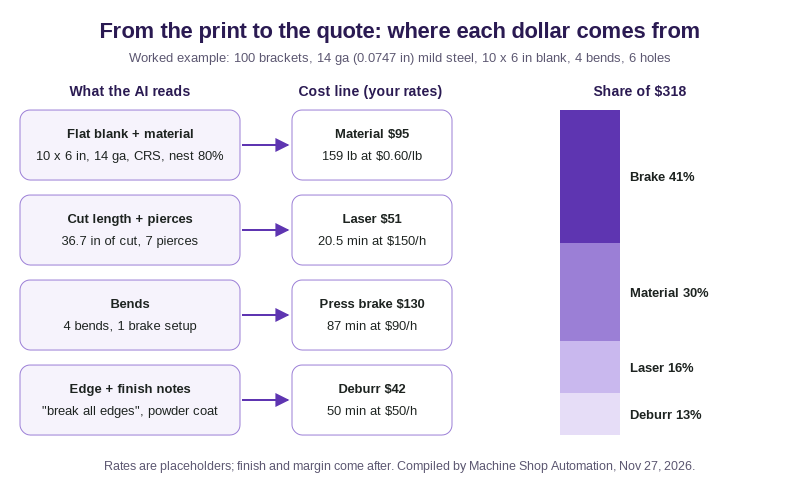
- 100 brackets in 14 gauge (0.0747 inch) mild steel cost about $318 in-house before finish and margin, and the press brake, not the laser, is the biggest line at 41%
- What still needs a person
- Flagged callouts, tight bend tolerances, new materials, outside-process prices and the final number
What is an automated sheet metal estimating tool?
An automated sheet metal estimating tool is software that turns an incoming RFQ into a priced draft without an estimator unfolding, measuring and retyping each part.
It reads three things. The RFQ email gives part numbers, revisions and quantities. The PDF print gives material, gauge, bend notes, hardware and finish. The DXF flat pattern or the 3D model gives the geometry that drives laser and brake time.
The tool then runs the same arithmetic your estimator runs today, with your shop’s rates, and lays the result out as a quote sheet. It drafts; a person decides.
Why does sheet metal estimating take so long by hand?
Sheet metal estimating is slow by hand because every part has to be flattened, measured and counted before a single price is safe to send.
On the Practical Machinist fabrication forum, a fabricator with about 30 years in the trade described the hand method: rough out the blank size, count the bends, holes and punch hits, and approximate the laser’s linear inches from the part’s outline times a multiplier.
The same thread shows why that rough method has limits. He found the K-factor fine for quoting but not accurate enough for the tolerances his shop holds, while another member flattens every part in SolidWorks or Alibre just to get a true blank size.
Multiply that by a twelve-part RFQ and the estimator’s day is gone. The Fabricator reported on a job shop that studied 1,794 RFQs over one year and found that more than half of its winning bids had gone back to the customer within three days.
Is sheet metal easier to estimate automatically than CNC machining?
Yes, in one important way: sheet metal costs come from a handful of operations that each run at a near-fixed, measurable rate.
Paperless Parts co-founder Jay Jacobs made the case on the Paperless Parts blog: No one operation contributes more than 30% of the cost/time.
A laser cuts a known number of inches per minute and takes a known number of seconds per pierce, and bends run at a roughly fixed rate per hour.
That means the laser’s run time is a formula with no guesswork once the cut length and pierce count are known. A CNC machining quote, by contrast, leans on a cycle-time guess that depends on tooling, workholding and the programmer.
Here’s the catch: the formula is only as good as the numbers fed into it. Reading the right material, gauge and flat pattern off the print is where the time and the risk sit.
How does an automated sheet metal estimating tool work, step by step?
An automated sheet metal estimating tool follows the same steps a careful estimator follows, with the reading, measuring and arithmetic done in minutes.
- Watch the inbox. RFQs go to one address, such as quotes@yourshop.com. Your web server watches it through Gmail API push notifications or Microsoft Graph change notifications and unpacks every PDF, DXF, STEP and zip.
- Read the print. Each PDF goes to a vision-capable AI model. Anthropic’s Claude PDF support sends each page as an image plus its text, so the title block, bend notes and hardware callouts are read as a drawing.
- Extract fixed fields. The model returns material, gauge and decimal thickness, finish, hardware, quantities, revision and due date, each with a confidence flag.
- Measure the geometry. The DXF flat pattern, or the unfolded 3D model, gives blank size, cut length and pierce count; the model or print gives the bend count.
- Price with your rates. Your own rate card, not the AI, turns those numbers into money: material by weight and nest yield, laser minutes, brake setups and hits, deburr, hardware and outside finishing.
- Sign off. The estimator sees the print, the extracted fields and the draft price side by side, fixes anything flagged, and approves. A won job is pushed to the ERP.
What does the AI read off a sheet metal print and RFQ?
The AI reads the fields your estimator retypes today, plus the small notes that quietly change a sheet metal price.
| Source | Fields | Why it changes the quote |
|---|---|---|
| RFQ email | Customer, part numbers, revisions, quantities and quantity breaks, due date | Sets batch size, how setups spread, and whether the lead time is possible |
| Title block | Material, gauge and decimal thickness, finish, general tolerances, revision | Material and thickness set the weight, the laser speed and the brake tooling |
| Flat pattern (DXF) | Blank size, outer and inner contours, holes, etch lines | Gives cut length, pierce count and nest yield on your stock sheet sizes |
| Bend notes and views | Bend count, inside radius, bend direction, flange tolerances | Each bend is a brake hit; a tight flange tolerance can add setup and inspection time |
| Notes and BOM | Self-clinching hardware, welds, deburr or “break all edges”, powder coat, plating | Hardware insertion, welding and finishing add labor, vendor cost and days |
Paperless Parts’ October 21, 2026 DXF announcement describes this kind of reading: its Wingman assistant labels each feature as an exterior or interior cut, bend or etch, and can pull flat patterns from PDF prints into DXF.
Why does the word “gauge” trip up automated estimates?
The word “gauge” trips up sheet metal estimates because the same gauge number means a different thickness in each material.
The Fabworks gauge chart lists 16 gauge as 0.0598 inch in steel, 0.0508 inch in aluminum and 0.0625 inch in stainless. A tool that reads 16 GA
but looks up the wrong column prices the wrong weight and the wrong cut speed.
The guard is simple: the extractor must return material and decimal thickness together, and flag any print that gives a gauge without saying which metal it is.
How does a sheet metal estimating tool turn a print into a price?
A sheet metal estimating tool turns a print into a price by multiplying each measured quantity by one of your shop’s rates, then adding them up.
What a good estimating draft really hands back is attention. Your estimator stops counting holes and bends, and starts looking at the one flange tolerance that could make the job lose money.
Here is that arithmetic on one ordinary part, so you can see what the tool is doing for you on every line.
| Cost line | What was measured | Rate used | Cost for 100 | Share |
|---|---|---|---|---|
| Material | 60 sq in blank at 80% nest yield = 75 sq in per part, about 1.59 lb; 159 lb total | $0.60 per lb | $95.33 | 30% |
| Laser | 36.7 in of cut and 7 pierces = 12.3 s per part; 20.5 min total | 250 in/min, 0.5 s per pierce, $150 an hour | $51.30 | 16% |
| Press brake | 4 bends at 10 s each = 40 s per part, plus a 20 min setup; 86.7 min total | $90 an hour | $130.00 | 41% |
| Deburr | 30 s per part; 50 min total | $50 an hour | $41.67 | 13% |
| Total before finish and margin | $318.30 ($3.18 a part) | 100% |
Assumptions: steel at about 0.284 lb per cubic inch; cut length is the 32 inch outline plus six hole circumferences; the cut speed, pierce time, bend time and all four rates are placeholders, not quotes from any shop. Put in your laser’s cut charts, your brake times and your current steel price.
The surprise for most people is the laser. It is the line everyone thinks of first, yet in this example it is only 16% of the cost, while the brake setup and hits are 41%. A tool that only times the laser misses most of the money.
Powder coat, self-clinching hardware and margin come after these lines, from your vendor price list and your own margin rules per customer.
Which automated sheet metal estimating tools can fab shops use?
The main choices are a cloud quoting platform, the quoting module of your nesting software, the quote screen of your ERP, or a custom inbox reader that feeds any of them.
| Option | What its maker says it does | Reads PDF prints with AI? |
|---|---|---|
| Paperless Parts | Geometry-driven sheet metal quoting, pricing tools, CAD viewing and manufacturability checks; new DXF quoting cleans and costs flat patterns | Yes, Wingman labels cuts, bends and etches and pulls flat patterns from PDF prints (DXF quoting in open beta, general availability planned by end of 2026) |
| Lantek iQuoting | Cloud subscription that analyses part geometry, estimates cutting time for laser, plasma, oxy-fuel, waterjet and punching, and uses cloud nesting for material use | Not described; it works from CAD files |
| SigmaQUOTE (SigmaTEK) | Quoting inside the SigmaNEST family: costing models, imports customer CAD files, quote history and conversion to work orders | Not described on its page |
| JobBOSS² and E2 MFG (ECI) | ERP quoting from materials, labor, overhead and past jobs, converted into orders and jobs | Not described; an estimator types the routing |
| Custom inbox reader | Watches your quotes inbox, reads prints with a vision AI model, measures DXFs, and fills a quote sheet or your ERP’s import | Yes, built around your own prints and rate card |
None of these makers lists a public price on the pages we read. Ask each one to quote three of your recent RFQs, including one with a scanned print and one aluminum part called out only by gauge.
A forum note worth remembering: in a Practical Machinist thread on quoting software, one member pointed out that an ERP’s quote screen does not actually estimate anything; it stores the numbers a person works out.
What should a human estimator still check on a sheet metal quote?
A human estimator should still own every judgment call on a sheet metal quote: tooling, risk, the customer and the final price.
- Any field the reader marks as low confidence, and any gauge without a named material.
- Bend tolerances or inside radii your brake tooling cannot hold without a special setup.
- Parts that will not nest on your stock sheet sizes, or need a remnant you may not have.
- Welding, assembly and hardware counts until a person has looked at the BOM.
- Outside finishing until a vendor price is attached, and the final number and lead time.
The aim is not an estimator who types faster. It is an estimator who spends their minutes on the three parts in the RFQ that actually carry risk.
What can go wrong with automated sheet metal estimating?
Four things go wrong most often with automated sheet metal estimating, and each has a simple guard.
- The wrong thickness. A gauge read against the wrong material’s column. Guard: decimal thickness and material must come back together, or the part is flagged.
- A flat pattern that does not match the print. The customer’s DXF was unfolded with a different K-factor or an older revision. Guard: compare the DXF blank size with the unfolded model or the print’s overall dimensions, and flag a gap.
- The wrong revision. Guard: compare the revision in the email, the title block and the file name, and stop the draft if they disagree.
- Export-controlled drawings. ITAR, EAR or CUI prints may not be allowed on just any cloud service. Guard: detect those markings first and route them to an approved system; the State Department’s DDTC administers ITAR.
How do you start with an automated sheet metal estimating tool?
Start with two weeks of shadow quoting, where the tool drafts every sheet metal quote in the background while your estimator keeps quoting as usual.
- Days 1 and 2: write down the rate card, and pick 20 recent sheet metal RFQs, won and lost, as a test set.
- Days 3 to 7: every new RFQ is drafted automatically, and the estimator compares each line with their own: material, laser, brake, deburr, finish.
- Days 8 to 10: repeat parts in familiar materials go out from the draft after review; welded assemblies and new materials stay manual.
- End of week 2: count the hours saved, the misreads caught and the quotes that went out within a day.
If the drafts do not save real estimating hours on your own prints in those two weeks, the tool is not right for your shop yet. That is the honest test.
For the wider picture, our guide to automated CNC quoting software covers machined parts, and our guide on how to extract dimensions from engineering drawings PDF files covers the print-reading step in depth.
Let it draft next week’s sheet metal RFQs in the background, and compare its brake line with yours.
Sources and further reading
- Paperless Parts: sheet metal estimating software
- Paperless Parts blog: automating sheet metal quoting is easier than machining (Jay Jacobs)
- Paperless Parts: new DXF quoting capabilities (October 21, 2026)
- Lantek: iQuoting sheet metal quoting software
- SigmaTEK: SigmaQUOTE
- ECI: JobBOSS² job shop ERP
- ECI: E2 MFG shop management
- Anthropic: Claude PDF support
- Gmail API: push notifications
- Microsoft Graph: change notifications overview
- Fabworks: sheet metal gauge chart by material
- U.S. State Department: Directorate of Defense Trade Controls (ITAR)
- The Fabricator: 5 steps to faster quoting in the job shop
- Practical Machinist forum: sheet metal blank size calculating (fabricator discussion)
- Practical Machinist forum: quoting / estimation software (owner discussion)
Questions and answers
Can I use AI to automate sheet metal estimating?
Yes. A vision-capable AI model can read the RFQ email and PDF print, pull material, gauge, bends, hardware and finish, and pair them with cut length and pierce counts from the flat pattern. Your own rate card then drafts the quote in minutes. Keep an estimator’s sign-off on every price.
How is laser cutting time calculated for a sheet metal quote?
Laser cutting time is the total cut length divided by the cutting speed for that material and thickness, plus the number of pierces times the pierce time. For example, 36.7 inches at 250 inches a minute plus 7 pierces at 0.5 seconds is about 12.3 seconds per part.
Do I need a 3D model, or is a PDF print enough to quote sheet metal?
A PDF print is often enough for a draft, because a vision model can read material, gauge, bends and notes, and some tools can pull a flat pattern from the print. A DXF flat pattern or 3D model makes cut length and blank size far more exact, so ask for one on larger orders.
How accurate is an automated sheet metal estimate?
An automated estimate is as accurate as the rate card and the extracted fields behind it. Arithmetic errors disappear, but a misread gauge or a mismatched flat pattern still produces a wrong price, which is why flagged fields and the final number go to an estimator.
Will an automated sheet metal estimating tool work with my nesting software and ERP?
Usually, yes. Lantek and SigmaTEK build quoting into their own nesting families, Paperless Parts connects won quotes to job shop ERPs, and a custom inbox reader can fill your ERP’s import file or the quote sheet you already use.