ProShop ERP Estimating Automation for Machine Shops
Short answer: ProShop ERP automates the costing and handoff after an estimator picks a template and checks the job inputs. Use separate fields for normal setup, first-run setup and minutes per part. If the delay starts in emailed drawings, add an intake step that drafts the fields for review before you price.
A repeat RFQ looks like an easy copy and paste until you find setup time from the first run in the old quote.
On November 29, 2026, I read the 1995 paper AI Planning Versus Manufacturing-Operation Planning in NIST’s archive.
Estimating discussions often start with minutes saved at the desk.
The researchers were already counting the time the tool spends out of the cut.
In 1995 the IMACS researchers modeled time to cut, change tools and set up. In October 2021, ProShop announced its Paperless Parts integration. In June 2026, ProShop described Chip, which uses job history to surface cycle times and cost information for estimators.
What can ProShop ERP automate in estimating?
ProShop can calculate an estimate from configured labor, material and vendor costs, use it to build a quote, and carry approved job details into production. Its official walkthrough shows the linked records: Estimate, Quote, Customer Purchase Order, Part and Work Order.
The product page describes customizable templates pre-loaded with your shop’s actual labor, material, and vendor costs
. Use that to price repeatable work consistently. The template still needs the correct quantity, material, revision and set of operations for this bid.
| Stage | What the record is for | Check before moving on |
|---|---|---|
| Estimate | Operations, setup, minutes per part and cost inputs | Match the print revision, material and quote quantities. |
| Quote | Customer prices, quantity breaks and how to show first-run expense | Confirm margin, delivery commitments and what the quote includes. |
| Customer PO, Part and Work Order | Accepted requirements and the production record | Match the order to the approved revision and keep the attachments available. |
See ProShop’s Estimate Cost Breakdown if you want to trace which inputs are contributing to the total before a quote goes out.
How should you separate first-run setup from repeat work?
Recurring setup goes on each lot, first-run setup goes on the initial lot for the applicable revision, and run time goes on each piece. ProShop Help calls first-run setup NR Set-up and describes a separate field for breakdown. Review what counts as first-run work when a revision changes.
The 1995 IMACS paper says the planner checked whether operations could meet the design tolerances before estimating manufacturing time. That’s a useful review rule today. A previous run’s cycle time carries little weight if a tighter tolerance changes the process.
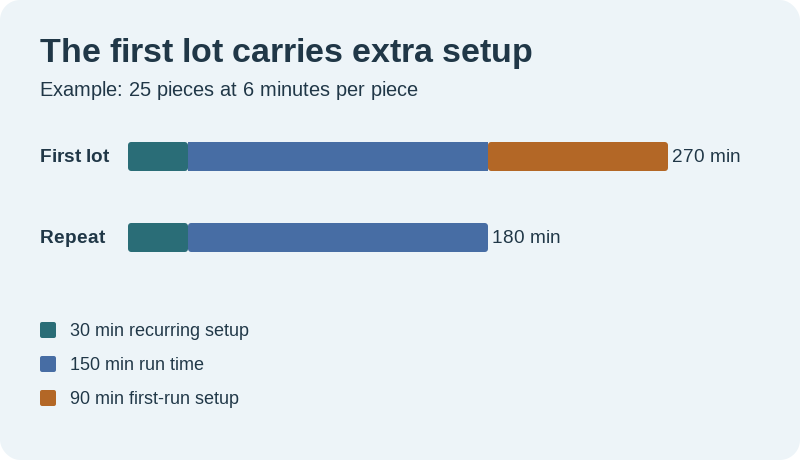
Example: an operation takes 30 minutes of recurring setup, 90 minutes of first-run programming and 6 minutes per piece at a blended $80 per hour. At 25 pieces, the first lot totals 270 minutes and $360. A repeat with the same setup and no new programming totals 180 minutes and $240.
The difference is $120, or $4.80 per piece at 25 pieces. At 100 pieces it is $1.20 per piece. These figures cover the illustrated operation only. Include material, outside services, inspection and margin separately as applicable.
ProShop documents options to quote non-recurring expense separately or spread it across unit prices. If a customer orders a smaller quantity than expected, compare the original assumptions before deciding which price still covers the work.
Do you need a separate tool to read RFQs and drawings?
Use a separate intake step if the work starts in an inbox and your team still copies part numbers, revisions and quantities by hand. ProShop’s public template documentation describes applying your costs. A drawing reader addresses the earlier step of turning customer files into fields an estimator can check.
I’d check the minutes per part and the setup minutes on separate lines during the first reconciliation.
| Approach | Best starting point | What to verify |
|---|---|---|
| Native ProShop template | Known material, operations and costs already in the ERP | Revision match, setup category and quantity break |
| Paperless Parts with ProShop | Vendor-described intake and quoting plus a documented integration for won quotes | Which fields and attachments move, at which event, in your configuration |
| Approved inbox reader and draft sheet | PDF or email intake when the estimator wants to keep quote creation in ProShop | Source page, units, conflicting revisions and a supported transfer method |
ProShop’s Chip announcement describes suggestions based on similar work in the shop’s history. Confirm availability and scope for your account if you want it to assist the workflow. Test one repeat with a known drawing revision before changing how your team enters estimates.
For the source-reading step, our guides to automated RFQ intake and checking extracted drawing dimensions show which fields to present with the original page. Keep customer drawings in the systems your shop has approved for them.
What should an estimator verify before the quote goes out?
Run one completed repeat job through the draft and compare the numbers with the original job record. Use a familiar part and quantity. Reconcile recurring setup, first-run work and run minutes separately before looking at the final total.
- Match customer, part number, print revision, units and requested quantity to the source files.
- Confirm material, inspection, outside services and any special finish before picking a template.
- Compare the estimate with the job’s actuals and note legitimate differences, such as a new process or quantity.
- Keep the accepted PO and revision linked to the released work order. Have the estimator approve the price and schedule.
In the same 1995 study, the researchers separated fixed from variable machining costs. If you only compare two unit prices at one quantity, an error in fixed setup can hide. Compare a small and a larger lot to see which part of the estimate changes.
How we researched this
- Read ProShop Help’s RFQ-to-work-order walkthrough and cost breakdown, ProShop’s product and integration pages and Paperless Parts’ description of intake and won-quote handoff on November 29, 2026.
- Read the original IMACS paper and a public machinist discussion about differences in how shops use the system. Product features come from the makers.
- Calculated the example using the stated minutes and rate. The workflow has no measured savings or customer results attached.
Compare the same part at two quantities. If the setup cost moves in proportion to quantity, check how it’s classified before reusing the estimate.
Sources and further reading
- Nau, Gupta and Regli: AI Planning Versus Manufacturing-Operation Planning, 1995
- ProShop Help: Getting from a Client’s Request for Quote to a Work Order
- ProShop Help: Estimate Cost Breakdown
- ProShop: Estimating and Quoting
- ProShop: First-run setup and quoting non-recurring expense
- ProShop: Paperless Parts integration announcement, October 2021
- ProShop: Chip announcement, June 2026
- Paperless Parts: Manufacturing estimating, intake and ERP integration
- Machinist discussion: ProShop ERP workflows
Questions and answers
Can I use AI for ProShop ERP estimating automation?
Yes. Use AI to draft RFQ fields or surface relevant job history, then have an estimator verify the inputs and price the bid using approved data.
Does ProShop support separate first-run and repeat setup?
Yes. Its Help walkthrough distinguishes Set-up from NR Set-up. Review the non-recurring value when the job or revision changes.
Can ProShop turn an estimate into a quote and work order?
Its documented process links the estimate and quote to a customer purchase order, part and work order. Inspect the accepted quote and order before releasing work.
Does Paperless Parts integrate with ProShop ERP?
Both makers document an integration. Check the supported fields and handoff event in your configuration before relying on it for production.
Should a repeat job always use its last quoted price?
Check the same revision, requested quantity and current material and outside-service costs. A repeat can drop first-run work while carrying a new cost somewhere else.