How to Extract Data from a Bill of Lading PDF Without Retyping It
Hello to everyone who has ever zoomed in on a crooked phone photo to read a pallet count.
Picture the billing queue on a Monday morning, with every signed bill of lading already read, matched to its load and ready to invoice.
Most small brokerages and fleets still open each BOL by hand, zoom in on the driver’s photo, and type the BOL number, pieces and weight into the TMS.
That typing is slow, and it is also where the costly mistakes hide: a 1 read as a 7 in the weight box, or a short-count note in the margin that nobody saw.
Short answer: To extract data from a bill of lading PDF, send each BOL to a document reader such as Amazon Textract, Azure AI Document Intelligence, Google Document AI or a vision AI model like Claude, ask for a fixed list of fields, check them against the load and rate con, and write clean JSON into your TMS.
What data is on a bill of lading?
A bill of lading carries the parties, the stops, the freight and the signatures, and federal rules set a minimum of five items.
Under 49 CFR 373.101, every motor carrier subject to § 373.100 shall issue a receipt or bill of lading for property tendered for transportation in interstate or foreign commerce
listing the consignor and consignee, origin and destination, number of packages, a description of the freight, and its weight, volume or measurement when that affects the rating.
| Group | Fields | Why billing and claims need it |
|---|---|---|
| Identifiers | BOL number, PRO number, shipper and PO numbers, SCAC | Matches the paper to the right load and invoice |
| Parties | Shipper (consignor), consignee, bill-to or third party | Required by 373.101; decides who gets the invoice |
| Places | Origin and destination addresses | Required by 373.101; must match the rate con |
| Freight | Handling units, pieces, description, NMFC class, hazmat flag | Package count and description are required; class drives LTL pricing |
| Weight | Weight per line and total | The number reweighs and overweight disputes turn on |
| Equipment | Trailer number, seal number | Proves the seal was intact on arrival |
| Terms | Prepaid, collect or third party; COD amount; declared value | Settles who pays before anyone argues |
| Proof | Shipper, driver and receiver signatures, dates, exception notes (OS&D) | Turns the BOL into a proof of delivery |
Retail shippers often use the GS1 US bill of lading, the former VICS BOL, which adds a 17-digit BOL number and a customer order table with several POs. Plan for both layouts from the first day.
Why is a bill of lading PDF so hard to read automatically?
A bill of lading is hard to read automatically because every shipper prints its own layout and the copy that matters most, the signed one, usually arrives as a phone photo.
The signed delivery copy carries handwriting, stamps and carbon-copy smudges. A receiver writes 2 pallets short
in the margin, the driver shoots the page at an angle in a dim cab, and page 2 of a multi-stop BOL never gets photographed at all.
OCR vendors are open about the gap. LaneProof, a freight software vendor, writes that On clean, typed carrier invoices, OCR runs at 97 to 99 percent accuracy
, but that on handwritten BOLs or faxed PODs it drops to 60 to 75 percent
(LaneProof, May 10, 2026). Those are a vendor’s numbers, so measure your own.
The paperwork can also be the wrong paper. A September 2026 guide from Nexasphere lists the unsigned pickup BOL sent instead of the signed delivery copy, a blurry or cut-off photo, and page one of a multi-page BOL as everyday reasons a POD packet gets rejected.
So BOL extraction is half reading and half judging. The reading part is what software now does well. The judging part is a short list of rules, covered below.
How much time does keying BOLs by hand cost?
Keying bills of lading by hand costs a small operation one to four hours a day once both copies of every load are counted.
Most loads produce two BOL images: the shipper’s copy at pickup and the signed copy at delivery. Each one gets opened, read, compared with the load and typed in.
| Loads a day | BOL pages a day | Hours a day (3 min a page) | Hours a month (21 workdays) | Textract Queries cost a month |
|---|---|---|---|---|
| 10 | 20 | 1.0 | 21 | $6.30 |
| 20 | 40 | 2.0 | 42 | $12.60 |
| 40 | 80 | 4.0 | 84 | $25.20 |
Assumptions: two one-page BOLs a load, 3 minutes to open, read and key each page, 21 working days a month. The last column uses the published Amazon Textract price of $0.015 a page for Analyze Document Queries on the first million pages a month (Amazon Textract pricing, US West Oregon example).
The reading itself costs pennies. What you pay for is the setup, the checks and the person who reviews the flagged pages, which is why the review step matters more than the price per page.
How do you extract data from a bill of lading PDF automatically?
You extract data from a bill of lading PDF automatically in five steps: collect it, prepare it, read it, check it and write it.
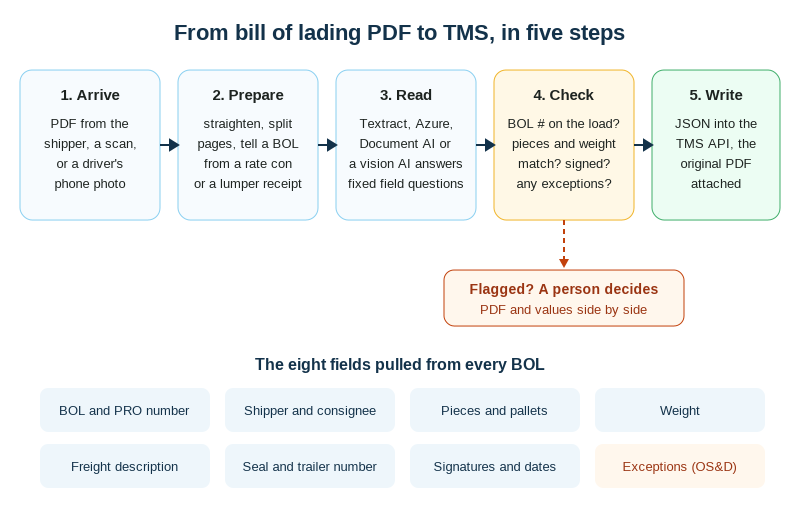
- Arrive. BOLs come in by email, from a driver app upload, or from a texted photo. One shared inbox, such as pods@yourcompany.com, keeps them in one place.
- Prepare. The service straightens the image, splits a multi-page PDF, and sorts each page: BOL, rate con, lumper receipt or scale ticket.
- Read. A document reader or vision AI model answers a fixed list of questions:
What is the BOL number?
, “How many pieces?”,Is the consignee signature present?
,Are there exception notes?
- Check. Rules compare the answers with the load: same BOL or PO number, pieces and weight within your tolerance, signature and delivery date present.
- Write. Clean values go into the TMS as JSON through its API, and the original image is attached to the load. Anything flagged waits for a person.
The diagram shows the same five steps: 1 Arrive (PDF, scan or driver photo), 2 Prepare (straighten, split, sort), 3 Read (Textract, Azure, Document AI or a vision AI), 4 Check (BOL number, pieces, weight, signature, exceptions), 5 Write (JSON into the TMS, original attached).
The eight BOL fields in the diagram are the BOL and PRO number, shipper and consignee, pieces and pallets, weight, freight description, seal and trailer number, signatures and dates, and exceptions (OS&D).
Which tools can read a bill of lading?
Four general cloud services can read a bill of lading today, and none of the three big OCR clouds ships a ready-made BOL model, so each one needs a little setup.
| Tool | How you point it at BOL fields | What the maker documents |
|---|---|---|
| Amazon Textract Queries | Ask plain questions such as What is the PRO number? | Returns the answer, a confidence score and its location on the page; $0.015 a page on the first million pages |
| Azure AI Document Intelligence | Label sample BOLs and train a custom extraction model | No prebuilt BOL model; custom extraction needs only five examplesof a form to start, and custom template models detect whether a signature is present |
| Google Document AI Custom Extractor | Write a schema of the fields you want | Generative extraction; For zero-shot, only the schema is required, with 5 to 10 documents suggested for few-shot |
| Claude PDF and image input | Send the PDF with instructions and a JSON shape to fill | Each page is read as text plus an image, so stamps, checkboxes and handwriting are visible to the model |
Freight-specific OCR products bundle these same steps with BOL layouts already learned. Whichever you try, run 50 of your own BOLs through it, including the worst phone photos, before you trust a vendor’s accuracy number.
Anthropic’s documentation explains why a vision model helps with paper like this: Because Claude receives an image of each page, you can ask for insights on visual elements of a PDF
. On a BOL, those visual elements are the “Freight Prepaid” stamp, a ticked hazmat box and a receiver’s scrawled note.
Does it matter if the BOL is a digital PDF, a scan or a phone photo?
Yes, the source of a bill of lading decides most of its accuracy: a shipper’s digital PDF reads almost perfectly, a flat scan reads well, and a dim angled photo or a fax is where errors cluster.
Here’s the quiet win: once the signed BOL reads itself, billing stops waiting on paperwork, and the exception notes that matter finally get a person’s full attention instead of a tired glance at 5 p.m.
- Digital PDF from the shipper’s system: the text is already inside the file, so extraction mostly means finding the right label.
- Flat scan: clean OCR, with handwriting the weak spot.
- Driver phone photo: shadows, angles, cut-off edges; straightening helps, and a confidence threshold sends the rest to a person.
- Fax: low resolution; Azure’s documentation sets a minimum text height of about 8-point text at 150 dots per inch.
What should be checked before BOL data goes into the TMS?
Before bill of lading data goes into the TMS, six checks should pass, and any failure sends the document to a person instead of the invoice.
- The BOL, PO or PRO number matches a load that is open in the TMS.
- Pieces and weight match the rate con or order within your tolerance, for example 2 percent on weight.
- The consignee signature and the delivery date are present on the delivery copy.
- The page is the signed delivery copy, not the unsigned pickup copy sent twice.
- Any exception wording, such as “short”, “damaged”, “refused” or “subject to count”, is flagged for a person.
- The seal number on the BOL matches the seal number recorded at pickup.
How does extracted BOL data get into McLeod, Tai, Aljex or Rose Rocket?
Extracted bill of lading data reaches the TMS as a small JSON record sent through the TMS’s API, an approved integration or an import file.
{ "load": "LD-48213", "bol_number": "8817342", "pro_number": "PRO 55120934",
  "pieces": 22, "pallets": 22, "weight_lb": 38140, "seal": "4471182",
  "consignee_signed": true, "delivered": "2026-11-28",
  "exceptions": "2 pallets short", "needs_review": true }
That record carries an exception note, so it is marked for review. A dispatcher sees the photo and the values side by side before billing moves.
McLeod Software, Tai Software, Aljex and Rose Rocket differ in how outside programs connect, so ask your rep how a program can update a load and attach a document.
The same inbox pipeline that reads BOLs can read rate cons too; see how to automate rate confirmation data entry and the wider freight broker TMS email integration. If the signed BOL never arrives, automated check calls can text the driver for it at the dock.
Will electronic bills of lading make PDF extraction unnecessary?
Electronic bills of lading will shrink PDF extraction for large LTL carriers first, but truckload freight will keep sending PDFs and photos for years.
The NMFTA eBOL API standard, version 2.1 since March 2024, lets a shipper send a structured BOL straight to an LTL carrier’s system, and NMFTA has since published a full truckload eBOL standard as well.
Adoption depends on every shipper and carrier on a lane. Until the regional shipper with a carbon-copy pad joins in, someone still has to read that paper, and that is the job a document reader takes over.
What does a sensible first week look like?
A sensible first week runs the extraction on last month’s bills of lading before it ever touches a live load.
- Day 1: pull 50 real BOLs from last month, including the worst photos and both VICS and straight layouts.
- Day 2: agree on the fields and the six checks, and run all 50 through one or two readers.
- Day 3: compare the output with what your team keyed, field by field, and count the misses.
- Day 4: run it on live BOLs in shadow mode while billing works as usual.
- Day 5: let clean, matched BOLs go straight to the load, and review the rest with one click.
If the reader cannot match your team on your own paperwork in that week, it is not ready.
If it can, the hours in the table above come back to billing, and the signed BOL is on the load before the driver leaves the dock.
Start with last month’s 50 worst BOLs, see what a reader makes of them, and let the clean ones take care of themselves.
Sources and further reading
- eCFR: 49 CFR 373.101, for-hire, non-exempt motor carrier bills of lading
- eCFR: Appendix A to Part 1035, Uniform Straight Bill of Lading
- GS1 US: Bill of Lading Guideline R5.0 (the former VICS BOL), September 2025
- NMFTA Digital Standards Development Council: eBOL API standard
- NMFTA: Build Once, Connect Everywhere, the new FTL eBOL API standard
- Amazon Textract: Queries
- Amazon Textract: pricing
- Microsoft: Azure AI Document Intelligence model overview
- Google Cloud: Document AI Custom Extractor with generative AI
- Anthropic: Claude PDF support
- LaneProof: Freight OCR, what it reads well and where it fails (vendor claim, May 10, 2026)
- Nexasphere: Missing POD is holding your freight invoice (September 19, 2026)
Questions and answers
Can I use AI to extract data from a bill of lading PDF?
Yes. A vision AI model or a document reader such as Amazon Textract, Azure AI Document Intelligence or Google Document AI can read a BOL PDF, scan or photo and return the BOL number, pieces, weight, signatures and exception notes as structured data. Check the values against the load and keep a person on flagged pages.
What information is legally required on a bill of lading?
Under 49 CFR 373.101, a for-hire motor carrier’s bill of lading must show the names of the consignor and consignee, the origin and destination points, the number of packages, a description of the freight, and its weight, volume or measurement when that affects the rating.
Can OCR read handwritten notes on a BOL?
Partly. Typed text reads well, but handwriting, stamps and faxed copies are where OCR errors cluster; one freight software vendor puts handwritten BOL accuracy at 60 to 75 percent. Vision AI models do better on messy pages, but exception notes should still go to a person.
How much does it cost to extract data from BOLs automatically?
The reading itself is cheap. Amazon Textract lists $0.015 a page for Queries on the first million pages a month, about $12.60 a month for 40 BOL pages a day. Setup, the checks and the person reviewing flagged pages cost more than the pages.
Is a bill of lading the same as a proof of delivery?
Not exactly. The bill of lading is the shipping receipt and contract issued at pickup. It becomes the proof of delivery when the receiver signs and dates the delivery copy, often with exception notes, which is why the signed copy matters for billing and claims.