
How to Automate Monthly Bookkeeping Client Check-Ins (Without the Chase)
Hello, and welcome to anyone who sends any receipts for me?
on the 1st and still waits on the 28th.
Every month-end, bookkeepers send some version of any receipts for me?
and then wait.
I spent November 29, 2026 with Xero’s reconciliation page, Intuit’s bank feed notes and a summary of what bookkeepers say on r/Bookkeeping, to separate what the software already does from what is still done by hand.
Two facts stood out. Both QuickBooks and Xero already suggest or apply categories to bank lines. And the part nobody automates by default is the asking, then checking what comes back.
Short answer: To automate monthly bookkeeping client check-ins, pull the bank feed on a set day, list only the transactions missing a receipt or answer, send each client one text or link, check every photo or PDF for blur and missing pages, stop reminders when the list is empty, and push categorized entries to QuickBooks or Xero for review.
What does an automated monthly bookkeeping client check-in do?
It replaces the general reminder with a specific one. On a fixed day, it reads each client’s bank feed, finds the lines it cannot yet explain, and asks the client about those lines only.
| Part | What happens | Who does it |
|---|---|---|
| 1. Trigger | A set day each month starts the run | The schedule |
| 2. List | Bank lines with no receipt or clear category are listed | The system |
| 3. Ask | One text or web link with only those items | The system |
| 4. Check | Each upload is read for blur, missing pages, line items | AI Vision |
| 5. Review | Categorized entries wait in QuickBooks or Xero | A person, for exceptions |
In one line: the system asks, reminds and reads, and a person approves.
Why do clients ignore the monthly send me your receipts
email?
Because the request is vague and the work is theirs. A client who must remember 40 charges from three weeks ago puts it off.
A third-party summary of r/Bookkeeping threads, ThreddIQ’s teardown, reports bookkeepers saying clients never log into portals, and that a receipt is often gone within hours of the purchase. It is a secondary summary, so treat it as a sketch of the complaint, not a statistic.
That fits the usual fix: ask sooner, ask about fewer things, and make the answer a photo on a phone.
What is a simple monthly check-in schedule?
Seven days is enough for most small clients. Here is one example schedule; the day numbers are ours, not a standard.
- Day 1, pull: read the bank feed and list unmatched or unclear lines.
- Day 2, ask once: text or link with only the open items, grouped by vendor.
- Days 3 to 6, check: read each upload; a failed file gets a one-line retake text.
- Day 5, nudge: a shorter reminder to clients with items still open.
- Day 7, review: entries are in QuickBooks or Xero and a person sees the exceptions.
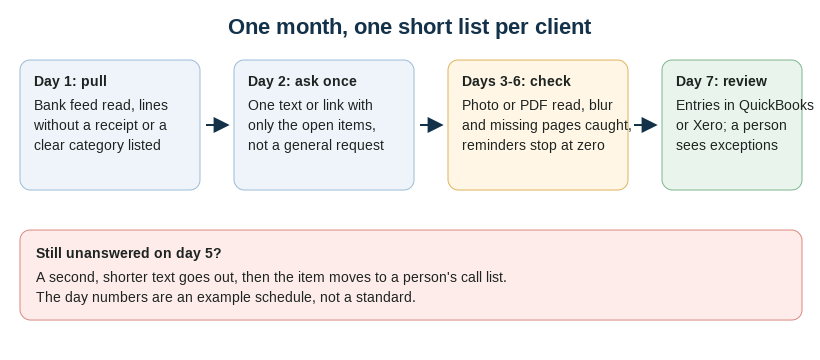
The picture in text: day 1 pull, day 2 ask once, days 3 to 6 check, day 7 review. If an item is unanswered on day 5, a second shorter text goes out, then it moves to a person’s call list.
Why is one list of open items better than a general request?
A list of five named charges takes a client two minutes. “Send everything” takes an evening, so it waits.
- Name the charge:
$84.12 at the hardware store, March 3.
- Offer the answer shapes: photo, “personal”, or “not mine”.
- Stop at zero: once the list is empty, no more messages.
The same specificity runs through our guide to automating the chase for tax documents.
What do QuickBooks and Xero already categorize for you?
Quite a lot of the repeat lines. Xero’s reconciliation page describes bank rules, suggested matches that learn from your corrections, and a label on each reconciled transaction: Rule, Match, Memory, Prediction or Manual. It lists automatic reconciliation on the Growing plan and above.
Honestly, the short list is the kindness here. A client who sees five named charges instead of a month of guessing usually answers the same evening.
Intuit’s bank feed release notes say bank rules scan bank items for details and assign payees and categories, that rules can automatically accept bank feed transactions, and that you can attach a receipt or photo to a bank transaction.
| Job | Already in QuickBooks / Xero | Still needs a check-in |
|---|---|---|
| Repeat vendor (rent, software) | Rules suggest or apply categories | No |
| One-off cash or card purchase | Category is a guess | Yes: what was it? |
| Receipt for the audit file | You can attach one | Yes: the client has it |
Summary: rules handle the lines you have seen before, and the check-in is for the ones you haven’t. Our guide to QuickBooks receipt categorization shows the matching step.
How does the system check a client’s photo before it reaches the books?
AI Vision opens the image, asks whether it is sharp and complete, reads the date, vendor, line items and total, and tests that the lines add up to the total.
A failed file gets a retake text naming the problem. A good one is matched to its bank line and coded, ready for review. The six tests are described in our guide to verifying uploaded documents automatically.
How many hours do monthly check-ins cost a bookkeeping firm?
Here is our own model, with every assumption shown. Change the numbers to yours.
| Assumption | Value |
|---|---|
| Clients | 25 |
| Messages and file checks per client per month | 5 |
| Minutes each | 6 |
| Total | 25 x 5 x 6 = 750 minutes = 12.5 hours a month |
| If the system handles 70% | About 8.75 hours back each month |
The 5 messages, 6 minutes and 70% are placeholders, not a survey. Count one real month of your own first.
What does a person still decide?
A person approves categories the system is unsure about, answers a client who replies what is this charge?
, and decides what goes on a return. Anything personal-versus-business stays a human call.
Protect client files too. The IRS page Protect your clients, protect yourself is the place to start before any new tool reads them. For the wider month, see bookkeeping firm workflow automation.
How we researched this
- Read on November 29, 2026: Xero’s bank reconciliation page, Intuit’s QuickBooks Online bank feed release notes and accountant Data in page (via search), and ThreddIQ’s summary of r/Bookkeeping complaints.
- Canopy’s February 2026 press release on Canopy Bookkeeping and Intuit’s bank rules help article did not load for us, so we make no claims from them. We could not open individual Reddit threads, so we cite no thread counts.
- Built ourselves: the seven-day schedule, the open-items list format and the 25-client time model.
- Did not do: we have not installed or tested a check-in system against QuickBooks or Xero.
Try it with your three slowest clients next month, and see whose list empties first.
Sources and further reading
Questions and answers
Can I use AI to automate monthly bookkeeping client check-ins?
Yes, for most of it. A system can list unmatched bank lines, text each client the open items, read photos for blur and missing pages, extract line items and suggest categories. A person approves what it is unsure about and everything that goes on a return.
What should a monthly bookkeeping check-in message say?
Name each open charge with its date and amount, say what you need (a photo, or ‘personal’ or ‘not mine’), and give one link. A short list is answered faster than a general request for everything.
When should a bookkeeper send the monthly check-in?
Early in the month, right after the bank feed has the prior month’s lines, with a nudge a few days later. Our example is day 1 pull, day 2 ask, day 5 nudge, day 7 review, but the days are yours to pick.
Do QuickBooks and Xero categorize transactions automatically?
Partly. Xero’s page describes bank rules, suggested matches and prediction, and Intuit’s release notes describe bank rules that assign payees and categories and can auto-accept lines. One-off purchases still need the client’s answer.
How do I stop reminders when the client has answered?
Make the list the source of truth: each answered item is removed, and reminders send only while items remain. When the list is empty, the system stops and marks the client ready for review.