How to Verify Uploaded Tax Documents Automatically (Before You Open Them)
Hello, and welcome to anyone who has opened a client’s upload only to find a photo of a thumb.
Every tax season, the same upload turns up: a W-2 photo that is half shadow, or a statement missing its last page.
I spent November 28, 2026 reading the IRS instructions for Form W-2 and TaxDome’s help pages on document checklists, to see which parts of is this file usable?
a program can answer.
Six questions turned out to be checkable by a machine in seconds. TaxDome’s own pages show checklist matching is already built in, though they do not describe reading a file for blur or missing pages.
Short answer: To verify uploaded tax documents automatically, run each file through six checks the minute it arrives: sharp enough to read, every page present, the right form, the right tax year, the client’s own name, and totals that add up. A failure texts the client what to fix. A pass sends the entries on for a person to review.
What can you verify automatically about an uploaded tax document?
Six things, each a yes or no question. A document check opens the file, answers them in order, and stops at the first failure with a reason the client can act on.
| Check | What it catches | Can a program decide it? |
|---|---|---|
| 1. Sharp enough | Blur, glare, a cut-off corner, a dark photo | Yes, from the image itself |
| 2. All pages | Page 1 of 3with only two uploaded | Yes, when the pages are numbered |
| 3. Right form | A 1099-INT sent where a 1099-DIV was asked | Yes, from the form title and box layout |
| 4. Right year | Last year’s W-2 uploaded again | Yes, the year is printed on the form |
| 5. Right person | A spouse’s document filed under the wrong client | Mostly: name match, then a person confirms |
| 6. Totals add up | A misread digit in a statement line | Yes, by arithmetic |
In one line: a program can answer all six, and a person only needs to see the files that fail or look unusual.
Does TaxDome check uploaded documents against a client’s checklist?
It matches them to the list, which is the first half of the job. TaxDome’s document checklist help page says clients upload each item or say why it isn’t available, and that with auto-matching on, uploaded files are matched to checklist items and the item is marked completed.
Its checklist management page adds that firms can build a checklist with AI from a client’s prior-year PDF return, and that a beta “request missing documents” feature creates an upload request for every incomplete item.
We found no sentence there saying the file is read for blur or missing pages. Matching tells you the box is ticked. It does not tell you the photo is legible.
| Question | Described on TaxDome’s pages? |
|---|---|
| Is the upload matched to the right checklist item? | Yes, auto-matching |
| Is the item marked complete when matched? | Yes |
| Is the file sharp, complete and the right year? | Not described |
Our guide to Karbon workflow automation shows the same split in another practice platform: it runs the job, and something else has to read the file.
How does a program know a photo is too blurry or a page is missing?
It measures the image. A sharp photo of printed text has strong edges. A blurry one has soft edges, and software can score that in milliseconds and compare it with a threshold you choose.
Missing pages are found two ways. Most statements print Page 1 of 3
in a footer, so a count of the pages received settles it. When there is no footer, the running balance gives it away: the opening balance on page 2 has to match the closing balance on page 1.
An AI vision model does this reading; it is the same step described in our guide to extracting data from scanned receipts and bank statements.
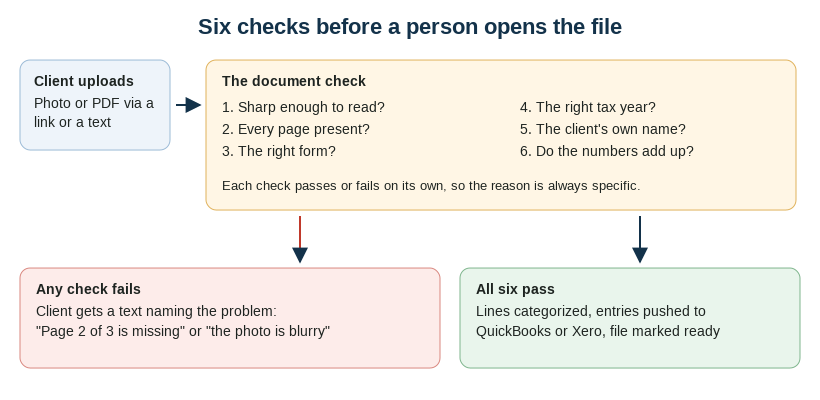
The picture in text: client uploads, then six checks (sharp, all pages, right form, right year, right person, totals add up). Any failure sends the client a text naming the problem. All six passing sends the entries to QuickBooks or Xero and marks the file ready for review.
Can software catch the wrong tax year, the wrong person or the wrong copy of a W-2?
Yes for the year and the form, and it can flag the person for a human to confirm. The tax year is printed on the form, and the form title identifies a W-2 from a 1099.
The wrong copy is a sharper catch. The IRS General Instructions for Forms W-2 and W-3 say employers furnish Copies B, C and 2 to employees, while Copy A goes to the Social Security Administration.
So a client’s upload marked “Copy A” is worth a quick question: it is usually not the copy an employee receives, and a clearer copy B may exist. Treat it as a flag, not an error.
For tax year 2026 the same instructions list February 1, 2027 for furnishing the employee copies, because January 31 falls on a Sunday. That date is when your clients’ W-2s start to arrive, and when this check earns its keep. Our guide to text reminders for missing W-2s covers the nudge that gets them there.
What does the “totals add up” check actually do?
It does arithmetic on what it read. For a bank statement, opening balance plus deposits minus withdrawals must equal the closing balance. If it doesn’t, a digit was misread or a page is missing, and the file stops there.
| Document | Test |
|---|---|
| Bank statement | Opening + deposits — withdrawals = closing balance |
| Receipt | Line items + tax = total |
| Multi-page PDF | Page 2 opening balance = page 1 closing balance |
Summary: if the arithmetic holds, the extraction is very likely right. If it fails, a person looks at one file instead of a hundred. The full method is in our guide to converting PDF bank statements to CSV.
What should the client be told when a file fails a check?
Exactly which check failed, in one plain line, with a link to try again. Your upload didn’t work
sends the client back to guessing. Page 2 of 3 of your March statement is missing
gets the page back the same evening.
Honestly, the specific retake text is the kindest part. A client told page 2 of 3 is missing
fixes it tonight, and nobody on your team has to be the bearer of vague news.
- Blurry:
The photo of your W-2 is hard to read. Please retake it in good light.
- Missing page:
We received pages 1 and 3 of your statement. Please add page 2.
- Wrong year:
This is a 2025 W-2. We need the one for 2026.
The same tone works for the follow-ups in our guide to automating the chase for tax documents.
How many hours do bad uploads cost a firm in one season?
Here is our own model, with every assumption shown. Change the numbers to yours.
| Assumption | Value |
|---|---|
| Clients who upload documents | 150 |
| Bad or incomplete files per client | 2 |
| Minutes to open, discover, write back and wait | 6 |
| Total | 150 x 2 x 6 = 1,800 minutes = 30 hours |
| If checks catch 80% at upload time and the client fixes them without staff | 24 hours back |
The 2 files, 6 minutes and 80% are placeholders, not a survey. Count one real week of your own first.
Is it safe to let a tool read clients’ tax documents?
It can be, if the tool sits inside your security plan. The IRS page Protect your clients, protect yourself points tax professionals to Publication 4557, which it describes as covering the FTC Safeguards Rule, and to Publication 5709 on writing a security plan.
The IRS newsroom item what tax preparers need to know about a data security plan says Federal Trade Commission regulations require professional tax preparers to create and enact security plans to protect client data.
What still needs a person?
A reviewer decides what a document means for the return, confirms the name when the match is uncertain, and approves categories the system is unsure about.
The checks only say whether a file is usable. They do not say whether it is right for this client, and they should never change a return on their own.
To see how the entries land after a pass, read our guide to QuickBooks receipt categorization.
How we researched this
- Read on November 28, 2026: the IRS General Instructions for Forms W-2 and W-3 (2026) and its W-2 page, the IRS pages on protecting clients and data security plans, and TaxDome’s help pages on document checklists and checklist management.
- The IRS Publication 4557 PDF would not load as readable text for us, so we describe it only as the IRS page does. We did not read forum threads for this article, so we cite no counts.
- Compared: what TaxDome’s pages describe (matching and completion) against the six checks we list.
- Built ourselves: the six-check table, the arithmetic tests and the 150-client time model.
- Did not do: we have not installed or tested a document check against TaxDome or any other platform.
Run one client’s last season of uploads through the six checks on paper first, and see how many would have been caught at the door.
Sources and further reading
Questions and answers
Can I use AI to verify uploaded tax documents automatically?
Yes, for the first pass. An AI vision model can read each file, flag blur, missing pages, the wrong form or year, and test that the totals add up, then text the client what to fix. A person still reviews anything unusual and every return.
What checks should run on a client’s uploaded W-2?
Sharp enough to read, every page present, the right form and tax year, the client’s own name, and the numbers extracted without error. A W-2 marked Copy A is also worth a question, since the IRS says employers furnish Copies B, C and 2 to employees.
Does TaxDome verify uploaded documents?
TaxDome’s help pages describe matching uploads to checklist items automatically and marking the item complete. We found nothing there about reading a file for blur or missing pages, so that check is one you add.
How does software detect a missing page in a bank statement?
By page numbers in the footer and by the balances. The opening balance on one page must equal the closing balance of the page before it. If it doesn’t, a page is missing or a digit was misread.
Is it safe to let a tool read clients’ tax documents?
It can be when the tool is part of your written security plan. The IRS says FTC regulations require professional tax preparers to create and enact security plans, so add where files are stored, who sees them and how long they are kept.