Automated SMS Reminders for Missing W-2s (That Stop on Their Own)
Hello, and welcome to anyone whose return is finished except for one W-2 that’s still in a client’s kitchen drawer.
Every tax season, someone in a small firm says it out loud: clients ignore our emails, but they answer a text.
I spent November 28, 2026 checking that idea against the paperwork, reading the SMS settings of TaxDome and Financial Cents, the FCC’s opt-out rule, Twilio’s price list and the IRS page on missing W-2s.
Three dates shaped what I found. TaxDome opened two-way texting to all its firms in March 2024. The FCC’s rule that a reply of “stop” must end texts within 10 business days took effect on April 11, 2025. And employers must furnish 2026 W-2s by February 1, 2027, so a January text asks for paper that doesn’t exist yet.
Short answer: Automated SMS reminders for missing W-2s work best as one short text per missing employer with a secure upload link, sent after the February 1, 2027 furnishing date, repeated weekly, and stopped the moment the W-2 arrives and passes a photo check. Get written texting consent first, honor STOP, and never ask for numbers by text.
Why send missing W-2 reminders by text instead of email?
A missing W-2 reminder works well by text because the request is small and the client’s phone is the camera: one tap on the link, one photo of the form, done.
Email still carries the full document request. The text is the second channel that points back to it, aimed at the one item holding up the return.
| Question | Email reminder | SMS reminder |
|---|---|---|
| Best job | The full checklist with reasons | One missing item and a link |
| Length | As long as needed | 160 characters per segment in plain text |
| Consent needed | Engagement letter covers it | Prior express consent under the TCPA, plus carrier 10DLC registration |
| Opt-out | Unsubscribe link | ”STOP” and similar words, honored within 10 business days |
| Safe for the W-2 itself? | Only through a secure portal link | Only through a secure portal link, never as a photo reply |
Here’s the catch with the popular numbers. Texting vendors publish big claims, such as EZ Texting saying tax preparers spend 40 to 60% of the season chasing documents. We found no study behind that figure, so treat it as marketing, not data.
When should the first missing W-2 text go out?
The first missing W-2 text should go out a few days after February 1, 2027, the date by which the IRS says employers must furnish Copies B, C, and 2 of Form W-2
for tax year 2026.
January 31, 2027 falls on a Sunday, which is why the 2026 deadline is Monday, February 1. Payroll apps often post W-2s earlier: Gusto’s help center says employees can see theirs in the Documents section in mid-to-late January.
| Date | What happens | Who acts |
|---|---|---|
| Email checklist goes out; no W-2 texts yet | Automation | |
| Employers’ W-2 furnishing deadline for tax year 2026 | Employers | |
| Text 1: names the missing employer, adds the upload link | Automation | |
| Text 2: adds the payroll app hint (ADP, Gusto) | Automation | |
| Text 3: last automatic nudge | Automation | |
| A phone call, not a fourth text | A person | |
| The IRS help line and Form 4852 route, if the employer never sends it | A person, with the client |
Weekly spacing keeps three texts inside the three weeks between the deadline and the end of February, which is when the IRS starts helping with a missing W-2.
What should a missing W-2 text message say?
A missing W-2 text should name your firm, the employer, the tax year and the upload link, and end with how to opt out, all inside one 160-character segment.
These three examples use a made-up firm and client. We counted every character on November 28, 2026, using Twilio’s segment rules: 160 characters for one plain-text message, 153 per part when longer.
| Text | Message | Characters | Segments |
|---|---|---|---|
| First reminder | Smith Tax: Hi Dana, your 2026 W-2 from Lakeside Clinic hasn’t reached us yet. Snap a photo of it here: https://example.com/u/8KQ2 Reply STOP to opt out. | 152 | 1 |
| Second reminder | Smith Tax: Still need your Lakeside Clinic W-2. On ADP or Gusto? Look under Tax Statements or Documents in the app. Upload: https://example.com/u/8KQ2 | 150 | 1 |
| Upload receipt | Smith Tax: Got your Lakeside Clinic W-2, thank you. Still missing: your Northgate Schools W-2. Same link works. | 111 | 1 |
| First reminder, curly apostrophe in “hasn’t” | Same words, pasted from a word processor | 152 | 3 |
The last row is the trap nobody mentions. One curly apostrophe switches the whole text to UCS-2 encoding, where a single message holds only 70 characters, so the same reminder becomes three billed segments.
Twilio’s page says word processors often swap straight quotes for curly ones, and its Smart Encoding setting changes them back. Type templates in a plain text editor and the reminder stays one segment.
How do automated SMS reminders for missing W-2s work, step by step?
Automated SMS reminders for missing W-2s work by comparing each client’s expected W-2 employers with what has arrived, texting only about the gaps, and stopping when a checked photo of each W-2 comes in.
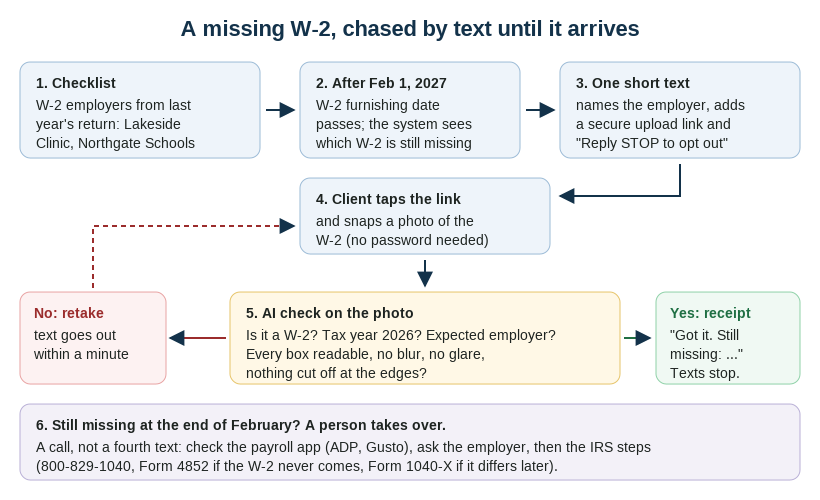
- Checklist: last year’s return lists every W-2 employer, such as Lakeside Clinic and Northgate Schools, plus any new job the client mentions.
- Trigger: after February 1, 2027, the system finds each employer with no W-2 uploaded.
- Text: one short message per missing W-2, with the employer’s name and a secure upload link that needs no password.
- Photo: the client taps the link and photographs the form, or uploads the PDF from the payroll app.
- Check: an AI vision step reads the photo and decides whether it is the right W-2 and fully readable.
- Answer: a pass sends a receipt and stops that W-2’s reminders; a fail sends a retake request within a minute.
- Hand-off: a W-2 still missing near the end of February goes to a person’s call list.
Step 1 matters most. Reminders that say your W-2
get a shrug; reminders that say your Lakeside Clinic W-2
tell a client with two jobs exactly which envelope to find.
For new clients there is no last year to copy, so the employer list comes from intake. Our accounting client onboarding document checklist guide shows how to ask for it.
What should AI check on a W-2 photo before the reminders stop?
AI should check that a W-2 photo is the right form, the right year and the right employer, and that every box can be read, before the reminder for that W-2 is switched off.
- Form type: a Form W-2, not a final paystub, which shows similar totals but is not the form.
- Tax year: 2026, since a photo of last year’s W-2 from the same drawer is a common mix-up.
- Employer: the name and EIN match the checklist line it claims to fill.
- Readable boxes: Box 1 wages, Box 2 federal withholding and the state boxes are in frame and sharp.
- Whole page: no cut-off edges, no glare across the numbers, no finger over a box.
- Corrections: a Form W-2c is flagged for a person, because it changes figures already reported.
Plain reminder software only knows that a file landed. The AI step is what turns “a file arrived” into the right W-2 arrived and we can use it
, which is the moment the texts should end.
The extracted figures still go to a preparer for review. For business clients, the same upload link and check handle receipts and statements, which are categorized and pushed to QuickBooks Online or Xero, as our guide to extracting data from scanned receipts and bank statements explains.
Which accounting tools can send automatic W-2 text reminders?
Among the practice tools small firms use, Financial Cents states on its own pages that it sends scheduled text reminders until the client completes the task; TaxDome texts clients but its FAQ said automated SMS reminders were not available.
| Tool | Texts clients? | Automatic text reminders? | Worth knowing |
|---|---|---|---|
| TaxDome | Yes, two-way, through Twilio | FAQ: At present, setting automated reminders as SMS is not available. | US and Canada only; texts are paid from the firm balance; manual or bulk sends |
| Financial Cents | Yes | Yes: Schedule automatic email and SMS reminders to chase down the client for you | Reminders run until the client tasks are done; Auto Reminders need the Scale plan |
| Canopy | In-app Client Messaging; texting from the mobile app | Not found in Canopy’s help pages | At its 2023 Summit, Canopy said SMS for reminders was likely |
| Karbon | Not found | Email reminders on set dates | Clients can respond without an account or password |
| Twilio, built yourself | Yes | Yes, if you build the schedule and the stop rule | You register the 10DLC brand and campaign yourself |
In short, only one of the four practice tools we checked documents scheduled text reminders, so many firms add a small automation that reads the checklist and sends the texts through Twilio.
Where sources disagree: TaxDome’s SMS FAQ is old, and the feature may have grown since. Ask TaxDome support whether pipeline automations can send an SMS today before you build around it.
What do automated W-2 text reminders cost to run?
For a 300-client firm, a season of automated W-2 texts through Twilio costs roughly $43 in our model, most of it one-time registration, while the same texts sent by hand take about 30 staff hours.
Honestly, naming the employer is the kindest touch. A client with two jobs doesn’t have to guess which envelope you mean, and the photo usually arrives the same evening.
| Item | Price used | Season total |
|---|---|---|
| 1,200 text segments (300 clients x 3 reminders + 1 receipt) | $0.0083 per segment + $0.005 carrier fee (Verizon, the highest listed) | $15.96 |
| Local phone number, 3 months | $1.15 a month | $3.45 |
| 10DLC brand registration | $4 one time | $4.00 |
| 10DLC campaign vetting | $15 one time | $15.00 |
| 10DLC campaign fee, 3 months | $1.50 a month (low end) | $4.50 |
| Total | $42.91 |
Assumptions: every reminder fits one segment, carrier fees at Verizon’s $0.005, and no software subscription. Twilio’s 10DLC page lists the $4 brand fee and $1.50 to $10 campaign fee; some 2026 guides report a $4.50 brand fee after an August 2025 increase, so check the Twilio console.
The curly-apostrophe trap from the texting table would triple the segment line to about $48. The manual comparison assumes 900 reminders at 2 minutes each.
The calculator adds the receipt text for each client, the $1.15 number and the $1.50 campaign fee per month, and the one-time $4 and $15 fees. It leaves out the cost of building or subscribing to the automation itself.
What rules apply to texting clients about missing W-2s?
Texting clients about missing W-2s needs prior express consent, a working STOP, carrier 10DLC registration for the sending number, and messages that never carry tax numbers.
- Consent: under the TCPA, get the client’s permission before automated texts; a line in the engagement letter plus the mobile number on the intake form is the usual route.
- Opt-out: 47 CFR 64.1200(a)(10) treats a reply of
“stop,” “quit,” “end,” “revoke,” “opt out,” “cancel,” or “unsubscribe”
as revoking consent, and requires honoring itwithin a reasonable time not to exceed ten business days
. - Registration: US carriers expect business texts from a local number to run on a registered A2P 10DLC brand and campaign; Twilio handles it for its senders, and TaxDome registers the brand for its firms.
- Hours: the 8 a.m. to 9 p.m. limit in the same rule covers telephone solicitations, not service reminders, but sending mid-morning on weekdays is simply polite.
- Security: texts point to a secure upload; they never ask for a Social Security number, and the new step belongs in your written security plan, as the IRS reminds tax professionals.
This is not legal advice. When your consent wording is new, a short review by your firm’s attorney costs less than one argument about it later.
What if a client texts back a photo of their W-2?
If a client texts back a photo of their W-2, save it to the client’s file, delete it from the texting thread, and reply with the secure link for next time.
Clients will do it, because replying with a photo feels natural. A plain text or picture message is not a secure portal, and the W-2 shows the employee’s Social Security number, wages and address.
Practitioners on a TaxProTalk thread about texting with clients describe the same line: text reminders, yes; confidential documents by text, no. One preparer has clients sign a texting authorization first.
A kind automatic reply keeps the relationship warm: Thanks, we saved it. Next time, the link keeps your W-2 off phones: https://example.com/u/8KQ2
. The photo can still run through the AI check, so the reminder for that employer stops.
What if the W-2 is still missing at the end of February?
If a W-2 is still missing at the end of February, the reminders should stop and a person should call, because the client may need the IRS route rather than another text.
The IRS page on missing W-2s sets the order. It tells taxpayers to check their IRS online account and contact the employer first, and if they still haven’t received the missing or corrected form by the end of February
, to call 800-829-1040.
The IRS then contacts the employer and mails Form 4852. If the W-2 never comes, the client can file with Form 4852, estimating wages and withholding, and must file Form 1040-X if the real W-2 later differs.
- Ask whether the employer pays through ADP or Gusto, where W-2s usually sit under Tax Statements or Documents.
- Check whether the job ended, since former employees often miss the mailed copy.
- Confirm the employer has the client’s current address.
- Decide together whether to wait, use Form 4852, or plan an extension.
Those are judgment calls about deadlines and estimates, which is exactly where automation should hand the client back to their accountant.
For the wider picture of the season’s inbox, see how to reduce tax season client follow-up emails and how to automate chasing clients for tax documents beyond W-2s.
How do you set up W-2 text reminders before the 2027 season?
Set up W-2 text reminders in December: collect consent and mobile numbers, register the sending number, write three plain-text templates, and test the whole loop on a staff member’s own W-2.
- Add a texting consent line to the 2027 engagement letter and collect mobile numbers.
- Register the 10DLC brand and campaign, or confirm your practice tool has done it.
- Build each client’s W-2 employer list from last year’s return.
- Write the three texts in a plain text editor and check each stays under 160 characters.
- Turn on the photo check: form, year, employer, readable boxes.
- Schedule texts for February 3, 10 and 17, 2027, with a call list for the 24th.
Done well, February’s W-2 chase becomes three short texts per client at most, a photo checked in under a minute, and a call list of the few cases that need a person.
How we researched this
- Read the IRS Tax Topic on missing W-2s and the 2026 General Instructions for Forms W-2 and W-3 on November 28, 2026, and built the texting calendar from their dates.
- Read 47 CFR 64.1200 and 47 U.S.C. 227 on Cornell’s Legal Information Institute for the opt-out and damages wording.
- Read the SMS and reminder pages of TaxDome, Financial Cents, Canopy and Karbon, and recorded what each says about automatic text reminders.
- Took prices from Twilio’s US SMS pricing and 10DLC pages; noted that third-party guides report a newer $4.50 brand fee.
- Counted characters and segments of the sample texts ourselves with Twilio’s GSM-7 and UCS-2 rules; the cost model and calculator are our own assumptions.
- Read practitioner discussion on TaxProTalk and vendor guides; paraphrased, no private people named. We did not install or test these tools in a firm.
Write the three texts once, let February send them, and keep your phone calls for the few W-2s that really need a person.
Sources and further reading
- IRS Tax Topic 154: Forms W-2 and 1099-R (what to do if incorrect or not received)
- IRS: General Instructions for Forms W-2 and W-3 (2026)
- 47 CFR 64.1200: Delivery restrictions (revoking consent, 8 a.m. to 9 p.m.)
- 47 U.S.C. 227: Restrictions on use of telephone equipment (TCPA damages)
- Twilio: SMS pricing in the United States
- Twilio: A2P 10DLC registration and fees
- Twilio: what is the SMS character limit (GSM-7, UCS-2, curly quotes)
- TaxDome Help Center: SMS explained
- TaxDome Help Center: SMS communication FAQ
- TaxDome: March 2024 update (SMS for all users)
- Financial Cents Help: client tasks and requests (email and SMS reminders)
- Financial Cents Help: Auto Reminders on client task sections (Scale plan)
- Canopy: client communication
- Canopy Summit 2023 (SMS for reminders discussion)
- Karbon: client portal and client requests
- Gusto Help Center: view, print, or download your W-2 (for employees)
- IRS: Protect your clients, protect yourself (security plans)
- TaxProTalk: texting with clients (practitioner discussion)
- EZ Texting: accounting and tax firms SMS use cases (vendor claims)
Questions and answers
Can I use AI to send automated text reminders when a client’s W-2 is missing?
Yes. AI is most useful after the text goes out: it checks the photo the client sends back, confirms it is the 2026 W-2 from the expected employer with every box readable, asks for a retake within a minute if not, and stops that reminder when it passes. The schedule itself is plain automation. A person should still handle W-2s missing at the end of February.
Do I need consent to text tax clients reminders?
Yes. Get prior express consent before automated texts, usually a line in the engagement letter plus the mobile number on intake. Under 47 CFR 64.1200(a)(10), a reply such as STOP, quit or cancel revokes consent and must be honored within ten business days.
Is it safe for clients to text a photo of their W-2?
No. A W-2 shows the Social Security number, wages and address, and a text thread is not a secure portal. Send a secure upload link instead. If a client texts a photo anyway, save it to their file, delete it from the thread and reply with the link.
How many reminder texts should a client get for a missing W-2?
Three weekly texts is a sensible limit: around February 3, 10 and 17, 2027, after the February 1 furnishing date. After that, a phone call works better, and the IRS help line becomes an option once February ends.
Does TaxDome send automatic SMS reminders?
TaxDome sends two-way texts through Twilio for US and Canadian firms, but its SMS FAQ said that setting automated reminders as SMS is not available, so texts are sent by hand or in bulk. Ask TaxDome support whether this has changed before building on it.