
How to Automate Service Advisor Follow-Ups (and Keep the Human Ones)
Hello, and here’s to every advisor whose monitor is framed in sticky notes.
If your service advisor keeps a list of callbacks on a sticky note, this guide is for you.
Some of those notes are estimates nobody answered, some are declined brakes from last month, and one is a customer who said the noise might be back.
Your shop management system already knows about every one of them, so the real question is who remembers to follow up.
Short answer: To automate service advisor follow-ups, connect follow-up messages to repair order events in Tekmetric, Shopmonkey or Mitchell 1: an unanswered estimate, a changed parts ETA, a closed repair order, a declined job or a sent supplement. Each event starts a timed text or email, and only replies with questions, problems or disputes go back to the advisor.
What follow-ups does a service advisor have to make?
A service advisor owes five kinds of follow-up, and each one starts from something that already happened on the repair order.
| Follow-up | Starts when | Usual timing | Can it send itself? |
|---|---|---|---|
| Unanswered estimate | The inspection or estimate link goes out and nobody approves or declines | Hours, the same day | Yes, one or two texts, then the advisor calls |
| Parts and ETA update | The parts date on a job changes | Each time the date moves | Yes, unless the new date breaks a promise |
| “How’s it running?” | The repair order is closed and paid | About 3 days after pickup | Yes; a reply about a problem goes to a person |
| Declined work reminder | A recommended job is declined or deferred | Weeks to months, or by a needed-by date | Yes, with the technician’s photo and notes |
| Insurance supplement (collision) | The estimator sends a supplement to the adjuster | Daily until answered | Yes for the reminders; disputes stay with the estimator |
None of these follow-ups needs new judgment from the advisor when it goes out. Every fact in the message already sits in the shop system: the job, the photo, the date and the customer’s phone number.
That is why follow-ups are such a good first thing to automate. The advisor still decides what to recommend; the schedule just remembers to ask again.
How much time do service advisors spend on follow-up calls?
At about four minutes per manual follow-up, a counter that owes 20 follow-ups a day spends roughly 29 hours a month on them.
| Follow-ups a day | Minutes a day at 4 minutes each | Hours a month (22 working days) |
|---|---|---|
| 10 | 40 | 14.7 |
| 20 | 80 | 29.3 |
| 40 | 160 | 58.7 |
Assumptions: four minutes covers opening the repair order, finding the number, dialing, leaving a voicemail and writing a note. That is our round estimate, not a survey figure. Count one day of your own callbacks and swap in your number.
Here’s the catch: the hours are not the biggest cost. A follow-up that never happens costs the job itself, and the busiest days are exactly the days the sticky notes get skipped.
Mitchell 1 makes the same point about recommendations. Its ShopConnection blog says automating is the only way to efficiently stay on top of the process of tracking and reminding all your customers
, because customers who put work off simply forget (Mitchell 1, How to boost your revenue by using recommendations).
How do automated service advisor follow-ups work?
A small service watches the shop management system for repair order events, waits the right amount of time, sends a plain-English message and logs it on the repair order.
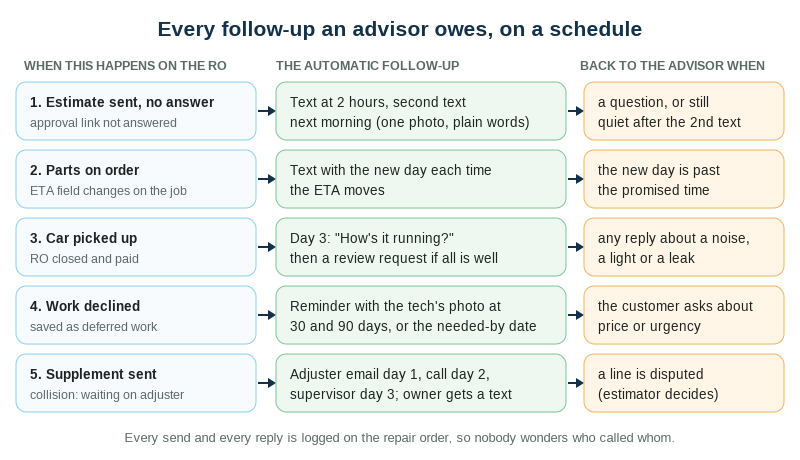
The diagram, as text:
- Estimate sent, no answer: a text at 2 hours and a second text the next morning; the advisor calls after that, or as soon as the customer asks a question.
- Parts on order: a text with the new day each time the ETA moves; the advisor steps in when the new day is past the promised time.
- Car picked up: a “How’s it running?” text on day 3, then a review request if all is well; any reply about a noise, a light or a leak goes to the advisor.
- Work declined: a reminder with the technician’s photo at 30 and 90 days, or by the needed-by date; questions about price or urgency go to the advisor.
- Supplement sent (collision): adjuster email on day 1, a call on day 2, a supervisor on day 3, and a text to the owner; disputed lines stay with the estimator.
- Watch. The service reads repair orders through the shop system’s API. Tekmetric opens its API to approved partners, and Shopmonkey publishes a public API.
- Match. Each event is matched to one follow-up rule: which event, how long to wait, which channel and what to say.
- Check again. Right before sending, the service re-reads the repair order. If the customer already approved, paid or called, the follow-up is cancelled.
- Send. The text uses the customer’s first name, the vehicle, the job in plain words and one link, such as the inspection or booking link.
- Log. The message and any reply are saved on the repair order, so the next person at the counter sees the whole history.
- Hand over. A reply with a question, a complaint or the word “call” goes to the advisor’s list with the repair order number attached.
Step three matters most. A follow-up that arrives after the customer already said yes is how automation earns a bad name at a shop.
How do you automatically follow up on an estimate the customer hasn’t approved?
Send one short text a couple of hours after the estimate goes out, a second one the next morning, then hand the repair order to the advisor for a call.
Most unanswered estimates are not a “no”. The customer is in a meeting, saw a long link with eleven line items and planned to look later.
So the follow-up text should be shorter than the estimate. Lead with the one item the technician marked as most urgent, in plain English, with its photo.
- Do:
Hi Maria, your Camry’s front brake pads are at 2 mm, and Jake took a photo. Tap to see it and approve or decline: [link].
- Don’t: resend the whole estimate with a “REMINDER” heading and every line item again.
- Stop: the moment the customer approves, declines or calls, which is why the service re-reads the repair order before each send.
If the customer is waiting in the lobby, skip the text. The advisor walks over, which is still the best follow-up ever invented.
Turning a technician’s shorthand into owner-friendly words is a whole topic of its own. Our guide to automated repair status texts shows how inspection notes become a plain-English approval text.
How do you automate declined work follow-ups without sounding pushy?
Remind the customer of the exact job, show the technician’s photo again, give an honest reason to come back and make booking one tap.
One shop’s records show why honesty matters here. Chuck’s Garage reviewed 14,538 completed repair orders and found 7,822 declined recommendations across 2,460 vehicles (Chuck’s Garage, November 2, 2026).
Only 802 of those 2,460 vehicles came back to that shop at least once. By our arithmetic, that is 32.6%, so about two in three cars with declined work did not return there.
The same review found that putting work off rarely made things worse. Its author put it simply: A good inspection tells you a part is wearing, not that the sky is falling
.
That is the tone a declined-work reminder should take. Calm, specific, with the photo, and never a scare line like your brakes could fail at any moment
.
- Save it right. The advisor marks the job as declined or deferred, not deleted, so it stays on the vehicle record.
- Set the date. A needed-by date or mileage from the technician beats a generic 90 days. Mitchell 1 builds its reminders on that needed-by date.
- Remind once or twice. One reminder around 30 days and one around 90 days is plenty for most jobs.
- Bring it to the next visit. When the car comes in for an oil change, the declined job shows up on the new estimate.
What follow-ups do Tekmetric, Shopmonkey and Mitchell 1 already automate?
All three remind customers about declined work; they differ on channels, price and whether unanswered estimates are covered.
A follow-up that sends itself is a small act of care for the customer and for the advisor. The customer hears back on time, and the advisor gets to spend their attention on the calls that need a real voice.
| Software | Declined work | Other follow-ups | Worth knowing |
|---|---|---|---|
| Tekmetric automated reminders | Service reminders for declined jobs, by email and text | ”How’s it running?” check-ins, review requests, private feedback requests, appointment reminders | Part of Tekmetric Marketing, listed as +$345 a month per shop on Tekmetric’s pricing page, on top of a plan |
| Shopmonkey campaigns | Automatic reminders for previously declined services, by text and email | ”Automated Estimate Followups” and a Google Reviews Manager on the Genius and Multi-Shop plans | Declined services move to the customer’s Deferred Services section automatically; Genius is listed at $499 a month, or $449 billed annually, on Shopmonkey’s pricing page |
| Mitchell 1 SocialCRM with Manager SE | Recommendations with a needed-by date on the work order trigger an automatic email reminder | Responses tracked under Recurring Campaigns in the SocialCRM dashboard | The recommendations reminder Mitchell 1 describes goes out by email |
The built-in tools cover the slow follow-ups well. The fast ones, like the unanswered estimate at 2 p.m. or the parts date that moved again, are where shops most often still rely on memory.
Of the three, only Shopmonkey names estimate follow-ups on its pricing page, and only on its top plans. Check your own plan before building anything; the feature you need may already be a switch away.
When the built-ins don’t fit, a custom follow-up service connects through the shop system’s API. Tekmetric’s API is open to approved partners through an application at api.tekmetric.com, and Shopmonkey’s is documented publicly.
Which service advisor follow-ups should stay human?
Comebacks, complaints, big-ticket estimates and anything where the customer sounds worried should always get a call from a person.
- A comeback. If the “How’s it running?” reply mentions the same noise, the advisor calls the same day and books the car back in.
- A large estimate. A timing belt or a transmission job deserves a conversation, not a reminder link.
- A broken promise. When a parts delay pushes past the promised day, the customer should hear it from a person, with a plan.
- A price question.
Why is it so much?
is a conversation about labor and parts, and only the advisor can have it well. - An insurance dispute. The estimator argues the disputed supplement lines; automation only makes sure the adjuster is reminded on time.
Automating the routine follow-ups is what makes these calls possible. An advisor who isn’t dialing 20 voicemails has time for the two calls that matter.
Collision centers can read how the adjuster side runs in our guide to insurance supplement follow-up, with its day-by-day email and call schedule.
What should an automated follow-up text say?
Name the customer, the car and the one job, say what happens next, and keep it under three short sentences.
- Unanswered estimate (2 hours):
Hi Maria, Jake found your Camry’s front brake pads at 2 mm. Photo and approve or decline here: [link]. Questions? Just reply.
- Parts update:
Hi Tom, the water pump for your F-150 now arrives Thursday morning. We’ll text you when the truck is ready.
- How’s it running (day 3):
Hi Lee, how is the Outback driving since the brake job? Reply here if anything feels off and we’ll take a look.
- Declined work (30 days):
Hi Sam, last month Jake noted your rear tires at 3/32 and took this photo: [link]. Want a time this week? Book here: [link].
- Supplement waiting (owner):
Hi Ana, we sent your insurer the extra repairs we found and are waiting for approval. We follow up daily and will text you when it’s in.
Each text sounds like the counter on a good day. If a message would make your best advisor wince, rewrite it before the schedule sends it a hundred times.
What consent rules apply to automated follow-up texts?
Get the customer’s permission to text on the repair order, register the sending number for A2P 10DLC and stop at the first STOP.
- Registration: texts sent by an application from a 10DLC number must be registered for A2P 10DLC, as Twilio’s documentation explains. Shop software that texts for you usually handles this; a custom service must do it itself.
- Kinds of message: CTIA’s Messaging Principles and Best Practices treat informational and promotional messages differently. A status or parts update reads as informational; a declined-work reminder with a booking link leans promotional, which calls for clearer consent.
- Opt-out: every reply of STOP ends texting at once, and the opt-out is saved on the customer record so no rule texts that number again.
- Voice: automated voice follow-ups to customers fall under stricter calling rules than texts to someone who just asked a question, so keep customer follow-ups to text and email unless your counsel says otherwise.
How do you start automating service advisor follow-ups?
Start with the “How’s it running?” text, add declined-work reminders next, and save same-day estimate follow-ups for last.
- Week 1: pull one week of callbacks from the advisors’ notes and count them by type; that is your baseline.
- Week 1: turn on the day-3 “How’s it running?” text, since nothing can go wrong with asking.
- Week 2: clean up how declined jobs are saved, then switch on 30-day and 90-day reminders with photos.
- Week 3: add parts and ETA texts, with a hand-off when a date passes the promise.
- Week 4: add the unanswered-estimate texts, and read every reply for the first week.
By the end of the month, the sticky notes should only hold the calls a person needs to make. That short list is the whole point.
And when a follow-up reply turns into a phone call nobody can pick up, automated phone answering and scheduling books it onto the calendar instead of voicemail.
Your advisor keeps the conversations; the schedule keeps the reminders. That trade is what makes the counter feel lighter.
Count one week of callbacks this week, and the first follow-up to automate will be obvious.
Sources and further reading
- Tekmetric: automated customer reminders for auto repair shops
- Tekmetric: auto repair shop marketing software
- Tekmetric: pricing
- Tekmetric API: partner application
- Shopmonkey: automotive text messaging and email marketing campaigns
- Shopmonkey: pricing
- Shopmonkey: recommended service reminders and Deferred Services (August 11, 2021)
- Shopmonkey Developer: public API
- Mitchell 1 ShopConnection: How to boost your revenue by using recommendations
- Chuck’s Garage: What happens if you put off a car repair? We checked our own records (November 2, 2026)
- Twilio: A2P 10DLC registration
- CTIA: Messaging Principles and Best Practices (May 2023)
Questions and answers
Can I use AI to automate my service advisors’ follow-ups?
Yes. AI can watch repair orders in Tekmetric, Shopmonkey or Mitchell 1, send timed follow-up texts for unanswered estimates, parts updates, how’s-it-running checks and declined work, and write the technician’s notes in plain English. Replies with questions, complaints or price concerns should still go to a service advisor.
How long should a shop wait to follow up on declined work?
Use the technician’s needed-by date or mileage when there is one. Otherwise, one reminder around 30 days and another around 90 days covers most jobs. Include the original inspection photo and a booking link, and stop after the second reminder if the customer doesn’t respond.
Does Tekmetric send declined job reminders automatically?
Yes. Tekmetric’s automated reminders page lists service reminders for declined jobs by email and text, along with how’s-it-running check-ins and review requests. These are part of Tekmetric Marketing, listed as a $345 a month per shop add-on on Tekmetric’s pricing page, read November 27, 2026.
Should an unanswered repair estimate get a text or a call?
Start with a short text about two hours after the estimate goes out, leading with the most urgent item and its photo. Send one more the next morning. If the customer is still quiet or has questions, the service advisor calls. A customer waiting in the lobby gets a visit, not a text.
Do I need permission to send automated follow-up texts to customers?
Get permission to text on the repair order, and treat declined-work reminders with booking links as promotional, which needs clearer consent under CTIA’s guidelines. Register your sending number for A2P 10DLC, and honor STOP at once. Check your setup with your texting provider or an attorney.