How to Extract Insurance Info From a Photo of a Card (Dental and Clinic Guide)
Every front desk retypes the same twelve-digit ID from a card, so I read how the card-reading tools handle a photo.
Every front desk has the same ritual: take the card, look at the ID, type it, and hope.
I spent an afternoon with Microsoft’s card-reading model documentation, Stedi’s eligibility request rules and a practice-side guide to card photos, to see what a photo can really hand you.
Microsoft says its health insurance card model reads phone photos, scans and PDFs, and the text must be at least 12 pixels high on a 1024 x 768 image.
Short answer: You can extract insurance info from a photo of a card with a card-reading model that returns payer, member ID, group number and name as structured data. Have the patient or staff confirm each field, then send the member ID and payer to an eligibility check. The weak points are blur, cropped edges and one wrong digit.
- What gets read
- Insurer, member, prescription and group numbers, returned as JSON (Microsoft Document Intelligence)
- Photo limits
- Text at least 12 px high on a 1024 x 768 image, one clear photo per document, JPEG, PNG, BMP, TIFF, HEIF or PDF
- What an eligibility request needs
- A payer ID, a provider NPI, and the patient’s member ID, name or date of birth (Stedi docs)
- Always human
- The final look at the member ID, and any plan the reader cannot match
Can you extract insurance info from a photo of a card?
Yes. A card-reading model takes a photo of the front and back and returns the printed fields as structured data, so nobody retypes them. Your team still confirms the result before it is trusted.
The same step is the front door of automated dental insurance verification: once the member ID and payer are data instead of a picture, a nightly eligibility check can use them.
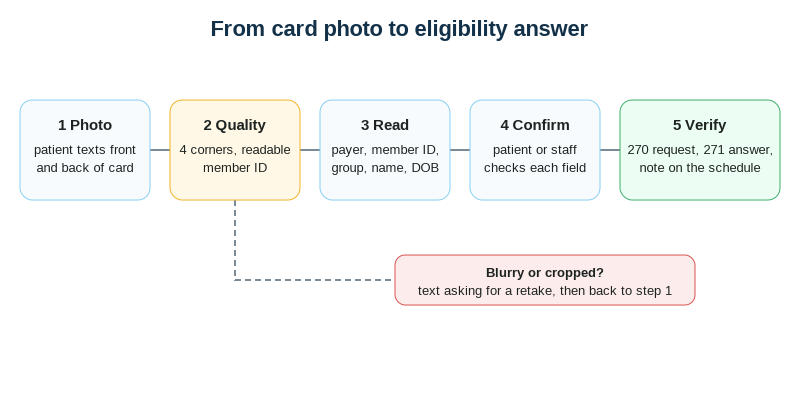
In words, the diagram shows five steps and one loop:
- Photo: the patient texts the front and back of the card.
- Quality: the system checks four corners and a readable member ID.
- Read: a vision reader extracts payer, member ID, group number, name and date of birth.
- Confirm: the patient or staff checks each field on screen.
- Verify: an eligibility request goes out and the answer lands on the schedule.
- Loop: a blurry or cropped photo triggers a text asking for a retake.
Which insurance card fields can a reader extract, and which can’t it?
A reader extracts what is printed: insurer name, member name, member ID, group number, plan name and prescription numbers. It cannot know what is not on the card, such as your clinic’s dental benefits, the remaining maximum or whether the plan is still active.
| Item | On the card? | From the photo? | Where it really comes from |
|---|---|---|---|
| Insurer / payer name | Yes | Yes | Mapped to a payer ID for the eligibility request |
| Member ID | Yes | Yes, check each character | The card |
| Group number | Usually | Yes | The card |
| Subscriber name and date of birth | Name yes, birth date often no | Name only | Intake form or chart |
| Dental coverage, deductible, maximum | No | No | The 271 eligibility response |
| Active today? | No | No | The 271 eligibility response |
In short, the photo gives you the keys to ask the question, and the eligibility response gives you the answer.
Which tools read an insurance card photo?
Microsoft’s Document Intelligence has a prebuilt model named prebuilt-healthInsuranceCard.us that returns insurer, member and group numbers as JSON. Dental verification products such as Aron list a card-photo step in their own flow.
| Route | What you get | What you build or sign |
|---|---|---|
| Microsoft Document Intelligence | A card model that returns structured JSON; v4.0 GA is dated 2024-11-30 | Your own intake step and a HIPAA agreement with Microsoft |
| A general vision model | Flexible reading of odd cards, but you design the fields and checks | Prompt, validation rules and a vendor agreement |
| A dental verification product | Photo, payer match and verification in one product, as the maker describes it | A contract and a link to your practice software |
Sources do not agree on one right route. Product pages promise a finished flow; Microsoft’s page documents only the reading step, so the confirmation and eligibility call are yours to wire up.
What makes an insurance card photo good enough to read?
A good card photo shows the front and back, all four corners, a sharp member ID and group number, and the payer name, with no glare. A practice-side guide from Dental Office VA says to retake it while the patient is still at the desk.
- Four corners: a cropped top loses the payer name; a cropped bottom loses the member ID.
- Back of the card: it often carries the claims address and payer ID.
- Plain background, flat card, no overhead glare.
- Readable without zooming: Microsoft’s minimum is 12 px text height on a 1024 x 768 image, about 8-point text at 150 dots per inch.
Our arithmetic: a standard bank-size card is 85.6 mm, about 3.4 inches, wide, so at 150 dots per inch it needs a bit over 500 pixels across. Any current phone camera clears that easily; the real failures are blur and glare, not resolution.
The same guide says a single transposed digit in the member ID can send a check to the wrong plan, and that its quality check should add under two minutes to check-in.
How does a card photo turn into an eligibility check?
A texted photo is read, confirmed and then sent as an eligibility request. The trigger is a booked new-patient visit; the output is a verified, partly verified or needs-attention note on the schedule.
- Trigger: a new appointment is booked, by a person or by an AI phone receptionist.
- Text: the patient gets a link to photograph the card front and back.
- Read: the reader returns payer, member ID, group and name.
- Confirm: the patient sees the fields and taps yes, or fixes one.
- Request: the server sends payer ID, the clinic’s NPI and the patient’s member ID, name and date of birth.
- Write back: active or not, plus benefits, goes on the schedule note; failures become a task.
- Tell: staff see only the exceptions.
Stedi’s documentation says the API needs at least one of member ID, date of birth or last name, but that supplying member ID, first name, last name and date of birth together means a payer must return a response if the member is in its database. That is why the confirm step collects all four.
Where do card readers make mistakes?
Readers slip on blurry digits, look-alike characters such as 0 and O or 1 and I, cards with several ID numbers, and payers whose printed name does not match the name in the clearinghouse list. A wrong digit is the costly one.
The reading is the easy part. A clear photo and one look from a person before the check goes out is what keeps a wrong digit from costing a call back.
| Failure | What happens | Fix |
|---|---|---|
| Look-alike character (0 / O) | The check fails or matches no member | Show the ID in large type and ask the patient to confirm |
| Cropped bottom edge | Member ID missing | Retake text; require four visible corners |
| Medical and dental cards mixed | The medical ID is sent to a dental payer | Ask which card covers dental care |
| Payer name not found in the list | No payer ID to send | Task for staff to match once and save the mapping |
The workflow assumption to avoid is silent trust. Show the reader’s result to a person before the check goes out.
Is it HIPAA-safe to send an insurance card photo to an AI reader?
It can be, but only with a signed business associate agreement. A card photo carries a name and a member ID, which is patient information, so a vendor reading it on your behalf must sign one with you first.
HHS explains the written contract on its business associates page and publishes sample agreement provisions. Its cloud computing guidance covers the case where the vendor stores your files.
How much desk time does reading cards by photo save?
If your desk retypes 60 cards a month at 3 minutes each, that is 180 minutes, or 3 hours, about $66 a month at $22 an hour. The saving is small in dollars; the real prize is the wrong-digit calls and the same-day answer.
| Step | Math | Result |
|---|---|---|
| Retyping by hand | 60 x 3 min | 180 min = 3 h |
| Desk cost at $22 an hour | 3 h x $22 | $66 a month |
| Confirming a read card, at 30 seconds | 60 x 0.5 min | 30 min = $11 |
| Time freed | 180 — 30 | 150 min a month |
For a cash-pay or out-of-network clinic the card still matters, because the patient’s reimbursement estimate starts from the plan. A clean read means a quote built on the right plan the first time.
Can I use AI to extract insurance info from a photo of a card?
Yes, with limits. AI can read the printed fields from a clear photo and hand them over as data, and it is the first step of a verification workflow. A person should confirm the member ID, and the vendor must sign a business associate agreement.
Start with new-patient cards only, run the confirm step for a month, and keep a count of how many reads the patients had to correct. That number tells you when to loosen the checking.
How we researched this
- Read November 28, 2026: Microsoft’s health insurance card model page (updated October 19, 2026), Stedi’s eligibility request documentation, the Dental Office VA card-image guide, and the HHS business associate, sample agreement and cloud computing pages.
- Searched for practitioner threads on card scanning; the search returned vendor and practice-guide pages, not forum threads, so we quote no forum posts.
- Compared three routes to reading a card and listed what each documents.
- Calculated desk time from stated assumptions.
- We did not test any reader on real cards and did not install anything in a clinic.
Start with new-patient cards, confirm every read for a month, and count how many the patients had to fix.
Sources and further reading
- Microsoft: Health insurance card model, Document Intelligence
- Stedi: Send eligibility checks
- Dental Office VA: Insurance card image retake standard at check-in
- Aron: Dental insurance verification (maker’s page)
- HHS: Business associates
- HHS: Sample business associate agreement provisions
- HHS: Guidance on HIPAA and cloud computing
Questions and answers
Can I use AI to extract insurance info from a photo of a card?
Yes. A card-reading model can pull payer, member ID, group number and name from a clear photo of the front and back and return them as data. A person should confirm the member ID before it goes to an eligibility check, and any vendor that sees the photo must sign a HIPAA business associate agreement.
What insurance information can be read from a card photo?
The printed fields: insurer, member name, member ID, group number, plan name and prescription numbers. Benefits, deductibles and whether the plan is active today are not on the card and come from the eligibility response.
What makes an insurance card photo unreadable?
A blurry member ID, a cut-off group number, a missing back of the card, glare, or a crop that loses the payer name. Microsoft’s model needs text at least 12 pixels high on a 1024 x 768 image.
Is a photo of an insurance card protected under HIPAA?
It carries a name and a member ID, so it is patient information when a clinic holds it. A vendor reading it for you acts as a business associate and must have a written agreement with you first (HHS).
What do I need after reading the card to check eligibility?
A payer ID for the plan, the clinic’s NPI, and the patient’s member ID, name and date of birth. Stedi’s documentation says sending all of them together means the payer must return a response if the member is in its database.