Open Dental Two-Way SMS Scheduling: Built-In vs AI Assistant
A patient texts Can I come Friday instead?
and the reply lands in a mailbox that someone has to remember to open.
I spent an afternoon in Open Dental’s manual, fee pages and API reference to see what two-way scheduling by text really covers.
The manual says a patient who replies C
to an eConfirmation updates the appointment’s Confirmed status.
Web Sched Recall texts a link, and once a patient books through it, the appointment can’t be changed there.
The appointments API lists open slots and a Confirm call, and access is granted after a request that takes one to three business days.
Short answer: Open Dental two-way SMS scheduling works in two layers. Integrated Texting sends and receives texts, and Web Sched sends a link where patients pick a time. Plain replies like “Friday instead?” still wait for staff, so an assistant on the Open Dental API reads them, finds open slots and books the visit.
- Incoming texts
- Unlimited and free; $0.04 per outgoing text in the US (Open Dental fees, checked Nov 28, 2026)
- Web Sched Recall
- $75 a month; Web Sched ASAP $20 a month, free with Web Sched Recall (same fees page)
- Reply that Open Dental acts on
C
to an eConfirmation sets Confirmed (Appointment Texts)- API access
- Developer Portal request, one to three business days; the office can enable or disable the key (API Setup)
- FCC limit for automated health care texts
- 1 a day, 3 a week, 160 characters each (47 CFR 64.1200)
What does two-way SMS scheduling mean in Open Dental?
Two-way SMS scheduling in Open Dental means a patient can text your office and your office can text back, and the conversation ends with an appointment booked, moved or confirmed instead of a note for someone to call later.
Open Dental offers two separate ways to get there. Integrated Texting is the pipe: your office sends messages and receives replies on a number you sign up for. Web Sched is the booking page: the patient taps a link and chooses from open times.
Neither one reads a sentence and decides what to do with it. That third piece, reading Can I come Friday instead?
and acting on it, is what people mean when they ask for a text scheduling assistant.
What can Open Dental’s built-in texting and Web Sched do on their own?
Open Dental’s built-in texting can send appointment texts, record a patient’s replies and log each text sent in the Commlog, while Web Sched lets a patient book a time from a texted link with no staff involved.
| Piece | What it does by text | Price in the US |
|---|---|---|
| Integrated Texting | Sends texts from a number you sign up for and receives patient replies | $5 a month per location for an assigned number, $0.04 per outgoing text, incoming free |
| eConfirmations | Texts a confirmation request; a reply of C sets the appointment to Confirmed | $25 a month, includes Integrated Texting access (per-text fee applies) |
| Web Sched Recall | Texts or emails a unique link; the patient picks a date and time and the visit appears in the Appointments Module | $75 a month |
| Web Sched ASAP | Offers a freed slot to patients on the ASAP list | $20 a month, free with Web Sched Recall |
| Manual texting | Staff text any patient from Open Dental; each text creates a Commlog entry | Same per-text fee |
In short, patients can book themselves from a link, and staff can text by hand. The part missing from that list is a layer that answers a free-text question with real open times.
The Web Sched Recall patient page shows the flow: click the link, pick a date and time, click Finalize Appt, confirm with Yes. The appointment appears in the Appointments Module right away and staff get an alert.
The Recall List page adds a limit worth knowing: only openings in the next three months are considered, and an alert appears if there are none.
Which patient text replies does Open Dental understand?
Open Dental understands only a few fixed replies: C to confirm, A on an arrival message, HELP, and the opt-out words STOP, END, QUIT and UNSUBSCRIBE. Everything else, including a question about Friday, needs a person or another system to act.
| Patient texts | What Open Dental does | Who finishes the job |
|---|---|---|
| C (to an eConfirmation) | Updates the Confirmed status | Nobody |
| A (to an Arrival message) | Updates the status and sends an automated reply | Nobody |
| HELP | Sends an automated reply | Nobody |
| STOP, END, QUIT, UNSUBSCRIBE | Sets Text OK to No and ends all texts | Nobody; only the patient can opt back in |
C see you then! | Not recognized as a confirmation | Staff or an assistant |
Can I come Friday instead? | Recorded as a reply; no booking | Staff or an assistant |
The manual is exact on the opt-out. These replies must only contain the single opt out phrase
, and receiving one excludes the patient from all future text message correspondence.
The office cannot opt a patient back in; the patient must text START or OPTIN.
For the full confirmation-reply picture, our guide to how to reduce dental clinic no-shows with SMS compares Open Dental, Weave and Dentrix Patient Engage side by side.
Where do Open Dental’s own pages leave a gap about incoming texts?
Open Dental’s own pages explain sending in detail but say little about how an incoming free-text reply reaches the right person. The pages we read mention a Text Messaging Mailbox, yet none of them lays out a rule for who must read each reply.
Here is what the manual does say. The eServices Texting page counts texts received for the month
. The Text Message page says texts can be sent or viewed from the Text Messaging Mailbox
, and that text messages are not a secure method of sending PHI
.
One line matters more than it looks: the eConnector must be running at all times
, and if it isn’t, customer replies are not recorded. A reply sent while the eConnector is down may never appear.
That is the gap an assistant fills: not sending, which Open Dental already does, but making sure every reply is read within minutes and acted on.
What Open Dental API calls let an assistant find a slot and book it?
An assistant needs four kinds of call: list open slots, create an appointment, break the old one, and set the Confirmed status. Open Dental’s appointments API documents all four.
| Call | What the page says it does | Use in a text conversation |
|---|---|---|
| GET /appointments/Slots | Returns open slots from provider or operatory schedules; can ignore slots shorter than lengthMinutes | Find 2 or 3 times of the right length |
| GET /appointments/SlotsWebSched | Returns slots using Web Sched logic; needs a Web Sched eService and prior setup | Use your Web Sched rules for new or existing patients |
| POST /appointments | Creates an appointment; needs PatNum, Op and AptDateTime | Book the time the patient picked |
| PUT /appointments/{AptNum}/Break | Breaks a scheduled appointment; breakType “Cancelled” adds D9987, “Missed” adds D9986 | Free the old slot and keep a record |
| PUT /appointments/{AptNum}/Confirm | Updates the confirmation status | Mark Confirmed after a plain “yes” |
| PUT /appointments/{AptNum}/Note | Appends a line to the note | Write Moved by textfor the front desk |
| GET /appointments/ASAP | Returns appointments with ASAP priority | Offer the freed slot to the short-notice list |
Access is controlled by your office. The API Setup page says the office must run an eConnector and enable the API, and that the customer has the ability to enable or disable a key.
The office can view the permissions a key holds but cannot change them.
A developer asks for Developer Portal access by contacting vendor relations. Open Dental says such requests take one to three business days to process.
Neither the API Setup page nor the fees page lists an API fee, and neither mentions HIPAA or a business associate agreement, so ask both Open Dental and your vendor for those terms in writing.
How does an AI assistant book a “Friday instead?” reply in Open Dental?
An AI assistant books a “Friday instead?” reply by reading the text, checking the original appointment, asking the API for open slots of the same length, offering two or three, booking the pick and freeing the old chair, all within a few minutes.
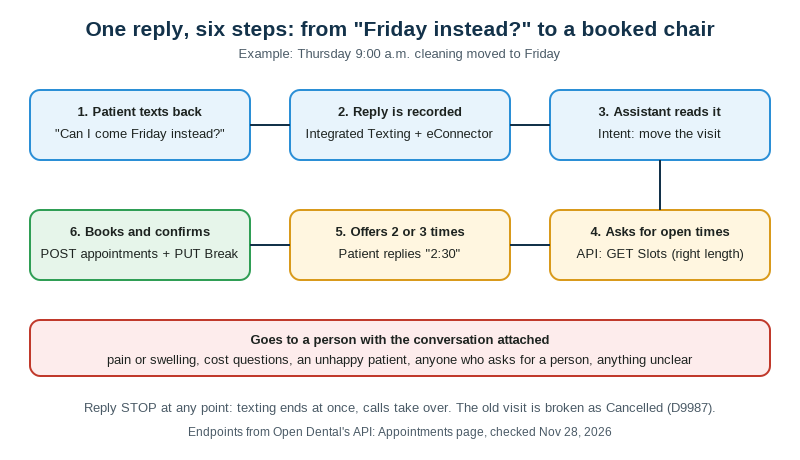
In words, for a Thursday 9:00 a.m. cleaning:
- Trigger: the patient replies to the 2-day confirmation with
Can I come Friday instead?
- Read: the assistant opens the appointment: patient, provider, visit type and length.
- Find: it asks GET Slots for Friday openings long enough for a cleaning.
- Offer: it texts
I have Friday at 10:30 or 2:30. Which works?
in the practice’s name. - Book: the patient answers “2:30”; the assistant creates the new appointment and breaks Thursday’s as Cancelled.
- Tell: it adds a note, texts the new time, and puts the freed slot in front of the ASAP list.
What stays human: pain or swelling, cost and payment questions, an unhappy patient, anyone who asks for a person, and any request the assistant is unsure about. Those land on a short list with the whole thread attached.
It also fits the other jobs on the phones. A front desk phone overflow setup catches calls, and an assistant on texts catches the patients who would rather not call at all.
What does two-way text scheduling cost for a dental office?
Open Dental’s own texting costs little: $5 a month for the number and $0.04 per outgoing text, with replies free. In our 150-request example the fees come to $29 a month, and staff time is the larger number.
Open Dental already carries the texts. What it leaves to your team is reading each reply and turning it into a booked chair.
| Approach | Staff minutes per request | Staff hours | Staff cost at $22/hour | Texting fees | Monthly total |
|---|---|---|---|---|---|
| Phone calls and voicemail | 6 | 15.0 | $330 | $0 | $330 |
| Staff text by hand in Open Dental | 3 | 7.5 | $165 | $29 | $194 |
| Assistant handles 80%, staff review | 1.6 (1 for handled, 4 for the rest) | 4.0 | $88 | $29 | $117 plus the assistant’s fee |
Assumptions: 4 outgoing texts per request ($0.16), 150 requests, $22 an hour as a rough loaded front desk cost, and minutes per request that are our estimates, not measurements. An assistant’s own fee is quoted per practice; ask for it in writing before you compare.
Add Web Sched Recall at $75 a month if you want patients to self-book from recall links. Open Dental’s bundle page lists the eServices Bundle at $165 a month, which includes the texting access fee.
The number the table can’t show is the chair hour: a request answered in two minutes is a slot you can still fill that same afternoon.
What HIPAA, carrier and FCC rules apply to a texting scheduling assistant?
A texting scheduling assistant has to respect carrier registration, patient opt-outs, the FCC’s health care text limits and HIPAA’s rules for any vendor that handles patient information. Open Dental covers the first two inside its software.
- Carrier registration: Open Dental’s Register with Carriers page says registration is needed once per database, and that it makes carriers
less likely to block texts.
- Opt-outs: STOP, END, QUIT and UNSUBSCRIBE end all texting, and only the patient can opt back in.
- Message size: a segment is 160 characters; longer messages cost more, and images and videos can’t be sent.
- Spending cap: the SMS Warning Amount stops manual texts when it is reached, so set it above your real monthly use.
- FCC: the health care exemption at 47 CFR 64.1200(a)(9)(iv) limits automated messages to 1 a day and 3 a week, 160 characters, with no billing or marketing content.
The FCC limit is written for automated messages that rely on that exemption. How a reply inside a conversation the patient started is counted is a question for your compliance counsel and your vendor, so ask for their answer in writing.
Why does a cash-pay dental clinic gain the most from fast text scheduling?
A cash-pay or out-of-network clinic gains the most because its patients choose the practice on service, and a fast, friendly reply is part of that service. A slow answer to “Friday instead?” costs a patient who was already willing to pay out of pocket.
These patients also tend to book larger visits ahead of time, so one moved appointment leaves a longer gap to refill. Offering the freed slot to the ASAP list the same day matters more than a stern reminder.
Keep fees and financial terms out of scheduling texts, as the FCC condition above requires for exempt health care messages. Put them in your intake paperwork and booking email.
What should you check before patients can book by text?
Check the connector, the registration, the consent record and the handoff list first, because a two-way setup repeats any gap in them on every conversation.
- The eConnector runs all day, since replies are not recorded when it is off.
- Carrier registration is complete for every database.
- The intake form asks for consent to texts about appointments and records the mobile number the patient gave.
- The API key is enabled, and you have reviewed the permissions it holds.
- Provider schedules and operatories are set so open slots are real, including operatories marked for Web Sched.
- Rebooking offers only slots of the right length and provider.
- Replies are read within minutes in business hours, by staff or an assistant.
- Clinical, cost and unclear messages go to a named person with the thread attached.
- Every texting and AI vendor that sees patient data has signed a business associate agreement.
- A morning summary lists booked, moved, confirmed and unanswered.
How do you start two-way text scheduling in the first month?
Start with Integrated Texting and carrier registration in week 1, read every reply by hand in week 2, add an assistant for simple reschedules in week 3, and widen it in week 4 only if the summaries look right.
- Week 1: finish carrier registration, turn on eConfirmations, and confirm the eConnector stays running.
- Week 2: read every reply by hand and note how many are “C”, how many ask to move, and how many ask a question.
- Week 3: connect an assistant through the API for reschedule requests only, with every booking showing in a morning list for review.
- Week 4: count moved visits, refilled slots, handoffs and staff minutes, then decide what to add, such as new-patient requests through Web Sched logic.
After a month you will have your own numbers: how many patients write back, how many want a different time, and how many hours the replies used to take.
The patient who texted “Friday instead?” at 8:05 gets two real times by 8:10.
How we researched this
- Read Open Dental’s Appointment Texts, eServices Texting, Text Message, Register with Carriers, Web Sched Recall setup, Web Sched Recall patient page and Recall List manual pages, the appointments API, API Setup and fees pages on November 28, 2026.
- Compared what the pages say about incoming replies and noted where they are silent, such as how a staff member must be told of a free-text reply; we state that as a gap, not as a defect.
- Read the FCC rule text at Cornell LII, and used HHS’s sample business associate agreement provisions.
- Built the cost table from Open Dental’s published US prices and stated assumptions; the minutes per request are our estimates.
- Searched for front-desk discussion on Reddit and Dentaltown about Open Dental texting; no usable Open Dental threads came back, so the trade view here rests on the manual and a vendor comparison we flag as having a stake.
- What we did not do: install Open Dental texting or an assistant, test the API, or measure reply times in a practice.
Start with the eConnector and the reschedule replies, read every thread for a week, and let the assistant take the easy ones.
Sources and further reading
- Open Dental Manual: Appointment Texts (replies and opt-outs)
- Open Dental Manual: eServices Texting
- Open Dental Manual: Text Message
- Open Dental Manual: Register with Carriers
- Open Dental Manual: Web Sched Recall
- Open Dental Manual: Web Sched Recall, What Patient Sees
- Open Dental Manual: Recall List
- Open Dental Manual: Web Sched ASAP
- Open Dental API: Appointments
- Open Dental API: Setup and keys
- Open Dental: Fees for Software, Support, and Services
- 47 CFR 64.1200: FCC rules for automated calls and texts, health care messages
- HHS: Sample business associate agreement provisions
- Resonate: dental texting software that integrates with Open Dental (vendor comparison)
Questions and answers
Can I use AI to do Open Dental two-way SMS scheduling?
Yes. An AI assistant can read patient replies, ask Open Dental’s API for open slots, offer two or three times, book the pick and note it on the appointment. Your office enables the API key, the vendor must sign a business associate agreement, and clinical or cost questions should still go to your team.
Does Open Dental have two-way texting built in?
Yes, through Integrated Texting, a paid eService. Open Dental says it sends texts and receives unlimited incoming messages at no cost. Outgoing texts cost $0.04 each in the US, and a number costs $5 a month per location. Reading and answering free-text replies is still done by staff.
Can patients schedule themselves by text link in Open Dental?
Yes, with Web Sched. Web Sched Recall texts or emails a unique link; the patient picks a date and time, clicks Finalize Appt and confirms, and the appointment appears in the Appointments Module with a staff alert. It costs $75 a month, and once booked it can’t be changed in Web Sched Recall.
What text replies does Open Dental recognize?
C to an eConfirmation sets Confirmed, A to an Arrival message updates the status, HELP triggers an automated reply, and STOP, END, QUIT or UNSUBSCRIBE opt the patient out. The opt-out word must stand alone. Other replies, such as Can I come Friday?
, wait for staff or an assistant.
How long does it take to get Open Dental API access for a texting assistant?
Open Dental says Developer Portal requests take one to three business days to process. Your office then enables the API in setup, and it can enable or disable a key and see its permissions. Neither the API setup page nor the fees page lists an API fee, so ask in writing.