
How to Stop Manual Order Entry for Distributors Without a Portal Fight
Good morning, and here’s to every order desk that has typed 2 cases large tomatoes
into the ERP more times than anyone can count.
Picture an order desk where nobody types a single line from a text, a voicemail or a PDF all day.
At most distributors the desk does the opposite: a phone full of texts, a voicemail box full of buyers, and an inbox of purchase orders, all keyed by hand into the ERP.
The good news is that stopping it does not mean forcing every customer onto a portal.
Short answer: To stop manual order entry, sort your orders by how they arrive, then give each channel its own fix: EDI for chain and retail accounts, a portal for buyers who like to tap, and AI order capture for everyone who keeps texting, calling or emailing PDFs. All three create draft orders a person only spot-checks.
Why do distributors still type orders by hand?
Distributors still type orders by hand because most customers keep ordering the way that is easiest for them, and that is rarely the distributor’s portal.
A chef texts after service. A store manager leaves a voicemail from the walk-in. A purchasing clerk emails a PDF straight out of their own system. Each of those is an order your desk has to read, decode and key.
A study by Forrester Consulting for Sana Commerce, reported by IT Brief on November 26, 2026, surveyed 335 senior B2B ecommerce decision-makers. Seven in ten respondents also said buyers bypass digital channels at critical points in the purchasing process.
The same report describes a UK manufacturer, with about £50 million in yearly turnover, that has an online portal yet still receives almost all of its 100 to 150 daily orders as PDF attachments by email.
- Buyers who skip digital channels at key moments
- 7 in 10 sellers say so (Forrester for Sana Commerce, 335 respondents, November 2026)
- Sellers who say manual work grows with order complexity
- 88%, same study
- Daily orders still arriving as emailed PDFs at one portal-equipped manufacturer
- almost all of 100 to 150
So the portal is not the whole answer. The orders that matter most often come from the customers least likely to log in.
What are the ways to stop manual order entry for distributors?
There are three proven ways to stop manual order entry, and most distributors end up using all three for different customers.
| Route | Best for | What the customer changes | Where it falls short |
|---|---|---|---|
| EDI (X12 850 purchase order in, 855 acknowledgment out) | Chain grocers, retailers and large accounts with their own buying systems | Nothing on their side once set up; their system sends the order | Each trading partner needs its own setup, so it rarely pays off for a single restaurant |
| Customer portal or ordering app | Buyers comfortable tapping, ordering from an order guide | They have to log in and use it every time | Holdouts keep texting, and some buyers email the same order too |
| AI order capture | Texts, voicemails, photos of handwritten sheets and emailed PDFs | Nothing; they keep ordering as they do | Needs a person to check flagged lines, and good item matching to set up |
The fourth “way,” hiring another order clerk, does not stop manual order entry. It just spreads the typing across more people and more payroll.
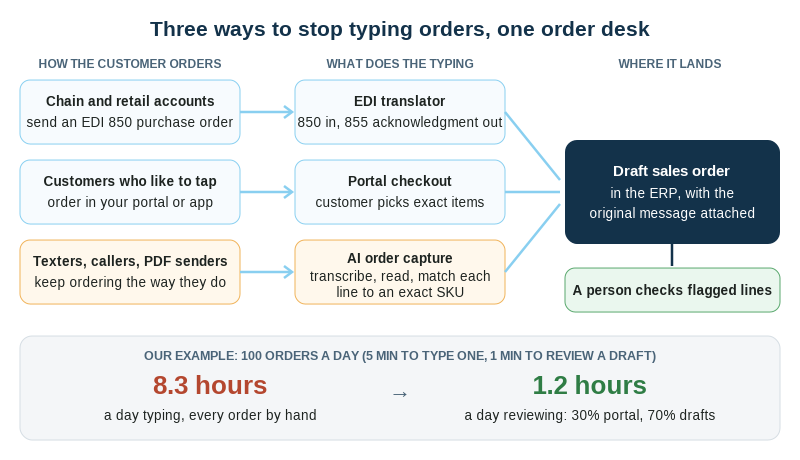
The diagram in text: chain and retail accounts send an EDI 850 purchase order through an EDI translator, which returns an 855 acknowledgment.
Customers who like to tap order in your portal or app. Texters, callers and PDF senders keep ordering as they do, and AI order capture transcribes, reads and matches each line to an exact SKU.
All three routes create a draft sales order in the ERP with the original message attached, and a person checks only the flagged lines. In our example, 100 orders a day go from 8.3 hours of typing to about 1.2 hours of review.
How many hours does manual order entry cost a distributor?
Manual order entry costs about one full-time clerk for every 50 orders a day, if each order takes 5 minutes to key.
That is the whole reason to stop it: the typing hours grow in a straight line with every new account, while reviewing finished drafts grows five times slower.
| Orders a day | Typing hours a day | Typing hours a week | Typing hours a year | Reviewing drafts, hours a year |
|---|---|---|---|---|
| 50 | 4.2 | 20.8 | 1,042 | 208 |
| 100 | 8.3 | 41.7 | 2,083 | 417 |
| 200 | 16.7 | 83.3 | 4,167 | 833 |
Assumptions, all ours: 5 minutes to key one order by hand, including finding the customer and each item; 1 minute to check a finished draft; 5 order days a week and 250 a year.
Your own minutes may be higher. A messy voicemail replayed three times, or a PDF with the customer’s own part numbers, easily takes 10 minutes. Time five real orders with a stopwatch and swap in your number.
How much typing does a portal leave behind?
A portal leaves behind every order from customers who do not use it, and those are usually typed by hand at the same 5 minutes each.
Vendors disagree sharply on adoption: portal sellers report most orders moving online, while AI-capture sellers say most still arrive by phone and email. So here is the math at four adoption levels, for a distributor with 100 orders a day.
| Share of orders in the portal | Orders still by text, voicemail or email | Hours a day typing them | Hours a day reviewing them as AI drafts |
|---|---|---|---|
| 0% | 100 | 8.3 | 1.7 |
| 30% | 70 | 5.8 | 1.2 |
| 50% | 50 | 4.2 | 0.8 |
| 70% | 30 | 2.5 | 0.5 |
Here’s the catch: even a very successful portal at 70% still leaves two and a half hours of typing every day. AI order capture is what takes that last stretch to near zero.
How does AI order capture turn texts, voicemails and PDFs into ERP orders?
AI order capture reads each message the moment it arrives, matches every line to an item in your catalog, and writes a draft sales order your desk approves.
- Catch. Texts, after-hours voicemails and the shared order inbox all feed one cloud service, so no order lives only on a rep’s phone.
- Read. Voicemails are transcribed with a speech service such as Google Cloud Speech-to-Text, listed at $0.016 a minute for standard recognition when we read it on November 27, 2026. Photos and scans go to a reader such as Google Cloud Vision, whose documentation says
one specific use of DOCUMENT_TEXT_DETECTION is to detect handwriting in an image.
- Match. Each line is matched to an exact SKU, unit and pack size, searching the customer’s order guide and order history first.
- Check. Rules compare the draft with stock, credit status, the delivery day for that route and the account’s normal quantities.
- Write. A draft sales order goes into the ERP with the original text, audio or PDF attached and doubtful lines flagged.
- Tell. The customer can get a short confirmation, and the desk sees a queue with flagged orders on top.
The deep dives cover each channel: phone and text orders, voicemail to sales order software and emailed PDF purchase orders into QuickBooks.
How does it match 2 cases large tomatoes
to the right SKU?
AI order capture matches a vague item name by searching the items that customer actually buys before the whole catalog, then flagging anything it cannot pin down.
A bistro’s order guide may hold 80 items; your catalog may hold 8,000. Searching the 80 first is why “large tomatoes” usually lands on the one tomato that account always takes.
| What the customer wrote | Draft line | Why | Flagged? |
|---|---|---|---|
2 cases large tomatoes | 2 cs Tomato 5x6, 25 lb | The only large tomato on this account’s order guide | No |
same oil as last week | 1 Fryer oil, 35 lb jug | Copied from last week’s order | Yes, confirm quantity |
| “4 lemons” | 4 cs Lemons, 115 ct | Lemons sell by the case on this account | Yes, unit mismatch |
| “some limes” | Limes, quantity blank | No number given | Yes, ask the customer |
Pepper describes the same safeguard for its Order Agent: it flags uncertainty instead of guessing
. Whatever tool you use, insist on that behavior.
Every correction your desk makes can be saved as an alias for that customer, so “the big tomatoes” is matched without a flag next time.
When should a distributor use EDI instead of AI order capture?
Use EDI when a large account already sends structured purchase orders from its own buying system and is willing to set up a trading partnership.
What we like about this approach is that nobody has to win an argument with a customer. The chain stores send files, the app fans tap, and everyone else keeps texting while the typing quietly disappears.
In the X12 supply chain flow, the buyer sends an 850 Purchase Order and the seller answers with an 855 Purchase Order Acknowledgment, which X12 says may affirm the order or may indicate changes to the 850 Purchase Order
.
EDI suits chain grocers and retailers who order the same way every week. It does not suit a chef texting at 11 p.m., which is why EDI and AI order capture sit side by side rather than compete.
Which ERPs can accept automated draft orders?
Most current ERPs can accept automated draft orders through an API, an import file or their own ordering channel.
- Microsoft Dynamics 365 Business Central: the sales order API creates orders whose status comes back as “Draft,” with a unit of measure on every line.
- Acumatica: the Customer Portal gives willing buyers B2B ordering with real-time inventory and their own pricing, alongside any order capture for the rest.
- NECS entrée: food distributors on entrée can see how orders reach it in our guide to food distributor order entry automation.
- QuickBooks: smaller distributors can follow the steps to turn emailed PDF orders into QuickBooks entries.
Ask your ERP partner one plain question: How can an outside program create a draft sales order with a note and an attachment?
Their answer shapes the whole setup.
Should you buy an order capture tool or have one built?
Buy a packaged tool when your ERP is on its list and your orders look like everyone else’s; have one built when your channels, units or ERP are unusual.
- Choco OrderAgent: captures orders
from voicemail, WhatsApp, email, text, photos and more
, claims up to 97% accuracy, and says early adopters skip manual review for 50% of orders. Those are vendor claims. - Pepper Order Agent: Pepper says it supports voice, text, emails, PDFs and images, and produces orders ready for review and submission.
- A custom order agent: built on cloud speech, vision and language services around your own ERP, item file and customer aliases, so you own the rules and the data.
Whichever you pick, run one week of your own worst orders through it before you sign: the voicemail with the walk-in fan, the blurry clipboard photo, the PDF with the customer’s part numbers.
What should a person still check when manual order entry stops?
A person should still check every flagged line and a short list of lines no automation should pass alone.
- Unit mismatches: the customer’s unit differs from the item’s selling unit.
- First-time items: anything the account has never ordered.
- Unusual quantities: 20 cases where the account usually takes 2.
- Price exceptions: market-price items and anything off the customer’s price list.
- Credit holds: any order from an account past its terms.
- Missing details: no quantity, no delivery day, or a ship-to the account does not have.
How do you stop manual order entry without disrupting the order desk?
Stop manual order entry in stages over about a month, so the desk keeps working normally while the automation proves itself.
- Week 1, count: tally every order by channel (text, voicemail, PDF, email body, portal, EDI) and time five of each by hand.
- Week 2, shadow: the order agent drafts every incoming order in the background; clerks compare its drafts with what they typed and correct the matches.
- Week 3, regulars first: drafts from your steadiest accounts go into the ERP for one-click approval; new accounts stay manual.
- Week 4, decide: compare review minutes with typing minutes and count the errors caught, then widen it or stop.
Meanwhile, invite buyers who like apps to your portal and ask your chain accounts about EDI. Nobody is forced to change.
If the review queue is not clearly shorter than the typing queue by the end of the month, the matching needs more work, and that is far better learned in shadow mode than on a loaded truck.
Count one week of orders by channel, and you will already know which door to open first.
Sources and further reading
- IT Brief: B2B suppliers still stuck with manual order processing (Forrester Consulting for Sana Commerce, November 26, 2026)
- X12: Supply chain transaction flow (850 Purchase Order, 855 Acknowledgment)
- Acumatica: Customer Portal
- Microsoft Learn: Create salesOrders in Business Central
- Google Cloud: Speech-to-Text pricing (read November 27, 2026)
- Google Cloud Vision: Detect handwriting in images
- Choco: OrderAgent (vendor claims)
- Pepper: Streamlining orders with Order Agent (January 23, 2026)
Questions and answers
Can I use AI to stop manual order entry at my distribution company?
Yes. AI can transcribe order voicemails, read texts, photos of handwritten sheets and emailed PDFs, match each line to your exact SKU using the customer’s order guide, and create a draft sales order in your ERP. A person still reviews flagged lines such as unit mismatches, new items and unusual quantities.
Do I have to make my customers use an ordering portal?
No. A portal works well for buyers who like to tap, but many customers keep texting, calling and emailing PDFs. AI order capture reads those orders where they already arrive, so the portal and the capture service can run side by side.
Is EDI worth it for a small distributor?
EDI is worth it for large accounts that already send structured purchase orders from their own systems, such as chain grocers and retailers. It uses the X12 850 purchase order and 855 acknowledgment. For restaurants and small shops that text or call, AI order capture fits better.
How accurate is AI order capture?
Accuracy depends on your item data and how messy the orders are. Choco claims up to 97% accuracy for its OrderAgent, but that is a vendor claim. Test any tool on a week of your own orders and make sure it flags uncertain lines instead of guessing.
How long does it take to stop manual order entry?
A sensible rollout takes about a month: one week to count orders by channel, one week of shadow drafting, one week of one-click approval for regular accounts, and one week to compare minutes and errors. The ERP connection is usually the longest single step.