
GTA 6 Accessibility: Subtitles, Controller Remapping and Options for Disabled Players
Disclosure: this page contains Amazon affiliate links. As an Amazon Associate we earn from qualifying purchases, at no extra cost to you.
Picture your first drive through Leonida with subtitles you can read from the couch and buttons that sit right where your hands like them.
Well hi there, comfort-first Vice City cruiser, this one’s for you!
If a standard controller has ever felt like it was made for somebody else’s hands, the Xbox Adaptive Controller and the Access controller for PS5 are worth a look.
GTA 6 itself has a lot of help tucked into its Settings menu, too.
Here’s every accessibility option reported so far, which tab it’s on, and what’s still unconfirmed.
Short answer: GTA 6 has a wide set of accessibility options: full subtitles and closed captions in sizes up to Large, screen narration, audio descriptions, high-contrast shaders, Tap and Hold Assist, and Accessible Combat as an easy mode. Full button-by-button remapping isn’t confirmed; the game has preset layouts, and PS5 and Xbox can remap buttons system-wide.
What accessibility options does GTA 6 have?
GTA 6 has options for vision, hearing, motor and comfort needs, spread across its Settings tabs rather than in one Accessibility menu. The PlayStation Store lists 30 accessibility features for GTA VI, from fully subtitled dialogue to adjustable difficulty, and Push Square’s Robert Ramsey called it the most customizable Rockstar game yet for accessibility on .
Grand Theft Auto VI came out on , for PS5 and Xbox Series X|S, per Rockstar’s GTA VI page. We couldn’t find a separate accessibility page from Rockstar as of November 20, so the GTA 6 accessibility details here come from Rockstar Support’s settings guide, the console stores’ feature tags and outlets who’ve been through the menus.
Where are the accessibility settings in GTA 6?
Open the Pause Menu and select Settings: the GTA 6 accessibility options sit in a dedicated Accessibility section of the Gameplay tab, with the rest in the UI, Display, Camera, Audio and Controller tabs. That’s how Rockstar Support’s How to change Grand Theft Auto VI settings
lays out the GTA 6 Settings menu:
- Control Scheme
- Controller layouts, chosen separately for On Foot, Aiming, Melee, Land/Water Vehicles, Aircraft, Bicycle, Swimming and Parachute.
- Controller
- Aim and Look Sensitivity, Inverted Controls, and DualSense features on PS5.
- Gameplay
- Combat, Movement and Accessibility.
- Display
- Display, Visual Effects and High-Contrast Shaders.
- UI
- Scaling & Readability, Subtitles & Captions, Navigation, Reticle, Combat, HUD Notifications, Progress Notifications, Player & Vehicle Status, Prompt, Activities and Units of Measurement.
- Camera
- On Foot, Land & Water Vehicles, Comfort, Aircraft, Underwater and Cinematic.
- Audio
- Setup, Volume and Narration.
- Account
- General and legal information about Rockstar Games.
On PS5, you switch between the GTA 6 Settings tabs with L1 and R1, AllThings.How reported on November 19, 2026. The very first time you start GTA 6, three setup screens ask about Screen Narration, UI Text Size (Small, Medium, Large or X Large) and Subtitles (Off, Small, Medium or Large), so the most important GTA 6 accessibility choices come before you’ve even played.
What do the PlayStation Store’s accessibility tags say about GTA 6?
The PlayStation Store’s GTA VI listing carries 30 accessibility tags in five groups, and 4 of them are marked Advanced: subtitles, captions, stick inversion and adjustable difficulty. Sony’s tags are short standard descriptions, so they tell you what kind of help exists in GTA 6, not every setting name.
| Group | Tags | How many | Marked Basic or Advanced |
|---|---|---|---|
| Visuals | Clear Text, Large Text, Color Alternatives, High Contrast Visuals, Visual Comfort, Audio Cue Alternatives | 6 | Visual Comfort (Basic) |
| Audio | Volume Controls, Mono Audio, 3D Audio, Screen Reader | 4 | Screen Reader (Basic) |
| Subtitles and captions | Subtitles, Clear Subtitles, Large Subtitles, Captions, Clear Captions, Large Captions | 6 | Subtitles (Advanced), Captions (Advanced) |
| Controls | Controller Remapping, Adjustable Stick Sensitivity, Adjustable Stick Inversion, and playable without rapid button presses, motion controls, touch controls, controller vibration or the adaptive trigger effect | 8 | Controller Remapping (Basic), Stick Sensitivity (Basic), Stick Inversion (Advanced) |
| Gameplay | Adjustable Difficulty, Simplified Quick Time Events, Game Speed, Control Reminders, Tutorial Reminders, Game Pausing | 6 | Adjustable Difficulty (Advanced), Game Speed (Basic) |
| Total | All five groups | 30 | 5 Basic, 4 Advanced, 21 with no level |
The Xbox Store’s GTA VI page shows “13 Accessibility features” but didn’t list them when we checked on November 20, 2026. The two stores use their own tag lists, so 30 and 13 aren’t a like-for-like comparison of GTA 6 on PS5 and Xbox.
Which GTA 6 setting helps with which need?
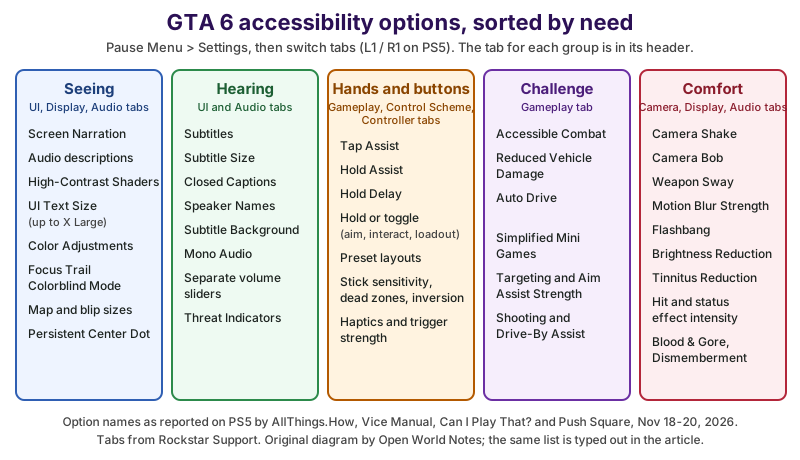
Most GTA 6 accessibility needs map to one or two Settings tabs: vision to UI and Display, hearing to UI and Audio, hands to Gameplay and Control Scheme, and motion comfort to Camera. Here’s the GTA 6 Settings menu sorted by need instead of by tab.
| Need | GTA 6 options | Settings tab |
|---|---|---|
| Seeing (blind and low vision) | Screen Narration, audio descriptions, High-Contrast Shaders, UI Text Size up to X Large, Color Adjustments, Focus Trail Colorblind Mode, map and minimap blip sizes, In-World Marker Size, Persistent Center Dot | UI, Display, Audio |
| Hearing (deaf and hard of hearing) | Subtitles, subtitle size, Closed Captions, Speaker Names, subtitle Background, Mono Audio, separate volume sliders, Threat Indicators | UI, Audio |
| Hands and buttons (motor) | Tap Assist, Hold Assist, Hold Delay, hold or toggle for aiming, interacting and loadout, preset control layouts, stick sensitivity, dead zones and inversion, haptics and trigger strength | Gameplay, Control Scheme, Controller |
| Challenge (cognitive load, fatigue) | Accessible Combat, Reduced Vehicle Damage, Auto Drive, Simplified Mini Games, Targeting, Aim Assist Strength, Shooting Assist, Drive-By Assist | Gameplay |
| Comfort (motion sickness, light, sound) | Camera Shake, Camera Bob, Weapon Sway, Motion Blur Strength, Flashbang, Brightness Reduction, Tinnitus Reduction, hit and status effect intensity, Blood & Gore Intensity, Dismemberment | Camera, Display, Audio |
Does GTA 6 have subtitles and closed captions?
Yes. GTA 6 has subtitles for spoken dialogue and separate closed captions for sounds, both on the UI tab under Subtitles & Captions. The PlayStation Store rates both Advanced: Spoken dialog in the game is fully subtitled
and Sounds and sound effects are fully captioned.
Alongside the GTA 6 subtitles themselves, AllThings.How lists a Size setting, Closed Captions, Speaker Names (so you know who’s talking) and a Background behind the text. Can I Play That?’s Marijn Rongen also noted separate volume sliders for sound effects, UI, dialogue, music and media, so you can turn the music down and keep voices clear. Threat Indicators on the UI tab show danger on screen, and the PlayStation Store’s Audio Cue Alternatives tag says Audio information is also communicated visually or through controller vibration.
Can you make GTA 6 subtitles bigger?
Yes. GTA 6 subtitles come in Small, Medium and Large, picked on the first-launch screen or later under UI, Subtitles & Captions, Size. Vice Manual counted three choices for the subtitle background, which makes GTA 6 subtitles much easier to read over a bright Vice City beach. Menu and HUD text has its own UI Text Size, up to X Large.
If you play from across the room, a bigger screen helps more than any setting; our GTA 6 TV and console settings guide covers picture modes and HDR, and a wireless gaming headset keeps dialogue close and clear.
Can you remap controls in GTA 6?
Partly. GTA 6 lets you pick preset control layouts separately for walking, aiming, driving, flying, swimming and more, but nobody has confirmed full button-by-button remapping inside the game. The PlayStation Store rates GTA VI’s Controller Remapping as Basic, which Sony defines as: You can change the controls to an alternate pre-set layout, or some remapping support is provided.
Rockstar Support lists the GTA 6 Control Scheme tab with separate schemes for On Foot, Aiming, Melee, Land/Water Vehicles, Aircraft, Bicycle, Swimming and Parachute. Can I Play That? counted three default presets, and Marijn Rongen wrote on November 18, 2026:
I couldn’t quite find confirmation that remapping is available so I’m afraid it is not.
Two smaller GTA 6 control changes help a lot of hands. Sprint sits on L3 (clicking the left stick) by default instead of tapping a face button, per Can I Play That? and Vice Manual. And aiming, interacting and opening your loadout can each be set to hold or toggle, so you don’t have to keep a button pressed down. When the GTA 6 presets aren’t enough, both consoles can swap buttons at the system level.
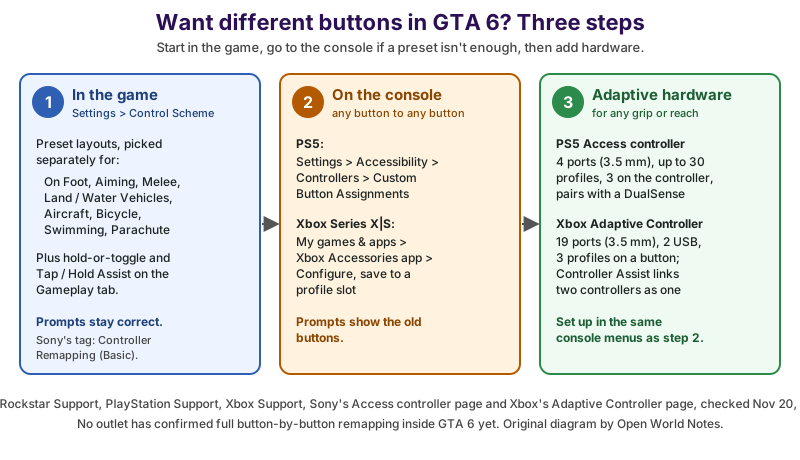
- In GTA 6: Settings, Control Scheme, then pick a preset layout for each situation (On Foot, Aiming, Melee, Land/Water Vehicles, Aircraft, Bicycle, Swimming, Parachute). Add hold-or-toggle and Tap or Hold Assist on the Gameplay tab. The on-screen button prompts match.
- On the console: PS5 Custom Button Assignments or the Xbox Accessories app can move any button to any other. GTA 6 doesn’t know about the swap, so its prompts still show the original buttons.
- With adaptive hardware: the Access controller for PS5 (four 3.5 mm ports, up to 30 profiles, 3 on the controller) or the Xbox Adaptive Controller (nineteen 3.5 mm ports, two USB 2.0 ports, 3 profiles on its Profile button), set up in the same console menus.
How do you remap buttons for GTA 6 on PS5?
Use the PS5’s own Custom Button Assignments, which work in any game, GTA 6 included. PlayStation Support’s PS5 accessibility page gives the steps:
- Go to Settings, Accessibility, Controllers, Custom Button Assignments for DualSense Wireless Controller.
- Turn on the custom assignments, pick the button you want to change, and choose what it should do.
- Select Apply, then start GTA 6.
The PS5 swap applies to every game and the console menus, so remember to turn it off before you play something else. A DualSense Edge adds two back buttons you can assign yourself, a handy way to move a GTA 6 action within reach of your fingers without losing a face button.
How do you remap buttons for GTA 6 on Xbox?
Use the Xbox Accessories app on your Xbox Series X|S: open My games & apps, select the Xbox Accessories app, choose your controller and Configure, then save the new layout to a profile. Xbox Support lists the Xbox Wireless Controller, the Xbox Elite Wireless Controller Series 2, the Xbox Adaptive Controller, the Xbox Adaptive Joystick and many third-party joysticks as remappable.
The Xbox Elite Wireless Controller Series 2 has four back paddles, and the Accessories app can map any GTA 6 action to them. As on PS5, the game’s prompts keep showing the default Xbox buttons.
Does GTA 6 have an easy mode?
Not as a difficulty menu, but yes in practice: GTA 6’s Gameplay tab has Accessible Combat, which lowers enemy health and the damage you take, and Reduced Vehicle Damage, which makes your car tougher. Push Square reported on November 19, 2026, that turning them on doesn’t disable Trophies.
Push Square’s Robert Ramsey found that GTA 6’s Accessible Combat doesn’t make you invincible (you still need cover in a firefight) but makes the challenge noticeably lower, and the menu warns that these settings change the game’s balance and experience
significantly. The PlayStation Store backs this up with an Adjustable Difficulty (Advanced) tag: You can customize the level of challenge or activate a range of assists individually to help you play the game.
Other GTA 6 settings take the pressure off too. Auto Drive drives you toward your set destination, Simplified Mini Games makes activity controls less complex, and the PlayStation Store’s Game Speed (Basic) tag says You can slow down the game for a limited amount of time, or only when performing specific actions.
Control Reminders and Tutorial Reminders let you look up the controls whenever you forget, and you can pause during gameplay and cutscenes when playing offline.
What do Tap Assist, Hold Assist and Hold Delay do in GTA 6?
GTA 6’s Tap Assist cuts down rapid button mashing in quick time events, Hold Assist helps with actions where you’d keep a button pressed, and Hold Delay changes how long a press must last before it counts, to avoid accidental presses. Vice Manual counted five Tap Assist steps, four Hold Assist steps and eleven Hold Delay steps on the Gameplay tab.
Can I Play That? described five levels of tap assists to help with QTEs
in GTA 6, plus many options to switch these holds to a toggle
and Hold Delay to help avoid accidental presses.
The PlayStation Store’s tags agree: GTA VI is Playable without Rapid Button Presses and has Simplified Quick Time Events.
How does aim assist work in GTA 6?
GTA 6 has a Targeting setting with three modes, an Aim Assist Strength slider, and separate Shooting Assist and Drive-By Assist toggles on the Gameplay tab. AllThings.How lists Targeting at Partial and Aim Assist Strength at 4 by default; Vice Manual says Partial drifts your aim toward a target without locking on.
For fine control in GTA 6, the Controller tab adds look and aim sensitivity, stick dead zones, and Vice Manual’s Aim Response Curve with four choices. The PlayStation Store rates GTA VI’s stick inversion Advanced: you can invert the horizontal and vertical movement for each stick.
What does GTA 6 offer blind and low-vision players?
GTA 6 has Screen Narration that reads most menus aloud from the very first screen, a separate audio description option, High-Contrast Shaders, and bigger text and map icons. Can I Play That?’s Marijn Rongen called these the most impressive GTA 6 features: GTA VI provides narration for most menus and the UI.
Little confession from a fellow fan: a game that offers to read its menus aloud before you’ve pressed a single other button made us grin. That’s the kind of welcome everyone deserves on launch night.
GTA 6’s narration is a start, not a full screen reader for everything: the PlayStation Store rates its Screen Reader Basic, saying it will help you start playing the game and adjust the settings
. Rockstar Support puts Narration on the Audio tab and High-Contrast Shaders on the Display tab. TechRadar’s GTA 6 review describes the high-contrast shader as adding a color to people and things you can interact with; the PlayStation Store’s tag says Characters, enemies, items, and interactive objects are easier to see against the environment.
On the UI tab, GTA 6 also has Map Blip Size, Minimap Blip Size, In-World Marker Size and a Persistent Center Dot for the reticle, per AllThings.How. If GTA 6’s own options aren’t enough, the PS5’s Zoom and High Contrast settings and the Xbox’s Magnifier and Narrator work on top of the game (PlayStation Support notes PS5 Zoom isn’t available during Remote Play).
Does GTA 6 have a colorblind mode?
Yes, two kinds: Color Adjustments on GTA 6’s UI tab (Vice Manual counted four options) and a Focus Trail Colorblind Mode on the Display tab, which Can I Play That? says boosts the colors of the focus trails. The PlayStation Store’s Color Alternatives tag says You don’t need to rely on understanding color to play the game.
On Xbox Series X|S there are also system color filters for deuteranopia, protanopia and tritanopia, per Xbox’s accessibility page, which apply to GTA 6 and everything else on the console.
Can you turn off camera shake and motion blur in GTA 6?
Yes. GTA 6’s Camera tab has a Comfort section with Camera Shake, Weapon Sway and Camera Bob, and the Display tab has a Motion Blur Strength slider, per AllThings.How. The PlayStation Store’s Visual Comfort (Basic) tag says You can play without camera movements and effects during gameplay that might result in visual discomfort.
AllThings.How lists GTA 6’s defaults as Camera Shake On, Weapon Sway On, Camera Bob 10 and Motion Blur Strength 3, so motion-sensitive players will want to turn them down first. GTA 6’s Display tab can also tone down flashbangs, switch on Brightness Reduction, and lower the intensity of player status, hit and awareness effects. And on the Audio tab, Tinnitus Reduction cuts the ringing after explosions, a small GTA 6 touch that Can I Play That? and TechRadar both pointed out.
The Display tab also holds GTA 6’s Blood & Gore Intensity and Dismemberment settings; our guide to GTA 6’s M rating for parents explains what those don’t change.
Which adaptive controllers work with GTA 6?
Any controller the console supports works with GTA 6, including the Access controller for PS5 and the Xbox Adaptive Controller, because they’re set up at the console level and the game just sees a normal controller. You configure them in the same PS5 and Xbox menus used for remapping.
- Access controller for PS5: Sony’s Access controller page lists four 3.5 mm ports for extra buttons and switches, up to 30 control profiles from the PS5’s settings, three stored on the controller, and swappable button and stick caps. Up to two Access controllers can work as one, alone or combined with a DualSense.
- Xbox Adaptive Controller: Xbox’s Adaptive Controller page lists
Nineteen 3.5mm ports and two USB 2.0 ports for external inputs
, three profiles you switch with its Profile button, and support for Xbox Series X|S, Xbox One and Windows PCs. - Two controllers as one: Xbox Controller Assist
links two controllers so you can use them as if they were one controller
, Xbox’s accessibility page says, so a friend or family member can help with the tricky parts of a GTA 6 mission.
Both adaptive controllers take 3.5 mm accessibility switches for buttons you press with a hand, foot, elbow or head. If buying one is the hard part, the charity AbleGamers (We combat social isolation through play
) runs Able Player One, which offers individual assessments and custom adaptive setups. And if you’re shopping for someone else, our GTA 6 gift ideas have more for the fan in your life.
What’s still unconfirmed about GTA 6 accessibility?
Three things about GTA 6 accessibility are still open as of November 20, 2026: whether GTA 6 has full button-by-button remapping, the full list behind the Xbox Store’s 13 accessibility features, and whether every option is the same on Xbox Series X|S, since the launch reports we used were from PS5.
Can I Play That? also noted that Rockstar apparently didn’t send early copies to accessibility outlets and creators, so more detailed GTA 6 accessibility reviews are still coming, and Rongen said the early list may be incomplete. There’s no PC version of GTA 6 announced yet, either; here’s what’s known about GTA 6 on PC. We’ll update this article as Rockstar patches GTA 6 and as hands-on accessibility reviews come in, and if you’re still deciding on hardware, our GTA 6 console requirements guide covers which consoles run it.
So spend five minutes in the Settings menu before your first mission. Leonida is a lot more fun when the game fits you, not the other way round.
Sources and further reading
- Rockstar Support: How to change Grand Theft Auto VI settings — the eight Settings tabs and their sections, Restore All / Restore Default
- Rockstar Games: Grand Theft Auto VI — official page: platforms and the November 19, 2026 release
- PlayStation Store: Grand Theft Auto VI — 30 accessibility tags, read November 20, 2026
- Xbox Store: Grand Theft Auto VI — 13 accessibility features (count only), read November 20, 2026
- Can I Play That?: Early looks at GTA VI accessibility features (Marijn Rongen, November 18, updated November 19, 2026) — narration, audio descriptions, tap and hold assists, remapping not confirmed
- Push Square: GTA 6 Has an Easy Mode Buried in an Impressive Range of Accessibility Options (Robert Ramsey, November 19, 2026) — Accessible Combat, Reduced Vehicle Damage, Trophies
- AllThings.How: GTA 6 Accessibility Options on PS5 — Where Each Setting Lives (updated November 19, 2026) — tab-by-tab option names and defaults
- Vice Manual: GTA 6 accessibility options — assist step counts, subtitle background, color adjustments (checked November 18, 2026)
- TechRadar: GTA 6 review — high-contrast shader, tinnitus reduction
- PlayStation Support: PS5 accessibility settings — Custom Button Assignments, Screen Reader, Zoom, High Contrast, Reduce Motion
- Xbox Support: Configure the Xbox Adaptive Controller in the Xbox Accessories app — button remapping and profiles
- Xbox: Accessibility features — Controller Assist, Narrator, Magnifier, color filters
- PlayStation: Access controller for PS5 — ports, profiles, pairing with DualSense
- Xbox: Xbox Adaptive Controller — 19 ports, 2 USB ports, 3 profiles
- AbleGamers — Able Player One and adaptive equipment help
Questions and answers
Does GTA 6 have subtitles?
Yes. GTA 6 has subtitles for all spoken dialogue and separate closed captions for sounds, with Small, Medium and Large sizes, speaker names and a background. You choose them on the first-launch screen or later under Settings, UI, Subtitles & Captions.
Can you remap buttons in GTA 6?
Only partly inside the game: GTA 6 has preset control layouts for each situation, and the PlayStation Store rates its remapping Basic. For any-button-to-any-button changes, use PS5’s Custom Button Assignments (Settings, Accessibility, Controllers) or the Xbox Accessories app.
Does GTA 6 have difficulty settings?
There’s no difficulty menu, but GTA 6’s Gameplay tab has Accessible Combat (weaker enemies, less damage to you) and Reduced Vehicle Damage, which together work like an easy mode. Push Square reported that Trophies still unlock with them on.
Does GTA 6 have a colorblind mode?
Yes. GTA 6 has Color Adjustments on the UI tab and a Focus Trail Colorblind Mode on the Display tab, and the PlayStation Store says you don’t need to rely on color to play. Xbox Series X|S also has system color filters.
Does GTA 6 work with the Xbox Adaptive Controller?
Yes. The Xbox Adaptive Controller works with any Xbox Series X|S game, GTA 6 included, because it’s set up in the Xbox Accessories app. On PS5, the Access controller works the same way through the console’s settings.