Can You Run ChatGPT Locally? OpenAI’s Offline Model and the Computer It Needs
Disclosure: this page contains Amazon affiliate links. As an Amazon Associate we earn from qualifying purchases, at no extra cost to you.
Picture your own computer answering questions with the Wi-Fi switched off, like a little ChatGPT that lives right on your desk.
Welcome, offline explorer!
You can get very close to that today with OpenAI’s own free model, and the one number that decides whether your computer can do it is its memory.
If you’re shopping, graphics cards with 16 GB of video memory on Amazon and a Mac mini are the two easiest places to start.
Short answer: Not ChatGPT itself: ChatGPT runs on OpenAI’s servers and its models can’t be downloaded. But OpenAI’s free open-weight model, gpt-oss, runs on your own computer, even offline. The smaller gpt-oss-20b needs about 16 GB of video memory or Mac unified memory; the larger gpt-oss-120b needs 60 to 80 GB.
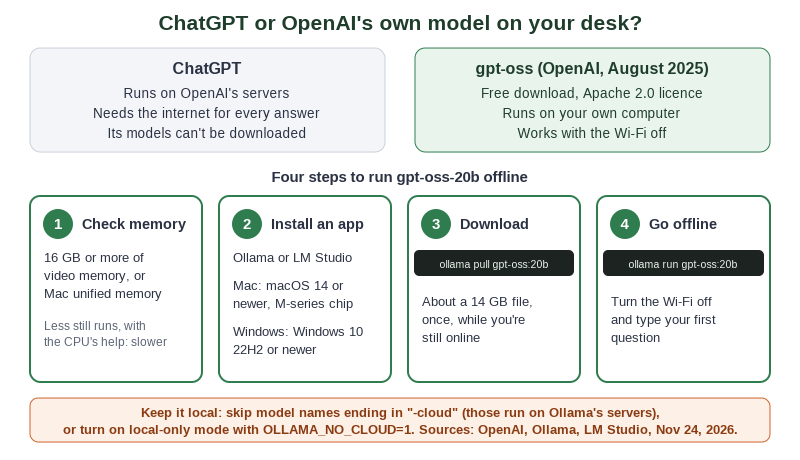
The same picture in plain text:
- ChatGPT
- Runs on OpenAI’s servers, needs the internet for every answer, and its models can’t be downloaded.
- gpt-oss (OpenAI, August 2025)
- A free download under the Apache 2.0 licence that runs on your own computer and works with the Wi-Fi off.
- Step 1, check memory
- 16 GB or more of video memory, or Mac unified memory. Less still runs with the processor’s help, but slower.
- Step 2, install an app
- Ollama or LM Studio. Mac: macOS 14 or newer on an M-series chip. Windows: Windows 10 22H2 or newer.
- Step 3, download
ollama pull gpt-oss:20b, about a 14 GB file, once, while you’re still online.- Step 4, go offline
ollama run gpt-oss:20b, turn the Wi-Fi off and type your first question.- Keep it local
- Skip model names that end in “-cloud”, or turn on local-only mode with
OLLAMA_NO_CLOUD=1.
Can you run ChatGPT itself on your own computer?
No, you can’t run ChatGPT itself on your own computer. ChatGPT’s answers come from OpenAI’s servers, so the ChatGPT app and chatgpt.com need an internet connection, and the models behind ChatGPT aren’t offered as a download.
What you can download is gpt-oss, OpenAI’s open-weight model family. OpenAI released it on August 5, 2025, in Introducing gpt-oss, in two sizes: gpt-oss-120b (117 billion parameters) and gpt-oss-20b (21 billion).
Both gpt-oss models are free under the Apache 2.0 licence, and the weights are on Hugging Face. OpenAI says the smaller one can run on edge devices with just 16 GB of memory
.
That makes gpt-oss the closest thing to “ChatGPT offline” that OpenAI itself offers. By November 2026 OpenAI had not released a newer general-purpose open-weight model; its later releases, like GPT-6 Astra, run only in OpenAI’s cloud.
How close is gpt-oss to ChatGPT?
gpt-oss is close to OpenAI’s smaller 2025 reasoning models, not to the newest ChatGPT. OpenAI’s announcement says The gpt-oss-120b model achieves near-parity with OpenAI o4-mini on core reasoning benchmarks
, and that gpt-oss-20b delivers similar results to OpenAI o3‑mini on common benchmarks
.
OpenAI trained gpt-oss on a mostly English, text-only dataset, with a focus on STEM, coding, and general knowledge.
So keep ChatGPT for pictures, voice chats and the latest models, and use gpt-oss for private text work on your own machine.
What computer do you need to run OpenAI’s model offline?
To run OpenAI’s gpt-oss-20b offline you need about 16 GB of memory the AI can use: video memory on a graphics card, or unified memory on an Apple silicon Mac. gpt-oss-120b needs 60 to 80 GB, which only big workstations and a few special machines have.
OpenAI’s Ollama guide says gpt-oss-20b is Best with ≥16GB VRAM or unified memory
and gpt-oss-120b is Best with ≥60GB VRAM or unified memory
.
On Ollama’s gpt-oss page, the downloads are 14 GB for gpt-oss:20b and 65 GB for gpt-oss:120b, both with a 128K context window. We set those file sizes against each machine’s memory:
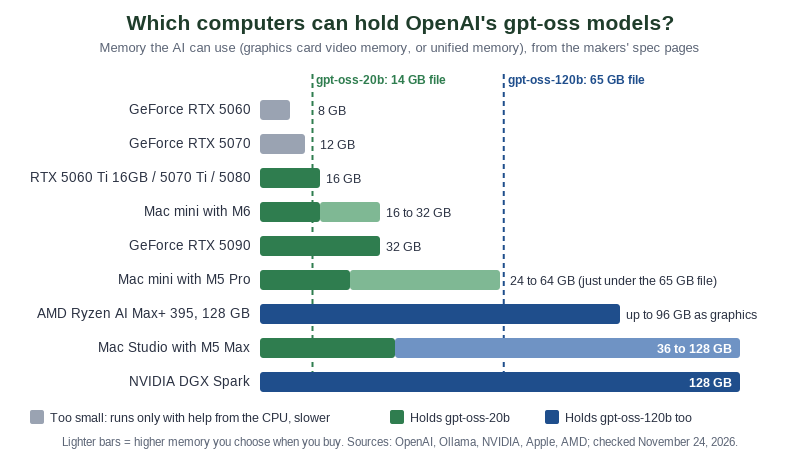
| Computer or graphics card | Memory the AI can use | gpt-oss-20b (14 GB file) | gpt-oss-120b (65 GB file) |
|---|---|---|---|
| GeForce RTX 5060 (or RTX 5060 Ti 8GB) | 8 GB video memory | 6 GB short: runs with the processor’s help, slower | No |
| GeForce RTX 5070 | 12 GB video memory | 2 GB short: runs with the processor’s help, slower | No |
| GeForce RTX 5060 Ti 16GB, 5070 Ti or 5080 | 16 GB video memory | Fits, about 2 GB room left | No |
| GeForce RTX 5090 | 32 GB video memory | Fits, about 18 GB room left | No, 33 GB short |
| Mac mini with M6 | 16 GB, or 24 or 32 GB unified memory | Fits, about 2, 10 or 18 GB room left, shared with macOS and your apps | No |
| Mac mini with M5 Pro | 24 GB, or 48 or 64 GB unified memory | Fits, about 10 to 50 GB room left | No: 64 GB is 1 GB short of the file alone |
| Mac Studio with M5 Max | 36 GB, or 48, 64 or 128 GB unified memory | Fits, about 22 to 114 GB room left | Only at 128 GB, about 63 GB room left |
| Mac Studio with M5 Ultra | 96 GB, or 256 or 512 GB unified memory | Fits easily | Fits, about 31 to 447 GB room left |
| AMD Ryzen AI Max+ 395 system with 128 GB | Up to 96 GB as graphics memory | Fits easily | Fits, about 31 GB room left |
| NVIDIA DGX Spark | 128 GB unified memory | Fits easily | Fits, about 63 GB room left |
The room left matters because the model needs a little extra memory for the conversation itself, and on a Mac the same memory also runs macOS and your apps. That’s why a 16 GB Mac is the floor for gpt-oss-20b and 24 GB is the comfortable pick.
Is a Mac or a Windows PC better for running gpt-oss?
A Mac counts all of its unified memory toward the AI model, while a Windows PC counts mainly the video memory on its graphics card.
So a 24 GB Mac mini holds gpt-oss-20b, but a PC with 32 GB of RAM and an 8 GB card has to split the model and runs slower.
Ollama’s macOS page asks for MacOS Sonoma (v14) or newer
and supports Apple M series (CPU and GPU support) or x86 (CPU only)
. Older Intel Macs can run it on the processor alone, which is much slower.
Ollama’s Windows page asks for Windows 10 22H2 or newer, Home or Pro
and NVIDIA 551.61 or newer Drivers
for NVIDIA cards. AMD Radeon cards work through AMD’s ROCm or Vulkan drivers, the same page says.
Microsoft’s gpt-oss post (August 5, 2025) says gpt-oss-20b also runs through Foundry Local on Windows, including on discrete GPUs with16GB+ VRAM
.
What does it take to run the bigger gpt-oss-120b?
Running gpt-oss-120b takes 60 to 80 GB of memory the AI can use. OpenAI’s announcement says it runs within 80GB of memory
, and the Hugging Face model card names data-centre cards like NVIDIA H100 or AMD MI300X
.
At home, that means a high-memory machine. Apple’s Mac Studio specifications list the M5 Max at up to 128 GB and the M5 Ultra at 96, 256 or 512 GB of unified memory.
AMD’s own blog (via search excerpts) says Ryzen AI Max+ 395 systems come with up to 128 GB, of which up to 96 GB can work as graphics memory. NVIDIA’s DGX Spark hardware overview (via search excerpts) lists 128 GB of unified memory.
If you’re buying at this level, browse a Mac Studio on Amazon or 128 GB Ryzen AI Max+ mini PCs, and check the exact memory size on the maker’s page before you order, because memory can’t be added later on these machines.
What should you not buy for running AI locally?
For running gpt-oss locally, skip graphics cards with 8 GB or 12 GB of video memory, Intel Macs, and computers with a nearly full drive. Each one still works, but slowly, or leaves you deleting files to make space.
- 8 GB and 12 GB cards. The 14 GB gpt-oss-20b file doesn’t fit, so part of it moves to the processor. OpenAI’s guide says you can offload to the CPU, but
expect it to run slower.
- Intel Macs. Ollama runs on their processor only, with no graphics help.
- A full drive. Ollama’s Windows page asks for at least 4 GB for the app, plus space for the models: 14 GB for gpt-oss-20b, 65 GB for gpt-oss-120b. An external SSD gives you room.
If your computer is older, our guide to speeding up an old PC shows which upgrade is worth it first.
How do you set up gpt-oss on your computer, step by step?
To set up gpt-oss, install Ollama, download gpt-oss-20b with one command, then start a chat with a second command. OpenAI’s own Ollama guide gives these steps:
- Download and install Ollama from ollama.com/download. On a Mac, drag the app to Applications.
- Open Terminal (Mac) or Command Prompt (Windows) and type
ollama pull gpt-oss:20b. That downloads the 14 GB model once. - Type
ollama run gpt-oss:20bto start chatting. Type your question and press Enter. - Only if you have 60 GB or more:
ollama pull gpt-oss:120bfetches the 65 GB model.
Prefer buttons to typing commands? LM Studio is a desktop app that also runs gpt-oss. It needs macOS 14.0 or newer
on Apple silicon, and on Windows At least 16GB of RAM is recommended
, with AVX2 support on x64 processors.
How do you know it’s really running offline?
You know gpt-oss is running offline when it still answers after you turn the Wi-Fi off. Do the download first, then switch the internet off and ask a question: a local model keeps answering.
Watch out for one thing in Ollama. Model names that end in “-cloud”, such as gpt-oss:120b-cloud, run on Ollama’s servers instead of your computer. Ollama’s cloud page says Inference runs on Ollama’s cloud service.
For local-only mode, Ollama’s FAQ says to set OLLAMA_NO_CLOUD=1 (or disable_ollama_cloud in ~/.ollama/server.json) and restart Ollama. The same FAQ says:
Ollama runs locally. We don’t see your prompts or data when you run locally.
What is a local AI model good for?
A local AI model is good for private writing, notes and code you’d rather not send anywhere, and for working with no internet, like on a plane. These starter prompts are our own:
Honestly, there’s something delightful about pulling the plug on the router and watching a computer keep thinking anyway. It feels a bit like camping with a very well-read friend.
- Private notes:
Here are my rough notes from today's meeting. Turn them into five clear bullet points and a list of who does what. - A plane-ride draft:
Help me outline a short speech for my sister's wedding. Ask me three questions first. - Explain an error:
Explain this error message in plain words and suggest two things to try. - Check it understood:
Before you answer, repeat my question back in one sentence.
Coders can also point OpenAI’s Codex at it. Ollama’s Codex post (January 15, 2026) says codex --oss starts Codex with the local gpt-oss:20b by default and recommends at least 32K tokens
of context.
Dreaming bigger? Our game-making guide covers the kind of gaming laptop that doubles as an AI machine.
Is running AI on your own computer more private?
Yes, running AI on your own computer is more private, because your prompts stay on your own drive instead of travelling to a company’s servers. That only holds while you use a local model, not a “-cloud” one, and keep the files on a computer only you use.
A local model is also on its own: it doesn’t know today’s news and can’t look anything up offline. OpenAI’s announcement adds that gpt-oss models do not replace a medical professional
.
What are the key numbers to remember?
The key numbers are the two memory needs, the two download sizes and the context length. All five, with their sources:
- 16 GB
- Memory gpt-oss-20b needs: video memory or Mac unified memory (OpenAI).
- 60 to 80 GB
- Memory gpt-oss-120b needs: “Best with ≥60GB” in OpenAI’s Ollama guide, “within 80GB” in its announcement.
- 14 GB
- Download size of gpt-oss:20b on Ollama.
- 65 GB
- Download size of gpt-oss:120b on Ollama.
- 128K
- Context window of both gpt-oss models (OpenAI and Ollama).
What should you do next?
Check your memory tonight: on a Mac, open the Apple menu > About This Mac; on Windows, open Task Manager > Performance > GPU and read Dedicated GPU memory. With 16 GB or more, install Ollama and pull gpt-oss:20b.
Then ask your first offline question with the Wi-Fi off. The newsletter box below tells you when OpenAI releases a new downloadable model.
Go peek at your memory number tonight. If it says 16 GB or more, you’re one download away from your own offline AI, and that first answer with the Wi-Fi off is a genuinely fun little moment.
Sources and further reading
- Introducing gpt-oss (OpenAI, August 5, 2025) — sizes, 16 GB and 80 GB memory, Apache 2.0, o3-mini / o4-mini comparisons, text-only training data; read Nov 24, 2026
- How to run gpt-oss locally with Ollama (OpenAI Cookbook) — 16 GB+ and 60 GB+ VRAM or unified memory, pull and run commands, CPU offload is slower; read Nov 24, 2026
- openai/gpt-oss-20b model card (Hugging Face) — single 80 GB GPU for 120b, 16 GB for 20b, Apache 2.0; read Nov 24, 2026
- gpt-oss in the Ollama library — 14 GB and 65 GB downloads, 128K context, -cloud tags; read Nov 24, 2026
- Ollama on macOS (Ollama docs) — macOS Sonoma 14 or newer, Apple M series or x86 CPU only; read Nov 24, 2026
- Ollama on Windows (Ollama docs) — Windows 10 22H2 or newer, NVIDIA 551.61+ drivers, AMD ROCm or Vulkan, 4 GB plus model space; read Nov 24, 2026
- Ollama cloud models (Ollama docs) — cloud models run on Ollama’s servers; read Nov 24, 2026
- Ollama FAQ — local-only mode with OLLAMA_NO_CLOUD=1, "We don’t see your prompts or data when you run locally"; read Nov 24, 2026
- OpenAI Codex with Ollama (Ollama blog, January 15, 2026) — codex --oss uses gpt-oss:20b, at least 32K context; read Nov 24, 2026
- LM Studio system requirements — macOS 14+, 16 GB RAM recommended, AVX2 on x64 Windows; read Nov 24, 2026
- OpenAI’s open-source model gpt-oss on Azure AI Foundry and Windows AI Foundry (Microsoft, August 5, 2025) — Foundry Local, discrete GPUs with 16 GB+ VRAM; read Nov 24, 2026
- Compare GeForce graphics cards (NVIDIA) — RTX 50 series memory sizes; read Nov 24, 2026
- Mac mini technical specifications (Apple) — M6 16 to 32 GB, M5 Pro 24 to 64 GB unified memory; read Nov 24, 2026
- Mac Studio technical specifications (Apple) — M5 Max 36 to 128 GB, M5 Ultra 96 to 512 GB unified memory; read Nov 24, 2026
- AMD Ryzen AI MAX+ 395 Processor (AMD blog) — up to 128 GB, up to 96 GB as graphics memory; read through search excerpts
- DGX Spark hardware overview (NVIDIA) — 128 GB unified memory; read through search excerpts
Questions and answers
Can I run ChatGPT offline?
No, ChatGPT itself needs an internet connection, because its answers come from OpenAI’s servers. OpenAI’s free open-weight model gpt-oss does run offline: download it once with Ollama or LM Studio, then it answers with the Wi-Fi off.
Is gpt-oss free to use?
Yes. OpenAI released gpt-oss-20b and gpt-oss-120b on August 5, 2025 under the Apache 2.0 licence, and the weights are a free download on Hugging Face. Ollama and LM Studio, which run it, are free apps too; you only need a computer with enough memory.
How much RAM do I need to run gpt-oss-20b?
OpenAI says gpt-oss-20b needs about 16 GB of memory, ideally 16 GB or more of video memory or Mac unified memory. On a Windows PC with a smaller graphics card it still runs with the processor’s help, but slower. On a Mac, 24 GB leaves comfortable room for macOS.
Is gpt-oss as good as ChatGPT?
gpt-oss is close to OpenAI’s smaller 2025 models, not the newest ChatGPT. OpenAI says gpt-oss-120b nearly matches o4-mini on core reasoning benchmarks and gpt-oss-20b delivers results similar to o3-mini; it was trained on a mostly English, text-only dataset.
Can you run ChatGPT locally on a Mac?
You can run OpenAI’s gpt-oss locally on a Mac with an Apple M-series chip and macOS 14 Sonoma or newer, using Ollama or LM Studio. gpt-oss-20b needs about 16 GB of unified memory; gpt-oss-120b needs a Mac Studio with 96 GB or more.