Filevine Workflow Automation Tools: What They Cover and What to Add
Hello, and welcome to everyone who has set up Filevine perfectly and still read the records packet by hand.
Every Filevine thread I read ends the same way: the software is set up, and the records still get read by a person.
I spent November 28, 2026 on Filevine’s own platform page, its developer portal and webhook pages, Zapier’s listing, and what reviewers and consultants say about it.
Three things stood out. Filevine lists document assembly, AI drafting and court timeline tracking. Its Zapier app has one trigger. And its webhooks let an outside server react the moment something happens in a matter.
Short answer: Filevine’s workflow automation tools are matter management, document assembly, AI drafting, court timeline tracking, and connections through webhooks, its API v2 and Zapier. They automate work inside the case. Reading a scanned records packet is usually added beside it, by a pipeline that writes the finished chronology back into the matter.
What do Filevine’s workflow automation tools cover?
Filevine’s platform page lists Matter Management, Document Assembly, AI Drafting, Court Timeline Tracking and Integrations and APIs as the tools of its case platform.
In the page’s own words, Matter Management keeps every detail organized and connected across people, tasks, and timelines
, and Court Timeline Tracking helps you track deadlines and court dates
. AI Drafting is described as a way to generate, edit, and review polished documents
. See the Filevine platform page.
Filevine also sells records tools such as MedChron, which we compare in our medical chronology software guide.
Why does the records packet still land on a paralegal?
The records packet lands on a paralegal because matter automation moves tasks and documents you already have, while a faxed 900 page PDF of clinic notes, bills and police reports has to be read first.
That reading is the bottleneck: sorting thousands of pages of medical records, police reports or immigration documents into a chronological summary. A rule that creates a task when a case moves to a new phase does nothing about page 412 of the packet.
So the useful question is not whether Filevine has automation. It is which jobs sit before and between its automations, and who does them.
How do webhooks, the API and Zapier connect to Filevine?
Three doors lead in and out of Filevine: webhook subscriptions that push events out, the Filevine API v2 that reads and writes data, and Zapier for no-code links.
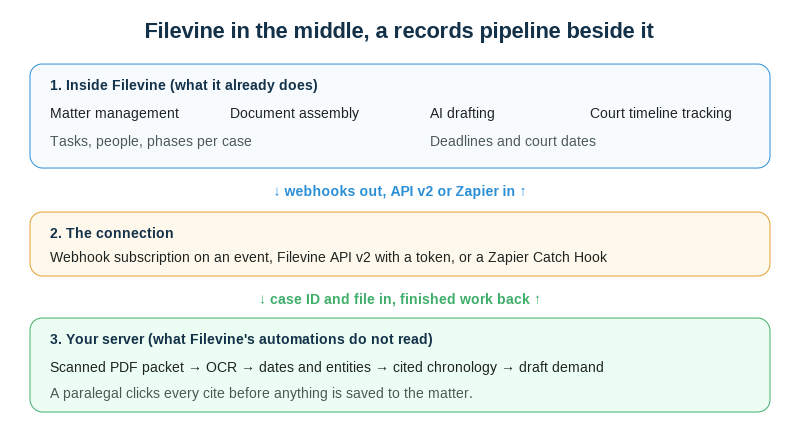
The three layers as text: 1 inside Filevine, matter management, document assembly, AI drafting and court timeline tracking; 2 the connection, a webhook subscription, API v2 with a token, or a Zapier Catch Hook; 3 your server, scanned packet to OCR to dates and entities to cited chronology to draft demand, with a paralegal checking every cite.
- Webhooks. Filevine’s API v2 documentation includes a Webhooks section where an outside address subscribes to events, each subscription with its own signing key to verify deliveries.
- API v2. Your server calls it with a token to find the project, fetch or upload documents, and add notes and tasks.
- Zapier. The Zapier Filevine app is quick to start with. It also has limits, covered next.
Where do Filevine’s own tools end and add-ons begin?
Filevine’s own tools end where a job needs a scanned file read, and an add-on begins there.
| Job | Inside Filevine | Added beside it | Source |
|---|---|---|---|
| Tasks and deadlines per case | Matter Management, Court Timeline Tracking | Usually nothing | Filevine platform |
| Letters and forms | Document Assembly, AI Drafting | A drafting step that pulls facts from a cited chronology | Filevine platform |
| Medical records into a chronology | MedChron, as a separate Filevine tool | A custom pipeline or another vendor | MedChron |
| Event goes out to another system | Webhook subscriptions | Your server or Zapier Catch Hook | API v2 docs |
| No-code link to other apps | Zapier app: 1 trigger, 9 actions, 9 searches, 3 find-or-create | Zapier API Request action for gaps | Zapier |
In one line: use Filevine for what happens inside the case, and add a separate step only for reading scanned records.
Here is a gap the vendor pages leave out. Zapier’s Filevine app has no document upload action, and a Vineskills guide to custom API requests in Filevine’s Zapier app shows the workaround, the beta API Request action. For PDF files a server calling the API directly is the safer path.
How can you automate Filevine with a records pipeline?
You automate Filevine by letting a webhook tell your server a case has records, having the server read them, and writing the chronology and summary back to the matter through the API.
- Trigger. A paralegal uploads scanned PDF packets to a secure web portal, or a Filevine webhook fires when a document lands in a records section.
- Read. Your server runs OCR and AI vision, sorts pages by provider and date, and removes duplicates.
- Extract. Dates of service, providers, diagnoses, bills and the page each came from go into a structured list. Our date extraction guide covers why the fax date is not the visit date.
- Draft. The server writes the structured summary and a first demand letter or intake packet from the same facts, as in demand letter drafting.
- Write back. The result is saved to the matter by the API, with a task for the paralegal to check it.
- Check. A person clicks the cites, then the attorney reviews. Nothing goes out unread.
Pair it with a 24/7 phone intake line so new leads open the matter in Filevine before the office does. The call flow is in our after hours intake guide.
What does a day of record reading cost compared with a tool?
A paralegal reading one 1,000 page packet by hand costs roughly one to two workdays of wages, and that is the number to compare with any tool’s price.
The calm part of connecting a records pipeline to the matter is that nothing changes on the paralegal’s screen except the work already being there, with every cite one click away.
| Packets a month | Hours each | Hours a month | Cost at $30 an hour |
|---|---|---|---|
| 4 | 8 | 32 | $960 |
| 8 | 8 | 64 | $1,920 |
| 8 | 12 | 96 | $2,880 |
Assumptions: 8 to 12 hours per 1,000 page packet is our estimate, not a vendor claim, and $30 an hour is a rough loaded cost. Replace both with your own timesheets before you decide anything.
Filevine does not publish a price on the pages we read, so we give none. Ask for a written quote including add-ons.
What do firms say about Filevine automation and its price?
Firms on review sites say Filevine’s automation saves administrative work, and some say the extras cost more.
In the Capterra reviews, paralegal reviewers describe workflow automation that cuts admin work and helps keep deadlines from slipping. On G2, a common complaint is that robust reporting, AI document automation and advanced integrations carry extra fees.
Consultants fill the gap. Calish Consulting’s Filevine workflow page lists 16 AI workflows built on top of it, such as records retrieval and chronology, demand drafting and deposition summaries, and says each uses the native API so nothing leaves the system of record.
We found no Reddit thread with enough detail to cite, so we do not quote one.
Is it safe to connect a second system to Filevine?
It can be safe when the connection uses a signed webhook, a scoped token, an agreement with the vendor and a closed test case first.
- Verify each webhook with its signing key.
- Give the API token only the access the pipeline needs.
- Keep the records in an encrypted store and delete working copies on a schedule.
- Ask in writing whether client files are used to train any model.
ABA Formal Opinion 512 says GAI tools cannot solely substitute for a lawyer’s competent legal work
, so a person reviews every output. The NCBE summary covers client consent.
How should you start automating Filevine?
Start with one case type and one closed case, and compare the pipeline’s chronology to the one your paralegal already built.
- Week one: list which Filevine automations already run, and which jobs still happen by hand.
- Week two: run one closed case through the pipeline and check every cite.
- Week three: add the webhook so new records start the work.
- Week four: count the hours saved against the table above.
How we researched this
- Read on November 28, 2026: Filevine’s platform page, MedChron page and developer API v2 docs, Zapier’s Filevine app page, a Vineskills guide to custom API requests, Calish Consulting’s Filevine workflow page, Capterra and G2 review summaries, and the NCBE summary of ABA Opinion 512.
- Compared: which jobs each Filevine tool covers, the Zapier trigger and action counts, and what reviewers say about price.
- Where sources disagree: Filevine’s platform page does not describe automations or triggers, while consultants and Zapier describe them in more detail. We trust the maker’s page for what exists and the others only for how people use it.
- We did not install Filevine or test any pipeline, and we claim no practitioner quotes.
Keep Filevine for the case, let a pipeline read the packet, and see what your team does with the days it gets back.
Sources and further reading
- Filevine: legal case management platform
- Filevine: MedChron medical record chronology
- Filevine developer portal: API v2
- Zapier: Filevine integrations
- Vineskills: custom API requests in Filevine-Zapier
- Calish Consulting: AI automations for Filevine
- Capterra: Filevine reviews
- G2: Filevine reviews
- NCBE Bar Examiner: ABA Formal Opinion 512
Questions and answers
Can I use AI to automate Filevine workflow tasks?
Yes, for parts of it. Filevine itself offers AI Drafting, and you can add a server that reads scanned records with OCR and AI, builds a cited chronology, and saves it to the matter through the API. A paralegal should check every cite before an attorney relies on it.
What workflow automation tools does Filevine have?
Filevine’s platform page lists Matter Management, Document Assembly, AI Drafting, Court Timeline Tracking and Integrations and APIs. It also sells records tools such as MedChron. The page does not describe trigger rules in detail, so ask for a demo of the exact workflow you want.
Does Filevine work with Zapier?
Yes. Zapier lists a Filevine app with 1 trigger, 9 actions, 9 searches and 3 find-or-create actions as of November 28, 2026. It has no document upload action, so file work usually goes through the API Request action or a custom server.
Does Filevine have webhooks and an API?
Yes. The developer portal documents API v2 and a Webhooks section where an outside address subscribes to events and verifies each delivery with a signing key. Check which API access your plan includes before building.
Is Filevine automation worth the cost for a small firm?
It depends on the hours it removes. Reviewers on G2 say advanced add-ons cost extra, and Filevine publishes no price on the pages we read. Multiply your paralegal hours on records and compare that to a written quote.