Immigration Law Document Checklist Automation: Stop Chasing Clients
Hello, and welcome to everyone who has asked a client for the same passport copy three times.
Every immigration paralegal I could find writing about this says the same thing: the checklist is easy, and getting the client to finish it is the job.
I spent an afternoon with the USCIS Form I-485 evidence checklist, the federal rule on translations and Docketwise’s own client portal pages, to see what a checklist can really check on its own.
The USCIS list for an immediate relative runs to 14 items, 7 of them marked “if applicable”. The rule on foreign language papers dates to 8 CFR 103.2, and a missing Form I-693 can get an I-485 rejected.
Short answer: Immigration law document checklist automation picks a checklist from the case type, asks the client to upload each item to a secure portal, reads every page to check the name, dates, expiry and language, ticks off what is right, flags what is wrong or missing, and sends reminders. A paralegal reviews the flags and the attorney signs off before filing.
What is immigration law document checklist automation?
It is a checklist that builds itself from the case type, collects the client’s documents, and reads each one before a person has to.
- Trigger
- A new matter is opened with a case type, such as a family green card, an employment-based filing or naturalization
- What it reads
- Each uploaded photo or scan, as text and as an image
- What it writes
- A status on every checklist line, a reminder list and a short review queue
- Who gets told
- The client (what is still missing) and the paralegal (what looks wrong)
It does not decide whether a client qualifies. That judgment stays with the attorney, and the checklist only shows what has arrived.
Why are immigration document checklists so hard to finish?
Immigration checklists stay open because clients upload the wrong paper, send photos of papers in another language, or simply do not know which item you mean.
- The wrong document. A client sends a bank statement when you asked for proof of immigrant category, and nobody notices until review.
- A foreign language paper. 8 CFR 103.2(b)(3) says
Any document containing foreign language submitted to USCIS shall be accompanied by a full English language translation
, certified by the translator. - A phone photo. A cropped, dark or half-visible page counts as received on a manual checklist and fails later.
- An expired item. A passport or ID that expires before filing is easy to miss in a scanned stack.
- Silence. The client meant to gather the papers on the weekend, and it is now week three.
Only the last one is a reminder problem. The first four need someone to open and read the file, which is the part software now does well.
Which items does a green card checklist ask for, and which can software check?
The USCIS checklist for an immediate relative filing Form I-485 lists 14 items, and software can check most of the identity and date items from an upload.
| Checklist item | Required? | What software can check from the upload |
|---|---|---|
| Two passport-style photographs | Yes | Two images present; a person checks the photo standard |
| Copy of a government-issued photo ID | Yes | Name, document number, expiry date |
| Copy of the birth certificate (or other birth evidence plus proof it is unavailable) | Yes | Name, date of birth, language, whether a translation is attached |
| Inspection and admission or parole documents | Unless INA 245(i) | Document type, admission date |
| Proof of immigrant category, such as the I-797 for the I-130 | Unless filed together | Form number and receipt number |
| Form I-693 medical exam | If applicable | Present or missing, date on form |
| Form I-864 or I-864EZ affidavit of support | If required | Present, signed, sponsor name |
| Certified police and court records | If applicable | Present, case dates; the attorney reads the content |
| Forms I-601, I-212, I-508, I-566, Supplement A and J-1/J-2 papers | If applicable | Present or missing once the attorney marks them applicable |
In one line: the reader can confirm that something is present, whose name is on it, and when it expires, and the attorney still decides which “if applicable” lines apply. USCIS also says Do not send original documents unless specifically requested
, so the checklist should also ask for copies, not originals.
The I-693 line is the sharp one. The USCIS checklist says that where it is required, you must submit it with your Form I-485. Otherwise, your Form I-485 may be rejected.
How does an automated document checklist work step by step?
An automated checklist works in five steps: pick the list, collect uploads, read each page, update the checklist, and send what is doubtful to a person.
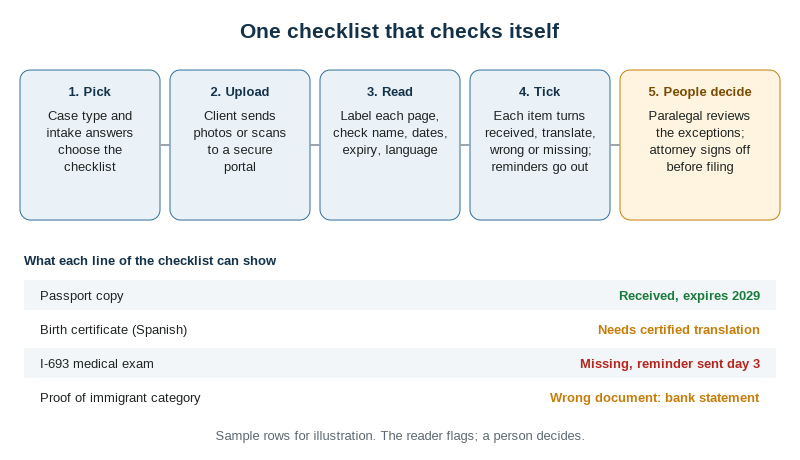
- Pick. The case type and the intake answers (married, previously arrested, entered with a visa or not) choose the checklist lines, including the “if applicable” ones the attorney confirms.
- Upload. The client uploads to a secure web portal, one line at a time, on a phone if they prefer. The page text tells them in plain words what each line means.
- Read. Each file is read with OCR or a vision-capable AI model, such as Azure AI Document Intelligence or Anthropic’s Claude PDF support, which reads each page as text and as an image.
- Tick. The result goes onto the checklist line: received, needs translation, wrong document, expires too soon or unreadable. Missing lines get reminders by text or email.
- Decide. A paralegal opens only the flagged lines, and the attorney signs off before anything is filed.
The diagram’s sample rows read: passport copy, received, expires 2029; birth certificate in Spanish, needs a certified translation; I-693 medical exam, missing, reminder sent on day 3; proof of immigrant category, wrong document, a bank statement.
The reading step is the same technology that lets a firm index and summarize a scanned legal packet, and the intake behind it can start with a Clio client intake form.
What can a reader check on a scanned immigration document, and what can’t it?
A reader can check what is printed on the page, and cannot check whether the document is the right one for the legal question.
| Check | Software | Person |
|---|---|---|
| Name matches the client’s name on the matter | Yes, flags spelling and order differences | Decides which spelling to use on the form |
| Expiry date is after the planned filing date | Yes | Decides whether to renew first |
| Language is not English | Yes | Orders the certified translation |
| Page is readable and complete | Yes, flags dark, cropped or partial pages | Asks for a better scan |
| Document type matches the checklist line | Usually, with a confidence score | Checks every low-confidence line |
| The document proves eligibility | No | Attorney |
| A certified translation is accurate | No | Translator and attorney |
The “usually” matters. Keep a confidence rule so that a page the system is unsure about goes to a person instead of getting a green tick it does not deserve.
How many paralegal hours does a manual immigration checklist take?
Building and chasing a document checklist by hand takes about 17 paralegal hours a month for 40 new cases, if each case takes 25 minutes.
The quiet win of a checklist that reads its own uploads is that the file stops being a mystery. Everyone can see which line is open and why, so nobody has to open forty PDFs to find out.
| New cases a month | Hours by hand (25 min each) | Wage cost by hand | Hours automated (8 min each) | Wage cost automated |
|---|---|---|---|---|
| 20 | 8.3 | $252 | 2.7 | $81 |
| 40 | 16.7 | $504 | 5.3 | $161 |
| 80 | 33.3 | $1,008 | 10.7 | $323 |
Assumptions: 25 minutes per case to write the client request, check each upload and chase gaps by hand, and 8 minutes per case to review only the flags. These are our estimates, not measured times, so replace them with a stopwatch from your own week.
Wages use the US median paralegal pay of $30.24 an hour from the Bureau of Labor Statistics (May 2025), without benefits.
Can Docketwise or my case management system do this already?
Partly. Immigration case management software already covers the client portal, questionnaires and tasks, and a custom reader adds the checking of what the client uploads.
Docketwise says clients can be invited to their own portal, where they can access questionnaires, complete tasks, pay invoices, and more
, and that you can Combine any number of immigration forms into a single intake questionnaire for your client to complete, once
. See the Docketwise features page.
Docketwise’s own page does not describe reading the content of each uploaded document (we read its features page on November 28, 2026), so that is the gap a reader fills. If your firm uses a general system, check your vendor’s page for portal requests before building around it.
A pipeline can sit beside either: it reads files from the portal’s folder, writes statuses to the task list, and leaves the system of record alone.
How do you start with one case type?
Start with the one case type you file most, and build one checklist for it before you try the rest.
- Copy the current USCIS checklist for that form into a list, one line per item, and mark which lines are “if applicable”.
- Write one plain-language sentence per line telling the client exactly what to upload and what a good scan looks like.
- Run the reader on five closed cases and compare its flags with what your paralegal found by hand.
- Switch on reminders at day 3, 7 and 14, and watch the review queue for a week.
Immigration forms and instructions change. USCIS posts new editions with a date after which older ones are rejected, so refresh your checklist from the form page each time, not from last year’s copy.
What still needs a person?
A person still decides which items apply, orders translations, judges whether a document proves anything, and signs off before filing.
The reader tells you a birth certificate is in Spanish. A person orders the certified translation, and the attorney decides whether the evidence is enough.
For the files behind the checklist, a chronology pipeline follows the same pattern, and new leads can reach you around the clock through an after hours intake line.
How we researched this
- Read the USCIS
Checklist of Required Initial Evidence for Form I-485
and the I-485 page on November 28, 2026, and counted the 14 items for immediate relatives ourselves. - Read 8 CFR 103.2(b)(3) and (b)(4) on the Cornell Legal Information Institute for the translation and copy rules.
- Read Docketwise’s features page for its portal, questionnaire and task wording, and the Azure and Claude documentation for document reading.
- Searched for vendor comparisons of immigration software; several are vendor blogs, so we used only the makers’ own pages for feature claims.
- Our time calculation uses stated assumptions and the BLS 2025 median paralegal wage. We did not test any product for this article.
Let the checklist do the chasing, keep the translations and judgment with your team, and see how much calmer the week before a filing feels.
Sources and further reading
- USCIS: checklist of required initial evidence for Form I-485
- USCIS: Form I-485, Application to Register Permanent Residence or Adjust Status
- 8 CFR 103.2: submission and adjudication of benefit requests
- Docketwise: features
- Microsoft: Azure AI Document Intelligence overview
- Anthropic: Claude PDF support
- BLS: paralegals and legal assistants, median pay
Questions and answers
Can I use AI to automate an immigration law document checklist?
Yes. Software can pick a checklist from the case type, collect client uploads in a secure portal, use OCR or a vision AI model to check the name, dates, expiry and language on each page, mark each line received, wrong or missing, and send reminders. A paralegal reviews the flags and the attorney decides what the documents prove.
What documents does USCIS require with Form I-485?
For an immediate relative the USCIS checklist lists 14 items: two photographs, a photo ID, a birth certificate, admission or parole documents, proof of immigrant category, and, where applicable, Form I-693, I-864, police and court records and several other forms. Always use the current checklist on the USCIS site.
Do foreign language documents need a translation for USCIS?
Yes. Under 8 CFR 103.2(b)(3), any document in a foreign language must come with a full English translation, certified by the translator as complete and accurate and as qualified to translate it.
Can software tell if a client uploaded the wrong document?
Often, yes. A reader can compare the document type, name and dates with the checklist line and flag a bank statement uploaded as proof of immigrant category. It is not perfect, so low-confidence pages should go to a paralegal instead of getting a tick.
Is it safe to put immigration documents in an automated portal?
It can be, if you choose carefully. Ask in writing where files are stored, how long they are kept, who can open them and whether they are used to train models, and use two-step login. Passports and medical exams are sensitive, so the same rules as for any client file apply.