How to Parse Customer RFQ Emails Automatically (Body, Prints and Zips)
Every estimator seems to know the feeling of a full quotes inbox, and a sheet to fill before any pricing can begin.
Every estimator I read about seems to start the day the same way: a full quotes inbox, and a sheet to fill before any pricing begins.
I spent an afternoon with the documentation of QuotedPart, Uptool and Kwantflow to see what an RFQ email parser really reads, and then worked out the retyping time for a small shop myself.
Uptool describes the Monday start as an estimator opening a laptop to 40 unread messages. QuotedPart’s page lists exactly what its reader takes from the body, the PDFs and the zip files.
Short answer: To parse customer RFQ emails automatically, a program on your web server watches the estimating inbox, reads the email body for buyer, due date and quantities, uses AI vision on the attached PDF prints for material, tolerances and part numbers, and writes one RFQ record. A person checks it, then pricing is drafted.
What does it mean to parse a customer RFQ email automatically?
It means turning an unstructured email and its attachments into labelled fields, so nobody retypes them.
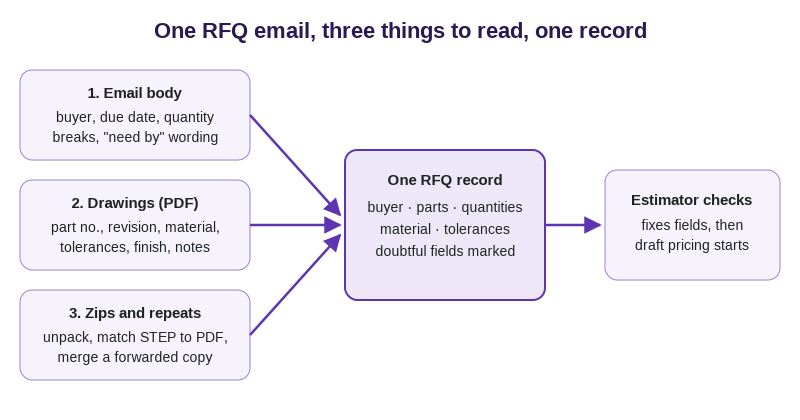
Text of the diagram: the email body gives buyer, due date and quantity breaks; the PDF drawings give part number, revision, material, tolerances and finish; zips are unpacked and repeats merged; the estimator checks the one record.
What does an RFQ email parser read, and what does it skip?
QuotedPart’s published limits are a good example: it reads the first 30,000 characters of the body, up to 25 files of 50 MB each, and looks inside zips.
| Part of the email | Read? | Fields taken |
|---|---|---|
| Email body | Yes, first 30,000 characters | Buyer company, contact, due date, needed-by date, quantities, other requirements |
| PDF drawings | Yes | Part number, revision, material, finish, heat treatment, tolerances, threads, notes, quantity |
| STEP, IGES, DXF, Parasolid, SOLIDWORKS part | Measured | Geometry for pricing |
| Files inside a .zip | Yes | Same as above |
| Spreadsheets and images | Kept, not read | None |
| Inventor files, SOLIDWORKS assemblies | Kept, not measurable | None; the page says to send STEP |
Table compiled by Machine Shop Automation from QuotedPart’s email documentation, checked November 29, 2026. A reader built for your shop would set its own limits.
The PDF reading itself relies on a vision model. Anthropic’s PDF support documentation says Claude reads both the text and the page images, so a scanned print can be read too, with more checking.
How much time does retyping RFQ emails cost a machine shop?
In our example, 25 RFQ emails a week at 10 minutes of copying each is about 4.2 hours a week of pure retyping.
| RFQs a week | Retyping at 10 min each | Checking a parsed record at 3 min each |
|---|---|---|
| 10 | 1.7 h | 0.5 h |
| 25 | 4.2 h | 1.3 h |
| 50 | 8.3 h | 2.5 h |
Assumptions: the 10 and 3 minute figures are examples, not measurements. Time your own estimator on five emails and replace them. For comparison, a vendor, US Tech Automations, estimates 8 to 12 minutes of manual handling per email-and-PDF RFQ; that is a marketing figure.
What about forwarded RFQs, duplicates and emails with no drawing?
A good parser treats these as normal cases, not errors.
- Forwards: QuotedPart treats the original sender as the buyer, not the person who forwarded the email.
- Duplicates: an RFQ that arrives twice, say in the inbox and as a forward, is kept as one quote. A STEP file and a PDF with the same name count as one part.
- No drawing: Uptool notes a vague “ASAP” request without a print usually gets parked until someone sends the drawing. A parser should mark it “drawing missing” and queue a reply asking for it.
Uptool’s own RFQ process guide says missing tolerances, unclear quantity breaks or vague finish notes trigger questions back to the customer. Those are exactly the fields to flag.
How do I set up RFQ email parsing step by step?
- Give RFQs one front door. A single quotes@ address, as TrustBridge suggests for small shops, so the watcher has one mailbox.
- Pick up each new message. Your web server checks the mailbox and saves the body and every attachment, unpacking zips.
- Sort the mail. New RFQ, revision, PO or noise. Only RFQs continue.
- Read. Body fields from the text, print fields from AI vision over the PDFs, written into one record.
- Hand over. The record, with doubtful fields marked, goes to the estimator, who corrects it before pricing is drafted.
Pricing from that record is covered in our guide to automated CNC quoting software, and the logging and chasing side in machine shop RFQ automation.
The best email reader is a careful one. It copies what it is sure of, marks what it is not, and leaves the bid decision to the person who knows the machines.
Should I buy an RFQ email reader or build one?
Try a ready-made reader first; build a script when your shop’s fields or ERP are unusual.
| Option | What it says it does |
|---|---|
| QuotedPart | Connects Gmail or Outlook, or a forwarding address; turns each RFQ email into a quote for review |
| Kwantflow | Free, open-source desktop software; turns RFQ emails, drawings, CAD files and BOMs into reviewed quote drafts |
| RFQ AutoPilot | Gmail and Outlook extension that detects RFQ emails and extracts part numbers and specs from PDFs |
| Your own script on your server | Watches the mailbox, calls a vision model, writes to your ERP or sheet |
We have not tested any of these, and the claims are the makers’ own. If your ERP is JobBOSS², see our JobBOSS quoting integration guide.
Can I send ITAR or export-controlled RFQ emails to an AI reader?
Not unless the system is approved for that data; keep marked mail out of the reader.
How we researched this
- Read the public pages of QuotedPart, Uptool, Kwantflow and Anthropic’s PDF support documentation on November 29, 2026.
- Searched for machinist threads on this exact phrase; the searches returned vendor pages, not Reddit threads, so we do not report what forum members say.
- Calculated the time table ourselves; the minutes per email are our assumptions.
- We did not install or test any tool. Vendor claims are the vendors’ own.
Forward five old RFQ emails to a test mailbox this week, and see how many fields a reader fills correctly.
Sources and further reading
Questions and answers
Can I use AI to parse customer RFQ emails automatically?
Yes, with a person checking the result. An AI vision model can read the PDF prints for material, tolerances and part numbers, and a script reads the body for buyer, due date and quantities. The estimator corrects one record instead of retyping the email.
What fields can be extracted from an RFQ email?
From the body: buyer, contact, due date and quantities. From the prints: part number, revision, material, finish, tolerances, threads and notes. QuotedPart’s documentation lists these fields.
Can it read attachments inside a zip file?
Some can. QuotedPart says it looks inside .zip files, up to 25 files of 50 MB each. If you build your own, unpack zips before reading.
What happens when an RFQ email has no drawing?
It should be flagged ‘drawing missing’ and a reply asking for the print queued. Uptool notes that vague requests without a drawing usually get parked until one arrives.
Is it safe to send ITAR drawings to an AI reader?
Not unless the system is approved for controlled data. Check your agreements and markings first, and send marked mail to a person instead.