AI Photo Diagnosis for Tenant Repair Requests: What It Sees and Misses
Hello, and welcome to everyone who has squinted at a tenant’s photo and wondered whether it was a pipe, a fitting or just a wet towel.
Every vendor demo of “AI maintenance” shows a perfect photo of a perfect leak.
I spent an afternoon on November 28, 2026 reading what the makers themselves say their photo tools can and cannot do.
Property Meld’s MAX asks residents for photos or videos and says it identifies the problem “in seconds”. VerticalRent has Claude read photo attachments and assign Emergency, Urgent or Routine. fixRAgent says plainly that its water heater photo cannot see inside the tank
.
Three tools, one honest pattern: the photo helps a lot, then a rule or a person finishes the job.
Short answer: Yes. AI photo diagnosis reads a tenant’s repair photo and names the item, the visible fault, the likely trade and an urgency level, so the right vendor goes first time or a simple fix goes out by text. It sees only what the photo shows, so hidden faults, unclear shots and danger still go to a person.
What is AI photo diagnosis for tenant repair requests?
AI photo diagnosis is a vision model that reads the picture a tenant texts or uploads with a repair request and turns it into a structured work order note.
- Item
- What is in the photo: a water heater, a disposal, a thermostat, a ceiling stain.
- Visible fault
- What can be seen: rust on a grille, water on a cabinet floor, a blank display, a cracked fitting.
- Trade
- Plumber, electrician, HVAC, appliance repair or handyman.
- Urgency
- One word such as emergency, today, this week or whenever, with a reason.
That output matches how the tools describe themselves. fixRAgent returns the item, the urgency in four words and the trade needed, and calls the result triage, not a repair manual
.
It is one step inside the bigger flow in our guide to automated tenant maintenance triage software.
Why does a repair request without a photo cost so much?
A request without a photo makes staff guess the trade and the part, and a wrong guess means a second trip charge.
Property Meld’s post on resident photos says that without clear images a request can send the wrong vendor, who may have the incorrect part needed to fix the issue
, which can lead to multiple trip charges. It also notes that vendors are often booked weeks ahead, so a return visit strains the relationship.
The same post admits that many portals ask for photos and residents often skip them. That is the real gap: the tool is only as good as the picture, so texting works better than a portal link nobody opens.
A BiggerPockets landlord thread shows the cost: a $75 repair service call that found a working dishwasher and a tripped GFCI outlet. A photo of the outlet row would have shown it before anyone drove out.
How does AI diagnose a maintenance problem from a tenant’s photo?
AI diagnoses a photo in three moves: it reads the picture, a gate of plain rules checks the reading, and the result decides who gets the job.
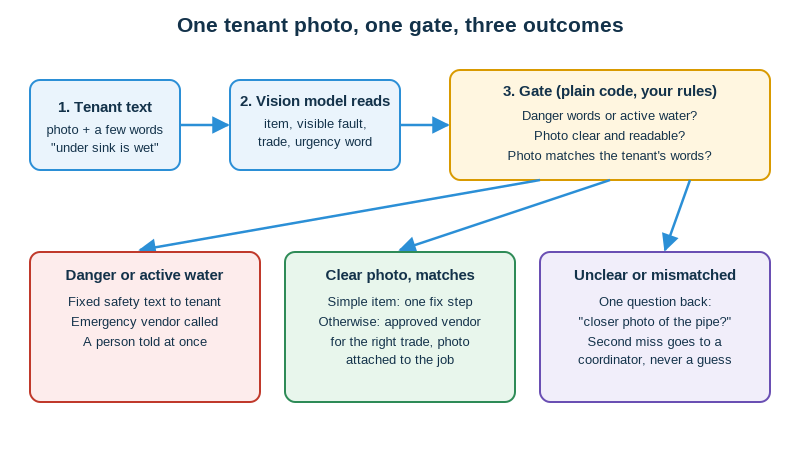
The diagram in words:
- Tenant texts. A photo and a few words arrive at any hour on your maintenance number.
- The model reads. It returns the item, the visible fault, the trade and an urgency word.
- The gate checks. Plain code looks for danger words or active water, a readable photo, and agreement between the photo and the tenant’s words.
- The outcome. Danger goes to the emergency vendor and a person. A clear match gets a simple fix step or a booking for the right trade with the photo attached. An unclear or mismatched photo gets one question back.
For the fix step, see our guide on a tenant troubleshooting text bot. For the booking, see how to automate vendor dispatch for rentals.
What can AI see in a repair photo, and what can it not see?
AI can read what is visible on the surface of a photo, such as water, rust, stains, labels and error codes, and cannot read what is hidden inside a wall, a tank or a motor.
| Problem | What the photo can show | What it cannot show | Safe default |
|---|---|---|---|
| Wet cabinet under a sink | Standing water, a dripping fitting, swollen wood | Whether it is the supply line, the drain or the wall behind | Plumber; treat water as urgent if unclear |
| Ceiling stain | Size, colour, a drip or sag | Where the water comes from above | Plumber or roofer by unit above; urgent if it is sagging |
| Dead dishwasher or outlet | A GFCI outlet with its reset button, a blank display, an error code | Whether the board or motor has failed | One reset step, then appliance repair |
| Water heater | Rust, a puddle, the label with model and age | The inside of the tank | Plumber; emergency if water is spraying |
| Outdoor AC unit | Rust on the grille, ice, debris | Refrigerant level or compressor state | HVAC vendor |
| Thermostat | A blank screen, the mode and set point | Wiring behind it | Battery and mode check, then HVAC |
In short: surface and labels yes, interiors and causes no. Anthropic’s vision documentation adds that Claude might hallucinate or make mistakes when interpreting low-quality, rotated, or very small images under 200 pixels
, and says to verify its interpretations especially for high-stakes use cases
.
fixRAgent states its own rule for the unclear case: if the photo does not show enough to judge, treat water as urgent and call.
How do you decide whether to trust the AI’s reading of a photo?
You trust the reading only after three plain checks pass: no danger signs, a clear photo, and a match with what the tenant wrote.
The quiet win is not a model that sees everything; it is a gate of plain rules that knows when the photo is not enough.
- [ ] Danger first. Words like gas, smoke, sparks, flooding or
water near the outlet
, or a photo showing active spraying, skip everything and go to the emergency path with fixed safety wording. - [ ] Clear enough. Dark, rotated, tiny or blurred photos get one request for a closer shot.
- [ ] Match. If the tenant writes
minor drip
and the photo shows pooled water and cabinet damage, the higher urgency wins and a person looks. - [ ] Second miss. Two unclear photos go to a coordinator. The bot never guesses a third time.
The match check is real in the market: one vendor describes raising priority when a tenant’s description and the photo disagree. Write that rule yourself, in code, so it does not depend on the model’s mood.
Where sources disagree is how much the AI should do alone. VerticalRent says an emergency is flagged for the landlord, not an automatic vendor dispatch
. Our stance for 100 to 1,000 units: emergencies should call the vendor and a person at the same moment, because waiting for a human tap costs minutes during a burst pipe.
How do you get tenants to send a photo the AI can read?
Ask for exactly two photos in your first reply: one wide shot for context and one close shot of the problem or the label.
- Wide shot:
Step back so we can see the whole sink and the floor.
- Close shot:
Now a close photo of the wet spot, or the sticker on the side.
- Light:
Turn on the light or use your flash if it is dark.
- Video: for a noise,
Hold your phone near it for ten seconds.
For appliances, ask for the label too, since model and age change the part. MyPropertyManaged suggests intake ask for the room, when it started, photos or video, and for appliances the model number and a photo of the error code.
Technically, Claude accepts images up to 8000x8000 pixels, so a normal phone photo is no problem, and a text message is a better door than a portal.
Which tools offer AI photo diagnosis for tenant repair requests?
Four ready-made tools read tenant photos today, and a custom build covers the rest.
| Tool | What it does with the photo | Dispatches vendors? |
|---|---|---|
| Property Meld MAX | Prompts residents for photos or videos and identifies the problem | Part of Property Meld’s maintenance platform |
| VerticalRent | Reads photo attachments plus the description and sets Emergency, Urgent or Routine | No: it recommends a trade and the landlord assigns |
| SpotFix AI | Turns photos and guided questions into a work order with trade, issue and urgency | It pre-fills the vendor form; its results are testimonials |
| fixRAgent | One photo in; item, fault, urgency, trade and resident lines out | No dispatch or scheduling; no native Buildium link |
| Custom build | Your own gate and scripts on a vision model API | Yes, through your rules |
If you already run Buildium or AppFolio, see how routing fits in our guides on Buildium work order routing and AppFolio maintenance request automation.
How much is one avoided wrong trip worth?
At the $75 trip fee in the BiggerPockets thread, 15 avoided wrong or needless trips a month is $1,125 a month for a 300-unit portfolio.
| Units | Repair requests a month (0.5 per unit) | Requests where the photo changes the dispatch (10%) | Trips saved at $75 each |
|---|---|---|---|
| 100 | 50 | 5 | $375 |
| 300 | 150 | 15 | $1,125 |
| 600 | 300 | 30 | $2,250 |
| 1,000 | 500 | 50 | $3,750 |
The 0.5 requests per unit and the 10 percent are our round working numbers, not measured results. Count your own “no problem found” and wrong-trade visits from last year, replace the 10 percent, and the table becomes yours.
After hours the same photo reading can feed an after hours call center, so the on-call vendor gets the picture too.
How we researched this
- Read November 28, 2026: Property Meld’s MAX page and its resident photos post, VerticalRent’s maintenance page, SpotFix AI’s property management page, fixRAgent’s photo triage page and Anthropic’s vision documentation.
- Read one BiggerPockets landlord thread on a $75 service call that was a tripped GFCI.
- Compared what each tool says it reads, what it cannot read, and whether it dispatches.
- Did not do: install or test any tool, or measure accuracy. Performance numbers on vendor pages are their claims. The trip table is our own arithmetic with its assumptions shown.
Ask for two photos, write the gate rules down, give the AI two shadow weeks, and let the right vendor arrive with the right part.
Sources and further reading
- Property Meld: Meet MAX
- Property Meld: Why residents need to submit photos on work orders
- VerticalRent: maintenance management (AI urgency levels)
- SpotFix AI: triage maintenance requests (vendor claims)
- fixRAgent: resident photo triage for property managers
- Anthropic: Claude vision documentation (limits and image size)
- BiggerPockets forum: Do I bill tenant for repair service charge? ($75 call, tripped GFCI)
- MyPropertyManaged: handle tenant maintenance requests with a clear workflow
Questions and answers
Can I use AI to diagnose tenant repair requests from photos?
Yes, for what a photo shows. AI can name the item, the visible fault, the likely trade and an urgency level from a tenant’s photo, so the right vendor goes first time. It cannot see inside tanks, walls or motors, so unclear photos, hidden faults and any danger sign should go to a person or the emergency path.
Can AI tell an emergency leak from a small drip?
Often, when the photo is clear: active spraying or pooled water reads differently from a damp fitting. Because a model can misjudge a poor photo, treat unclear water photos as urgent, and let a mismatch between the tenant’s words and the picture raise the priority.
Does the tenant need to send a video?
No, but a video helps for noises, drips and things that move. Many vision tools read still images, so a video is usually broken into a few frames first. Ask for two photos, one wide and one close, and a short video only when sound matters.
What if the AI names the wrong problem?
Build for it. Keep the vendor’s finding as the final record, compare it with the AI’s reading in a two-week shadow period, and route unclear or mismatched photos to a coordinator. Anthropic’s own documentation says to verify image interpretations in high-stakes cases.
Do I have to tell tenants that AI reads their photos?
Tell them. State it in your resident portal terms or your first text, and ask for photos of the problem only, not of people or documents. Rules differ by state and lease, so ask your attorney for the exact wording.