Buildium Automated Work Order Routing: What Runs Itself, What You Add
Hello, and welcome to every Buildium office that has read a new resident request and thought, Okay, which plumber this time?
Picture a Monday where every weekend request in Buildium already has the right plumber, electrician or appliance tech attached.
Today most offices still read each new task, decide who should fix it, build the work order and text the vendor by hand.
Buildium can do part of that sorting on its own now, and the part it skips is the one that matters most.
Short answer: Buildium automated work order routing covers staff, not vendors. Lumina AI’s auto-assign (beta, Premium plan with the AI add-on) picks the best available staff member by property and calendar. To send each job to the right approved vendor automatically, add rules through Buildium’s Open API and webhooks, Property Meld, or a dispatch service.
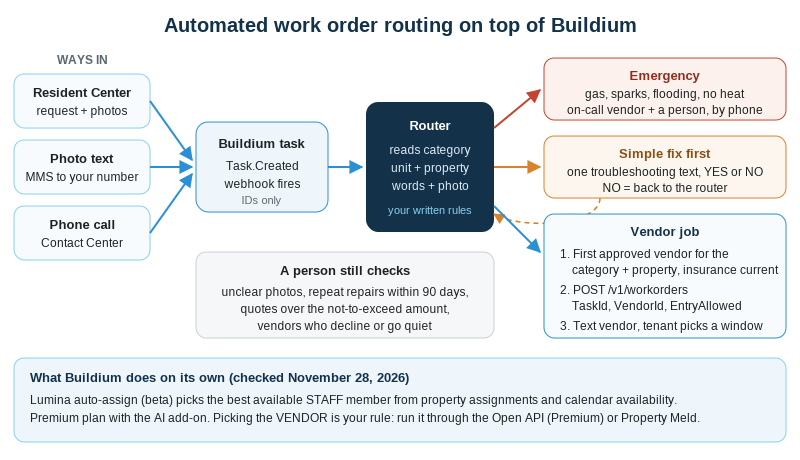
The diagram’s three routes, typed out: emergency words go to the on-call vendor and a person by phone; a simple fix gets one troubleshooting text first; every other job goes to the first approved vendor for that category and property whose insurance is current.
| Buildium feature | Routes the job to | How it decides | Plan |
|---|---|---|---|
| Lumina AI auto-assign (beta) | A staff member | Property assignments and staff calendar availability | Premium with the AI add-on |
| Resident Center assignment rules | A staff member | Your settings, used when a request arrives with no assignee | Not stated on the pricing page |
| Lumina AI Maintenance Agent | Nobody new; it watches the job | Summarizes work orders and monitors progress | Premium (all Lumina features) |
| Maintenance Contact Center | A work order for your team | A RealPage call agent gathers details and decides whether it is an emergency | Paid add-on, from $140 a month |
| Vendor on a work order | A vendor | You pick it by hand | All plans |
Can Buildium route work orders automatically?
Buildium can route requests automatically to staff, but it does not pick a vendor for you. The vendor on a work order is still chosen by a person, unless you add your own rules on top.
Buildium’s Lumina AI Maintenance Agent help article describes Auto-assign Maintenance Tasks
as a beta feature. Once “Auto-task assignment” is switched on in Lumina AI settings, the Assign to field fills with the best available staff member.
That suggestion is built from each person’s property assignments and the availability they set for the Staff Calendar. If Resident Scheduling is off, an incoming resident request is assigned automatically; if it is on and the resident has not picked a time slot, auto-assign still steps in.
Buildium’s own work order system guide (November 16, 2026) adds the price of entry: This runs on the Premium plan with the AI add-on.
It also says you confirm the suggested assignee before saving.
Here’s the catch for a 300-unit office that sends most repairs out. Auto-assign hands the request to your coordinator faster, and then your coordinator still picks the plumber. The routing that saves the most time, request to vendor, is the step Buildium leaves open.
Why does work order routing still take so long in Buildium?
Routing still takes long because a resident request in Buildium is a task, and the work order with a vendor is a second record somebody has to build from it.
A landlord in a BiggerPockets thread on property management software (about seven years old) described that flow: the tenant submits a task, staff create a work order, link it back and assign a technician. That is a lot of time and clicking for one work order.
Some of that has improved. Buildium’s maintenance software page now lists Assign work orders to your staff or vendors
and Generate a bill directly from a work order
, and Resident Scheduling lets tenants pick time slots.
The bigger leak is outside Buildium entirely. Tenants text a photo to the manager’s cell, call the office, or email, and none of that becomes a task until somebody types it in. A routing rule can only route what reaches the system.
The Open API also shows how coarse the built-in sorting is. A resident request’s Priority field has three values, Low, Normal and High, so no heat in January
and “dripping faucet” can both sit at High unless a rule reads the words.
How does automated work order routing work with Buildium?
Automated routing listens for new Buildium tasks, reads each one, decides between emergency, simple fix and vendor job, and writes the work order with the chosen vendor back into Buildium.
Every step below uses an endpoint or event from Buildium’s Open API documentation, read November 28, 2026.
- Trigger: a tenant submits a request in Resident Center, or your text line creates one. Buildium fires a
Task.Createdwebhook to your endpoint. - Read: the webhook carries only IDs (
TaskId,TaskType), so the router callsGET /v1/tasks/{taskId}for the title, description, category, unit and any photos. - Check for danger: gas, sparks, burning smell, flooding, a CO alarm or no heat in freezing weather skip everything and ring the on-call vendor and a person.
- Offer one safe fix: a tripped GFCI outlet, a garbage disposal reset or a thermostat battery gets one text step and a YES or NO reply.
- Pick the vendor: the first approved vendor for that category and property whose insurance date is still valid, from your written list.
- Write the work order:
POST /v1/workorderswithTaskId,VendorId,EntryAllowed,VendorNotesand the photo summary. - Tell people: the vendor gets one text with the job, and the tenant gets a choice of windows the vendor offered.
- Close the loop: a
WorkOrder.Updatedevent moves the task status and sends the tenant a status text.
Two fields in that work order call are required by Buildium: VendorId and EntryAllowed (Unknown, Yes or No). That is why the router must know whether the tenant allows entry, and why it should ask in the first text.
The full booking ladder after step 5, with accept deadlines and backup vendors, is in our guide on how to automate vendor dispatch for rentals.
What routing rules should you write before automating?
Write one row per repair category: the emergency words, the safe first fix, the first-choice vendor, the backup and the not-to-exceed amount a person must approve above.
Buildium already stores what the rules need. Every vendor carries a required CategoryId and a VendorInsurance record with an expiration date, and Buildium’s vendor insurance help article explains how to record those dates.
| Category | Emergency words | Safe first fix by text | First vendor, then backup | Person approves above |
|---|---|---|---|---|
| Plumbing | flooding, water through ceiling, sewage | Close the fixture’s shut-off valve | Plumber A, then Plumber B | $350 |
| Heating / HVAC | no heat below 40°F, burning smell | Check thermostat batteries and mode | HVAC A, then HVAC B | $500 |
| Electrical | sparks, smoke, hot outlet | Press RESET on the GFCI outlet | Electrician A, then B | $300 |
| Appliance | gas smell from the range | Check the breaker and the door latch | Appliance tech A, then B | $250 |
| Handywork | a door that will not lock | None; batch into the next visit | In-house tech, then handyman | $200 |
Two rules make the table safe. A gas smell anywhere goes to the gas utility and a person, never to a text script. And a vendor whose insurance date has passed is skipped, even if they are first on the list.
How do tenant photo texts become Buildium work orders?
A photo text becomes a Buildium work order when a text line receives the message, an AI vision model reads the photo, and the router creates the resident request and its work order through the Open API.
Buildium’s API lets the router Create a resident request
with a title, description, category, unit agreement, priority and entry permission. If no AssignedToUserId is sent, Buildium says assignment rules in the resident center settings (if configured) will be used for assignment.
The tenant’s photo goes onto the task’s history with Buildium’s two-step file upload: first the file details, then the file itself to a short-lived upload address that expires after 5 minutes.
Reading the photo is cheap. Anthropic’s vision documentation prices a 1000×1000 image at about $1.30 per thousand images on Claude Haiku 4.5. The model can read a model plate, see standing water, or spot a tripped outlet.
The text itself costs a little more. Twilio’s US price page lists an inbound picture message at $0.0165 and an outbound text at $0.0083 on a 10-digit number, before carrier fees.
The safe-fix conversation itself, one step per text, is in our guide to a tenant troubleshooting text bot.
Which Buildium plan do you need for automated routing?
You need Buildium’s Premium plan for both the Open API and Lumina’s auto-assign, which Buildium says also needs the AI add-on.
Buildium’s pricing page (read November 28, 2026) lists Essential from $65 a month, Growth from $202 and Premium from $420, and describes Premium as Full AI and Automations suite, plus Open API.
- Open API
- Premium only, per the developer docs, with one free sandbox account.
- Webhooks
- Set up under Settings, Developer Tools, Webhooks.
- Rate limit
- 10 concurrent requests per second; over that, Buildium answers with code 429.
- Webhook timeout
- Your endpoint must answer within 10 seconds.
- Retries
- After 1 minute, 10 minutes and 1 hour, then the event is dropped.
The AI add-on’s price is not printed on the pricing page, so ask your Buildium rep for it in writing before you compare it with the options below.
What are the ways to add vendor routing to Buildium?
There are four practical ways: Buildium’s own staff auto-assign plus manual vendor choice, Property Meld, Buildium’s Maintenance Contact Center for calls, or a custom router on the Open API.
The quiet win is not a smarter button in Buildium; it is a routing table written down clearly enough that software can follow it at 9 p.m. on a Saturday.
| Option | Picks the vendor? | Where the work happens | Public price |
|---|---|---|---|
| Lumina auto-assign | No, staff only | Buildium | Premium from $420 a month plus the AI add-on (price not listed) |
| Property Meld Ops | Yes, with Meld’s own workflows | Property Meld, bills back to Buildium | $2.00 per unit a month; MAX On-Call add-on $1.50 per unit |
| Maintenance Contact Center | No; it takes the call and flags emergencies | Phone calls into Buildium work orders | $1.10 per unit (all calls) or $0.70 (missed calls), minimum $140 a month, $300 setup |
| Custom router on the Open API | Yes, by your table | Buildium | Premium plan, plus texting and AI usage per message |
At 300 units, the public list prices work out to $600 a month for Property Meld Ops and $330 a month for the Contact Center’s all-calls plan. Those are list prices only; your quote may differ.
If your office runs AppFolio instead, our guide to AppFolio maintenance request automation covers what its Maintenance Performer already handles.
Where do sources disagree about Buildium routing?
Sources disagree on two points: whether Buildium routes to vendors, and whether work orders flow into Property Meld or stay out of Buildium.
| Question | One source says | Another says |
|---|---|---|
| Does Buildium route to vendors? | Buildium’s guide: You can assign a work order to a staff member or an outside vendor based on the type of job and who is available. | Buildium’s help article: auto-assign fills the Assign to field with the best available staff member |
| Do Buildium work orders go to Property Meld? | Property Meld’s blog: work orders created in Buildium flow directly into Meld | Meld’s Buildium help article: portfolio and contacts sync to Meld every 4 hours, maintenance happens in Meld, bills sync back |
| Can tenants pick a visit time? | The BiggerPockets landlord (about seven years ago): tasks hold no tenant time preferences | Buildium’s help article today: a Resident Scheduling setting where residents select time slots |
Our reading: the Buildium guide describes what a person can do, and the help article describes what the software does by itself. For Property Meld, plan on the help center’s version, where maintenance lives in Meld and Buildium keeps the accounting.
How much time does manual work order routing cost?
Manual routing costs about 9.6 coordinator hours a month at 300 units in our estimate, and about 2.1 hours once a router does the sorting and a person only reviews it.
The base number is Hemlane’s analysis of 193,000+ work orders: 3.3 maintenance requests per unit per year in 2024. The minutes are our assumptions, stated openly so you can change them.
| Units | Requests a month | Hours routing by hand | Hours reviewing after automation | Hours back each month |
|---|---|---|---|---|
| 100 | 27.5 | 3.2 | 0.7 | 2.5 |
| 300 | 82.5 | 9.6 | 2.1 | 7.6 |
| 600 | 165 | 19.3 | 4.1 | 15.1 |
| 1,000 | 275 | 32.1 | 6.9 | 25.2 |
Assumptions: 7 minutes to route one request by hand (read it, ask for a photo, pick the vendor, build the work order, text the vendor and the tenant), and 1.5 minutes for a person to glance over an automatically routed one.
The hours are only half the story. A request that waits until Monday for someone to route it is a weekend of a dripping sink, and the router works at 9 p.m. on Saturday the same as at 9 a.m.
What should a person still check in automated routing?
A person should still handle emergencies after the first call, unclear photos, repeat repairs, quotes above the approval limit and vendors who decline or go quiet.
- [ ] Emergencies: the router rings the on-call vendor and a person; a person takes it from there.
- [ ] Unclear photos or angry messages go to the coordinator, not to a script.
- [ ] The same unit and category within 90 days goes to a senior person to find the cause.
- [ ] Any quote above the not-to-exceed amount waits for approval.
- [ ] A vendor who declines or does not answer in time rolls to the backup, and the coordinator sees it.
Buildium’s webhooks need two safeguards of their own. The docs say an event can arrive twice and events can arrive out of order, so the router must log each event and ignore one it has already handled, or the plumber gets two work orders.
Buildium also suspends a webhook after 20 failed deliveries in a row and emails the contact address. Send that email to a shared inbox someone watches, or the router can stop quietly on a Friday night.
How do you roll out automated routing in Buildium?
Roll it out on one property in shadow mode first: the router suggests a vendor for every request, a coordinator approves or corrects it, and nothing goes out on its own for two weeks.
- Week 0: clean up vendor categories and insurance dates in Buildium, and write the routing table.
- Weeks 1 and 2: shadow mode on one property; count how often the coordinator changes the suggested vendor.
- Week 3: let routine plumbing and appliance jobs go out automatically; keep everything else in review.
- Week 4: add the photo text line, then the next property.
The number to watch is the share of suggestions a coordinator changes. When it stays low for two weeks in a row, the table is good enough to trust with that category.
If the bigger worry is how often the phone rings at all, our guide on how to reduce property management maintenance calls sorts those calls into five types and fixes each one.
How we researched this
- Read Buildium’s Open API documentation: webhook rules (timeout, retries, suspension, duplicates, ordering), the Task and WorkOrder events, and the create resident request, create work order, vendor and file upload endpoints, with the changelog up to October 27, 2026.
- Read Buildium’s work order system guide (November 16, 2026), maintenance software page, AI page, pricing page and Maintenance Contact Center page.
- Read Buildium’s Lumina AI Maintenance Agent help article through search results, because the help center would not load for our reader; the beta label may have changed.
- Read Property Meld’s pricing page and integration blog post, and its Buildium help article as indexed by search.
- Checked Twilio’s US SMS and MMS prices, Anthropic’s vision pricing example and Hemlane’s requests-per-unit figure.
- Read one BiggerPockets thread on Buildium’s work order flow and noted its age.
- All pages read November 28, 2026. We did not install or test any of these tools; the time table uses stated assumptions.
Write the table from last year’s work orders, give it two shadow weeks on one property, and let Buildium hold the jobs that are already routed.
Sources and further reading
- Open API, powered by Buildium: documentation, webhooks and changelog
- Buildium Help Center: Lumina AI Maintenance Agent (auto-assign maintenance tasks)
- Buildium: Close maintenance jobs faster with a property management work order system (November 16, 2026)
- Buildium: Property management maintenance software
- Buildium: Lumina AI property management software
- Buildium: Pricing
- Buildium: Maintenance Contact Center, powered by RealPage
- Buildium Help Center: Tracking vendor insurance
- Property Meld: Pricing
- Property Meld: Integrations with AppFolio, Buildium and Rent Manager
- Property Meld Help Center: Integration and screen details, Buildium
- Twilio: SMS and MMS pricing in the United States
- Anthropic: Claude vision documentation (image cost examples)
- Hemlane: Rental property maintenance, by the numbers (193,000+ work orders)
- BiggerPockets forum: Which property management software do you use?
Questions and answers
Can I use AI to route Buildium work orders automatically?
Yes. An AI router can read each new Buildium task and its photo, catch emergencies, offer one safe fix, and create the work order with your approved vendor through the Open API (Premium plan). Keep emergencies, unclear photos, repeat repairs and quotes over your limit with a person.
Does Buildium automatically assign vendors to work orders?
No, not on its own. Buildium’s Lumina AI auto-assign (beta, Premium plan with the AI add-on) fills in the best available staff member. The vendor on a work order is chosen by a person, unless you add Property Meld or a custom router.
Does Buildium have webhooks for new maintenance requests?
Yes. Buildium sends a Task.Created event when a task such as a resident request is created, and WorkOrder.Created and WorkOrder.Updated events for work orders. The events carry only IDs, so your system fetches the full record through the Open API.
How much does Buildium’s Maintenance Contact Center cost?
Buildium’s page lists $1.10 per unit a month to answer all maintenance calls, or $0.70 per unit for missed and after-hours calls, with a $140 monthly minimum and a one-time $300 setup fee (checked November 28, 2026).
Which Buildium plan includes the Open API?
Only the Premium plan, listed from $420 a month on Buildium’s pricing page (November 28, 2026). Premium also includes one free API sandbox account for building and testing integrations such as a work order router.