
How to Automate Load Board Posting (Software for DAT and Truckstop)
Every carrier forum has the same gripe about load boards: the same load reposted all morning, and the phone still ringing an hour after it was covered.
I read DAT’s and Truckstop’s own help and developer pages, then the posting documentation of six TMS and posting tools, because every vendor promises loads posted in seconds and almost none says what the boards themselves allow.
Three facts changed how I see the job.
A DAT One post made on the website lives 8 days at most, but a post sent over DAT’s older SOAP API or FTP expires at midnight the same day (DAT One support).
DAT puts automated load postings in its $319 Select Broker plan, $160 a month above Express (DAT load boards, checked Nov 28, 2026).
And on September 29, 2026, Transfix added Truckstop posting next to DAT in its TMS, with auto-refresh listed for DAT only (Transfix Q3 2026 update).
Short answer: Load board posting software takes each Available load from your TMS and posts it to DAT, Truckstop and 123Loadboard through their APIs, refreshes it, updates the rate and removes it the moment a carrier is booked. Tai, Alvys, Transfix and ARK do this inside the TMS; you need DAT API access (Connexion) and Truckstop’s Load Posting web service.
What does load board posting software automate?
Load board posting software automates the four things a dispatcher does to every load on every board: post it, refresh it, update it and take it down.
- Post
- Sends the load to each board when it turns Available in the TMS, with no retyping.
- Refresh
- Bumps the post back toward the top of carrier searches on the board’s allowed timer.
- Update
- Changes the rate, date or notes on the same post instead of creating a second listing.
- Remove
- Pulls the post from every board when the load is booked, cancelled or no longer eligible.
The fields are the ones you already typed into the TMS. Alvys, for example, sends origin and destination, equipment type, pickup date, load board rate, posting email and the poster’s username to DAT (Alvys help center).
Truckstop’s API needs at least two stops and an equipment type on every load: stops are Required — Min 2, max 20
(Truckstop Post a Load).
Searches for load board posting software come from two desks. Brokers post loads; carriers post empty trucks. Most of this guide covers the broker side, and the truck side has its own section near the end.
How much time does posting loads by hand cost?
Posting loads by hand costs a desk about 16 to 82 hours a month on two boards at 10 to 50 loads a day, by our calculation, and half as much again on a third board.
| Loads a day | Two boards, per day | Two boards, per month | Three boards, per month |
|---|---|---|---|
| 10 | 47 minutes | 16.3 hours | 24.5 hours |
| 25 | 1.9 hours | 40.8 hours | 61.3 hours |
| 50 | 3.9 hours | 81.7 hours | 122.5 hours |
Assumptions: 21 working days a month; per load and per board, 90 seconds to type the post, 30 seconds for one rate or date edit, and 20 seconds to take it down. That is 140 seconds a board, or about 4.7 minutes a load on DAT plus Truckstop.
These are our estimates, not measurements, and they leave out refreshing, because DAT One lets you select several shipments and refresh them together (DAT One, Refresh a shipment).
The posting tool SmartLoads says the same thing in plain words: for most broker desks, posting takes hours
(SmartLoads, vendor claim). Neither figure counts the calls on loads that should have come down an hour ago.
Compare that with DAT’s own price step. The Select Broker plan that adds automated load postings costs $160 a month more than Express, which is under $4 for each hour of two-board posting at 25 loads a day, before any Truckstop or TMS fees.
Do you need a special DAT or Truckstop plan to post loads from software?
Yes, on both big boards: DAT needs a plan with API access, called Connexion, and Truckstop needs Freight Match Pro plus its Load Posting web service.
| Board | What you need | Source |
|---|---|---|
| DAT One | Select Broker ($319 a month) or Office Broker ($449 a month); a Connexion license, after which DAT issues the username and password; one DAT account per user | DAT, Tai, Quote Factory |
| Truckstop | a Freight Match Pro license and access to the Load Posting web service; every person who posts authorizes their own Truckstop account | ARK TMS |
| 123Loadboard | A posting integration to Send load postings from your TMS or other posting workflow, or an API integration | 123Loadboard, Tai |
Alvys warns that Standard DAT accounts do not include API access by default.
Ask DAT in writing which plan and seats you need before you pay anyone to connect it.
If you want to build your own, DAT’s API integration page lists APIs for the DAT Load Board, BookNow, DAT Tracking, Freight Posting, and more
, behind a developer portal login.
How long does a load post stay up, and how often can software refresh it?
A DAT One post made on the website or through the REST API stays up until midnight of its last availability date, 8 days at most, and DAT One lets you refresh it every 15 minutes.
| Rule | DAT One | Truckstop |
|---|---|---|
| How long a post lives | Website and REST API: midnight of the latest availability date, and postings can only be active for 8 days max. SOAP API and FTP: expire at midnight the day they are posted | Not stated in the public pages we read |
| How often it can refresh | Every 15 minutes on DAT One web; too soon and you get Queue to Refresh | ”Refresh a load” is an API action; ARK follows the next-refresh time Truckstop returns, with a six-hour fallback |
| Extending | Up to 7 more days with Extend Pickup Date | Update a posted loadthrough the API |
| Expired posts | Delete to reuse the Reference ID; Expired postings are automatically deleted after about 48 hours | Not stated |
The connection type matters more than most brokers expect. A TMS on DAT’s older SOAP or FTP connection must resend every open load every day, while a REST connection keeps a three-day load up for three days. DAT’s own advice, if you don’t know which you have: contact your TMS provider.
Refreshing is what keeps a load near the top of carrier searches, which is why the tools automate it. Tai says it will automate reposting so your shipment is always at the top of the board
(Tai Software).
Sources for the table: DAT One, Extend the life of your shipment posting and Truckstop Load Management API.
Which software automates load board posting?
Four kinds of software automate load board posting: broker TMS platforms with built-in posting, standalone posting tools, multi-board posting networks, and custom builds on the boards’ own APIs.
| Software | Type | Boards | What the maker documents |
|---|---|---|---|
| Tai TMS | Broker TMS | DAT, 123 Loadboard, dexFreight, Motive, LoadBoard Network, Truckstop | Once a customer approves a quote, Tai will automatically push the load to your integrated platforms; automated reposting |
| Alvys | Carrier and broker TMS | DAT | Posts one at a time or on a recurring schedule; brokerage loads in Open, Quoted or Reserved status with a positive weight; removes a posting once the load is no longer eligible |
| Transfix TMS | Broker TMS | DAT, Truckstop, Transfix Carrier App | DAT posts post automatically or per shipmentand refresh automatically (September 29, 2026) |
| ARK TMS | Broker TMS | Truckstop | Create, update, manual refresh and remove; queued removal when the load leaves Available |
| McLeod PowerBroker | Broker TMS | Truckstop and others through partners | McLeod lists Truckstop and LoadBoard Network among its certified partners |
| SmartLoads | Posting tool | Truckstop by API, DAT by upload file | Posts during the agency’s board hours; loads come down when booked or archived; DAT API access is still pending(September 26, 2026) |
| DAT Freight Posting API, Truckstop Load Management API, 123Loadboard API | Build your own | Each board | Post, update, refresh and delete; you write the rules and the TMS connection |
If your TMS is Tai, Alvys, Transfix or ARK, turn on its built-in posting first. If you run McLeod, Aljex or an older system, ask your rep which posting partners are certified, or have a small service post through the board APIs using your TMS’s load data.
How does automated load board posting work from tender to covered?
Automated load board posting works in five steps: a tender arrives, the load is created in the TMS, posting rules run, the load posts to each board, and the post comes down when a carrier is booked.
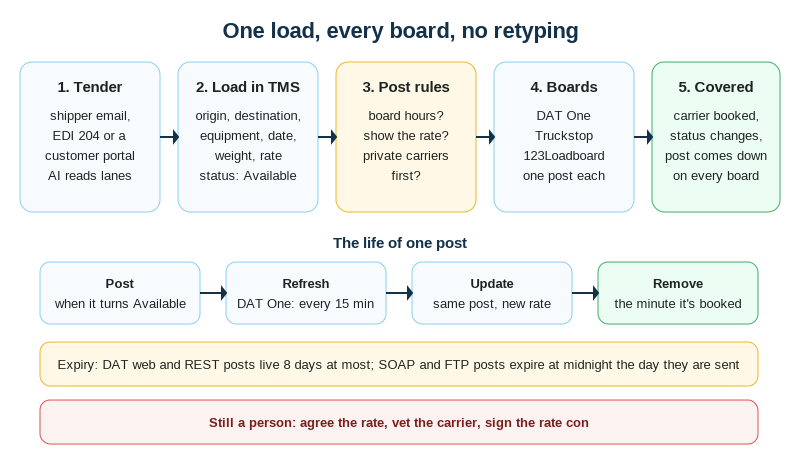
The diagram shows a tender arriving by email, EDI 204 or portal, a TMS load set to Available, posting rules for hours, rate and private carriers, one post each on DAT One, Truckstop and 123Loadboard, and the post removed on every board when the load is covered.
Below it, the life of one post runs post, refresh, update and remove. Two warnings sit under that: DAT web and REST posts live 8 days at most while SOAP and FTP posts expire at midnight, and a person still agrees the rate, vets the carrier and signs the rate con.
- Tender. A shipper email, EDI 204 or portal order arrives. An AI reader pulls lanes, dates, equipment and weight from the email text or attached PDF; our guide to freight broker TMS email integration covers this step.
- Load. A cloud service creates the load through the TMS API and sets it to Available, or Open in Alvys terms.
- Rules. Posting rules decide the hours, whether the rate shows, and whether your private carriers see it first. Truckstop’s private flag makes a load visible
only to your private carrier network
, and leadTimeHours sets when it turns public. - Post. The load posts to each board through its API, and the TMS keeps each post ID. ARK notes that edits change the existing post rather than creating a second listing.
- Refresh, update, remove. The post refreshes on the board’s allowed timer, updates when the rate changes, and comes down when the TMS status changes to Booked or Covered.
AI earns its keep before the post, reading tenders into loads, and after it, sorting the carrier emails and texts that answer it. The posting itself is plain rules and API calls, which is good news, because rules don’t guess.
How do you stop carrier calls on loads that are already covered?
You stop calls on covered loads by tying every post to the TMS status, so the post comes off every board the moment a carrier is booked instead of whenever someone remembers.
Here’s the quiet win: when every post comes down the minute the rate con goes out, the calls left on your desk are carriers asking about freight you still need covered.
Carriers have grumbled about stale and repeated posts for years. In a TruckersReport thread from September 2018, one driver described much of DAT’s volume as reposted loads from 30 minutes ago that continues to be reposted
.
A 2019 reply in the same thread wished the boards would push brokers to provide more detail to prevent unnecessary calls
. Fresh, accurate posts help both sides of the phone.
Removal is built into most tools. SmartLoads takes loads down when they are booked or archived, Alvys removes a posting in its next sync once a load is no longer eligible, and ARK queues removal when the load leaves Available.
Two details matter. Alvys says there is no bulk-delete option for postings, and ARK notes that removal on the board’s side settles asynchronously, so a failed removal must show up for a person.
DAT also lets brokers filter who calls. Its Carrier Management Suite, launched October 16, 2025 as a DAT One add-on, adds Qualification Settings that limit which carriers can view a load post based on authority, insurance and other factors (DAT news release).
Where do the sources disagree about automated load posting?
The sources disagree most on three points: which DAT plan can post from software, how long a post lives, and how often Truckstop lets you refresh.
| Question | One source says | Another says | What we’d do |
|---|---|---|---|
| Which DAT plan can post from a TMS? | DAT: the $160 upgrade from Express to Select adds automated load postings | Alvys: standard accounts lack API access; Quote Factory: on Express you may not be able to post; Tai: a Connexion license comes first | Ask DAT to confirm Connexion on your plan in writing |
| How long does a DAT post live? | Website and REST API: up to 8 days | SOAP API and FTP: midnight the same day | Ask your TMS which connection it uses |
| How often can a Truckstop post refresh? | Truckstop’s API overview lists “Refresh a load” with no interval | ARK: Truckstop returns a next-refresh time; ARK falls back to six hours | Follow the time each response returns, never a fixed timer |
| Is refresh automatic? | Tai and Transfix (on DAT) refresh automatically | ARK refresh is manual; SmartLoads refreshes DAT by re-sending the whole board each morning | Check per board, not per vendor |
The gap none of them fill: no public page we read says how often Truckstop allows a refresh. Build the refresh step to follow the time the board returns, and log every refused refresh.
What should be checked before a load posts automatically?
Before a load posts automatically, eight checks should pass, and a failed check holds the post for a person.
- The load is really open: an Available status, not a quote the customer hasn’t approved yet.
- Origin, destination, pickup date and equipment are filled; Truckstop refuses loads with fewer than two stops.
- The posted rate is shown or hidden on purpose, by customer or lane.
- The reference ID fits DAT: Tai notes DAT keeps only 8 characters of the Poster Reference ID.
- The contact on the post is the right desk; Quote Factory notes that a post uses the contact info from your DAT account.
- Posting hours match your office hours, so carriers don’t call an empty desk.
- Private carriers see the load first when you want them to, with Truckstop’s private flag and lead time.
- Each load has one post per board, and every change edits that post.
Can carriers automate posting empty trucks too?
Yes, carriers can automate truck posts the same way, and both DAT and Truckstop document truck posting.
DAT One’s help pages cover refreshing a truck posting and note that a truck post left unchanged looks older to brokers. Truckstop’s developer docs include a Post a truck call.
A carrier TMS can post a truck when a driver’s delivery is marked complete, using the delivery city and the driver’s next available time, and remove it when the next load is booked.
How do you start automating load board posting this week?
Start by turning on posting for one board and one customer’s loads, with removal tied to the booked status, and watch it for a week before adding boards.
- Day 1: ask DAT which plan and Connexion seats you need, and ask Truckstop to enable Freight Match Pro and the Load Posting web service.
- Day 2: in your TMS, map equipment types to each board and decide the rate-shown rule.
- Day 3: post one customer’s loads automatically on one board while a person watches every post.
- Day 4: book a load and time how long the post takes to come down on the board.
- Day 5: switch on refresh, then add the second board.
If the post still lingers after a booking on Friday, fix the removal trigger before adding anything else. Removal is the step carriers notice most.
When posting runs itself, the next chores in line are the check calls and the paperwork: see automated driver check calls software and how to automate rate confirmation data entry. Our map of trucking dispatch automation tools shows where posting fits among them.
How we researched this
- Read on November 28, 2026: DAT One support pages on posting expiry, refreshing and extending shipments and refreshing truck posts; DAT’s load board pricing page, API integration page and the October 16, 2025 Carrier Management Suite release.
- Read Truckstop’s developer documentation (Load Management overview, Post a Load, Post a truck) and 123Loadboard’s broker page.
- Read the posting documentation of Tai Software (DAT and 123 Loadboard articles, load coverage post), Alvys, Transfix (Q3 2026 update), ARK TMS, SmartLoads and Quote Factory, plus McLeod’s certified partner listings.
- Read one TruckersReport thread (2018 to 2019) about reposted loads; quoted only short, linked phrases and no usernames. Reddit could not be read by our tools this time.
- Compared: plan requirements, post lifetime, refresh rules, removal behavior and boards supported. The time table is our own arithmetic, with every assumption stated.
- What we did not do: we did not run any of these tools, and we did not test refresh limits on a live board.
Pick one board and one customer, let the posts come and go on their own for a week, and see how quiet the phone gets on covered loads.
Sources and further reading
- DAT One support: When do postings expire?
- DAT One support: Refresh a shipment
- DAT One support: Extend the life of your shipment posting
- DAT One support: Refresh a truck posting
- DAT: Load board plans and pricing
- DAT: API integration and developer portal
- DAT: Carrier Management Suite news release (October 16, 2025)
- Truckstop developers: Load Management API
- Truckstop developers: Post a Load
- Truckstop developers: Post a truck
- 123Loadboard: Post loads and cover freight faster (brokers)
- Tai Software knowledge base: DAT
- Tai Software knowledge base: 123 Loadboard
- Tai Software: Prompt and accurate load coverage
- Alvys help center: Post loads to DAT load board
- Transfix: Q3 2026 freight TMS product updates (September 29, 2026)
- ARK TMS: Truckstop load posting integration
- SmartLoads: How to post loads to DAT and Truckstop without retyping them (September 26, 2026, vendor claims)
- Quote Factory support: DAT
- McLeod Software: Certified partner Truckstop
- McLeod Software: Certified partner LoadBoard Network
- TruckersReport forum: DAT load board and Truckstop (2018-2019)
Questions and answers
Can I use AI to automate load board posting?
Partly, and that’s fine. The posting itself is rules and API calls: post when a load turns Available, refresh on the board’s timer, remove when it’s booked. AI helps around it, reading shipper tender emails into loads before the post and sorting carrier replies after it. Keep a person on rates and carrier choice.
What is the best software to automatically post loads to DAT and Truckstop?
Start with the posting built into your TMS. Tai posts to DAT, Truckstop and 123 Loadboard, Transfix to DAT and Truckstop, Alvys to DAT and ARK to Truckstop. Without a built-in option, use a posting tool such as SmartLoads or a small custom service on the boards’ APIs.
Do I need DAT Connexion to post loads from my TMS?
In practice, yes. Tai and Quote Factory both name Connexion, DAT’s API access, and Alvys says standard DAT accounts don’t include API access. DAT lists automated load postings with its Select Broker plan, $319 a month when we checked on November 28, 2026.
How often can you refresh a load on DAT?
Every 15 minutes on DAT One web. Refresh sooner and DAT offers Queue to Refresh, which runs once the 15 minutes pass. A post made on the website or REST API lives until midnight of its last availability date, 8 days at most.
Does automated load posting remove loads when they’re covered?
Most tools do. SmartLoads removes loads when they’re booked or archived, Alvys removes postings once a load is no longer eligible, and ARK queues removal when the load leaves Available. Test it: book one load and time how long the post takes to disappear.