
Trucking Dispatch Automation Tools: What Each One Takes Off Your Desk
Hello to every dispatcher who has typed the same pickup address into three different screens before 9 a.m.
Picture a dispatch board where every new load is already typed in, posted, tracked and waiting for its POD, and your team only touches the loads that need a decision.
Most of a dispatcher’s day still goes to the same five chores: reading rate cons, answering quote emails, posting loads, making check calls and chasing proof of delivery.
None of those chores covers a single load by itself, and each one now has a tool that can do the typing part.
Short answer: Trucking dispatch automation tools take one repetitive dispatch job each: an inbox reader turns rate cons into TMS loads, a quote tool prices lanes from DAT or Truckstop data, posting APIs list and remove loads, check-call bots text or call drivers, and AI vision reads POD photos. A person still sets rates and picks carriers.
What are trucking dispatch automation tools?
Trucking dispatch automation tools are programs that do one repetitive dispatch task without a person typing it, and write the result into your TMS.
Some live inside a TMS or load board as a switch you turn on. Others are separate AI services, or a small custom bot on a cloud server that watches your dispatch inbox and talks to your TMS API.
| Dispatch job | What the tool does | What a person still does |
|---|---|---|
| Rate con entry | Reads the PDF or email with AI vision and builds the load | Reviews flagged fields |
| Quote replies | Pulls a lane rate and drafts a price | Approves or changes the price |
| Load board posting | Posts to DAT or Truckstop and removes the post when covered | Picks the carrier |
| Check calls | Uses tracking pings, then texts or AI voice calls | Handles late or silent loads |
| POD chase | Asks for the photo at delivery and reads it | Checks shortage or damage notes |
| Billing hand-off | Attaches rate con, BOL and POD to the load | Sends or approves the invoice |
The one job a dispatch automation tool should not take is the decision itself: which carrier, at what rate, and what to tell an upset customer.
Where does a dispatcher’s day actually go?
A dispatcher’s day goes mostly to typing and chasing, but nobody has measured exactly how much, so count your own.
The trade newsletter Freight/Signal checked the popular figures, such as 4 to 8 minutes per rate con, and found that Every one traces to a vendor blog running an openly hypothetical example
(Freight/Signal Issue 10, July 21, 2026). Our table is a calculation too, with every assumption printed, so you can swap in your own minutes.
| Chore | Assumption | Hours a day | Hours a month (21 workdays) |
|---|---|---|---|
| Rate con entry | 20 loads x 6 minutes | 2.0 | 42 |
| Load board posting | 20 loads x 2 boards x 3 minutes (post, then remove) | 2.0 | 42 |
| Check calls | 20 loads x 3 calls x 4 minutes | 4.0 | 84 |
| POD chase | 20 loads x 1 follow-up x 3 minutes | 1.0 | 21 |
| Quote replies | 30 quote emails x 5 minutes | 2.5 | 52.5 |
| Total | 11.5 | 241.5 |
At these assumptions, a 20-load day spends 11.5 team hours on chores that cover no freight by themselves. That is more than one full-time dispatcher, every workday, before a single carrier is negotiated.
A small fleet dispatching its own trucks skips the posting row but usually adds load board searching and broker emails. The fastest way to know your real number is to keep a tally sheet next to the phone for one ordinary Tuesday.
Which trucking dispatch automation tools handle each job?
Each dispatch job has its own set of trucking dispatch automation tools, and most brokerages end up combining two or three of them around one TMS.
| Job | Tools to look at | What the maker says |
|---|---|---|
| Load board posting | DAT APIs, Truckstop Load Management API, TMS auto-sync such as Alvys | DAT lists APIs for the DAT Load Board, BookNow, DAT Tracking and Freight Posting; Truckstop’s API can post, update, refresh and delete loads |
| Lane pricing for quotes | Truckstop Rate Insights | Booked and posted rate estimates with a 4-week trendline; the Advanced version adds an AI-written explanation of the rate |
| Check calls and tracking | Descartes MacroPoint, Trucker Tools, Keelway | MacroPoint’s OpsForce AI makes the check callwhen a shipment goes quiet; Keelway writes call results back to Tai, McLeod, Aljex, Revenova, Turvo and Rose Rocket |
| Many call types at once | HappyRobot | AI workers for logistics, with carrier sales and track and trace among its use cases |
| Rate cons, quote emails, PODs | A custom inbox bot with an AI vision model such as Claude, writing to your TMS API | Claude can read text, tables and images inside PDF files |
| Small fleet starting out | Truckstop TMS Free | Comes with a Load Board subscription for up to 10 active loads at a time |
Every line in that table is the maker’s own description, not an independent test. MacroPoint’s 100% elimination of manual check calls
is a marketing figure, and Keelway calls its voice agents early access.
The deeper guides on this site cover the inbox side: how to automate rate confirmation data entry, freight broker TMS email integration and extracting data from bill of lading PDFs.
How does one load run through automated dispatch, step by step?
One load runs through six automated dispatch steps, from the email that creates it to the POD that bills it, with a person stepping in only where a decision is needed.
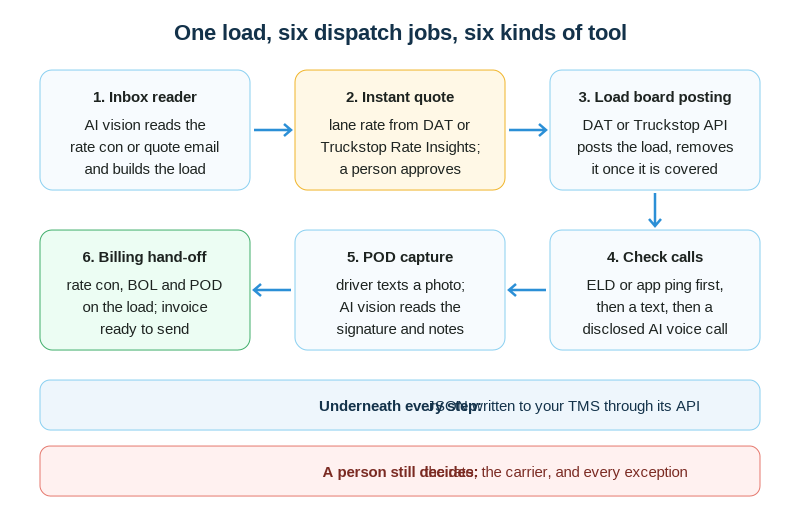
- Read. A cloud server watches the dispatch inbox in Outlook or Gmail. When a rate con or quote request arrives, AI vision reads the PDF or email and returns JSON: shipper, lane, dates, equipment, rate and reference numbers.
- Price. For a quote request, the server pulls the lane’s rate estimate and drafts a reply with your margin rule. A person approves it with one click.
- Post. For an open load, the server posts it to DAT and Truckstop through their APIs, and removes both posts the moment the TMS shows a carrier booked.
- Track. Once dispatched, the server checks the ELD or tracking app first, then texts the driver, then places a disclosed AI voice call only if needed.
- Collect. At delivery, the same text thread asks for the signed POD photo, and AI vision reads the signature, the date and any exception notes.
- Hand off. The load reaches billing with rate con, BOL and POD attached, and anything odd goes to a person’s review queue.
The data in the diagram, as text: inbox reader, instant quote, load board posting, check calls, POD capture, billing hand-off. Under every step, the tool writes JSON to your TMS through its API. Above every step, a person still decides the rate, the carrier and every exception.
Can load board posting be automated on DAT and Truckstop?
Yes, load board posting can be automated on both DAT and Truckstop, but each board grants API access separately, and your TMS has to stay the master record.
DAT’s API access runs through its developer portal; DAT asks you to create an account and write to its developer support team for access. Alvys, one TMS with DAT posting built in, says the integration needs a DAT Load Board license with API access, and that its auto-sync sends eligible loads automatically on a recurring schedule.
Truckstop documents its posting call publicly. The Post a Load reference takes equipment, two to 20 stops, the rate and who can see the load, and gives integrators one firm rule:
Your integration should always be treated as the source of truth for your loads.Truckstop developer documentation, Post a Load
In plain terms, edit the load in your TMS and let the posts follow. The best part is the removal: Alvys says that when a load is no longer eligible, its posting is removed,
so carriers stop calling about a load you covered two hours ago.
How do instant freight quote tools work?
An instant freight quote tool reads the quote request, looks up the lane’s market rate, applies your margin rules and drafts a price, usually in under a minute.
Here’s the quiet win in all of this: when the posting, the check calls and the POD chase run on their own, the phone calls left on your desk are the ones that actually need you.
The lane rate comes from a market data source. Truckstop’s Rate Insights API gives booked rate estimates with a 4-week trendline and a 3-year history, plus posted rate estimates, according to its developer portal.
Truckstop’s own October 27, 2026 release calls its rate estimates a planning tool, not a guarantee of final pricing. That is the right way to treat any instant quote: the tool drafts, a person sends.
Keep one rule in the tool for the lanes you know better than any average: holidays, produce season, a customer with a 4 a.m. appointment. Those quotes go to a person every time.
Should you buy a dispatch automation tool or build a custom bot?
Buy when your TMS or load board already offers the feature; build a small custom bot when your paperwork, your TMS or your rules are too unusual for any vendor.
| Option | Fits | The catch |
|---|---|---|
| Built into your TMS or load board | Load posting, basic tracking, invoice emails | Only covers the boards and partners your TMS supports |
| Specialist AI vendor | Check calls, carrier calls, track and trace at volume | Per-load or per-minute pricing that few publish |
| Custom bot on a cloud server | Odd rate con layouts, a TMS no vendor covers, your own rules | Someone has to watch it and fix it when a broker changes a form |
Many brokerages mix all three: posting from the TMS, tracking from MacroPoint or Trucker Tools, and a custom inbox bot for the rate cons and PODs nothing else reads well.
How much do trucking dispatch automation tools cost to run?
The raw messages and API calls behind trucking dispatch automation cost very little; the software licenses, the setup and the person who watches it cost the most.
- One text check-in with Twilio
- About $0.024 to $0.029 for one text sent and one reply, carrier fees included, from Twilio’s US price list.
- One phone number for the bot
- $1.15 a month on Twilio.
- A Truckstop Load Boost
- $1 for a 30-minute visibility boost, with one active boost per load, per Truckstop’s developer portal.
- Load board API access
- Tied to your DAT or Truckstop subscription level; ask each board for the current terms.
- Vendor AI tools
- Usually per seat, per load or per minute, and rarely published. Ask for a per-load price.
Hold that per-load price against the minutes in our 20-load table. If a tool costs less per load than the dispatcher minutes it saves, and its error rate is low on your own paperwork, it pays.
What should never be automated in truck dispatching?
Rates, carrier selection, claims and promises to customers should never be automated in truck dispatching; automate the typing, never the deciding.
That phrase is the headline of Freight/Signal Issue 10, and it is a good test. A misread zip code is a correction a person fixes in seconds. A bot that books a carrier at the wrong rate creates a claim.
Automation does help with one legal duty. Under 49 CFR 371.3, a property broker must keep a record of each transaction for three years, and every party to the deal may review it.
- The name and address of the consignor (shipper).
- The name, address and registration number of the originating motor carrier.
- The bill of lading or freight bill number.
- The broker’s compensation and who paid it.
- Any non-brokerage service, its compensation and payer.
- Freight charges collected and the date the carrier was paid.
A dispatch bot that saves the rate con, BOL and POD on every load fills most of that record by itself. Keep the human decisions in the same log, so the file shows who approved what.
How do you choose the right trucking dispatch automation tools?
Choose dispatch automation tools by your biggest chore first, then by how well each tool writes into your TMS and how easy its mistakes are to catch.
- Does it write into my TMS (McLeod, Tai, Aljex, Rose Rocket or yours) through an API or approved partner?
- Can it run in shadow mode for a week, beside my team, before it takes real loads?
- Does it flag low-confidence fields for a person instead of guessing?
- Does it keep a log of every action, with the original email or PDF attached?
- What is the price per load, all in?
- Who fixes it when a broker changes their rate con layout?
- Can I switch it off for one customer or lane without breaking the rest?
Start with the row in our table that costs your team the most hours, usually check calls or rate con entry. Our guide to automated driver check calls software covers the first; the rate con guide covers the second.
Give one tool one job for one week, compare it with your team’s work, and keep the coffee for the loads that need a real conversation.
Pick the one chore that ate the most of your team’s week, give it to one tool for one week, and see how the board looks on Friday.
Sources and further reading
- DAT: API integration (Load Board, BookNow, DAT Tracking, Freight Posting)
- Truckstop Developer Portal: Load Management, Rate Insights and other APIs
- Truckstop Developer Portal: Post a Load
- Truckstop: pricing, prospecting, onboarding and invoicing on one platform (October 27, 2026)
- Alvys Help: Post loads to DAT Load Board
- Descartes MacroPoint: real-time visibility and OpsForce AI for freight brokers and 3PLs
- Trucker Tools: real-time load tracking
- Keelway: AI Phone Call Agent for Freight Brokers
- HappyRobot: AI workers for logistics
- Anthropic: Claude PDF support
- Twilio: SMS and MMS pricing in the United States
- eCFR: 49 CFR 371.3, records to be kept by brokers
- Freight/Signal Issue 10: Automate the typing. Never the deciding (July 21, 2026)
Questions and answers
Can I use AI to automate truck dispatching tasks?
Yes, for the repetitive parts. AI can read rate cons and PODs, draft quotes from lane rate data, post and remove loads on DAT and Truckstop through their APIs, and text or call drivers for check calls, writing everything into your TMS. Rates, carrier choice and exceptions should stay with a dispatcher.
What is the best dispatch automation software for a small trucking company?
There is no single best one; match the tool to your biggest chore. A small fleet can start with its TMS’s built-in features, such as Truckstop TMS Free for up to 10 active loads with a Load Board subscription, then add an inbox reader for rate cons once volume grows.
Can I post loads to DAT and Truckstop automatically?
Yes. DAT offers posting APIs through its developer portal, and Truckstop’s Load Management API can post, update, refresh and delete loads. Both need the right subscription and API access. Many TMS platforms, such as Alvys for DAT, post on a schedule and remove the post once the load is no longer open.
Will dispatch automation replace dispatchers?
No. Dispatch automation removes typing, posting and routine check calls, but carriers, rates, breakdowns and upset customers still need a person. Freight/Signal’s rule fits: automate the typing, never the deciding. Most teams use the saved hours to cover more freight with the same people.
How much do trucking dispatch automation tools cost?
The texts and API calls cost little: a Twilio text check-in runs about $0.024 to $0.029, and a number is $1.15 a month. Vendor software usually charges per seat, per load or per minute and rarely publishes prices, so ask each vendor for an all-in price per load.