
OCR for Freight Rate Confirmations: Why Templates Break and What Works
Hello to every dispatcher who has hunted for the rate on a PDF from a broker they’ve never booked with before.
Picture a dispatch desk where every new rate con has already been read, checked and turned into a load before the coffee finishes brewing.
For most small fleets, dispatch services and brokers, the morning still starts with a stack of PDFs from different brokers, each one laid out its own way.
Somebody opens each one, hunts for the rate, the pickup window and the reference numbers, and types them into the TMS.
Short answer: OCR for freight rate confirmations turns a rate con PDF or photo into text, then pulls the rate, stops, dates and reference numbers into your TMS. Template OCR breaks because every broker uses a different layout, so working setups now use an AI vision model that reads fields by meaning, with checks and a person for flagged fields.
What is OCR for freight rate confirmations?
OCR for freight rate confirmations is software that reads the characters on a rate con and hands them to a program that decides which number is the rate, which date is the pickup and which code is the load number.
OCR (optical character recognition) on its own only turns pixels into letters. It does not know that “$2,150.00” next to “Total Carrier Pay” is the money you will invoice.
- OCR
- Turns a scanned or photographed page into raw text, for example Amazon Textract Detect Document Text at $0.0015 a page (Amazon Textract pricing, checked Nov 28, 2026).
- Extraction
- Finds named fields in that text: rate, stops, dates, broker MC number, load number.
- Validation
- Compares the fields with what was agreed and with public records before anything reaches the load.
When dispatchers search for rate con OCR, they almost always mean all three steps together. The rest of this guide uses the phrase that way.
Why does template OCR break on rate confirmations?
Template OCR breaks on rate confirmations because there is no standard rate con layout, so a template built for one broker’s form misses fields on the next broker’s form.
Each brokerage prints rate cons from its own TMS. One puts the rate at the top, another hides it in a charges table, a third splits linehaul, fuel and accessorials across two pages.
The TMS maker Alvys puts it in five words in an October 14, 2026 post: No two rate cons look the same.
Its own help center says that Because rate confirmation layouts vary across customers and brokers, extraction accuracy also varies
, and fields it misses stay blank (Alvys help center).
A small carrier hauling for 40 brokers would need 40 templates, and every time a broker changes its form, that template quietly starts reading the wrong box.
Drivers and dispatchers have been tired of retyping for years.
In a TruckersReport thread from December 2017, one fleet manager booking for about 30 trucks wrote: It is standard operating procedure to send a .pdf of the rate sheet along with the dispatch info.
Another driver simply asked the office to send a picture instead of rewriting it all.
How much time does reading rate cons by hand cost?
Reading rate cons by hand costs a small operation 14 to 70 hours a month at 10 to 50 loads a day, while the machine reading itself costs between a quarter and about $32 a month.
| Rate cons a day | Rate cons a month | Hand-keying hours a month (4 min each) | Amazon Textract Queries | Claude Sonnet 5.5 | Claude Haiku 5.5 |
|---|---|---|---|---|---|
| 10 | 210 | 14 | $6.30 | $4.68 | $0.23 |
| 25 | 525 | 35 | $15.75 | $11.69 | $0.58 |
| 50 | 1,050 | 70 | $31.50 | $23.39 | $1.17 |
Assumptions: 21 working days a month, two-page rate cons, and 4 minutes a rate con, the middle of Datatruck’s vendor estimate of 3 to 5 minutes to read, type into the TMS, and double-check
(Datatruck).
Textract uses $0.015 a page for Analyze Document Queries.
The Claude columns use Anthropic’s ceiling of 3,000 text tokens plus 1,568 image tokens a page from its PDF support page, 400 output tokens, and the list prices on the Claude pricing page ($2 and $10 per million tokens for Sonnet 5.5, $0.10 and $0.50 for Haiku 5.5).
Here’s the catch: the reading is the cheap part. The setup, the checks and the minutes a person spends on flagged fields decide what rate con OCR really costs you.
Is plain OCR enough, or do you need AI to read a rate con?
Plain OCR is not enough for rate cons from many brokers; it gives you the words but not their meaning, so you need either one template per layout or an AI model that finds fields by meaning.
| Approach | How it finds the rate | New broker layout | Best fit |
|---|---|---|---|
| Plain OCR (text only) | It doesn’t; you get all the text and still search it | Works, but nothing is labelled | Searchable archive of old rate cons |
| Template or trained model | A fixed position or a model trained on that form | Needs new samples; Azure custom extraction starts from only five examples | A broker with a handful of shippers who all send the same form |
| Question-based or AI vision reading | Asks What is the total carrier pay?and reads the page as a person would | Usually works on the first rate con, flagged when unsure | Carriers and dispatch services with dozens of brokers |
Amazon Textract Queries sits between the two: you ask a plain question and get back the answer, a confidence score and its spot on the page, as the Textract Queries documentation describes. Google’s Document AI Custom Extractor works from a field schema, and For zero-shot, only the schema is required
.
Vision models such as Claude go one step further. Anthropic writes that Claude receives each document as a combination of text and images
, which is why a stamped “REVISED” banner or a checked hazmat box is visible to it, not only the typed words.
Which fields should rate con OCR pull, and which ones trip it up?
Rate con OCR should pull twelve fields that drive dispatch and billing, and the fine-print terms are the ones that trip it up most often.
| Field | Why it matters | Where reading goes wrong |
|---|---|---|
| Broker name and MC number | Who pays you; checkable on FMCSA records | MC printed in a logo or footer image |
| Broker load number | Every invoice and check call references it | Confused with PO or pickup number |
| Total carrier pay | The money | Linehaul, fuel and extras listed separately or on page 2 |
| Accessorials | Lumper, stop-off pay, tarp pay | Buried in a “notes” paragraph |
| Pickup and delivery addresses | Routing and HOS planning | Facility name on one line, address on another |
| Appointment dates and times | Late arrival penalties | ”FCFS 0700-1500” versus a firm appointment |
| Equipment and length | The right trailer shows up | ”53’ V” abbreviations |
| Commodity and weight | Legal weight and claims | Pounds versus kilograms, weight per stop |
| Reference numbers | PO, pickup, BOL numbers for the dock | Several numbers with similar labels |
| Detention and layover terms | Paid waiting time | Free hours and hourly rate in fine print |
| Tracking requirement and fines | Penalties for not running an app | A one-line rule on page 3 |
| Payment terms | Quick pay fee, days to pay, where to send paperwork | Legal boilerplate around it |
The last three rows are where money leaks. A rate con OCR setup that reads only the rate and the stops will miss the line that says detention starts after two free hours, and nobody will notice until the invoice is short.
How does rate con OCR work from inbox to TMS?
Rate con OCR works in five steps: the rate con arrives, the page is read, the fields are checked, flagged fields go to a person, and the clean load is written to the TMS with the PDF attached.
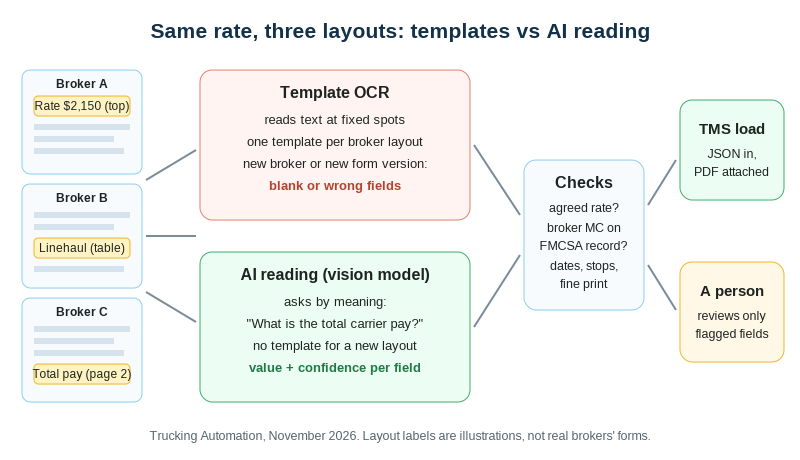
The diagram shows three rate cons, Broker A with the rate at the top, Broker B with linehaul in a table and Broker C with total pay on page 2. Template OCR reads fixed spots and needs one template per layout, so a new broker gets blank or wrong fields.
AI reading asks by meaning, for example What is the total carrier pay?
, and returns a value with a confidence score for each field.
Both paths feed the same checks (agreed rate, broker MC on the FMCSA record, dates, stops, fine print). Clean loads go into the TMS as JSON with the PDF attached, and flagged fields go to a person.
- Arrive. Rate cons land in one shared inbox such as loads@yourcompany.com, or a dispatcher drops the PDF into an upload box.
- Read. A cloud service sends each page to a reader and asks for a fixed list of fields in a JSON shape.
- Check. Rules compare the rate with what was agreed, look up the broker’s docket number, and test dates and stops.
- Review. Any field under your confidence threshold, or any failed check, shows up highlighted for a person.
- Write. The load is created or updated through the TMS API, and the original PDF is attached for billing and disputes.
The same pipeline can read the signed BOL later in the trip; our guide to extracting data from a bill of lading PDF covers that half. For the broader inbox setup, see freight broker TMS email integration.
Which OCR tools read freight rate confirmations today?
Several TMS products now read rate cons inside the TMS, standalone readers push rate con data into a TMS by API, and the general cloud readers let you build your own.
Here’s the quiet win: once the reader stops caring where each broker hides the rate, a new broker’s rate con is just another load, and the fine print about detention finally gets read every time.
| Tool | Type | What the maker documents |
|---|---|---|
| Alvys AI Load Creation | Carrier and broker TMS | Upload a PDF, JPEG or PNG up to 4 MB; Extraction typically takes 10 to 30 seconds; you review every field, then click Create Load |
| Tai Software | Broker TMS | OCR extracts data from shipping documents, including rate confirmations, and matches them to the correct shipment |
| Datatruck TruckGPT | Carrier TMS | Builds the load in under 15 seconds; on a revised rate con it shows a diff against the existing load |
| freightOptIQ | Standalone reader | 14 load fields without templates; Pro plan $149 a month with direct pushes to AscendTMS, Tai TMS and Rose Rocket |
| Amazon Textract, Azure AI Document Intelligence, Google Document AI | Build your own | Queries, custom models or a schema; you write the checks and the TMS connection |
| Claude PDF input | Build your own | Up to 600 pages a request; each page read as text plus an image |
If you already run Alvys, Tai or Datatruck, try the built-in reader first. If your TMS is McLeod, Aljex or something older, a custom reader that writes through your TMS’s API or import is usually the way in; ask your rep how an outside program can create a load and attach a document.
How accurate is OCR on rate confirmations?
Vendors put AI rate con reading at roughly 85 to 92 percent of fields right on the first pass, but their numbers disagree with each other and none publishes a test method, so measure it on your own rate cons.
| Source | Speed claim | Accuracy claim | What doesn’t line up |
|---|---|---|---|
| Alvys | 10 to 30 seconds (help center); 10 to 50 seconds (blog) | None given; fields may stay blank | Two different speed ranges on two Alvys pages |
| Datatruck | Under 15 seconds | About 90 percent of fields | No sample size or test set given |
| freightOptIQ | Clean PDFs in under 3 seconds | 90%+ in the body, 85% to 90% in its FAQ, 92%+ in its table | Three accuracy figures on one page |
The honest takeaway: around nine fields in ten will be right on a clean digital PDF, and the tenth is why every serious setup has a review step. Alvys builds that step in, and its help center tells users to Review every field and correct any that are missing or inaccurate.
Accuracy also depends on the paper. A broker’s digital PDF carries its text inside the file and reads cleanly. A photo of a printed rate con taken on a truck seat is where errors cluster, so ask brokers for the original PDF whenever you can.
What should be checked before rate con data reaches the load?
Before rate con data reaches the load, seven checks should pass, and a failed check holds the load for a person instead of dispatching it.
- The total carrier pay matches the rate the dispatcher agreed on the phone or by email.
- The broker’s docket number belongs to an active broker on the FMCSA record.
- The email came from the broker’s own domain, not a look-alike address.
- Pickup and delivery dates are in the future and in the right order.
- The equipment type matches a truck you actually have free.
- Detention, layover, TONU and tracking-fine terms are captured as text.
- A second rate con for the same load number is treated as a revision and compared field by field.
Can rate con OCR help spot a fake or altered rate confirmation?
Yes, rate con OCR can help spot a fake or altered rate con by checking the extracted broker details against public records and against the rate you agreed, though it cannot prove a document is genuine on its own.
The FMCSA’s QCMobile API returns carrier records by name, U.S. DOT number or motor carrier docket number
, and it needs a free web key. Once the reader pulls the MC number off the rate con, a lookup takes a second.
Altered numbers are not a new worry. In the same TruckersReport thread, a 2019 reply described a carrier that had been photoshopping the rate on the rate con
, which surfaced only when the broker sent the original.
Brokers are moving the other way too. Tai describes Highway’s Secure Rate Confirmation as a way that significantly reduces the risk of freight fraud caused by compromised email inboxes
, because the carrier must log in to view and accept it.
How do you test rate con OCR in the first week?
You test rate con OCR in the first week by running it on last month’s rate cons, comparing it with what your team typed, and only then letting it touch live loads.
- Day 1: pull 50 rate cons from last month, from as many different brokers as you can, including a few phone photos and revised versions.
- Day 2: agree on the twelve fields and the seven checks, and run all 50 through one or two readers.
- Day 3: compare field by field with the loads your team keyed, and count the misses per field.
- Day 4: run it in shadow mode on live rate cons while dispatch works as usual.
- Day 5: let clean, matched rate cons create loads on their own, with flagged fields going to one person.
If the reader cannot match your team on your own rate cons by Friday, it is not ready, and you have lost nothing but a week of shadow runs.
If it can, the hours in the table above come back to your dispatchers. For the full broker-side workflow, read how to automate rate confirmation data entry, and when the load delivers, automated POD collection closes the paperwork loop.
How we researched this
- Read on November 28, 2026: the Alvys help center article on automated data entry and its October 14, 2026 blog post; Tai Software’s FTL and document processing pages and its Highway Secure Rate Confirmation article; Datatruck’s and freightOptIQ’s rate con pages.
- Read the official documentation and pricing of Amazon Textract (Queries, pricing), Azure AI Document Intelligence (model overview), Google Document AI (Custom Extractor) and Claude (PDF support, pricing), plus the FMCSA QCMobile API page.
- Read one TruckersReport thread (December 2017 to June 2019) on sending and retyping rate cons; quoted only exact, linked sentences and no usernames.
- Compared: speed claims, accuracy claims, supported file types, field lists and prices. The cost table is our own arithmetic from published prices, with every assumption stated.
- What we did not do: we did not run these tools on real rate cons, and we did not verify any vendor’s accuracy figure.
Start with last month’s 50 rate cons from your busiest brokers, see what a reader makes of them, and let the clean ones build their own loads.
Sources and further reading
- Alvys help center: How to create a load using automated data entry
- Alvys: Which TMS reads rate cons and builds the load? (October 14, 2026)
- Tai Software: Full truckload (FTL) TMS
- Tai Software: Document processing
- Tai Software knowledge base: Highway Secure Rate Confirmation
- Datatruck: How AI reads a rate confirmation and builds the load (vendor claims)
- freightOptIQ: How to extract data from a rate confirmation PDF automatically (April 1, 2026, vendor claims)
- Amazon Textract: Queries
- Amazon Textract: pricing
- Microsoft: Azure AI Document Intelligence model overview
- Google Cloud: Document AI Custom Extractor with generative AI
- Anthropic: Claude PDF support
- Anthropic: Claude API pricing
- FMCSA: QCMobile API
- TruckersReport forum: Does your company send you the rate confirmation? (2017-2019)
Questions and answers
Can I use AI to read freight rate confirmations with OCR?
Yes. A vision AI model or an OCR service with question-based extraction can read a rate con PDF or photo and return the broker, load number, rate, stops, dates and terms as structured data, even from brokers it has never seen. Keep checks and a person for low-confidence fields, and never let it accept a load.
What is the best OCR for rate confirmations?
The best rate con OCR is the one that reads your own brokers’ forms accurately. If your TMS is Alvys, Tai or Datatruck, try its built-in reader first; otherwise test a standalone reader or a custom setup on Amazon Textract, Google Document AI or Claude with 50 of last month’s rate cons.
Why doesn’t template OCR work for rate cons?
Template OCR reads text at fixed positions, and every broker prints its rate con in a different layout. A carrier hauling for 40 brokers would need 40 templates, and each breaks when a broker changes its form. AI readers find fields by meaning instead.
How much does rate confirmation OCR cost per page?
Machine reading is cheap. Amazon Textract lists $0.015 a page for Queries, and our estimate for a two-page rate con on Claude Haiku 5.5 is about a tenth of a cent. Built-in TMS readers are often included in the plan; freightOptIQ lists $149 a month for direct TMS pushes.
Can OCR read the detention and TONU terms on a rate con?
Yes, if you ask for them. Most setups pull only the rate and stops, so detention free time, hourly rates, TONU and tracking fines get missed. Ask the reader to copy those terms word for word into a field your dispatcher reviews.