Karbon Workflow Automation for Accountants: What It Covers and What It Doesn’t
Hello, and welcome to anyone whose Karbon template is tidy and whose uploads still arrive blurry.
Every tax season, a Karbon template goes out with a client request, and a stack of half-readable uploads comes back.
I spent November 28, 2026 with Karbon’s own pages on automation, pricing, integrations and its developer documentation, to see where its automation stops and the reading of documents starts.
Three facts stood out. Automators change statuses, due dates, assignees and sections. Automatic client reminders and task automation are listed under the Business plan, at $89 per user per month billed annually. And Karbon’s Zapier listing has contact triggers and actions only, not work items.
Short answer: Karbon workflow automation for accountants means work templates, automators that change statuses, due dates and assignees, client requests and scheduled reminders. It does not describe reading a client’s file. To catch blurry receipts, missing statement pages and unsorted transactions, add a document-check step that reports back to Karbon.
What does Karbon workflow automation do for an accounting firm?
Karbon’s workflow automation page says automators are rules you build into a template
, and that an automator can change a status, shift a due date, reassign the work, or turn a section on or off.
Templates record a firm’s steps, statuses and job roles. Work Scheduler repeats recurring jobs with their steps, assignments and due dates already in place.
| Feature | What Karbon says it does | Plan |
|---|---|---|
| Work Templates | Records steps, statuses and roles for bookkeeping, tax and payroll | Every plan |
| Work Scheduler | Repeats recurring jobs with assignments and due dates in place | Every plan |
| Client requests | Sent from work items | Every plan |
| Automatic client reminders | Scheduled reminders for missing information | Business and Enterprise |
| Task automation (automators) | Status, due date, assignee and section changes when work events occur | Business and Enterprise |
In one line: Karbon automates who does what, by when, and who gets nudged. That is real time saved.
Which Karbon plan includes automatic client reminders?
The Business plan. Karbon’s pricing page lists Team at $59 per user per month billed annually ($79 monthly) and Business at $89 annually ($99 monthly), with monthly billing for teams of 4 or more.
Automatic client reminders and task automation sit under Business. Client requests are in every plan.
Here’s the catch: a firm on Team can send the request but, per the page, the scheduled follow-up and the automators are the Business features.
Does Karbon check that a client’s receipt or statement is readable and complete?
We found no sentence on the pages we read saying that Karbon looks inside an uploaded file for blur, missing pages or the wrong tax year. Its pages describe requests, reminders and routing.
That is not a flaw. It is a different job, and it is where the hours go.
- Karbon: asks, reminds, assigns, moves the status.
- A document check: opens each file, asks whether it is sharp, complete and the right form, reads the line items and suggests categories.
- QuickBooks or Xero: receives the finished entries.
Our guide to QuickBooks receipt categorization automation shows the categorizing half in detail.
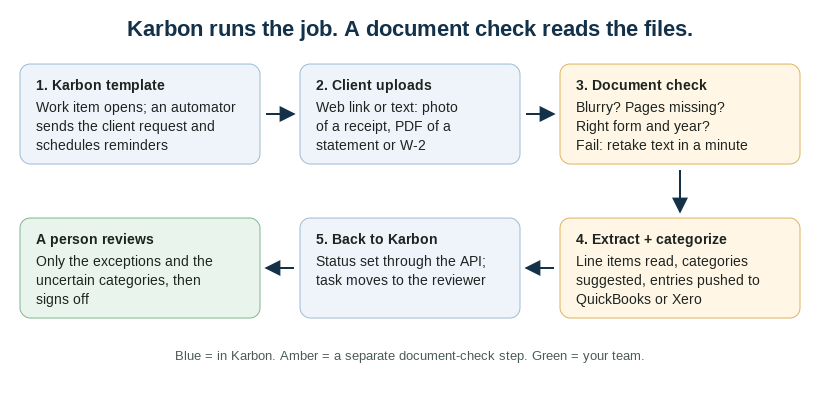
The picture in text: Karbon template and client request, then client upload, then document check (blur, missing pages, right form), then QuickBooks or Xero entries, then the result written back to the Karbon work item, then a person reviews only the exceptions.
How can a document check report back to a Karbon work item?
Through Karbon’s API. Karbon’s developer site says developers can create work items from scratch or from templates, update existing ones, upload files and manage custom fields.
It also offers webhooks: Subscribe to Karbon webhook events to receive real-time push notifications
, eliminating the need to poll
.
Zapier is thinner. Zapier’s Karbon listing shows triggers and actions for person and organization contacts only, with no work item actions. Karbon’s integrations page lists Intuit QuickBooks Online Accountant, Xero, Dext and Zapier.
So the dependable route for a custom check is the API and webhooks, which a developer sets up once. We have not built this against a live Karbon account.
Is Karbon alone enough, or do I need a document check too?
If most of your lost time is routing and reminders, Karbon alone may be enough. If it is opening files, a check helps. The table compares three setups.
Honestly, the clean split is the relief here. Karbon keeps the job moving, and something else reads the files, so nobody opens a photo just to find out it’s unusable.
| Setup | Asks and reminds | Checks the file | Categorizes |
|---|---|---|---|
| Karbon alone (Business plan) | Yes | Not described on its pages | No |
| Karbon plus a document check | Yes | Yes: blur, pages, form | Yes, before review |
| Document check alone | Its own reminders | Yes | Yes |
Summary: pick Karbon plus a check when your firm already lives in Karbon and the hours are going into reading uploads.
How many hours does chasing clients for documents cost a firm?
Here is our own model, with every assumption shown. Change the numbers to yours.
| Assumption | Value |
|---|---|
| Clients with documents to collect | 120 |
| Follow-up or bad-file threads per client | 4 |
| Minutes per thread (open, read, write, file) | 5 |
| Total | 120 x 4 x 5 = 2,400 minutes = 40 hours |
| If a check removes half of the threads | 20 hours back |
The 4 threads and 5 minutes are placeholders, not a survey. Count one of your own weeks first.
How do I set this up for one client type?
Start with one client type, such as sole proprietors with a W-2 and a few receipts, and one template.
- List the documents that client type always owes you.
- Build the Karbon template with a client request and, on Business, a reminder schedule.
- Send uploads to one link that accepts a phone photo or a PDF.
- Add the check for blur, missing pages and the right form, with a retake text when it fails.
- Write the result back to the work item, and let the reviewer see only exceptions.
Our document-chasing guide and missing W-2 text reminders cover the client-facing messages.
What still needs a person?
A reviewer still approves categories the system is unsure about, and anything that changes a return. A person also decides which documents a client truly owes.
The related guide on bookkeeping firm workflow automation shows where this fits in the month-end close.
How we researched this
- Read on November 28, 2026: Karbon’s workflow automation page, pricing page, integrations page and developer site, plus Zapier’s Karbon listing.
- Karbon’s help center article on automators did not load for us, so we make no claim about its trigger list beyond the workflow page. A search for Reddit threads on Karbon returned none we could read, so we cite no forum counts.
- Compared: which features Karbon lists on which plan, and what its API and Zapier listing expose.
- Built ourselves: the 120-client time model, with assumptions stated.
- Did not do: we have not used Karbon or tested a document check against it.
Pick one client type, build one template, and let the first season show how many threads never needed you.
Sources and further reading
Questions and answers
Can I use AI to do Karbon workflow automation for accountants?
Partly. Karbon’s own automators handle statuses, due dates, assignees and reminders. AI helps with the step Karbon’s pages don’t describe: reading a client’s receipt or statement, checking it is sharp and complete, and suggesting categories. A person should review the exceptions.
What can Karbon automators do?
Per Karbon’s workflow automation page, an automator can change a status, shift a due date, reassign the work, or turn a section on or off, and it runs each time that work repeats.
Which Karbon plan has automatic client reminders?
Karbon’s pricing page lists automatic client reminders and task automation under the Business plan, at $89 per user per month billed annually or $99 monthly. Client requests are included in every plan.
Does Karbon connect to Zapier and QuickBooks?
Karbon’s integrations page lists Zapier, Xero, Dext and Intuit QuickBooks Online Accountant. Zapier’s Karbon listing covers contact triggers and actions only, so work item automation usually goes through Karbon’s API and webhooks.
Does Karbon check whether a client’s uploaded document is blurry or incomplete?
We found nothing on Karbon’s pages saying it does. Its pages describe requests, reminders and routing, so a separate document-check step is how firms catch blurry or missing pages before a person opens the file.