Tekmetric Automated Customer Messaging: What Runs Itself, What Doesn’t
Set them up once, and Tekmetric handles the rest,
Tekmetric’s help center says of its automated texts.
I read Tekmetric’s help center and its release notes from 2019 to November 2026 to see which customer texts really go out without a person touching them.
The history explains a lot. On March 17, 2019, Tekmetric began texting the service writer whenever a customer approved an estimate. On November 9, 2020, two-way texting arrived as Tekmessage.
On February 13, 2024, Tekmetric rewrote its inspection text, because the old line, Your Inspection from <Shop Name> is ready,
made customers think the car itself was ready. And from February 1, 2025, carriers began blocking unregistered 10DLC business texts.
Short answer: Tekmetric automated customer messaging covers appointment confirmations and reminders, post-visit check-ins, Google review requests, and declined-service, oil-change and lost-customer reminders, all through the Tekmetric Marketing add-on ($345 a month per shop). Status updates, inspection and estimate links stay one advisor click, and there is no built-in follow-up on an unanswered estimate.
- Automations
- 7 types in Tekmetric Marketing: 3 marketing, 4 transactional (Tekmetric help center, updated August 25, 2026)
- Price
- Two-way texting is in the Scale plan at $439 a month; Marketing is +$345 a month per shop (Tekmetric pricing, checked November 28, 2026)
- Frequency cap
- 1 marketing text a day and 2 per rolling 7 days per phone number (Marketing Campaigns)
- Quiet hours
- Appointment reminders go out only between 9 a.m. and 8 p.m. shop time (Automatic Messaging for Appointments)
- Our count
- Of 12 message moments in a repair visit, 5 send themselves, 4 need one advisor click and 3 have no built-in message
What customer messages does Tekmetric send automatically?
Tekmetric sends seven kinds of automated customer messages, all set up in the Automations tab of Tekmetric Marketing: three marketing reminders and four transactional messages around appointments and recent visits.
| Automation | Type | What it sends | Timing you can set |
|---|---|---|---|
| Appointment Confirmation | Transactional | Details of the booking, right after it is made online or in Tekmetric | Immediate |
| Appointment Reminder | Transactional | A reminder; with reply options on, “Yes” confirms and “No” cancels on the calendar | Any delay; Tekmetric suggests at least one 24-hour reminder |
| Recent Service Follow-Up | Transactional | A check-in a few days after the visit | 1-24 hours, 1-14 days or 1-3 weeks |
| Review Request | Transactional | A choice between a Google review and private feedback | After each posted repair order, or once per customer |
| Declined Service Reminder | Marketing | A reminder about declined work marked “marketable” | From 1 day; default 6 months |
| Canned Job Reminder | Marketing | A reminder for recurring jobs such as oil changes; up to five campaigns | Your delay; cancelled if the customer comes in early |
| Lost Customer Follow-Up | Marketing | A note to customers with no posted repair order for a while | Default 12 months |
All seven live in Tekmetric Marketing. Tekmetric’s FAQ says plainly that Marketing Automations are included as part of the Tekmetric Marketing subscription
, so a shop on the base plans alone has none of them.
Texts from these automations land in the customer’s Tekmessage thread, next to the advisor’s own messages, so the whole conversation stays in one place on the customer profile.
Which Tekmetric customer texts still need your service advisor?
The messages that need an advisor are the ones in the middle of the repair: the inspection, the estimate, the parts news and the “car is ready” text. Tekmetric automates the edges of a visit well and leaves the middle to people.
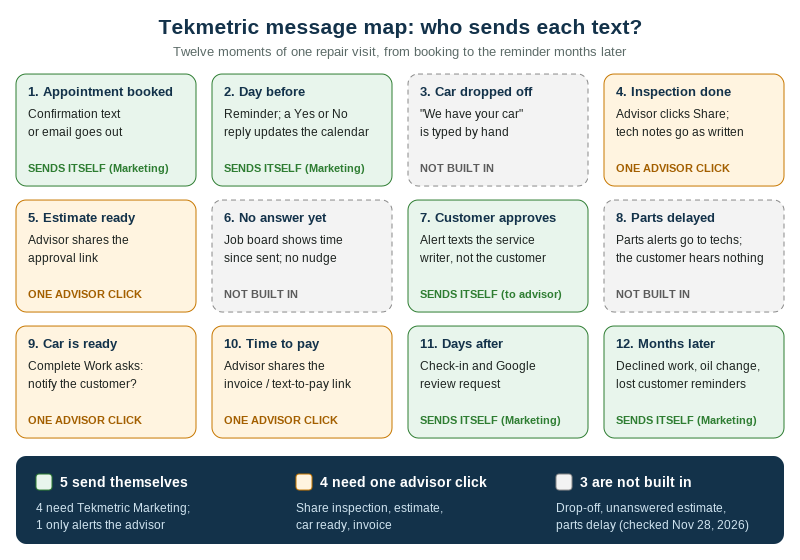
| Moment | What Tekmetric does | Who sends it |
|---|---|---|
| 1. Appointment booked | Confirmation by text or email | Sends itself (Marketing) |
| 2. Day before | Reminder with Yes/No reply | Sends itself (Marketing) |
| 3. Car dropped off | No documented automatic message | Advisor types it, or nobody does |
| 4. Inspection done | Mark Complete can alert the service writer; the customer link goes out when the advisor clicks Share | One advisor click |
| 5. Estimate ready | Live estimate link the customer approves or declines | One advisor click |
| 6. Estimate not answered | The job board shows time since the estimate was sent and viewed | Not built in |
| 7. Customer approves | Automatic text to the service writer on the repair order | Sends itself, to the advisor |
| 8. Parts delayed or arrived | Mark Order Received can notify technicians | Not built in for the customer |
| 9. Work complete | Complete Work opens a window to notify the customer “if desired” | One advisor click |
| 10. Time to pay | Invoice and text-to-pay link (Tekmetric Payments, powered by Stripe) | One advisor click |
| 11. Days after the visit | Recent Service Follow-Up and Review Request | Sends itself (Marketing) |
| 12. Months later | Declined service, canned job and lost customer reminders | Sends itself (Marketing) |
The count: 5 of the 12 moments send themselves, and 4 of those 5 need Tekmetric Marketing. Another 4 take one advisor click, and 3 have no built-in message at all.
Those three gaps are exactly the texts that keep the phone ringing. We have your car
, did you see the estimate?
and the part is a day late
are the questions customers call about when nobody sends them.
Does Tekmetric automatically text customers when their car is ready?
Not on its own. When the technician’s work is finished, the advisor clicks Complete Work, and Tekmetric opens a window that lets the advisor notify the customer if desired.
Tekmetric’s RO status notifications article (updated November 23, 2026) lists the events that can send a text: authorizing the repair order, the customer approving jobs, completing work, receiving a parts order and marking an inspection complete.
Only two of those five reach the customer, and both sit behind that “notify, if desired” window. The other three go to the service writer or the technicians.
The repair order’s workflow status changes in the background either way. Tekmetric’s workflow statuses move an estimate from Pending to Not started once it is approved, and a finished job to Balance due, without anyone texting the customer about it.
Wording matters here more than most shops think. Tekmetric’s February 13, 2024 release changed the inspection text to
to stop customers thinking the car was ready.Hello, your vehicle has been inspected at <Shop Name>. Please review the results in the link below
Turning the status changes themselves into customer texts is the subject of our guide to automated repair status text updates.
Can Tekmetric follow up automatically on an estimate the customer hasn’t approved?
No. Tekmetric has no built-in automation that re-sends or nudges a pending estimate; the follow-up is up to the advisor, helped by the job board’s timer.
What Tekmetric does give you is the signal. Its release notes list a job board view of the time since estimate sent and viewed by customer
, and an inspection viewed indicator added on August 16, 2022.
Those same release notes list webhook events for “Inspection marked complete” and “Customer viewed estimate” for 3rd party integrations
. That is the hook a custom follow-up service can listen to.
The Declined Service Reminder does not fill this gap. It waits at least a day (six months by default) and fires only on jobs already declined and marked marketable, not on estimates still sitting in Pending.
The timing that works for undecided estimates, with a 2-hour resend and a next-morning call, is in our guide to raising estimate approval rates by SMS.
How much does Tekmetric automated customer messaging cost?
A shop that wants both two-way texting and the automations pays for the Scale plan plus the Marketing add-on: $784 a month on monthly billing, by our addition of Tekmetric’s published prices.
| Plan or add-on | Monthly billing | Annual billing, per month | What it adds to messaging |
|---|---|---|---|
| Start | $199 | $179 | Digital authorizations and invoicing: inspection, estimate and invoice links by text |
| Grow | $349 | $309 | Everything in Start, plus marketing reports |
| Scale | $439 | $409 | Two-way texting (Tekmessage), custom wording for share texts, optional dedicated texting number |
| Marketing add-on | +$345 per shop | Listed monthly only | All seven automations, campaigns, review requests |
Our sums: Scale plus Marketing is $439 + $345 = $784 a month, or $9,408 a year. On annual Scale billing it is $409 + $345 = $754 a month, or $9,048 a year. Tekmetric’s page also says to ask about our special intro offers
, so quotes can differ.
Tekmetric charges by shop, not by user or repair order, so the price stays the same whether one advisor texts or four. The page promises Unlimited Users, Unlimited RO’s
.
How much advisor time do the hand-sent texts take?
At 12 repair orders a day and 8 minutes of hand-sent texts per repair order, an advisor spends about 35 hours a month on messages Tekmetric leaves to people.
The kindest message is often the one nobody had to remember to send. When the drop-off text and the parts update go out on time, the advisor gets to spend their voice on the customer who really needs a conversation.
Assumptions, all ours: 1 minute for the drop-off text, 3 minutes to share the inspection and explain the tech’s notes in plain words, 2 minutes to chase an unanswered estimate, 1 minute for a parts update and 1 minute for the car-ready click. That is 8 minutes, times 12 repair orders, times 22 working days.
The $25 an hour is a round example, not a published wage. Time one normal day of your advisor’s texting with a phone stopwatch and put your own numbers in; the result is the size of the job a custom layer would be taking on.
How do you set up Tekmetric automated text messages?
Set up the texting number first, register it for 10DLC, then turn on appointment messages, then the reminders, in that order, because each step depends on the one before.
- Get a Tekmessage number. In Shop Settings, Integrations, sign up for Tekmessage and pick a new local number or host your existing landline or VoIP number. Tekmetric says wireless numbers, including Verizon numbers, are not supported (Setup Two-Way Texting).
- Register for 10DLC. Use the Register for 10DLC button on the Tekmessage card. Tekmetric says registration
typically takes ~2 weeks
, with your legal name exactly as filed with the IRS and a 9-digit EIN. - Turn on appointment messages. In Marketing, Automations, edit the confirmation and reminder texts and switch on
Include appointment confirmation reply options
. - Add the visit follow-ups. Set the Recent Service Follow-Up and the Review Request, and decide whether each customer gets one review request or one per visit.
- Add the long-range reminders. Mark your declined jobs as marketable, then set declined service, canned job and lost customer timings.
- Write your template messages. Template names have a 30-character limit, messages 420 characters, and templates cannot carry images; they never send on their own (Template Messages).
On the Scale tier you can also rewrite the default share texts. The defaults are Hello, your estimate from <Shop Name> is ready
and the same line for the invoice (Adjust Verbiage).
Why are Tekmetric texts not reaching customers?
Most failed Tekmetric texts come from an unregistered 10DLC number, an unsupported wireless or Spectrum-routed number, a recent phone change, or the customer’s carrier blocking Tekmetric’s numbers.
- 10DLC status: the Tekmessage tile shows “10DLC Pending” until registration is done, then “10DLC – Verified”.
- Error 4476: Tekmetric says this code often means incomplete 10DLC registration or an unsupported number setup (How to Troubleshoot Tekmessage).
- Carrier block: have the customer text START, YES and UNSTOP to (832) 263-1018 and (256) 633-5094, the Tekmetric numbers the help center names.
- Phone changes: a carrier switch can take up to 48 hours to activate texting; disconnect and reconnect Tekmessage after switching.
- Wrong number on file: check the phone number on both the customer profile and the employee’s account settings.
How can a custom automation fill the gaps in Tekmetric’s messaging?
A small service connected to Tekmetric can watch repair order events, read the technician’s notes, draft the missing texts in plain English and hand each one to the advisor or send it on a schedule.
- Trigger: a Tekmetric webhook event such as “Inspection marked complete” or “Customer viewed estimate”, or a regular check of repair orders in Pending.
- Read: the repair order, its jobs, the technician’s findings and the customer’s texting preference, through Tekmetric’s partner API, which is granted on application at api.tekmetric.com.
- Write: a plain-English draft such as
Front brake pads are at 2 mm; the photo is in your inspection link
, never a scare line. - Check: the advisor approves the draft with one tap, or routine texts (drop-off, parts update) go out on their own after the advisor trusts the wording.
- Tell: an unanswered estimate after a set time becomes a callback task for the advisor, with the repair order number and what the customer viewed.
Here’s the catch: one shop number can’t serve two texting systems. Tekmetric’s help center says a number hosted for Tekmessage can’t also be used with outside texting services, which would need a different number.
So the cleanest design keeps customer texts in the Tekmessage thread: the service drafts, and the advisor or Tekmetric sends. If a second number is used, give each stage one sender, so nobody gets the same reminder twice from two numbers.
Even Tekmetric’s own AI phone agent stops at this line. Tekmetric Receptionist, in early access, sends vehicle status checks, estimate approvals, price quotes
to a callback queue rather than answering them. Our guide to auto shop phone answering covers the calls.
For collision work, the same layer can track the adjuster side too, with logged calls and emails on each supplement, as in our insurance supplement follow-up guide. The full callback ladder is in automating service advisor follow-ups.
Some messages should stay with a person whatever the software can do: a large repair, a declined safety item, a comeback and any customer who asked to be called rather than texted.
How often can Tekmetric text a customer, and what consent does it need?
Tekmetric caps marketing texts at one a day and two per rolling seven days per phone number, and sends marketing only to customers who are both opted in and marked “Market to Customer”.
- Priority: transactional messages first, then campaigns, then automations; lower-priority messages are rescheduled or dropped when a limit is hit.
- Two boxes: “Market to Customer” is your shop’s preference; “Subscribed” is the customer’s consent. Both must be true for marketing (Subscribed Customer Base).
- Transactional: appointment confirmations and reminders need no marketing opt-in.
- Opting in and out: customers can text JOIN to subscribe, tick a box in online booking, and are unsubscribed automatically when they reply STOP.
- Quiet hours: Tekmetric sends appointment reminders between 9 a.m. and 8 p.m. shop time, every day, which it ties to the TCPA.
- Campaign size: text campaigns are limited to 2,000 phone numbers each.
Customers want this channel. J.D. Power’s 2026 Aftermarket Service Index (10,572 vehicle owners) found that more than half of aftermarket customers in every segment prefer texts for service updates.
Where do Tekmetric’s pages and outside guides disagree?
The sources agree on what Tekmetric’s messaging does, but differ on who gets “transactional” texts and on how much of the API can write data.
| Question | One source says | Another says | What we conclude |
|---|---|---|---|
| Do transactional texts reach everyone? | Subscribed Customer Base: confirmations and reminders “don’t require opt-in” | Marketing Automations: review requests and recent service follow-ups send only to customers with “Market to Customer” enabled | No opt-in needed, but unticking Market to Customer also silences check-ins and review requests |
| Is the API read-only? | A September 30, 2026 Carly guide quotes Tekmetric’s docs as granting “read-only access” | Tekmetric’s own release notes list New DELETE and POST Endpoints for Appointments in Public API | At least appointments can be written; check the partner docs for anything else |
| Who can use webhooks? | Release notes list “Custom Webhooks” (2019) | The same notes describe estimate and inspection events for 3rd party integrations | Ask Tekmetric which events your shop’s integration can receive |
| Which texts are transactional? | Campaigns FAQ: confirmations, reminders and review requests | Automations table: also Recent Service Follow-Up (made transactional June 9, 2026) | The newer Automations table is current |
One gap none of these pages closes: Tekmetric publishes no measured number for its own automations, such as how many no-shows a 24-hour reminder prevents. The RO Marketing Source report is where your shop can count its own.
Start with the cheapest win. Turn on the 24-hour appointment reminder with Yes/No replies, write templates for your three most-typed texts, and time one day of your advisor’s hand-sent messages.
How we researched this
- Read 14 Tekmetric help center articles on messaging, automations, campaigns, statuses, 10DLC, troubleshooting and Tekmetric Receptionist, through the help center’s public article feed, with each article’s last-updated date noted (August to November 2026), on November 28, 2026.
- Read Tekmetric’s Release Date & Feature Notes from 2019 to November 24, 2026 for the dated turning points in the opening and the webhook events.
- Read Tekmetric’s pricing and two-way texting pages for plan prices and features, and did the cost sums ourselves.
- Built the 12-moment message map by walking one repair visit through those articles; each cell is what a help article documents, and “not built in” means we found no documented customer message.
- Compared Tekmetric’s pages with a third-party API guide (Carly, September 30, 2026) for the conflicts table.
- Looked for shop owners’ own threads on Tekmetric texting; Reddit and the main review sites were not readable by our tools, so no forum quotes are used.
- What we did not do: we have not used Tekmetric in a shop or sent test texts, and the time calculator is arithmetic on stated assumptions, not a measurement.
Time one day of your advisor’s texting this week, and the first message to hand over will pick itself.
Sources and further reading
- Tekmetric Help Center: Marketing Automations (updated August 25, 2026)
- Tekmetric Help Center: Marketing Campaigns (updated November 23, 2026)
- Tekmetric Help Center: Automatic Messaging for Appointments (updated September 30, 2026)
- Tekmetric Help Center: How to Manage and Grow Your Subscribed Customer Base
- Tekmetric Help Center: Setup Two-Way Texting
- Tekmetric Help Center: How-To Use Tekmessage
- Tekmetric Help Center: Set up Template Messages
- Tekmetric Help Center: Adjust Verbiage for Inspection, Estimate & Invoice Texts
- Tekmetric Help Center: RO Status Text & Email Notifications (updated November 23, 2026)
- Tekmetric Help Center: RO Labels and Workflow Statuses
- Tekmetric Help Center: Register your Tekmessage Number with 10DLC
- Tekmetric Help Center: How to Troubleshoot Tekmessage
- Tekmetric Help Center: Tekmetric Receptionist overview (updated November 27, 2026)
- Tekmetric Help Center: Release Date & Feature Notes (to November 24, 2026)
- Tekmetric: Pricing
- Tekmetric: Customer communication and two-way texting
- Tekmetric API: partner application
- Carly: Tekmetric API, what your shop can automate (September 30, 2026)
- J.D. Power: 2026 U.S. Aftermarket Service Index (ASI) Study
Questions and answers
Can I use AI to automate customer messaging in Tekmetric?
Yes, for the texts Tekmetric leaves to people. An AI service connected to Tekmetric’s partner API can read a finished inspection or a pending estimate, draft a plain-English text from the technician’s notes, and remind the advisor when an estimate goes unanswered. The advisor should approve the wording, and large repairs, declined safety items and comebacks still need a call.
Does Tekmetric send automatic text reminders?
Yes, with the Tekmetric Marketing add-on. It sends appointment confirmations and reminders (customers reply Yes or No), recent service follow-ups, Google review requests, and declined-service, canned-job and lost-customer reminders. Marketing reminders go only to opted-in customers, at most one a day and two per seven days.
Is two-way texting included in every Tekmetric plan?
No. On Tekmetric’s pricing page (checked November 28, 2026), Two-Way Texting is listed in the Scale plan at $439 a month, or $409 a month billed annually. The Start and Grow plans can still share inspection, estimate and invoice links by text.
Can Tekmetric text from my shop’s existing phone number?
Yes, if it is a landline or a VoIP number that is not set up as wireless. Tekmetric hosts only the texting side and calls are unaffected. Wireless numbers, including Verizon numbers, are not supported, and a hosted number can’t also be used with other texting services.
Why are my Tekmetric texts not being delivered?
Check that your Tekmessage number shows 10DLC Verified, that it is not a wireless or Spectrum-routed number, and that the customer’s number is correct. If the customer’s carrier blocks Tekmetric, have them text START, YES and UNSTOP to (832) 263-1018 and (256) 633-5094.