Eaglesoft Automated Appointment Confirmation: eReminders and Beyond
Hello, and a warm welcome to every front desk that sees a column of U’s on the Eaglesoft schedule after the eReminders have already gone out.
Every front desk with Eaglesoft hears the same promise: turn on eReminders and the schedule confirms itself.
On Sunday, November 29, 2026, I read Patterson’s own eReminders support article line by line, then went back to a January 2012 Dental Economics history to see where Eaglesoft came from.
You probably won’t find this on Reddit, but that history says EagleSoft, Inc. began in 1993 and released Version 1.0 in 1994, and that Patterson bought it in 1997 when 25 employees served 1,000 customers.
The same Patterson article says a reply to a text confirms the visit unless it holds a word like Cancel or Can’t.
Short answer: Eaglesoft automates confirmation with Patterson eReminders, which call, text or email patients with an Unconfirmed status and write the result back to the schedule. It handles the patients who press 1 or reply. It does not chase the rest or read a reply like “Friday instead?”, so an assistant can cover that part.
- Built-in tool
- Patterson eReminders: calls, texts and email; results update the appointment in OnSchedule (Patterson eReminders, checked Nov 29, 2026)
- Price
- $80 a month for up to 300 calls/texts, up to $380 for 3,000; $0.20 per call over the plan; email unlimited (same page)
- Only reminded if
- The appointment status is Unconfirmed (U) and contact information is complete (Need to Know about eReminders)
- Email replies
- Replying to an email does not confirm the appointment (same article)
- Outside tool access
- Through Patterson Innovation Connection, an apply-and-approve program (Dentalcompare announcement)
What does automated appointment confirmation mean in Eaglesoft?
Automated appointment confirmation in Eaglesoft means the software, not a staff member, contacts each patient before a visit and records the answer as a confirmation status on the appointment in the schedule.
Patterson’s native tool for this is eReminders, a paid eService. Patterson describes it as a tool that will allow your office to automate their confirmation calls to patients
, and it can also send texts and emails.
There are two other routes. Vyne Trellis Reminders is a separate system that confirms when a patient replies C. And third-party tools such as mConsent say they write a text reply back to Eaglesoft, which is a vendor claim we could not test.
All three share one idea: the schedule’s status column is the single source of truth. The work worth automating is everything that has to happen so that column is right.
What do Patterson eReminders send, and what do they cost?
eReminders place automated phone calls, send texts and send emails for upcoming appointments, and the patient’s answer updates the appointment status. Patterson sells it as a monthly plan sized by how many calls and texts you use.
| Plan | Calls/texts included | Monthly price | Price per included message |
|---|---|---|---|
| Base | 300 | $80 | $0.27 |
| Plan 1 | 600 | $120 | $0.20 |
| Plan 2 | 1,000 | $180 | $0.18 |
| Plan 3 | 1,500 | $230 | $0.15 |
| Plan 4 | 2,000 | $280 | $0.14 |
| Plan 5 | 3,000 | $380 | $0.13 |
Calls beyond the plan cost $0.20 each, and every plan includes unlimited email. The last column is our arithmetic: the plan price divided by the messages it includes.
The support article lists one more fact that matters for a family practice: several appointments for one patient, or several patients on one Responsible Party, on the same day go in one message. Confirming that message confirms all of them.
What has to be true before Eaglesoft sends a reminder?
Four things must be true for every appointment: complete contact information, an Unconfirmed (U) status, the eReminders computer and the server both on and logged into Windows, and an active internet connection. Miss one and the patient simply gets nothing.
Setup lives in Utilities, then eReminders Setup, and Patterson says eReminders can only be setup on one machine.
The wizard asks for how many days ahead to look, an upload time and a check time.
- Upload time: when appointment data goes out; Patterson says not before 8 AM or after 8 PM.
- Check time: when confirmations come back into Eaglesoft; Patterson suggests at least 2 hours after the upload.
- Return email address: if it is invalid, patients set up for email or text get no reminder at all, not even a phone call.
- Time zone: the online summary shows Central Standard Time, because the servers are in Texas.
Two settings surprise people. To stop a reminder, you remove the patient’s contact information or change the status away from U. And an appointment already moved to another status by hand is never reminded.
What does each call result do to the status in the schedule?
A live patient who presses 1 becomes C (confirmed). Almost everything else comes back as U, which means the appointment is still unconfirmed and still on somebody’s list.
| What happened | Status in Eaglesoft | Who finishes the job |
|---|---|---|
| Live person pressed 1 | C | Nobody |
| Answering machine played the message | L | Staff decide whether to call again |
| Live person pressed 2, did nothing or hung up after the prompts | U | Staff |
| Busy, ring no answer, fax machine, line drop, disconnected number | U | Staff |
| No phone number, email sent instead | E (Sent Email) | Staff, since email replies do not confirm |
The retry rules are narrow. With Retry Failed Calls on Next Attempt
checked, a failed call is tried again the following day, and only if reminders go out more than one day ahead. No attempt is made on the day of the appointment.
If a text or email was sent, no follow-up phone call is made, whether or not the patient answered it. A patient who got a text and ignored it is not called.
Which text and email replies confirm an Eaglesoft appointment?
For texts, Patterson says any reply confirms the appointment unless it contains a negative word. For email, Patterson says a reply does not confirm anything, and staff must check the return mailbox by hand.
The negative words listed are Sorry, Cancel, Can’t, Cant and Reschedule, and a second section of the same article adds Cannot, Not and Won’t. The two lists differ, so ask Patterson support which one is current. Negative replies show in red on the Daily Data Report and do not confirm.
A reply that is only Quit, End, Stop, Unsubscribe or Cancel unsubscribes the patient, and those words inside a longer message do nothing. Texting JOIN brings the patient back.
Text confirmations also need Receive Text Message Confirmations
turned on in the setup wizard. Without that setting, Patterson’s article says text confirmations are not recorded.
How do Vyne Trellis reminders differ for Eaglesoft offices?
Vyne Trellis works the other way round from eReminders: a patient confirms only by replying C to the automated message. Vyne’s FAQ says In order to confirm an appointment, a patient must reply C to the automated (System) message.
That is stricter and cleaner for the status, but it creates its own gaps. Manual emails or texts from the office don’t confirm anything in Vyne or the practice system, so those appointments must be updated by hand.
| Question | Patterson eReminders | Vyne Trellis Reminders |
|---|---|---|
| What confirms a text | Any reply without a negative word | The patient replies C |
| Phone call confirmation | Yes, press 1 | Not described on the page we read |
| Email reply confirms | No | Not described on the page we read |
| Send-time limit | Upload time between 8 AM and 8 PM | No built-in time limit; messages can go at 2 am if the office sets that |
| Eaglesoft Receive Recall box | Not discussed | Not recognized by Vyne Trellis |
Vyne suggests checking your state’s patient messaging laws and picking a safe window such as 8 am to 7 pm. Both products leave one job to you: the people who do not reply.
Which patients does automatic confirmation leave for staff?
Automatic confirmation leaves the silent patients, the patients who ask a question instead of pressing 1, and the patients with missing or wrong contact details. Those are the very visits most likely to become empty chairs.
From Patterson’s own statuses, the leftover group is easy to name:
- Calls that rang out or reached a machine, still U or L.
- Patients who got a text or email and did nothing, who are never phoned afterwards.
- Replies that said Reschedule or Can’t, shown in red and left for a person.
- Email-only patients, whose replies sit in a return mailbox.
- Patients with no usable number or an opted-out phone.
Practice by Numbers makes a related point about confirmations that happen in a separate tool: updating the status in Eaglesoft then becomes a manual step. In our reading, every one of these groups ends the same way, with someone calling.
How can an AI assistant add a second try and read the replies?
An assistant works from the status column. It finds appointments still U or L two days out, texts a patient who has not answered, reads the reply, and writes C when the reply is a plain yes. Anything else goes to a person with the thread attached.
Eaglesoft’s own pages explain who gets reminded and what comes back. The part worth handing off is the patient who stays silent or answers with a question.
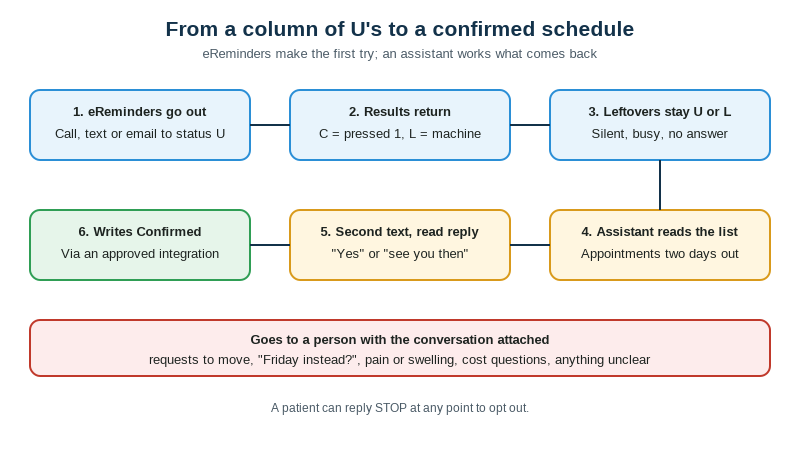
For a Tuesday 8:00 a.m. crown preparation still showing U on Sunday evening:
- Find: the assistant reads Monday and Tuesday’s U and L appointments.
- Try again: it texts in the practice’s name, with the time, and nothing clinical.
- Read: “yes” and “see you then” are plain confirmations; “can’t make it” or “Friday?” are not.
- Write: a plain yes is saved as Confirmed; a request to move goes to the front desk or to a rebooking step.
- Offer the slot: a cancellation is offered to the short-notice list the same day.
- Report: a morning list shows confirmed, moved, silent and handed to a person.
The same photo step used elsewhere on this site helps the other half of a new visit: reading the member ID from a card photo before the patient arrives, and an automated eligibility check the night before.
What stays human: pain or swelling, cost and payment questions, an unhappy patient, anyone who asks for a person, and any reply the assistant is unsure about.
How can an outside tool reach Eaglesoft at all?
An outside tool reaches Eaglesoft through Patterson Innovation Connection, known as PIC, which Patterson announced as a way for software developers to integrate with Eaglesoft. It is an approval program, not a self-serve key from your own settings.
Dentalcompare’s announcement says developers who meet specific criteria receive an API for Eaglesoft 18 and later. Third-party write-ups say the API runs on the practice’s own Eaglesoft server, and they disagree on the minimum version, so check yours with Patterson.
The same third-party sources say Patterson discourages unauthorized integrations built straight on the practice database, and one puts enrollment at $3,000 to $5,000 plus monthly fees. That figure is not from Patterson, and we could not confirm it.
The practical rule for an office: ask any assistant vendor in writing whether it is an approved PIC partner, which Eaglesoft versions it supports, and what it writes back. A vendor that cannot answer is not ready for your schedule.
What does Eaglesoft confirmation cost for 400 appointments a month?
In our 400-appointment example, staff calling by hand costs about $440 a month in time, Patterson eReminders about $120 plus follow-up, and eReminders with an assistant working the leftovers a similar amount plus the assistant’s fee.
| Approach | Staff minutes per appointment | Staff hours | Staff cost at $22/hour | Software | Monthly total |
|---|---|---|---|---|---|
| Staff phone every patient | 3 | 20.0 | $440 | $0 | $440 |
| eReminders, staff chase 40% who stay U | 1.2 averaged | 8.0 | $176 | $120 (Plan 1) | $296 |
| eReminders, assistant handles 70% of the leftovers | 0.6 averaged | 4.0 | $88 | $120 plus the assistant’s fee | $208 plus the assistant’s fee |
Assumptions: one call or text per appointment, so 400 fits Plan 1’s 600; 3 minutes to phone a patient; 40% still U after eReminders; $22 an hour as a rough loaded front desk cost. All of these are our estimates, not measurements, and Patterson’s page does not state how it counts a family message.
An assistant’s fee is quoted per practice, so ask for it in writing before you compare. The number the table cannot show is the chair hour: a visit confirmed or released two days ahead is a slot you can still fill.
What HIPAA and text rules apply to confirmation messages?
Confirmation messages must respect patient opt-outs, the FCC’s limits on automated health care texts, and HIPAA’s rules for any vendor that handles patient information. Eaglesoft’s eReminders handle opt-outs for you.
- Opt-outs: a reply that is only Stop, Quit, End, Unsubscribe or Cancel unsubscribes the patient, and only the patient rejoins by texting JOIN.
- Send time: eReminders uploads between 8 AM and 8 PM. A separate assistant should set its own safe window.
- FCC: the health care exemption at 47 CFR 64.1200(a)(9)(iv) limits automated messages to 1 a day and 3 a week, 160 characters, with no billing or marketing content.
- Vendors: any service that sees patient names and appointment times for you should sign a business associate agreement.
How the FCC count applies to a reply inside a conversation the patient started is a question for your compliance counsel and your vendor, so ask for their answer in writing.
What should you check before you trust the confirmed statuses?
Check the computer, the contact data, the reply rules and the leftover list first, because every gap repeats on every appointment.
- The eReminders computer and the server are on, awake and logged into Windows at upload and check times.
- The return email address is valid, so text and email patients are not skipped.
- Edit Patient shows a direct-dial phone, not an extension, and the right text and email boxes are ticked.
- Text confirmations are switched on in the wizard if you want replies recorded.
- You have read a week of the Daily Data Report, including the red negative replies.
- Someone owns the U and L list each afternoon, and the return mailbox each morning.
- Reminders are sent far enough ahead that the retry day exists.
- Any outside assistant is a Patterson-approved integration for your Eaglesoft version.
- Every vendor that sees patient data has signed a business associate agreement.
- A morning summary lists confirmed, moved, silent and handed to a person.
How do you improve Eaglesoft confirmations in the first month?
Fix the data and the setup in week 1, read every reply by hand in week 2, add an assistant for the leftover list in week 3, and widen it in week 4 only if the summaries look right.
- Week 1: check the setup items above, and clear patients with no usable contact.
- Week 2: read every reply and count plain yeses, requests to move, questions and silences.
- Week 3: connect an assistant to the U and L list only, with each change in a morning review.
- Week 4: count confirmed, moved, refilled and no-show visits and the staff minutes, then decide what to add.
The three numbers you need are the share of patients who press 1, the share who reply with a question, and the share who stay silent. The first is what eReminders fixes, the second is what a plain-yes rule misreads, and the third is where the missed chairs hide, so the third decides what is worth adding.
Sunday evening’s column of U’s can be a short list with names, reasons and a morning plan.
How we researched this
- Read Patterson’s eReminders page and its support articles Need to Know about eReminders and Reminders FAQ (Vyne Trellis) on November 29, 2026.
- Read Dental Economics’ January 2012 history of the Patterson Technology Center, by Pam Hemmen, for the EagleSoft origin and the 1997 acquisition.
- Read the Dentalcompare announcement of Patterson Innovation Connection, and compared third-party write-ups on access, noting where they disagree on versions and fees.
- Read mConsent’s Eaglesoft page and Practice by Numbers’ Eaglesoft guide as vendor claims about write-back; we could not verify them.
- Built the cost table from Patterson’s published plan prices and stated assumptions; the minutes and percentages are our estimates.
- Searched for front-desk discussion on Reddit about Eaglesoft confirmations; no usable threads came back, so the trade view rests on Patterson’s pages and the vendor comparisons we flag.
- What we did not do: install eReminders or an assistant, test a reply like “Friday instead?”, or measure confirmation rates in a practice.
Check the setup, read a week of replies, and let the leftover list get a second try before anyone picks up the phone.
Sources and further reading
- Patterson Dental: eReminders (features and plans)
- Patterson Support: Need to Know about eReminders
- Patterson Support: Reminders FAQ (Vyne Trellis)
- Dental Economics (Jan 1, 2012): Patterson Technology Center, evolving to meet the needs of customers
- Dentalcompare: Patterson Innovation Connection (PIC)
- Supergood: Eaglesoft API report card (third-party assessment)
- mConsent: Eaglesoft integration (vendor claims)
- Practice by Numbers: Eaglesoft integration guide (vendor)
- 47 CFR 64.1200: FCC rules for automated calls and texts, health care messages
- HHS: Sample business associate agreement provisions
Questions and answers
Can I use AI to automate appointment confirmation in Eaglesoft?
Yes, for the part eReminders leaves. An assistant can work the list of appointments still Unconfirmed, text patients a second time, read plain yes replies and hand questions to your team. It needs a Patterson-approved integration for your Eaglesoft version and a signed business associate agreement.
Does Eaglesoft have automated appointment confirmation built in?
Yes, through Patterson eReminders, a paid eService. It calls, texts and emails patients with an Unconfirmed status and writes the result to the schedule. Plans run from $80 a month for 300 calls and texts to $380 for 3,000, with $0.20 for each call over the plan.
Why is an appointment still unconfirmed after eReminders went out?
Most results other than a live patient pressing 1 come back as U. That includes no answer, a busy line, a hang-up after the prompts, and patients who got a text and ignored it. Patterson also says no phone follow-up is made once a text or email was sent.
Does replying to an Eaglesoft reminder email confirm the appointment?
No. Patterson’s support article says replying to an email does not confirm the appointment, and staff must check the return email account manually. A text reply can confirm, unless it contains a negative word such as Cancel or Can’t.
Does Eaglesoft have an API for confirmation tools?
Yes, but only for approved developers. Patterson Innovation Connection gives approved partners an API for Eaglesoft 18 and later, according to the Dentalcompare announcement. Your office doesn’t get its own key, so ask any assistant vendor which Eaglesoft versions it supports.