
Automate NetSuite Sales Order Creation from Email (Without Retyping)
Like clockwork, every NetSuite team is told the inbox can simply feed the sales order screen.
Every NetSuite forum thread about this ends in the same place: so who is going to build the part that reads the email?
Short answer: NetSuite has no switch that turns an inbound email into a sales order. You automate it with a dedicated orders inbox wired to NetSuite’s Email Capture plug-in, a reader (a script, or OCR and AI) that pulls out customer, items and quantities, and a step that creates the sales order for approval. A person checks only flagged lines.
I spent November 28, 2026 reading Oracle’s NetSuite help page for inbound email capture, Prolecto’s plug-in walkthrough, Anchor Group’s bakery case study and a vendor page for an AI email-to-order app, to find what is native and what has to be added.
Three facts stood out. Oracle’s native inbound capture handles customer sales orders only in XML, and it stores them as an inbound e-document rather than a finished sales order. Prolecto’s plug-in needs a script with one entry point, process(email). And the one hard hours figure I found, from Anchor Group, is for a single bakery customer.
- What goes in
- An email to a dedicated orders address: a PDF, an Excel file, XML or plain text
- What reads it
- A script for fixed layouts, or OCR and an AI model for messy ones
- What comes out
- A sales order in NetSuite for approval, with the email attached
- What stays human
- Unknown items, odd quantities, new customers and any line flagged unclear
- What NetSuite alone does not do
- Read a PDF or free text and decide which item a customer meant
Can NetSuite create a sales order from an email automatically?
NetSuite can receive an email and run a script on it, but it cannot read an order out of the email on its own, so a plug-in, script or add-on app has to do the reading and create the record.
Oracle’s own help page says the inbound email capture that ships with the Electronic Invoicing SuiteApp covers customer sales orders in XML format sent through email
. Nothing in it reads a PDF or a chef’s pasted list.
That gap is why this job is mostly custom work or an add-on. The same gap exists for QuickBooks users, and our guide to converting emailed PDF purchase orders to QuickBooks covers that version.
What are the ways to create NetSuite sales orders from email?
There are four: native XML capture, a custom Email Capture plug-in script, a ready-made SuiteApp with OCR and AI, and a custom reader that calls NetSuite from outside. The right one depends on how your customers send orders.
| Route | Reads | What it creates | Best when |
|---|---|---|---|
| Native inbound email capture (Electronic Invoicing SuiteApp) | XML attachments only | An inbound e-document of type sales order | A customer can send a clean XML file |
| Email Capture plug-in with a custom script | Whatever the script is written to read, such as one customer’s Excel layout | A sales order, or updates to an open one | A few big customers with fixed layouts |
| SuiteApp with OCR and AI (for example SuiteWorks Tech Email to Order) | PDFs and varied layouts | A sales order after matching | Many customers, many PO formats |
| Outside reader calling NetSuite | Email, PDFs, texts, voicemails, photos | A draft sales order through the API | Orders arrive on several channels, not just email |
Summary of the table: use XML if a customer can, a script if the layout never changes, and an AI reader when it does.
How does NetSuite’s built-in inbound email capture work for sales orders?
NetSuite’s built-in route needs the Electronic Invoicing SuiteApp, an enabled Inbound Email Capture plug-in, and a sender set up on each customer record; an XML email with the word SalesOrder in its subject then becomes an inbound e-document.
Oracle states it plainly: if an email subject in the email contains the word SalesOrder (case-sensitive), an inbound e-document will be created with transaction type selected as sales order.
If the word is missing, the page says an e-document of type bill is created instead.
Two catches. First, the system finds the customer by sender email domain or sender list, and if neither is set it won’t be able to determine the vendor of the email e-document and an inbound e-document won’t be created
. Second, the result is an e-document record that still has to become an order.
What is the NetSuite Email Capture plug-in, and how does a script use it?
The Email Capture plug-in is a NetSuite plug-in type that gives you an email address; every email sent there runs your script’s process(email) function, which can read the email and create or update records.
Prolecto’s walkthrough says The script definition expects one “function process(email){}” as your entry point.
Setup is under Customization, Plug-ins, Plug-In Implementations, choosing Email Capture, then enabling the implementation under Manage Plug-ins to get the address.
Prolecto’s sample is deliberately small. It looks for an order number in the email, checks the first 100 characters for “approve” or “reject”, and updates a status on an existing sales order. The author’s own sample leaves out error handling, so treat it as a starting sketch, not production code.
The same plug-in is the front door for an AI reader. The script receives the email, hands the attachment to a reading service, then creates the sales order from the clean rows it gets back.
What does a real NetSuite email-to-order automation look like?
Anchor Group’s case study of FireKing Baking Company, a Massachusetts bakery, shows one: a grocery customer’s 20-plus daily emails became sales orders automatically, saving what FireKing reports as 40-plus hours a week.
Before, staff retyped hundreds of lines a day; Anchor Group says that took about 8 hours daily, over 2,000 hours a year. The customer made two small changes: send orders to a new address tied to the plug-in, and attach the lines as an Excel file exported from its own ordering software.
| Rule | What it does |
|---|---|
| Who may send | Accepts emails only from approved customer addresses |
| What is read | Ignores subject, body and file name; reads only the file contents |
| Big files | Splits them into smaller ones to avoid script timeouts |
| Changes | Creates orders, or updates quantities and lines on open orders, including deleting lines |
| Missing SKU | Matches the item by its description |
| Delivery | Flags morning or afternoon delivery so urgent orders go first |
| Safety net | Emails confirmations and errors, then sends orders through the existing approval process |
The project took 35 hours of consulting and development, per the same page. A caution: this was one customer with one clean file layout. A distributor with 80 customers sending 80 layouts is a different job, which is where an AI reader earns its keep.
Can an AI reader handle messy PDFs and 2 cases large tomatoes
in a NetSuite order?
An AI reader can turn PDFs and free text into order rows and match each to a SKU, but it should write a draft, flag what it is unsure of, and never post straight to shipping.
What we like about this approach is that customers change almost nothing. They keep emailing the way they always have; your team just stops typing it all a second time.
The SuiteWorks Tech page describes a flow of Email Capture plug-in, OCR, AI matching, then a sales order with customer name, PO number, line items, quantities, rates and totals. It promises minimal manual correction
, gives no accuracy figure, and describes no review step. Those are the two questions to ask any vendor.
For food distributors the matching is the hard part. “Large tomatoes” could be three SKUs, and “same as Tuesday” is a pointer to history, not an item. Matching uses each customer’s past orders and their own shorthand. Our guide to stopping manual order entry for distributors sorts customers into EDI, portal and AI capture.
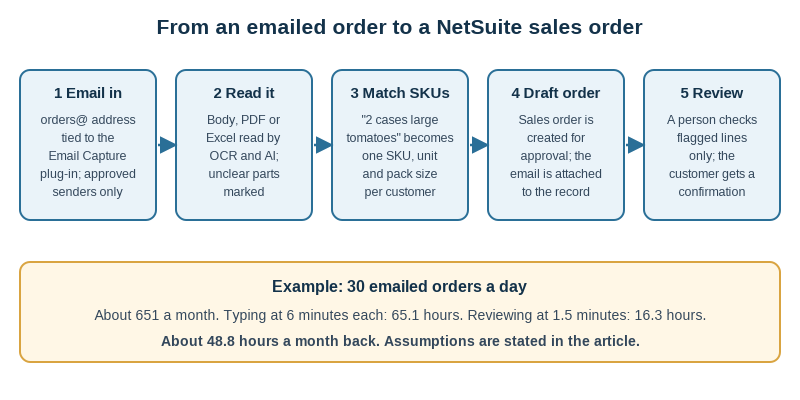
The diagram in text: 1 email to the orders address, 2 body and attachment read, 3 items matched to SKUs, 4 sales order created for approval, 5 flagged lines reviewed and confirmation sent. The example strip reads: 30 orders a day is about 651 a month; typing 65.1 hours, reviewing 16.3 hours.
What are the steps to automate sales order creation from email in NetSuite?
The steps are the same whichever tool you choose, and a person touches only the lines the system flags.
- Set up one orders address. Use the Email Capture plug-in address, or a mailbox that forwards to it, and tell customers where to send orders.
- Check the sender. Match the sender’s address or domain to a customer record, and park anything unknown for a person.
- Read the order. Pull customer, PO number, ship-to, requested date, quantities and item text from the body and attachments.
- Match items. Map each line to one SKU, unit and pack size from that customer’s history, and flag a first-time term.
- Create the order for approval. Write the sales order in a pending or draft-like status, attach the original email, and avoid duplicates by checking the PO number first.
- Confirm and review. Send the customer a short confirmation, and show your team only the flagged lines.
Keep the approval stage. FireKing sends its automated orders through the sales order approval process it already had, and so should you.
What goes wrong when email orders are created automatically?
Automated email orders fail in a few predictable ways, and each needs a rule that sends the problem to a person instead of guessing.
| Trap | Why it hurts | Safe handling |
|---|---|---|
| Duplicate email or forward | The customer gets two orders | Check PO number and sender before creating |
| Wrong item match | The wrong tomato ships | Per-customer aliases; flag first-time terms |
| Case versus each | A 24x quantity error on a 24-count case | Use the customer’s usual unit and flag differences |
| Changed order in a reply thread | The new quantity is missed or doubled | Treat replies as changes to the open order, for review |
| Unknown sender | A stranger creates an order | Approved senders only, as the FireKing script does |
| Script timeouts on big files | An order half-created | Split large files, as FireKing’s script does |
Summary: check duplicates, items, units, changes, senders and file size, and let everything else flow.
How many hours does automating NetSuite email orders save?
At 30 emailed orders a day, automation cuts about 65.1 hours of monthly typing to about 16.3 hours of review, saving roughly 48.8 hours.
| Orders a day | Orders a month | Typing hours | Review hours | Hours back |
|---|---|---|---|---|
| 15 | 326 | 32.6 | 8.1 | 24.4 |
| 30 | 651 | 65.1 | 16.3 | 48.8 |
| 60 | 1,302 | 130.2 | 32.6 | 97.7 |
Assumptions, all ours: 21.7 working days a month; 6 minutes to open the email, find the customer and key one order; 1.5 minutes to review a draft with the email beside it. Not included: setup, any app subscription, and model or OCR charges.
Compare with FireKing’s reported 8 hours a day from one customer. Time five of your own emails with a stopwatch, then replace our 6 minutes.
How do you test email order automation before relying on it?
You test it by running a month of your own saved order emails through it in the background and comparing every draft with the order your team entered.
- Collect: 100 real emails across your customers, including the worst ones, with the entered orders beside them.
- Run: process them in a NetSuite sandbox, not the live account.
- Score: count lines right, lines flagged, and lines wrong but not flagged. The last number matters most.
- Go live by customer: start with the customers whose emails scored well, and keep the rest on the old path.
We did not run anyone’s emails, so there is no accuracy number in this guide. Yours, from step 3, beats any vendor’s. When the same customers also text or call, the same review queue can take them, as in our guide to automating phone and text orders in wholesale.
How we researched this
- Read Oracle’s NetSuite help page on Electronic Invoicing inbound email capture on November 28, 2026: XML sales orders, the SalesOrder subject word, sender setup, the e-document result.
- Read Prolecto’s Email Capture plug-in walkthrough (2015, so the script style is older) for the
process(email)entry point and setup path. - Read Anchor Group’s FireKing case study for the rules, hours and project size, and the SuiteWorks Tech Email to Order page for the AI flow; treated both as vendor statements.
- The hours table is our own arithmetic with assumptions shown. A search for Reddit threads on this exact job returned vendor pages, not threads, so we quote none.
- We did not test any product, run anyone’s emails or measure accuracy.
Save a hundred of your own order emails, run them in a sandbox, and let the count of unflagged mistakes tell you where to begin.
Sources and further reading
- Oracle NetSuite Help: Electronic Invoicing Inbound Email Capture
- Prolecto: Implement a NetSuite Email Plug-in to Automate Order Processing
- Anchor Group: Converting Customer Emails to Automated Orders (FireKing case study, vendor claims)
- SuiteWorks Tech: Email to Order in NetSuite (vendor claims)
- Nuage: Order Entry Automation (vendor blog)
Questions and answers
Can I use AI to automate NetSuite sales order creation from email?
Yes. An AI reader can take an order email and its PDF or Excel attachment, pull out customer, items and quantities, match each line to your exact SKU and create a sales order in NetSuite for approval. A person should still check unknown items, odd quantities and anything flagged unclear.
Does NetSuite have a built-in way to create sales orders from email?
Only for XML. Oracle’s Electronic Invoicing SuiteApp captures customer sales orders sent as XML by email and stores them as inbound e-documents. PDFs, spreadsheets and free text need an Email Capture plug-in script, a SuiteApp or an outside reader.
What is the NetSuite Email Capture plug-in?
It is a plug-in type that gives you an email address. Each email sent there runs your script’s process(email) function, which can read the message and create or update NetSuite records, such as a sales order.
How long does it take to build?
It depends on how many layouts you receive. Anchor Group reports 35 hours of consulting and development for one bakery customer with one Excel layout. Many customers and many PDF formats take longer, so test on a month of your own emails first.
Should automated orders post without approval?
No. Create them for approval first, as FireKing does through its existing sales order approval process. Once the flagged-line count stays low on a customer for weeks, you can relax checks for that customer only.