
OCR for Handwritten Wholesale Order Sheets: How It Really Works
Like clockwork, every order desk is told that a photo of a handwritten sheet can simply be read by a machine.
Every vendor page says the same thing: send us a photo of the handwritten order and it will “just read it.”
Short answer: OCR for handwritten wholesale order sheets works in two passes. An OCR reader such as Azure AI Document Intelligence turns the photo into lines of text and flags the handwriting; a vision model turns those lines into order rows, matches each to an exact SKU, and marks every unclear line. A person approves only the marked lines.
I spent November 28, 2026 reading Microsoft’s Read model page, Google Cloud Vision’s handwriting page, Anthropic’s vision documentation and the handwritten-order page of Takkada, to find what each says about handwriting, and what none of them promise.
Three facts stood out. Microsoft’s Read model dates from the v4.0 release of November 30, 2024 and lists a handwriting style flag for every line. Anthropic’s vision page, in the same week, says its models might hallucinate or make mistakes when interpreting low-quality, rotated, or very small images
.
And not one of the four pages gives an accuracy percentage for handwriting. That gap decides how this guide is built.
- What goes in
- A photo or scan of a handwritten order sheet, a clipboard page or an order pad
- What reads it
- An OCR reader for the words, then a vision or language model for the order rows
- What comes out
- Draft order rows with a confidence flag per line, and the original photo attached
- What no maker promises
- A handwriting accuracy percentage; so you measure on your own sheets
- Who still checks
- A person, on every flagged line, new item and odd quantity
What does OCR for handwritten wholesale order sheets actually do?
OCR for handwritten wholesale order sheets turns a picture of a hand-written order into lines of text, and in a good setup passes those lines on to be matched to your items and entered as a draft sales order.
OCR alone only gives text. It does not know that “lg tom” means 25 lb Tomato 5x6 for this chef. The reading and the matching are separate jobs, and a system that does both is what our guide to automating phone and text orders in wholesale describes for texts and voicemails too.
| Job | What it does | Example |
|---|---|---|
| Read the page | Finds lines and words, marks which lines are handwriting, gives a confidence per word | Azure AI Document Intelligence Read model |
| Make order rows | Turns lines into quantity, unit and item, and says what is unclear | A vision or language model with a fixed output format |
| Match to items | Maps each row to one SKU, unit and pack size using that account’s history | Per-account aliases such as “lg tom” |
| Draft and review | Writes a draft order and shows a person the flagged rows | Your ERP’s sales order import |
Can OCR really read a chef’s or a driver’s handwriting?
OCR can read much handwriting from a clear photo, but no maker states how much, so a distributor should treat every handwritten line as probably right and prove it on its own sheets.
Microsoft’s Read model page says the model extracts print and handwritten text from PDF documents and scanned images
, with bounding coordinates and a confidence for each word. It adds that handwriting detection applies to supported handwritten languages
, so check your language first.
Google’s Cloud Vision handwriting page says One specific use of DOCUMENT_TEXT_DETECTION is to detect handwriting in an image.
It also warns that a wrong language hint can be a significant hindrance
, and recommends leaving the hint empty so the language is detected automatically.
Here is where the pages leave a gap. Both describe what the reader can do, and neither gives a handwriting accuracy figure. Takkada’s page for handwritten orders does the honest thing and gives none either; it describes safeguards instead.
Should you use an OCR reader, an AI vision model, or both?
Using both is the safest design: the OCR reader gives per-word confidence and positions, and the vision model reads the page as a whole and resolves shorthand, with each checking the other.
| Question | OCR reader (Azure Read, Cloud Vision) | Vision model (such as Claude) |
|---|---|---|
| Confidence per word | Yes, in Azure’s output | Not as a built-in number; ask it to flag unclear lines |
| Marks a line as handwriting | Yes, a handwritten style flag with a score | Can say so when asked |
Understands same as last time | No, it only reads | Can pass the phrase on for matching |
| Known limits | Text at least 12 pixels high in a 1024 x 768 image | Mistakes on low-quality, rotated or tiny images under 200 pixels |
| Image limits | 50 x 50 to 10,000 x 10,000 pixels, 500 MB paid tier | Up to 8000 x 8000 pixels, 10 MB per image on the Claude API |
The limits come from Microsoft’s input requirements and Anthropic’s vision documentation. In short: both can take a normal phone photo, and both do worse on a bad one.
How does a photo of a handwritten order sheet become an ERP sales order?
A photo of a handwritten order sheet becomes an ERP sales order in five steps, and a person touches only the rows the system flags.
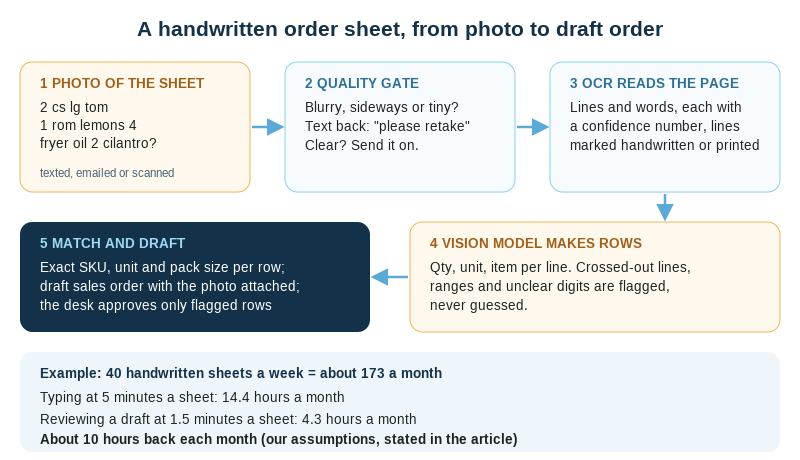
- Receive. The photo arrives by text, email or scan, and the sender’s number or address finds the customer account.
- Check the photo. A blurry, sideways or tiny photo gets an automatic reply asking for a retake, before any reading happens.
- Read the page. The OCR reader returns lines, words, positions, a confidence for each word, and which lines are handwriting.
- Make rows. A vision model turns the lines into quantity, unit and item, and marks crossed-out lines, ranges and unclear digits instead of guessing.
- Match and draft. Each row gets one SKU, unit and pack size from the account’s history, and a draft sales order is created with the photo attached.
The diagram in text: 1 photo in, 2 quality gate, 3 OCR reads the page, 4 vision model makes rows and flags the unclear ones, 5 match to SKUs and create the draft in the ERP. The example strip reads: 40 sheets a week is about 173 a month; typing takes 14.4 hours, reviewing 4.3.
What goes wrong when OCR reads handwritten order sheets?
Handwritten order sheets fail in six predictable ways, and a good system flags each one for a person instead of guessing.
| Trap | Why it hurts | Safe handling |
|---|---|---|
| A 1 that looks like a 7, or a 4 like a 9 | Wrong case count, a credit later | Flag any digit below a confidence level; show the crop beside the number |
| “cs”, “ea” or no unit | Case or each is a 24x difference on a 24-count case | Fall back to the account’s usual unit and flag if it differs |
| Crossed-out lines | The chef changed their mind; typing it anyway ships product they did not want | Leave out and note it; Takkada says it leaves crossed-out lines out |
| Ranges such as “3-4 cs” | The sheet does not say which | Keep as a range and ask; Takkada says A range stays a range. |
| Shorthand such as “lg tom” | Roma, beefsteak or grape? | Match from that account’s history; flag a first-time term |
| Notes in the margin | Leave at back dooris not an item | Keep as an order note, not a line |
Summary of the table: flag digits, units, crossings-out, ranges, new shorthand and margin notes, and let everything else pass.
What should a customer’s photo of a handwritten order sheet look like?
A usable photo is flat, in focus, lit evenly, shows the whole sheet, and has handwriting at least 12 pixels tall, which any current phone camera easily reaches when the sheet fills the frame.
What we like about this approach is that nobody has to fix a chef’s handwriting. The sheet stays as scribbled as ever; only the unclear lines ever reach a person.
Anthropic’s image quality guidance says to Ensure images are clear and not too blurry or pixelated
. It also warns that heavy lossy compression can make text difficult to read
. Microsoft asks for one clear photo or high-quality scan per document
.
| How much of the frame the 8.5-inch sheet width fills | Pixels per inch on the paper | Against Microsoft’s 8-point, 150 dpi guide |
|---|---|---|
| All of it | about 474 | More than 3 times |
| Three quarters | about 356 | More than 2 times |
| Half | about 237 | About 1.6 times |
The method: the long side of the photo, 4032 pixels, divided by the 8.5-inch sheet width times the share of the frame it covers. So the pixels are rarely the problem. Blur, shadows, a folded corner or a photo sent through an app that shrinks it are.
How many hours does reading handwritten order sheets save?
For a distributor receiving 40 handwritten sheets a week, reading and reviewing drafts takes about 4.3 hours a month instead of the roughly 14.4 hours it takes to type them.
| Sheets a week | Sheets a month | Typing hours | Review hours | Hours back |
|---|---|---|---|---|
| 20 | 87 | 7.2 | 2.2 | 5.0 |
| 40 | 173 | 14.4 | 4.3 | 10.1 |
| 80 | 347 | 28.9 | 8.7 | 20.2 |
Assumptions, all ours: 4.33 weeks a month; 5 minutes to find the account and type one sheet; 1.5 minutes to review a draft with the photo beside it. Not included: setup, the OCR and model charges, and the ERP connection.
Thread Transfer’s wholesale blog puts re-keying at 4 to 8 minutes per order and order entry errors at 2 to 5% of orders, as one vendor’s estimate. Our 5 minutes sits inside that range. Time five of your own sheets with a stopwatch and swap in your number.
Which handwritten lines should a person still read?
A person should still read every line the system flags, every first-time item, and any quantity far from that account’s usual order.
- Low-confidence digits: any number the reader is unsure of, shown as a crop next to its reading.
- Unit missing or odd: “4 lemons” from an account that buys by the case.
- Crossed-out or overwritten lines: decide what the chef finally wanted.
- Quantities far off the usual: 20 cases from an account that takes 2.
- Anything cut off by the photo edge: ask for a retake rather than guess.
- The whole sheet when confidence is low overall: a pencil sheet photographed in a dark walk-in.
Keep the photo attached to the draft. When someone says that’s not what I wrote,
the picture settles it in seconds.
Which tools read handwritten order sheets, and when is a custom build better?
A distributor can use a ready-made reader such as Takkada if it runs Tally, call the Azure or Google reading services directly, or build a custom pipeline that reads, matches and drafts into its own ERP.
| Option | What its page says | Best read as |
|---|---|---|
| Takkada | Photograph the order book page; items, quantities and rates are matched to your item masters and returned as draft lines; photo or PDF up to 5 MB | A ready answer for Tally users |
| Azure AI Document Intelligence | Reads print and handwriting, with confidence and a handwriting style flag | The reading step of a custom build |
| Google Cloud Vision | DOCUMENT_TEXT_DETECTION can detect handwriting in an image | An alternative reading step |
| Claude vision | Reads images; warns about low-quality, rotated and tiny images | The row-making and flagging step |
A custom build fits when your ERP is not one a product supports, your items need per-account aliases, or you want the sheets and corrections to stay yours. For the choice between EDI, a portal and AI capture across all your customers, see our plan to stop manual order entry for distributors.
How do you test handwritten order OCR before you rely on it?
You test handwritten order OCR by running a month of your own saved sheets through it in the background and comparing every draft with what your clerks typed.
- Collect: 100 real sheets and photos, including the worst ones, with the typed orders beside them.
- Run: process them without touching the live desk.
- Score: count lines read right, lines flagged, and lines wrong but not flagged. That last number is the one that matters.
- Decide: go live on the customers whose sheets scored well, and keep the rest on the old path.
Our count does not exist here: we did not run anyone’s sheets, so there is no accuracy number in this guide. Yours, from step 3, is worth more than any vendor’s.
If the same customers also text or call after hours, our guide to an SMS order taking system for wholesalers feeds the same review queue.
How we researched this
- Read Microsoft’s Azure AI Document Intelligence Read model page (v4.0, dated August 15, 2026) on November 28, 2026: handwriting, confidence, input limits.
- Read Google Cloud Vision’s handwriting documentation and Anthropic’s vision documentation (image limits, quality guidance, limitations) the same day. Google’s pricing page did not load for us, so this guide quotes no OCR prices.
- Read Takkada’s handwritten-order page for how a ready-made tool treats crossed-out lines, ranges and review. Read Thread Transfer’s wholesale blog as shown in search results, and quote it only as a vendor estimate.
- The photo-sharpness and hours tables are our own arithmetic with the assumptions shown. We searched for Reddit and trade-forum threads on handwritten order OCR and found none worth quoting, so we quote none.
- We did not test any product, run anyone’s sheets or measure accuracy.
Collect a hundred of your own real sheets, run them in the background, and let the count of wrong lines tell you where to begin.
Sources and further reading
- Microsoft: Azure AI Document Intelligence Read model (print and handwriting)
- Google Cloud Vision: Detect handwriting in images
- Anthropic: Vision (limits, quality guidance, limitations)
- Takkada: Handwritten order to Tally from a photo (vendor claims)
- Thread Transfer: Wholesale order management (vendor estimate)
Questions and answers
Can I use AI to read handwritten wholesale order sheets?
Yes. An OCR reader such as Azure AI Document Intelligence can read the handwriting, and a vision model can turn it into order rows, match each to your exact SKU and create a draft order in your ERP. A person still checks unclear digits, missing units, crossed-out lines and new items.
How accurate is OCR on handwritten order forms?
No maker we read gives a handwriting accuracy percentage. Microsoft gives a confidence score for every word, and Anthropic warns of mistakes on low-quality, rotated or tiny images. The honest answer is to run 100 of your own sheets and count the wrong lines that were not flagged.
What photo quality does handwritten order OCR need?
A flat, sharp, evenly lit photo of the whole sheet. Microsoft’s Read model needs text at least 12 pixels high in a 1024 x 768 image, which a 12-megapixel phone photo exceeds even when the sheet fills half the frame. Blur, shadows and compression are the usual problems.
What should happen to crossed-out lines and ranges like 3-4 cases?
Neither should be guessed. A crossed-out line should be left out and noted, and a range should stay a range and be sent to a person or back to the customer. Takkada’s page describes exactly this behavior for its handwritten order reader.
Do I need Tally or QuickBooks for this to work?
No. The reading and matching steps are the same for any system. What changes is the last step, writing the draft order, which uses your ERP’s sales order import or API, such as Microsoft’s Business Central sales order API or QuickBooks Online sales orders.