Match Customer Product Names to SKU Automatically (2026 Guide)
Like clockwork, every order desk is told that a machine can simply know which tomato “large tomatoes” means.
Every order desk eventually learns that “the usual” is the most expensive item name in the catalog.
Short answer: You match customer product names to SKUs automatically with layers: first an exact match, then the customer’s saved alias for that item, then their past orders to choose between look-alikes, and finally a flag for a person when the match is still unclear. The aliases are built from orders your team has already confirmed.
I spent November 28, 2026 reading the Sage Intacct and Infor M3 documentation on customer item aliases, plus two 2026 articles on how automated order intake matches item names, to see what an ERP does alone and what an AI reader adds.
Three things stood out. Both ERPs already store a customer’s own name for an item and resolve it to your SKU, but only when someone has entered it. One vendor article says an alias library grows from human-reviewed orders. And every figure on match rates I found comes from a vendor, so I treat them as claims, not benchmarks.
- What goes in
- A line as the customer wrote it:
2 cases large tomatoes
, “chix breast 40#”, “same as Tuesday” - What does the matching
- Your ERP’s customer item aliases, plus an AI reader that uses that customer’s order history
- What comes out
- One SKU, unit and pack size per line on a draft sales order
- What stays human
- New terms, ambiguous items, odd units and anything the system marks as unsure
How do you match a customer’s product name to the right SKU automatically?
You give the system three sources of truth in order of trust: your catalog, each customer’s saved aliases, and that customer’s order history. It uses the strongest one that gives exactly one answer, and flags the line when none does.
The diagram below shows the path of one line, 2 cases large tomatoes
, from the customer’s words to a single SKU on a draft order.
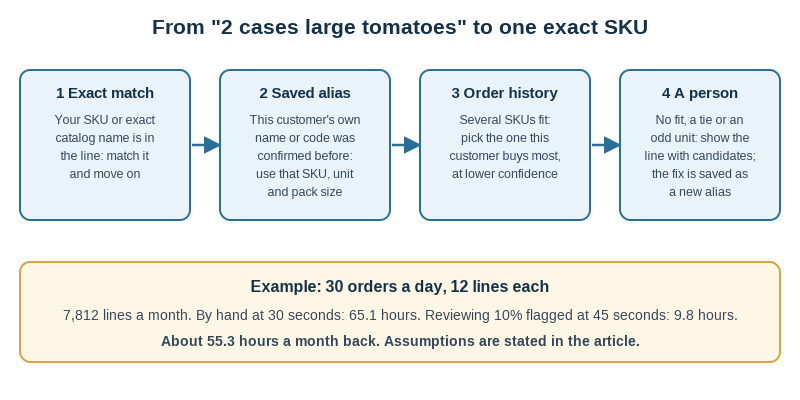
The diagram in text: layer 1, exact SKU or catalog name; layer 2, this customer’s saved alias; layer 3, this customer’s order history; layer 4, a flag for a person. Example strip: 7,812 lines a month, 65.1 hours by hand, 9.8 hours of review at a 10 percent flag rate.
Why do customers’ product names never match your SKUs?
Customers name items by how they use them, not by how you stock them, so one SKU collects many names and one name can fit several SKUs.
A restaurant says large tomatoes
. Your catalog has a 25 lb case of 5x6 tomatoes, a 20 lb case of 6x6, and a 25 lb case of vine-ripes. A grocer’s PDF carries the grocer’s own product code. A handwritten sheet says toms
. Each is a different problem for the same match.
Distributor-side sources describe the same split. One guide to order exceptions says customers send low-confidence fields
that need a person, and another lists incorrect customer SKUs and case-pack conflicts as common exception causes. I found no Reddit thread on this exact job; the search returned vendor pages only.
| What the customer writes | Why it is hard | What resolves it |
|---|---|---|
| “large tomatoes” | Three SKUs could fit | That customer’s past orders |
| “toms 2 cs” | Short form and unit shorthand | Saved alias plus a unit rule |
| Grocer’s code 48213 | Customer’s number, not yours | Customer item cross-reference |
| “same as Tuesday” | A pointer, not an item | Order history lookup, then a flag |
| “10 cases” of a 24-count item | Case or each is unclear | The customer’s usual unit; flag if different |
| A brand name that changed | Old name, new SKU | A person adds the alias once |
Summary: names differ by customer, unit and habit, and each difference needs a rule or a saved alias.
Does my ERP already match customer item names to SKUs?
Many ERPs do it for typed customer item numbers, but only after someone has entered each alias by hand; none of them reads free text like “large tomatoes” on its own.
Sage Intacct documents it plainly: External cross references, or aliases, match the customer and vendor identifiers for an item to the item ID you use.
Each record holds the customer, the customer’s identifier, an optional description and an optional unit. Type the customer’s identifier on a sales order line and Intacct fills in your item ID.
Infor M3 calls it an alias number, To enter a customer specific name for an item, the alias number.
M3 also lets you give an alias a valid-from and valid-to date, which helps when a customer renames a product. Entering an alias is optional.
QuickBooks, NetSuite and BlueCart handle this differently, and in my search NetSuite showed no native customer-item alias feature, only custom records or scripting. Check your own system’s page before you assume.
| ERP | What it calls it | What it stores | Source |
|---|---|---|---|
| Sage Intacct | External cross reference (alias) | Customer, customer’s identifier, description, unit | Intacct help |
| Infor M3 | Alias number | Customer-specific item name, valid-from and valid-to dates | Infor docs |
Summary: an ERP alias table is the backbone, and the automation’s job is to fill it and use it, not replace it.
What order should automatic SKU matching try things in?
It should go from the most certain source to the least, and stop at the first layer that gives exactly one answer.
Mirage Metrics describes this sequence for industrial distributors: First, it checks for an exact SKU match.
Then it searches the manufacturer cross-reference database, then uses the customer’s order history if several results come back, and flags the line for human review rather than guessing.
For a food distributor the same logic reads like this.
- Exact: the line holds your SKU or exact catalog name. Match it and move on.
- This customer’s alias: the words or code were confirmed for this customer before.
- This customer’s history: several SKUs fit, so pick the one they have bought most often, and mark it lower confidence.
- A person: nothing fits, two fit equally, or the unit looks wrong. Show the line with the likely candidates.
Keep the order. A history guess should never outrank a confirmed alias, and a flagged line should never be filled with a best guess.
What is an alias library, and how do you build one?
An alias library is a list of each customer’s own names and codes for your items, and you build it from orders your team has already confirmed, not by typing it all up front.
Hublerx says it is built incrementally: starting with the highest-volume customers and most common SKUs,
adding aliases as new names appear and are confirmed through human review. It claims coverage of 80-90 percent of order volume within 60-90 days. That is a vendor claim, not an independent measure, so use it as a question to ask, not a promise.
You can start the same list yourself. Pull the last three months of sales order lines, and note the customer’s wording beside the SKU your team chose. Those pairs are your first aliases. Our guide to OCR for handwritten wholesale order sheets covers how the same list helps read messy handwriting.
- Save an alias per customer, not for everyone, because “large” means different things to different chefs.
- Save the unit with it, so “2 cases” never becomes 2 each.
- Date it, as Infor M3 allows, so a retired alias stops matching.
- Add a new alias only after a person confirms the match once.
What happens to a line like 2 cases large tomatoes
?
The system checks that customer’s alias and history, picks the SKU if one stands out, and flags the line if it does not.
What we like about this approach is that customers keep their own words. Nobody renames an item; the desk just stops translating the same phrase twice.
| Line as written | Evidence used | Outcome |
|---|---|---|
2 cases large tomatoes(this chef always buys the 25 lb 5x6) | Alias plus history | Matched, no flag |
2 cases large tomatoes(new customer) | No history, three candidates | Flagged with three choices |
| “toms x2” | Saved alias, unit missing | Matched, unit confirmed by the customer’s usual case |
| Grocer code 48213 | Customer cross-reference | Matched exactly |
| “same as Tuesday” | Tuesday’s order lines | Copied as a draft, flagged for a check |
| “10 cs” of a 24-count item | Usual unit differs | Flagged, case versus each |
Summary: matched when evidence points to one SKU, flagged when evidence is missing or splits.
Can AI match fuzzy item names to SKUs without guessing wrong?
AI can match fuzzy names well when it reads them against your catalog and that customer’s history, and it stays safe only if low-confidence lines go to a person instead of being filled in.
The AI step reads chix brst 40#
and proposes the likely SKUs; it does not need an exact word. That is what a plain ERP alias lookup cannot do.
What makes it trustworthy is the rule around it: a line below your confidence threshold is shown, not written. Hublerx describes it as routing Low-confidence fields
to human review with the specific uncertainty identified.
Ask any vendor three questions: what accuracy did you measure on a catalog like mine, what happens to a line below your threshold, and where do my aliases live. Mirage Metrics reports exceptions at 2.8 percent of lines after 60 days for one 90,000-SKU distributor; that is one vendor case, not a promise for yours.
What are the steps to set up automatic SKU matching?
The steps are the same for any ERP, and the first two are about your data, not the AI.
- Clean the catalog. Give each SKU a plain name, a pack size and a unit, and remove duplicates. Weak item names cause wrong matches whatever the tool.
- Pick the home for aliases. Use your ERP’s customer item or alias table where it has one; otherwise a simple table the matcher can read.
- Seed it from history. Load the pairs of customer wording and SKU from three months of confirmed orders.
- Read the incoming line. Pull the item text, quantity and unit from the text, voicemail, PDF or photo.
- Run the layers. Exact, then alias, then history, then flag.
- Create a draft order. Write the SKU, unit and quantity as a draft in your ERP, with the original message attached.
- Learn from corrections. When a person fixes a flagged line, save the fix as that customer’s new alias.
Step 7 is where it improves. Each correction removes a flag from the next order. The same matching sits behind our guides to phone and text orders and emailed NetSuite orders.
How many hours does automatic SKU matching save?
At 30 orders a day with 12 lines each, matching by hand takes about 65.1 hours a month, and reviewing only the flagged lines takes about 9.8 hours at a 10 percent flag rate.
| Flag rate | Flagged lines a month | Review hours | Matching by hand | Hours back |
|---|---|---|---|---|
| 5% | 391 | 4.9 | 65.1 | 60.2 |
| 10% | 781 | 9.8 | 65.1 | 55.3 |
| 20% | 1,562 | 19.5 | 65.1 | 45.6 |
Assumptions, all ours: 30 orders a day, 12 lines each, 21.7 working days a month, which is 7,812 lines; 30 seconds to find and key one line by hand; 45 seconds to resolve one flagged line. Not included: setup, subscriptions, or model charges.
Time ten of your own lines with a stopwatch and replace our 30 seconds. Matching alone does not cover reading the order; that part is in our guide to stopping manual order entry for distributors.
How do you test SKU matching before relying on it?
You run 100 real order lines through it in the background and compare every match with the SKU your team chose.
- Collect: 100 lines from at least 10 customers, including the vague ones, each with the SKU your desk entered.
- Run: let the matcher propose a SKU and a confidence for each, with nothing written to the ERP.
- Score: count lines right, lines flagged, and lines wrong but not flagged. The last number matters most.
- Go live by customer: turn on the customers who scored well and keep the others on the old path.
We did not run anyone’s lines, so there is no accuracy figure in this guide. Yours, from step 3, beats any vendor’s.
How we researched this
- Read Sage Intacct’s help page on item cross references and Infor M3’s page on customer item aliases on November 28, 2026, for fields, behavior and dates.
- Read Hublerx’s April 22, 2026 article on alias libraries and Mirage Metrics’s article on layered SKU matching (published March 27, 2026, updated October 5, 2026); treated both as vendor statements and quoted their figures as claims.
- The hours table and the example lines are our own, with assumptions shown. Searches for Reddit threads on this exact job returned vendor pages, not threads, so we quote none.
- We did not test any product, run anyone’s orders or measure accuracy.
Take a hundred of your own order lines, let the matcher propose a SKU for each, and let the count of quiet mistakes tell you where to begin.
Sources and further reading
- Sage Intacct Help: Item cross references
- Infor M3 documentation: Define Item Related Data for a Customer
- Hublerx: Reducing Order Errors Through Automated Capture and Validation (vendor blog, April 22, 2026)
- Mirage Metrics: MRO Distributor Automation for 50,000+ SKU Catalogs (vendor blog)
- Peakflo: Customer PO to Sales Order Automation, product code mismatch (vendor blog)
Questions and answers
Can I use AI to match customer product names to SKU automatically?
Yes. An AI reader can take a line like 2 cases large tomatoes
, compare it with your catalog and that customer’s past orders, and propose one exact SKU for a draft order. Lines it is unsure about should go to a person instead of being guessed.
Does my ERP match customer item names to SKUs by itself?
Partly. Sage Intacct and Infor M3 store a customer’s own identifier or alias for an item and resolve it to your SKU, but someone must enter each alias, and they do not read free text. Check your own system’s documentation.
What is an alias library?
It is a list of each customer’s own names and codes for your items, linked to your SKUs. It is built gradually from orders a person has confirmed, so each correction makes the next match easier.
How accurate is automatic SKU matching?
It depends on your catalog and customers. Vendors report figures such as 80-90 percent alias coverage in 60-90 days, or 2.8 percent of lines needing review after 60 days, but those are vendor claims. Measure it on 100 of your own order lines.
What should be flagged for a person?
Flag any line with no match, two equal matches, a new customer term, an odd unit such as case versus each, or a pointer like “same as Tuesday”. Flagged lines should show the likely candidates so the fix takes seconds.