SMS Order Taking System for Wholesalers: From Text to ERP Order
Like clockwork, every new ordering app promises to be the one that finally gets wholesale customers to stop texting their orders.
The texts keep coming anyway, to the order line, to a rep’s own cell and to the owner’s phone at 10:40 p.m.
Short answer: An SMS order taking system for wholesalers is a registered business texting number connected to software that reads each customer’s text or photo, finds the account, matches every line to your SKUs, texts back a confirmation to approve, and writes a draft sales order into your ERP. Your desk only reviews the lines it flags.
I spent November 27 and 28, 2026 with Twilio’s price lists and carrier rules, and with the text-ordering pages of Orderwerks, Ordana, Freshline and Prokeep, to see what such a system is really made of.
Three facts set the frame. In 2021, the ordering company Pepper said restaurants and grocers leave their order on a voicemail 80% of the time. On August 1, 2025, the carrier fee to register a texting brand on Twilio rose from $4.00 to $4.50.
And in November 2026, one SMS segment still holds 160 plain characters, while a single emoji cuts that to 70. That last one turns out to matter more than it sounds.
- What customers do
- Keep texting orders in their own words, or send a photo of the order sheet
- What you need first
- One business number registered for texting (A2P 10DLC or toll-free verification in the US)
- What reads the text
- An AI model that returns order lines in a fixed format, plus a vision reader for photos
- What a plain text costs
- $0.0083 per SMS segment each way at Twilio’s US list price, plus carrier fees (checked November 28, 2026)
- Where it ends
- A draft sales order in your ERP with the original text attached
What is an SMS order taking system for wholesalers?
An SMS order taking system for wholesalers is the set of parts that lets a customer text an order and have it arrive in the ERP as a draft, without anyone retyping it.
From the customer’s side it looks like nothing new: they text a number, and a confirmation comes back. Behind that number sit seven parts.
| Part | What it does | Example |
|---|---|---|
| Business texting number | Receives and sends the texts, registered with US carriers | A Twilio local or toll-free number, or your order line text-enabled |
| Message hook | Hands every incoming text and photo to your software the moment it lands | Twilio’s incoming-message webhook |
| Account lookup | Finds the customer from the sender’s phone number | A contact table matched to ERP customer numbers |
| Reader | Turns free-form words or a photo into order lines | A language model with structured outputs; a vision reader for photos |
| Item matcher | Matches each line to one SKU, unit and pack size | Per-account aliases and order history |
| Confirmation | Texts back what was understood and waits for YES or changes | A one-segment reply |
| ERP writer and review queue | Creates the draft order and shows a person what was flagged | Business Central or QuickBooks Online sales order APIs |
Only the first part is about texting. The other six are the same order-capture steps covered in our guide to automating phone and text orders in wholesale, which also handles voicemails.
Why do wholesale customers order by text instead of an app or portal?
Wholesale customers order by text because it is the fastest thing on the phone already in their hand, and the person on the other end has always understood it.
Ordana, which sells AI text ordering to beverage distributors, says on its SMS ordering FAQ that text ordering is common among smaller retailers and on-premise accounts
. Its sample order reads like every order desk’s inbox: Need 6 pale, 4 ipa, 2 seasonal same as last time but double the stout
.
That one line holds four products, two references to an earlier order and no units. A portal would have asked the buyer for all of that. A text leaves it to you, which is exactly the work an SMS order taking system takes over.
How do you get text orders off sales reps’ personal phones?
You get text orders off reps’ personal phones by giving customers one shared order number whose texts land in a team inbox and in the order system, not on one person’s cell.
Orderwerks names the problem plainly on its SMS order entry page: Texts to individual rep phones never reach the office
. Prokeep’s business texting page promises to move conversations off inside sales and counter teams’ personal cell phones
.
The fix is gentle. Reps keep their relationships; the rep simply asks each customer to text orders to the shared number, and forwards the stragglers for a few weeks.
Which phone number should take text orders: your order line, a new local number or toll-free?
The best number to take text orders is the one customers already call, if it can be text-enabled; otherwise a new local 10DLC number is the usual choice, and toll-free works well for national accounts.
| Option | What customers see | Before it can text | Number cost at Twilio |
|---|---|---|---|
| Text-enable your existing order line | The number on the invoice and the truck | Carrier paperwork; voice stays with your phone company | Depends on the provider |
| New local number (A2P 10DLC) | A new number with your area code | Brand and campaign registration | $1.15 a month |
| New toll-free number | An 800-style number | Toll-free verification | $2.15 a month |
Prokeep says it text-enables your existing branch phone number
. Twilio offers the same idea through its Hosted Numbers feature, but its FAQ says the API is in development and not intended for use by new customers
.
Here’s where Twilio’s own pages disagree: the Hosted Numbers FAQ says numbers can be hosted for SMS and MMS
, while the Hosted Number Order reference says Currently, only SMS is a supported capability.
If customers send photos of order sheets, ask any provider to show a picture arriving on your hosted number before you rely on it.
A toll-free number cannot text at all until it is verified. Twilio’s toll-free verification guide says such numbers can’t send SMS messages to the United States and Canada until you’ve completed toll-free verification
.
What does A2P 10DLC registration cost a wholesaler?
A2P 10DLC registration costs a wholesaler about $19.50 to $61 once, plus $1.50 to $10 a month per campaign, at Twilio’s listed carrier pass-through fees.
Twilio’s A2P 10DLC documentation explains why it is not optional: senders on unregistered numbers will receive additional carrier fees for sending unregistered traffic
, and registered traffic is filtered less.
| Fee | Amount | When |
|---|---|---|
| Brand registration (Low Volume Standard) | $4.50 | Once |
| Standard brand, with secondary vetting | $46 ($4.50 + $41.50) | Once |
| Campaign vetting | $15, non-refundable | Once per campaign |
| Standard campaign (such as customer care or mixed) | $10 | Monthly |
| Low-volume mixed campaign | $1.50 | Monthly |
Twilio’s brand registration page states it directly: A one-time fee of $4.50 is required when registering a new Brand with TCR to establish it in the system.
Describe the campaign honestly as order confirmations and customer care for existing business customers. Marketing blasts belong in a separate campaign, if you send them at all.
How does a text order become an ERP sales order, step by step?
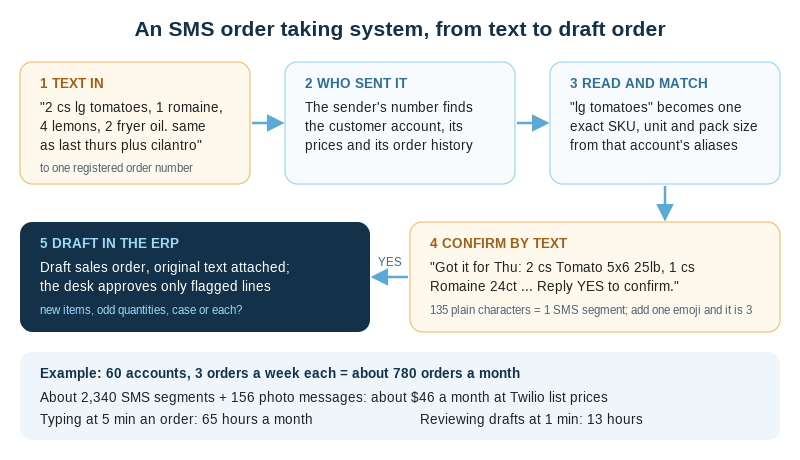
A text order becomes an ERP sales order in eight steps, and a person only touches the ones where something looks off.
- Receive. Twilio’s incoming-message webhook sends your server the sender’s number and the message
Body
, which it describes asUp to 1600 characters long.
Photos arrive as media links. - Find the account. The sender’s number is matched to a customer. An unknown number goes to a person.
- Read photos. A picture of an order sheet goes to a vision reader first, so it becomes text.
- Read the lines. A language model turns the words into lines. Anthropic’s structured outputs documentation says
Structured outputs guarantee schema-compliant responses
, so every line comes back with the same fields. - Match. Each line gets one SKU, unit and pack size from that account’s aliases and history, with a confidence level.
- Check. Rules compare stock, price, cutoff, credit and the account’s usual quantities.
- Confirm. The customer gets one short text listing what was understood and replies YES or texts the change.
- Draft. The order is created in the ERP, for example through Microsoft’s Business Central sales order API, with the original text attached.
The diagram in text: 1 text in to one registered number, 2 the sender’s number finds the account, 3 read and match each line to an exact SKU, 4 confirm by text (135 plain characters fit one segment), 5 draft in the ERP with the desk approving flagged lines.
The example strip reads: 60 accounts ordering 3 times a week make about 780 orders a month, about 2,340 SMS segments and 156 photo messages, about $46 a month at Twilio list prices. Typing them takes 65 hours a month; reviewing drafts takes 13.
QuickBooks users can follow the same path. Intuit’s sales order help page lists which QuickBooks Online plans include sales orders.
What should an order confirmation text say, and how long can it be?
An order confirmation text should list each line with its unit and pack size, the delivery day, and one clear reply instruction, in under 160 plain characters so it stays one SMS segment.
Twilio’s SMS character limit page gives the rule: 160 characters in one GSM-7 segment, 153 per segment once a message is split, and only 70 when the text needs UCS-2. It adds: If your message includes a UCS-2 character like an emoji or a Chinese hanzi, SMS switches to the UCS-2 encoding.
| Version | Characters | Encoding | Segments billed |
|---|---|---|---|
Plain: Got it for Thu: 2 cs Tomato 5x6 25lb, 1 cs Romaine 24ct, 4 cs Lemon 115ct, 2 jugs Fryer Oil 35lb. Reply YES to confirm or text changes. | 135 | GSM-7 | 1 |
| The same, plus one check-mark emoji at the end | 137 | UCS-2 | 3 |
| The same, ending “text what’s different” with a curly apostrophe | 144 | UCS-2 | 3 |
| Seven lines instead of four, plain characters | 205 | GSM-7 | 2 |
The surprise is the apostrophe. Many templates and phone keyboards swap the straight apostrophe (') for a curly one (’), and that one character makes a 144-character message cost three segments instead of one. Keep confirmation templates in plain characters, and let the software strip curly quotes before sending.
How do customers change or cancel an order by text?
Customers change an order by texting the change in plain words before cutoff, and they should cancel by replying with a word that is not a carrier opt-out keyword.
What we like about this one is that it meets buyers exactly where they already are. Nobody downloads anything; the text they were going to send anyway simply lands somewhere useful.
Here’s the catch. Twilio’s opt-out documentation lists the default opt-out words as STOP, UNSUBSCRIBE, END, QUIT, STOPALL, REVOKE, OPTOUT, and CANCEL
.
So a buyer who replies “CANCEL” to cancel Thursday’s order has unsubscribed from every text you send, confirmations included. The order is still on the books, and nothing tells them it is.
- To confirm: “YES,” which Twilio also knows as an opt-in word, so test it once on your own number.
- To change: any plain text, such as
add 1 cs cilantro, no oil,
which edits the same draft. - To cancel the order: “NO ORDER” or “SKIP THIS WEEK,” which your software treats as an order instruction.
- Never in your templates: “reply CANCEL,” “reply END” or
reply STOP to cancel this order.
Twilio also reserves “HELP,” and “START” and “UNSTOP” bring a customer back. Honor every real STOP at once, and have the rep call that account instead.
How much does an SMS order taking system cost to run each month?
The texting itself costs a wholesaler with 60 accounts about $46 a month at Twilio list prices; the real saving is the roughly 52 hours of typing that turns into review.
| Accounts | Orders a month | SMS segments | Photo messages | Texting cost a month | Typing hours | Review hours |
|---|---|---|---|---|---|---|
| 30 | 390 | 1,170 | 78 | $28.78 | 32.5 | 6.5 |
| 60 | 780 | 2,340 | 156 | $46.41 | 65 | 13 |
| 120 | 1,560 | 4,680 | 312 | $81.66 | 130 | 26 |
Assumptions, all ours: 3 orders a week per account; 80% arrive as one-segment texts and 20% as one photo (MMS); every order gets a confirmation averaging 1.2 segments and a one-segment YES.
Prices from the Twilio US price list, checked November 28, 2026: $0.0083 per SMS segment each way and $0.0165 per inbound MMS. We added $0.005 per segment and $0.01 per MMS for carrier fees, which Twilio lists by carrier between $0.0025 and $0.007 per segment.
The fixed costs are one local number at $1.15 and one standard campaign at $10 a month. Typing is 5 minutes an order and review is 1 minute. Not included: the language model, the item-matching setup and the ERP connection.
At a rough $22 an hour, the 52 hours saved at 60 accounts are worth about $1,144 a month. Time five of your own text orders with a stopwatch and swap in your minutes.
What should a person still check on text orders?
A person should still check every flagged line on a text order, plus a short list of cases where a text is easy to misread.
- Unknown senders: a new phone number, or a manager texting from a personal cell for the first time.
- Case or each: “4 lemons” from an account that buys by the case.
Same as last time
: when last time was a special order for an event.- Quantities far off the usual: 20 cases from an account that takes 2.
- Two texts, one order:
oh and add cilantro
ten minutes later should edit the draft, not start a second order. - After cutoff: a person decides whether a truck can still take it.
- No YES yet: unconfirmed drafts at cutoff, so the rep can call.
Keep the original text or photo attached to every draft. When a buyer says that’s not what I ordered,
the message settles it in seconds.
Which SMS ordering software can a wholesaler buy, and when is a custom system better?
A wholesaler can buy text ordering from vendors such as Orderwerks, Ordana and Freshline, add a shared texting inbox such as Prokeep, or have a custom system built around its own ERP and item file.
| Vendor | What its page says | Best read as |
|---|---|---|
| Orderwerks | Customers text their order to a dedicated number in plain language; parsed orders wait in a dashboard for review | Text ordering for route-based distributors, with QuickBooks sync |
| Ordana | Reads text orders, matches products to the catalog and enters the order into the ERP; sends a clarifying text when unsure | AI text ordering for beverage and similar distributors |
| Freshline | Freshline’s AI captures orders from SMS, email, and voicemail | A food B2B ordering platform with text capture built in |
| Prokeep | Text-enables the branch number, shares one inbox, connects to the ERP | A shared texting inbox, not mainly an order parser |
A custom system fits when your units are unusual (catch weight, split cases), your ERP is older, or you want the aliases, templates and message history to stay yours. It is built from the same parts: a texting number, a language model, your item file and your ERP’s import route.
Whichever way you go, ask to see two weeks of your own real customer texts run through it before you sign. For deciding which customers belong on texts, EDI or a portal, see our plan to stop manual order entry for distributors.
How do you launch text ordering without confusing your customers?
Launch text ordering with ten steady accounts over three weeks, so the order desk keeps working normally while the system earns trust.
- Week 0, paperwork: pick the number, file the brand and campaign registration, and write plain-character confirmation templates with no opt-out words in them.
- Week 1, shadow: forward the ten accounts’ texts to the new system while clerks type as usual, and compare every draft with what was typed.
- Week 2, confirm: send each of the ten a first message from the order number, then switch on confirmation texts and one-click draft approval.
- Week 3, widen: reps ask their texting customers to use the shared number, and the next twenty accounts join.
Then count review minutes against typing minutes and the mistakes caught before the trucks loaded. If the numbers are clearly better, keep going.
If many of the same customers also call after hours, our guide to voicemail to sales order software plugs into the same review queue.
How we researched this
- Read Twilio’s US SMS price list, its A2P 10DLC overview and brand registration pages, its toll-free verification guide, Hosted Numbers FAQ and API reference, opt-out keyword tutorial, incoming-message webhook reference and SMS character limit page on November 27-28, 2026. The 10DLC campaign fees come from Twilio’s Help Center fee article as shown in search results that day.
- Read the text-ordering pages of Orderwerks, Ordana, Freshline and Prokeep on November 28, 2026, and quote them as vendor claims.
- Read Anthropic’s structured outputs documentation, Microsoft’s Business Central sales order API and Intuit’s QuickBooks Online sales order help.
- Counted the confirmation-text characters and segments ourselves with Twilio’s GSM-7 and UCS-2 rules. The cost table is our own arithmetic with the assumptions shown.
- Searched Reddit and trade forums for first-hand threads on taking orders by text; we found none worth quoting, so we quote none. We did not test any product or install this system for anyone.
Register the number, pick ten accounts that already text you, and let three weeks of their orders show you what your desk no longer has to type.
Sources and further reading
- Twilio: SMS and MMS pricing for the United States (checked November 28, 2026)
- Twilio: A2P 10DLC overview
- Twilio: A2P 10DLC brand registration and fees
- Twilio Help Center: Pricing and fees for A2P 10DLC
- Twilio: Toll-free verification
- Twilio: Hosted Numbers FAQ
- Twilio: Hosted Number Order resource (API reference)
- Twilio: Advanced Opt-Out and default keywords
- Twilio: Incoming message webhook request
- Twilio: What is the SMS character limit?
- Anthropic: Structured outputs
- Microsoft Learn: Create salesOrders in Business Central
- Intuit: Create and manage sales orders in QuickBooks Online
- Orderwerks: SMS order entry (vendor claims)
- Ordana: SMS and text ordering FAQ (vendor claims)
- Freshline: B2B eCommerce for food (vendor claims)
- Prokeep: Business texting (vendor claims)
- Perishable News: Pepper raises $16M Series A (voicemail ordering figure, 2021)
Questions and answers
Can I use AI to take customer orders by text message for my wholesale business?
Yes. AI can read each customer’s text or photo of an order sheet, find the account from the phone number, match every line to your exact SKU and unit, text back a confirmation, and create a draft sales order in your ERP. A person still approves new items, odd quantities, case-or-each questions and late orders.
Can customers text orders to our existing office phone number?
Often, yes. Providers such as Prokeep text-enable an existing landline while your phone company keeps the voice calls. Twilio’s Hosted Numbers feature does the same, but its FAQ says it is not intended for new customers yet. Otherwise, a new local or toll-free number works.
Do I need A2P 10DLC registration to take orders by text?
In practice, yes, if you reply from a regular 10-digit number through software. Confirmation texts are business messages, and Twilio says unregistered traffic pays extra carrier fees. At Twilio it costs $4.50 to $46 once for the brand, $15 per campaign, then $1.50 to $10 a month.
What happens if a customer texts STOP or CANCEL to the order number?
Both are default opt-out keywords at Twilio, along with END, QUIT and UNSUBSCRIBE, so the customer stops getting every text from that number. Use words like NO ORDER or SKIP THIS WEEK for canceling an order, and never write reply CANCEL
in a template.
How much does it cost to send an order confirmation text?
At Twilio’s US list price on November 28, 2026, one SMS segment costs $0.0083, plus a carrier fee of roughly a third to half a cent. A plain 135-character confirmation is one segment. Add a single emoji or curly apostrophe and the same text becomes three segments.