Restaurant Supplier Ordering Automation Your Chefs Won’t Notice
Good morning, and here’s to every order desk that knows each chef’s texting style better than their own handwriting.
Picture a Tuesday cutoff where every restaurant order is already waiting as a clean draft, matched to the right items, before anyone on your desk sits down.
For most food suppliers the night looks different: a chef’s text at 11:40 p.m., a voicemail recorded next to a roaring hood fan, and a purchase order emailed straight out of the restaurant’s own inventory software.
Each one gets read, decoded and keyed into the ERP by hand, usually in a hurry.
Short answer: Restaurant supplier ordering automation is a cloud service that catches every restaurant order wherever it arrives (text, voicemail, photo, emailed PO or app), matches each line to your exact SKU, checks stock and cutoff, texts the chef a confirmation, and creates a draft sales order in your ERP. Your desk only approves the flagged lines.
What is restaurant supplier ordering automation?
Restaurant supplier ordering automation means the whole ordering loop between a restaurant and its food supplier runs without anyone retyping it: the reminder, the order, the item matching, the confirmation and the sales order.
The phrase gets used from two sides, and that is where most of the confusion starts.
| Side | Who buys it | What it automates | Example tools |
|---|---|---|---|
| Restaurant side | Owners, chefs, multi-unit purchasing | Counting stock, suggesting orders from par levels, sending the purchase order out | Restaurant365, MarketMan |
| Supplier side, app | Food distributors | Gives chefs an ordering app with order guides, minimums and cutoffs | Cut+Dry, Choco, the broadliners’ own apps |
| Supplier side, order capture | Food distributors | Reads texts, voicemails, photos and emailed POs and turns them into ERP drafts | Choco OrderAgent, Pepper Order Agent, a custom order agent |
This guide is written for the supplier. Here’s the catch: when a restaurant automates its side, your side often gets more typing, not less, and the next section shows why.
How do restaurants order from suppliers today?
Restaurants order from suppliers through five channels at once, and a single kitchen may use three of them in the same week.
A post by Food Decision Software on November 17, 2026 describes the same mix seen across the trade: a mix of phone calls, hand written notes, voicemail, email, and text messages
. It adds that chefs and/or managers often place orders late at night after service ends
.
| How the chef orders | What lands at the supplier | Typed by hand today? |
|---|---|---|
| Text to the rep or the order line | A free-form message, often with nicknames and no units | Yes |
| Voicemail after hours | A recording, sometimes with kitchen noise | Yes, after replaying it |
| Photo of a clipboard or order sheet | A handwritten list in a picture | Yes |
| Inventory software such as Restaurant365 or MarketMan | An emailed purchase order, unless you are set up for EDI | Usually yes |
| Your ordering app or portal | A structured order with exact items | No |
Only the last row arrives clean. The first four are exactly what an order agent is built to read.
Why does a restaurant’s automated order still get retyped?
A restaurant’s automated order still gets retyped because most restaurant inventory software sends the purchase order to a non-EDI supplier as an email, and someone at the supplier keys it into the ERP.
Restaurant365 says this in its own EDI documentation. For a non-EDI vendor with an email address, the purchase order will be sent to the email address on the vendor record
, and the contact who receives this order will then have to submit the order into the vendor’s system.
MarketMan’s purchasing page describes the restaurant’s side of the same moment: You review and approve the order with one click, then it’s sent directly to the supplier.
One click for the restaurant can mean ten minutes of typing for you.
That gap is the one nobody talks about. The restaurant feels automated; the supplier inherits a stream of PO emails in a dozen layouts, each with the restaurant’s own item names instead of your SKUs.
How does restaurant supplier ordering automation work, step by step?
Restaurant supplier ordering automation works as a loop of six steps that repeats on every order day, and only two of those steps ever need a person.
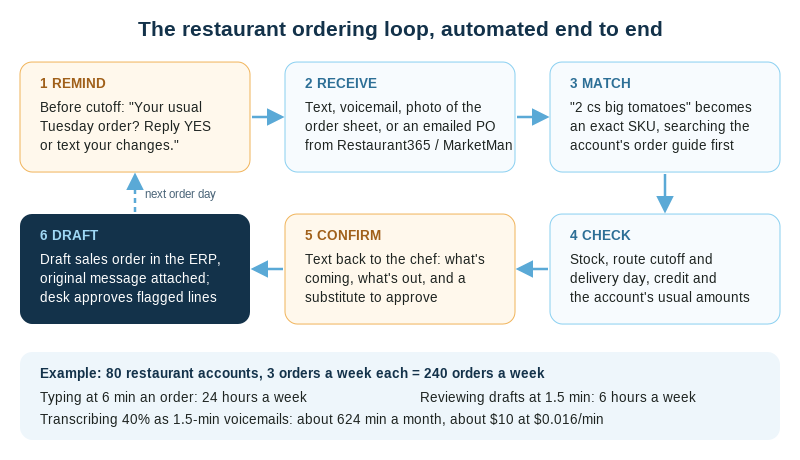
- Remind. Before each route’s cutoff, the restaurant gets a text with its usual order, ready to confirm or change.
- Receive. Texts, voicemails, photos and emailed POs all feed one cloud service. Voicemails go through a speech service such as Google Cloud Speech-to-Text. Photos go to a reader such as Google Cloud Vision, whose documentation says
one specific use of DOCUMENT_TEXT_DETECTION is to detect handwriting in an image.
- Match. Each line is matched to an exact SKU, unit and pack size, searching that restaurant’s order guide and history before the full catalog.
- Check. Rules compare the order with stock on hand, the route’s cutoff and delivery day, the account’s credit and its usual quantities.
- Confirm. The chef gets a short text back: what is coming, what is out, and a suggested substitute to approve.
- Draft. A draft sales order goes into the ERP with the original message attached and doubtful lines flagged for the desk.
The diagram in text: step 1 remind, step 2 receive (text, voicemail, photo or an emailed PO from Restaurant365 or MarketMan), step 3 match to SKUs using the order guide first, step 4 check stock, cutoff, credit and usual amounts, step 5 confirm to the chef with substitutes, step 6 draft in the ERP for approval.
Below the loop, the example strip reads: 80 restaurant accounts ordering 3 times a week make 240 orders, 24 hours of typing at 6 minutes each or 6 hours of review at 1.5 minutes each. Transcribing 40% of them as 1.5-minute voicemails is about 624 minutes, about $10 a month.
For a deeper look at the night shift, see our guide to food distributor order entry automation; for the recordings alone, voicemail to sales order software.
How can an independent supplier match the Sysco and US Foods ordering apps?
An independent supplier can match the broadliners’ most-loved ordering features over plain text messages, without asking a single chef to download anything new.
Chefs who also buy from Sysco or US Foods are used to helpful nudges in those apps.
The Sysco Shop app says you can access up to 14 months of previous order history and modify existing orders up to the delivery cut-off time
.
US Foods’ MOXē help center describes a Did You Forget feature reminding you of your regularly purchased items that aren’t on your order
.
| Feature chefs know from an app | Where it is published | The same thing done by an order agent over text |
|---|---|---|
| Edit the order until cutoff | Sysco Shop | Add 1 cs lemonsbefore cutoff updates the same draft, not a second order |
| Order history | Sysco Shop, up to 14 months | Same as last Tuesdayis read against that account’s history |
| Forgotten-item reminder | US Foods MOXē, Did You Forget | No fryer oil this week? Reply ADD to include your usual 2 jugs. |
| Cutoff and reminder alerts | Cut+Dry Distributor Portal | A reminder text before each route’s cutoff |
| Order minimums | Cut+Dry Distributor Portal | You’re $40 under the minimum. Add anything?sent before the draft is final |
The Cut+Dry Distributor Portal listing promises to eliminate problematic orders with automatic minimums, cut off times and order reminder alerts
. An app is one way to deliver those. A text thread the chef already uses is another.
How do you automate standing orders and cutoff reminders for restaurants?
Automate standing orders with one scheduled text before each route’s cutoff that shows the restaurant its usual order and asks for a yes or the changes.
A sample message at 2 p.m. on a Monday, for a Tuesday route: Hi, it’s your usual Tuesday order: 2 cs Tomato 5x6, 1 cs Romaine 24 ct, 2 jugs fryer oil 35 lb. Reply YES to send, or text what to change. Cutoff 4 p.m.
- YES: the draft goes into the ERP as is, already matched, and the desk barely touches it.
- A change:
add 1 cs lemons, no oil
edits the same draft, and the chef gets the new list back. - Silence: the account’s own rule decides, either send the standing order or hold it, and the rep sees who never answered.
This is the step most capture tools skip. Reading orders is half the loop; asking for them at the right moment is the other half, and it is what turns late-night scrambles into calm afternoons.
What happens when a restaurant orders an item that is out of stock?
When an ordered item is out of stock, the order agent texts the chef before cutoff with the shortage and one suggested substitute, and nothing changes on the order until the chef approves.
What we like most here is that the restaurants feel looked after, not managed. They get a friendly reminder, a quick confirmation and a heads-up on shortages, all in the thread they already use.
The check runs at step 4 of the loop, against stock on hand for that delivery day, so the shortage reaches the chef while there is still time to choose. Finding out at the back door, with the truck already unloaded, is the version everyone wants to retire.
A sample message: Heads up: 115 ct lemons are short for Tuesday. We can send 140 ct at the same case price, or skip. Reply SUB or SKIP.
The chef’s answer is saved for next time. If a chef says always OK to sub limes, never sub the burrata,
the agent remembers that rule for that account.
How much time and money does restaurant order entry cost a supplier?
Typing restaurant orders costs about 24 hours a week for a supplier with 80 restaurant accounts ordering three times a week, if each order takes 6 minutes to key.
| Restaurant accounts | Orders a week | Typing hours a week | Review hours a week | Typing hours a year | Voicemail transcription a month |
|---|---|---|---|---|---|
| 40 | 120 | 12 | 3 | 624 | 312 min, about $5 |
| 80 | 240 | 24 | 6 | 1,248 | 624 min, about $10 |
| 150 | 450 | 45 | 11.3 | 2,340 | 1,170 min, about $19 |
Assumptions, all ours: 3 orders a week per restaurant; 6 minutes to key one order by hand; 1.5 minutes to review a finished draft; 52 weeks a year.
For transcription, we assumed 40% of orders arrive as voicemails averaging 1.5 minutes. We priced them at Google Cloud Speech-to-Text’s listed standard rate of $0.016 a minute, checked November 28, 2026.
The lesson in that last column surprises most people: hearing the voicemails is the cheapest part of the whole system. The real costs are matching your items well and connecting to your ERP, and those are one-time setup work.
Time five of your own restaurant orders with a stopwatch, including the replayed voicemails, and swap in your real minutes.
What should a person still check on restaurant orders?
A person should still check every flagged line, plus a few restaurant-specific lines no automation should approve alone.
- Substitutions that touch allergens: a different oil, flour, nut or seafood product changes what the kitchen can tell its guests, so the chef approves it, always.
- Market-price items: fish, shellfish and specialty produce whose price moves daily.
- Unit mix-ups: “4 lemons” from an account that buys lemons by the case.
- Quantities far off the usual: 20 cases from a bistro that takes 2.
- Accounts on credit hold: any order from a restaurant past its terms.
- Orders after cutoff: they need a person to decide whether a truck can still take them.
Should a food supplier use an ordering app, an order agent, or both?
Most food suppliers end up with both: an ordering app for chefs who like to tap, and an order agent for everyone who keeps texting, calling and emailing POs.
- Cut+Dry: an ordering and payments platform for distributors. Its restaurant page says
Cut+Dry is free for restaurants forever
and that chefscan only order from your existing contracted distributors
. - Choco OrderAgent: captures orders
from voicemail, WhatsApp, email, text, photos and more
, according to Choco. - A custom order agent: built on cloud speech, vision and language services around your ERP, your item file and each restaurant’s aliases, so the reminders, substitution rules and data stay yours.
Whatever you pick, the drafts need a home. Microsoft’s Business Central sales order API is one example of an ERP that accepts orders from an outside program. Ask your ERP partner how an outside program creates a draft order with a note and an attachment.
For sorting customers between an app, EDI and order capture, our plan to stop manual order entry for distributors walks through each door.
How do you start restaurant supplier ordering automation without disrupting the desk?
Start with ten steady restaurant accounts for three weeks, so the order desk keeps working normally while the automation earns trust.
- Week 1, shadow: every order from the ten accounts is drafted in the background while clerks type as usual, then the two are compared line by line.
- Week 2, confirm: drafts go into the ERP for one-click approval, and chefs start getting confirmation texts.
- Week 3, remind: standing-order reminders and substitution texts switch on for the accounts that agreed to them.
Then compare review minutes with typing minutes and count the errors caught before the trucks loaded. If the numbers are clearly better, add the next twenty accounts.
And if your restaurants mostly text, our guide to automating phone and text orders in wholesale covers that channel in detail.
How we researched this
- Read Restaurant365’s purchase order and EDI documentation, MarketMan’s purchasing page and Cut+Dry’s restaurant page on November 27-28, 2026, to see how restaurant-side tools send orders to suppliers.
- Read the Sysco Shop App Store listing, the US Foods MOXē help center and the Cut+Dry Distributor Portal listing on November 28, 2026, for the ordering features chefs already know.
- Checked Google Cloud Speech-to-Text’s price list and Google Cloud Vision’s handwriting page on November 28, 2026, plus Microsoft’s Business Central sales order API.
- Read Food Decision Software’s November 17, 2026 post on order channels. Reddit and trade-forum searches turned up no first-hand threads on this exact topic, so we quote none.
- The hours and transcription tables are our own arithmetic with the assumptions shown. We did not test any product or install this automation for anyone.
Pick ten steady restaurant accounts, let three weeks of their orders draft themselves, and let the numbers decide the rest.
Sources and further reading
- Restaurant365: Submit Orders via EDI (non-EDI vendors receive purchase orders by email)
- Restaurant365: Review and Submit a Purchase Order
- MarketMan: Restaurant Purchasing & Order Management
- Sysco Shop on the App Store
- US Foods: Ordering on MOXē (help center)
- Cut+Dry: for restaurants
- Cut+Dry Distributor Portal on Google Play
- Food Decision Software: 4 Ways Food Distributors Can Cut Order Processing Time (November 17, 2026)
- Google Cloud: Speech-to-Text pricing (checked November 28, 2026)
- Google Cloud Vision: Detect handwriting in images
- Microsoft Learn: Create salesOrders in Business Central
- Choco: OrderAgent (vendor claims)
Questions and answers
Can I use AI to automate ordering from my restaurant customers?
Yes. AI can transcribe restaurant voicemails, read texts, photos of order sheets and emailed purchase orders, match each line to your exact SKU using the restaurant’s order guide, and create a draft sales order in your ERP. It can also text reminders before cutoff and offer substitutes. A person still approves flagged lines, allergen-related substitutions and market-price items.
Why do I still retype orders from restaurants that use Restaurant365 or MarketMan?
Restaurant365 emails the purchase order to a non-EDI supplier, and its documentation says the person who receives it then has to submit it into the supplier’s system. MarketMan also sends orders straight to the supplier. Unless you are set up for EDI, those emails can be read by an order agent instead of being retyped.
Do my restaurant customers need to download an app?
No. An ordering app works for chefs who like to tap, but an order agent reads orders where they already arrive: texts, voicemails, photos and emails. Reminders, confirmations and substitution offers can all go out as plain text messages.
How much does it cost to transcribe restaurant order voicemails?
Very little. Google Cloud Speech-to-Text listed standard recognition at $0.016 a minute on November 28, 2026. In our example, 96 voicemails a week at 1.5 minutes each is about 624 minutes a month, or roughly $10. Item matching and the ERP connection are the larger, one-time costs.
How do standing orders work with ordering automation?
Before each route’s cutoff, the restaurant gets a text with its usual order and replies YES or sends changes. A YES becomes a ready draft in the ERP; a change edits the same draft. Silence follows the account’s own rule, and the rep sees who never answered.