Freight Broker Back Office Automation: What to Automate First
Every broker back office has one inbox that does the work of five departments.
Every vendor page on broker back office automation says the same thing: the paperwork is where the margin leaks.
I spent an afternoon reading what four of them actually document, then checked each claim against the maker’s own page, because the numbers are thin.
Three things stood out.
SPI Logistics lists five back office jobs, but its page states no hours saved and no percentages (SPI Logistics, read Nov 28, 2026).
Tai Software built a no-code rules tool into its TMS in January 2024 for status updates, carrier assignments and customer notifications (Tai release, June 17, 2025).
And Fifth Wheel Freight says rate negotiation is not worth automating, because A bot doesn’t know which carrier saved the day for you last week.
Short answer: Freight broker back office automation means a cloud server watches your dispatch inbox, reads rate cons and scanned PODs with AI Vision, pushes the data into your TMS through its API, and sends automatic check calls and POD requests to drivers. Start with data entry and paperwork chasing. Keep rates and carrier choice with a person.
What does freight broker back office automation cover?
Freight broker back office automation covers the repetitive paperwork between booking a load and getting paid, and SPI Logistics names five jobs.
- Invoicing and billing
- Invoices go out
immediately upon load completion
, per SPI. - Compliance and documents
- Digital copies of shipping paperwork, carrier insurance and tax forms stored for audits.
- Receivables and payables
- Tracking invoices, sending reminders and forecasting cash flow.
- Carrier settlements
- Paying carriers automatically, with what SPI calls
payment transparency and speed
. - Load tracking and data integration
- Linking load boards, TMS and accounting so nobody types a field twice.
Our five-step version for a small brokerage adds the front of the chain: read the rate con, ask the driver for the POD, then bill. Those three steps are the ones dispatchers feel first, and they match the bottleneck most small desks describe: hours of parsing rate cons from email, updating load boards and chasing PODs.
What should a freight brokerage automate first, and what should it leave alone?
A freight brokerage should automate paperwork and data extraction first, and leave rate negotiation, recruiting and sales outreach to people.
Fifth Wheel Freight, which adapted its guidance from its Inside Freight episodes with its VP of Technology (Fifth Wheel Freight, 2026), says paperwork, data pulling and accounting workflows are necessary tasks, but not ones where people provide unique value.
| Job | Automate? | Why |
|---|---|---|
| Rate con and BOL data entry | Yes | Repetitive, rule-based, the same fields every time |
| POD and paperwork chasing | Yes | The reminder is routine; a person only handles misses |
| Check calls | Yes, with escalation | Status is data; a problem goes to a person |
| Invoicing and reminders | Yes, with approval | Triggered by a delivered load with a POD |
| Rate negotiation | No | Depends on relationships and history a bot lacks |
| Sales outreach and recruiting | No | Over-automating makes the industry noisier, less effective, and less trust-worthy |
In short, automate the work that happens after a person has made the decision, and keep people on the decision itself.
How much time does back office paperwork cost per load?
Back office paperwork costs about 36 minutes a load by our assumptions, which is 252 hours a month at 20 loads a day, and a reviewer at 5 minutes a load would need about 35.
| Task per load | By hand | Exception review only |
|---|---|---|
| Retype the rate con into the TMS | 8 min | 1 min |
| Three check calls | 12 min | 1 min |
| Chase and file the POD | 10 min | 1 min |
| Build and send the invoice | 6 min | 2 min |
| Total per load | 36 min | 5 min |
| At 20 loads a day, 21 working days | 252 hours a month | 35 hours a month |
Assumptions: these minutes are our estimates, not measurements, and your desk will differ. The review column assumes the server reads cleanly and a person only looks at flagged loads.
The useful part is the ratio, not the totals. Replace the minutes with your own stopwatch numbers for one week before you decide anything.
How does a cloud server run the back office from email to invoice?
A cloud server monitors the dispatch inbox, reads attachments with AI Vision, pushes structured JSON into the TMS API, and triggers SMS or voice check calls to drivers.
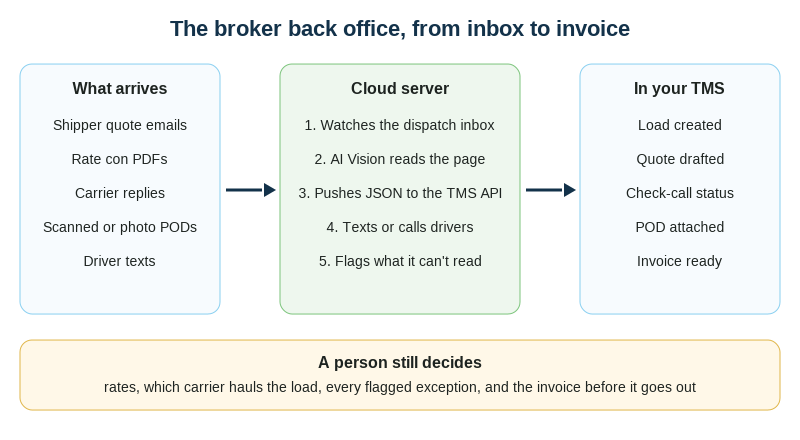
The diagram shows what arrives (quote emails, rate con PDFs, carrier replies, scanned PODs, driver texts), the five server steps, what lands in the TMS (load, quote, check-call status, POD, invoice-ready flag) and the human approvals underneath.
- Watch. The server reads the dispatch mailbox and sorts each email: quote request, rate con, carrier reply or POD.
- Read. AI Vision turns the PDF or photo into fields. Anthropic’s PDF support documentation describes sending a PDF to Claude for extraction.
- Write. The server pushes JSON to your TMS API and attaches the original file to the load. Our guides on TMS email integration and rate confirmation data entry show this step.
- Ask. A text or voice call asks the driver for status or the signed POD, covered in automated driver check calls and proof of delivery collection.
- Flag. Anything unreadable or mismatched goes to a person instead of the TMS.
Quick quotes follow the same path. The server drafts a quote from your lane rates and a person approves it before it goes out.
What software can a small brokerage start with?
A small brokerage can start with the automation inside its TMS, such as Tai’s workflow rules, and add a document reader or carrier onboarding tool next.
Here’s the quiet win: when the rate con, the POD and the invoice trigger all move on their own, the people on your desk spend the day on carriers and customers instead of retyping.
| Tool | Job | What the maker says |
|---|---|---|
| Tai TMS workflow automation | Rules inside the TMS | No-code rules on shipment events; brokers can automate critical workflows without additional software, licenses, or IT support |
| Highway | Carrier identity and onboarding | Carriers onboard in less than 30 seconds; products include Carrier Identity Engine and Load Lock |
| Cloud server on your TMS API | Rate con, POD and check-call automation | Custom build; you set the rules |
Highway’s page is written for carriers and does not describe broker pricing, so ask Highway directly. Which tool fits depends on your TMS; see our map of trucking dispatch automation tools.
Where do the sources disagree about savings and what to hand off?
The sources disagree on how much time back office automation saves, because none of the pages we read publishes a measured figure.
| Question | One source says | Another says | What we’d do |
|---|---|---|---|
| How much time is saved? | SPI: no hours or percentages stated | Other blogs promise results in a month; those are vendor and blog claims | Time one week of your own work first |
| What to hand off? | SPI includes carrier settlements and payments | Fifth Wheel Freight points first to paperwork and accounting workflows, and warns against automating relationship work | Start with data entry and POD chasing, add payments later |
The gap none of them fill: what a bad read costs. A wrong weight or rate in an invoice is a billing dispute, so build the review step before you build the speed.
What should be checked before the server writes to your TMS?
Before the server writes to your TMS, seven checks should pass, and a failed check holds the load for a person.
- The load number on the document matches an open load.
- Rate, pickup, delivery and weight pass range checks.
- The sender is a known broker, shipper or carrier address.
- The POD is signed and every page is there.
- The file is saved on the load before any field is changed.
- A duplicate email never creates a second load.
- A person approves the invoice before it goes out.
How do you start automating the back office this week?
Start with one customer and one document type, such as that customer’s rate cons, and run the server in shadow mode for a week.
- Day 1: time your current paperwork per load on 10 loads.
- Day 2: pick one customer and one document type; confirm your TMS offers an API.
- Day 3: let the server read that customer’s emails and show its answers beside yours.
- Day 4: fix the fields it gets wrong, then write only to a test load.
- Day 5: switch on writes for that customer, with the flag step on.
If a read goes wrong on Friday, fix that before adding the next document type. Then move on to PODs and check calls.
How we researched this
- Read on November 28, 2026: Fifth Wheel Freight’s 2026 guidance on what brokerages should automate, SPI Logistics’ back office automation page, Tai Software’s workflow automation release (June 17, 2025), Highway’s carrier page and Anthropic’s PDF support documentation.
- Searched for Reddit and forum threads on broker back office work; our tools returned none, so we quote no community posts.
- Compared: which jobs each source says to automate, what each documents, and whether a measured time saving is published (none was).
- The minutes-per-load table is our own arithmetic with assumptions stated, not a measurement.
- What we did not do: we did not run any of these tools, and we could not read broker pricing, which Highway does not publish on its carrier page.
Time one week of paperwork, pick the single document type that eats the most of it, and let the server read that one first.
Sources and further reading
Questions and answers
Can I use AI to automate freight broker back office work?
Yes, for the repetitive parts. AI Vision can read rate cons and scanned PODs, and a cloud server can push the data into your TMS and text drivers for check calls. Keep a person on rates, carrier choice and invoice approval.
What is freight broker back office automation?
It is software that takes over repeated paperwork between booking a load and getting paid. SPI Logistics lists invoicing, compliance documents, receivables and payables, carrier settlements and load tracking data integration.
What should a freight broker automate first?
Data entry and paperwork chasing: rate cons, PODs, check calls and invoice triggers. Fifth Wheel Freight advises against automating rate negotiation, recruiting and sales outreach first.
How much time does back office automation save a brokerage?
No source we read publishes a measured figure. By our own assumptions of 36 minutes of paperwork per load by hand versus 5 minutes of exception review, a desk at 20 loads a day would go from 252 to 35 hours a month. Time your own week first.
Do I need a new TMS to automate my back office?
Not always. Some TMS platforms, like Tai, include rules built in, and a cloud server can work through a TMS API. Check that your TMS offers an API before you pay for anything.