
AI as Free Tech Support: How Older Adults Are Using Chatbots to Fix Phone Problems
Disclosure: this page contains Amazon affiliate links. As an Amazon Associate we earn from qualifying purchases, at no extra cost to you.
Hey there, gadget whisperer — grab the phone that’s been acting up and maybe a biscuit, because it turns out AI chatbots make wonderfully patient tech support, and I’ve worked out exactly how to ask them so the answer matches your screen! The phone is doing something odd again, and in 2026 a growing number of older adults don’t wait for the grandkids’ next visit — they ask an AI chatbot. If you’ll be pointing a phone camera at a TV remote, a router or a laptop screen while the AI talks you through it, an adjustable phone stand on Amazon keeps both hands free for the buttons.
Short answer: Yes — ChatGPT, Gemini, Copilot and Claude can walk you through most everyday phone and computer problems if you name your device, say what you want and show a screenshot. Gemini Live (free) and Copilot Vision can even watch your screen live. No AI can vouch for a pop-up, a caller or a phone number.
The six facts that sum up AI tech support for older adults in November 2026:
- Technology guidance is one of the practical jobs older adults want from AI, and AARP Research says
retirees like using AI for guidance with technology and to learn about health options
(January 13, 2026). - 23% of Americans 65 and older use AI chatbots, against 49% of all U.S. adults (Pew Research Center, June 17, 2026).
- 42% of adults 50+ call themselves AI beginners (AARP Research, January 2026).
- Free and live: Google made Gemini Live with camera and screen sharing free for everyone on Android and iOS on May 20, 2025; Microsoft’s Copilot Vision on Windows, which can see your screen and show you where to click, arrived in the U.S. on June 12, 2025.
- 21,333 people 60+ reported tech support scams to the FBI in 2025 — more than every younger age group combined (19,008, our sum) — and lost about $1.04 billion (FBI IC3).
- Never: the FTC says
Real security pop-up warnings and messages will never ask you to call a phone number.
Why are older adults using AI chatbots for tech help?
Older adults use AI chatbots for tech help because an AI assistant is patient, available at any hour and happy to explain the same step three times. AARP Research lists technology guidance among the practical jobs adults 50+ want AI to do, and found that retirees in particular like using AI for guidance with technology.
AARP Research’s January 13, 2026 report Older Adults Want AI to Show Up in Practical Ways
(Brittne Kakulla; an online survey of 1,661 adults, including 1,148 people 50+, January 8-20, 2025) describes AI’s practical jobs as offering technology guidance, organizing health tasks and providing tailored financial tools
. The same report found that most older adults consider themselves beginners (42%) or intermediates (28%) with AI — which is exactly why a step-by-step helper appeals.
There’s a lot of room to grow. Pew Research Center’s How opinions and use of AI differ by age
(June 17, 2026; part of Americans and AI 2026
) found that 23% of adults 65 and older use AI chatbots such as ChatGPT, Gemini or Copilot, compared with 49% of all U.S. adults. Part 1 of this series has the full age breakdown.
Which AI assistants can see your screen or camera in 2026?
In 2026 every major AI assistant can look at a screenshot, and three can watch live: Gemini Live shares your phone’s camera or screen for free on Android and iPhone, Copilot Vision watches a Windows app and points to where to click, and ChatGPT’s voice mode takes live video and screen sharing. Claude reads screenshots you upload or paste.
Here’s how each assistant can see a problem, from the makers’ own announcements and help pages (ChatGPT from a named report):
| Assistant | Screenshot or photo | Live camera or screen | What the maker (or report) says |
|---|---|---|---|
| Gemini (Google) | Yes | Yes — Gemini Live camera and screen sharing, Android and iOS | Google made it available to everyone on Android and iOS for free(May 20, 2025) |
| Copilot (Microsoft) | Yes | Yes — Copilot Vision on Windows 10 and 11, U.S. | it can see what you see on your device and talk to you about it in real time; ask show me howand it highlights where to click (June 12, 2025) |
| ChatGPT (OpenAI) | Yes | Yes — video and Share Screen inside voice mode on the mobile apps | Rolled out first to Plus, Pro and Team users (9to5Mac, December 12, 2024); current plan details not confirmed by us |
| Siri and Visual Intelligence (Apple) | Yes — take a screenshot, then ask about what’s onscreen | Siri AI (beta) on iOS 27 can learn about what’s on your screen | Needs an Apple Intelligence-enabled iPhone 15 Pro, iPhone 15 Pro Max or iPhone 16 or later; usage limits may apply |
| Claude (Anthropic) | Yes — JPEG, PNG, GIF or WebP, up to 20 files per chat, or paste from the clipboard | No live screen sharing announced that we found | Claude Help Center, Uploading files to Claude |
Google’s announcement came from Josh Woodward, VP of Google Labs and Gemini, in Gemini App: 7 updates from Google I/O 2025
. Microsoft’s came in Copilot Vision on Windows with Highlights now available in US
(Athima Chansanchai): with Highlights, you ask Copilot “show me how” and it shows you, inside the app you’re using, where to click. For ChatGPT, 9to5Mac’s Zac Hall reported on December 12, 2024 that screen sharing starts from the three-dot menu in the voice screen, with “Share Screen.” Anthropic’s Uploading files to Claude
covers Claude’s image limits.
What’s new on the iPhone in iOS 27?
On iOS 27, Apple’s Visual Intelligence turns any screenshot into a question: take the screenshot and tools appear at the bottom of the screen, including one to ask a question about what’s onscreen. Apple’s iPhone User Guide for iOS 27 also says that with Siri AI (beta) you can use Siri AI to learn about what’s on your iPhone screen
.
Apple’s notes on the page: Siri AI is in beta on iOS 27 or later on an Apple Intelligence-enabled iPhone 15 Pro, iPhone 15 Pro Max or iPhone 16 model or later, starts in English, French, Japanese, Korean, Portuguese and Spanish, isn’t initially available in the EU on iOS, and usage limits may apply. On an older iPhone, a regular screenshot sent to any chatbot app does the same job.
How do you take a screenshot on each device?
A screenshot is the single most useful thing you can give an AI chatbot about a tech problem, and every phone and computer has a built-in shortcut for it. On most phones it’s two buttons pressed together; on computers it’s a three-key shortcut.
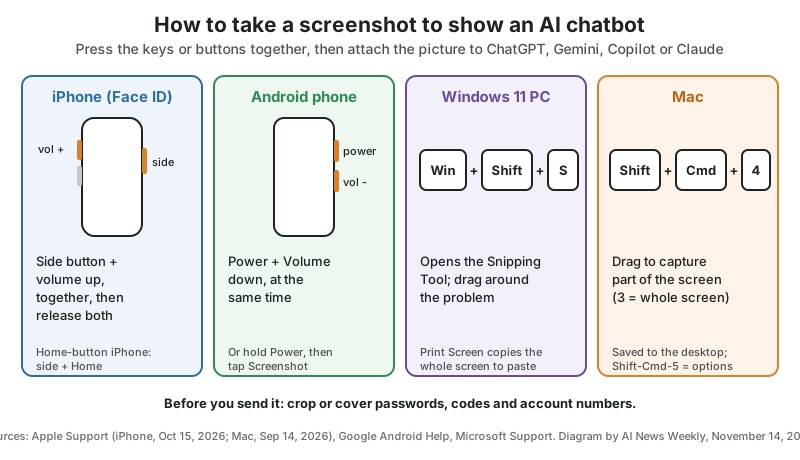
| Device | Shortcut | Where the screenshot goes |
|---|---|---|
| iPhone with Face ID | Press the side button and the volume up button at the same time, then quickly release both | A thumbnail to edit, share or save (Photos) |
| iPhone with Touch ID (Home button) | Press the side button and the Home button at the same time, then quickly release both | A thumbnail to edit, share or save (Photos) |
| Android phone | Press the Power and Volume down buttons at the same time; if that doesn’t work, hold Power for a few seconds and tap Screenshot | The phone’s photo gallery |
| Windows 11 PC | Windows logo key + Shift + S opens the Snipping Tool; Print Screen (PrtSc) copies the whole screen | The clipboard, ready to paste into a chat |
| Mac | Shift-Command-3 (whole screen), Shift-Command-4 (part of the screen), Shift-Command-5 (Screenshot app) | The desktop, unless you change it |
Sources: Apple’s iPhone screenshot page and Mac screenshot page, Google’s Android Help and Microsoft’s Snipping Tool page.
How do you ask an AI chatbot for tech help so it actually helps?
Ask an AI chatbot for tech help in four parts: the device and its system version, what you want to happen, what you see (a screenshot and the exact words of any message), and a request for one step at a time. Those four details turn a guess into a set of instructions that match your screen.
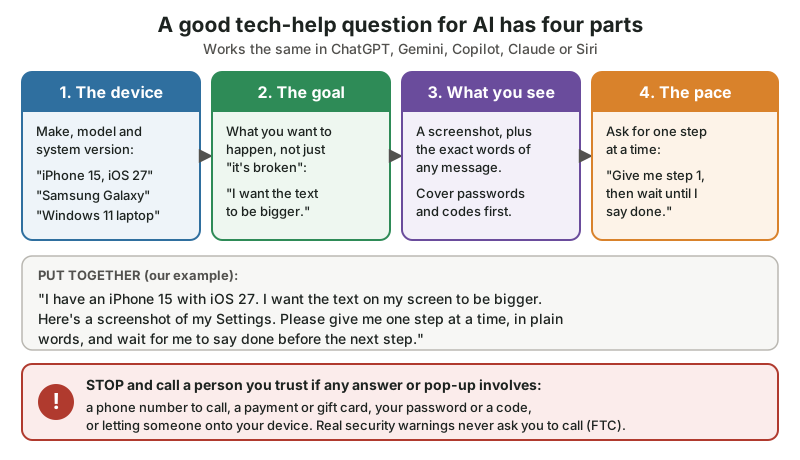
The diagram as text — 1. The device: make, model and system version (iPhone 15, iOS 27
, “Samsung Galaxy”, “Windows 11 laptop”). 2. The goal: what you want to happen, not just “it’s broken”. 3. What you see: a screenshot plus the exact words of any message; cover passwords and codes first. 4. The pace: Give me step 1, then wait until I say done.
Stop and call a person you trust if any answer or pop-up involves a phone number to call, a payment or gift card, your password or a code, or letting someone onto your device.
What’s the difference between a vague question and a good one?
A vague question makes the AI chatbot guess your device and your goal; a good question names both and shows the screen. Six everyday problems, asked two ways (our own examples):
| Problem | Vague question | Better question |
|---|---|---|
| Wi-Fi won’t connect | My phone is broken. | My Samsung Galaxy phone won’t connect to my home Wi-Fi. It says ‘Saved’ but nothing loads. What should I check first? |
| Text too small | I can’t see anything. | On my iPhone 15 with iOS 27, how do I make all the text bigger? One step at a time, please. |
| Email error | ”Fix my email.” | On my Windows 11 laptop, Outlook shows this message: [exact words]. What does it mean, and what’s the safest fix? |
| Scary pop-up | Do I have a virus? | Here’s a screenshot of a pop-up with a phone number on it. Is this a real warning or a scam? I haven’t clicked anything. |
| Sharing photos | How do I send pictures? | How do I send 5 photos from my Android phone to my daughter’s iPhone by text message? |
TV says No signal | The TV doesn’t work. | (In Gemini Live or ChatGPT voice, camera on) I’m pointing my camera at my TV remote. The screen says ‘No signal.’ Which button changes the input? |
What’s a good prompt to copy for any tech problem?
A good all-purpose tech-help prompt gives the AI chatbot the four parts and asks it to slow down and to warn you about anything risky. Our own example, for ChatGPT, Gemini, Copilot, Claude or Siri:
I'm not very technical, so please use plain words.
My device: [make, model, and system version if I know it]
What I want: [the goal, e.g. "join my home Wi-Fi"]
What happens instead: [exact words of any message]
I've attached a screenshot. I covered any passwords.
Please give me ONE step at a time and wait for me to
say "done" before the next step. If a step involves a
phone number, a payment, my password or letting anyone
onto my device, stop and tell me to check with a person
I trust first.
Which phone and computer problems can AI chatbots help fix?
AI chatbots are good at settings problems — the ones you can fix yourself by finding the right switch: bigger text, Wi-Fi, Bluetooth, storage, updates, sharing photos and setting up video calls. They’re also good at explaining what an on-screen message means before you tap anything.
Can I tell you my favorite trick in this whole story? Four words: one step at a time.
Add them to any tech question and the AI stops firing ten instructions at you and waits for you to say done. It’s like hiring the world’s calmest grandchild.
Eight jobs where an AI assistant with a screenshot or live camera tends to earn its keep:
- Making things easier to see and hear — bigger text, bolder letters, louder ringtones, captions on videos. A stylus pen for touch screens helps with small buttons, too.
- Wi-Fi and Bluetooth — joining a network, pairing earbuds, a speaker or a car.
- “Storage full” messages — finding what takes the space and what’s safe to remove.
- Updates — what an update notice means and how to start it.
- Photos and messages — sending, saving, sharing an album with family.
- Video calls — setting up FaceTime, WhatsApp, Zoom or Google Meet, and finding the camera and mute buttons.
- The TV, remote and router — pointing a live camera at the box with Gemini Live or ChatGPT’s voice mode and asking which light or button matters.
- Decoding messages — what an error, a permission request or a settings screen actually says, in plain words.
What can’t an AI chatbot fix for you?
An AI chatbot can’t fix anything that needs your account, your carrier or your hands on the device: a locked account, a forgotten password, a broken screen, a billing problem or a phone that won’t turn on. For those, go to the maker or the company directly, using a number or website you find yourself.
- Locked accounts and passwords
- Use the official recovery page of Apple, Google or Microsoft, reached by typing the company’s address yourself. Never paste a password or a sign-in code into a chatbot.
- Broken hardware
- Cracked screens, swollen batteries, water damage — that’s a repair shop or the maker’s own support (support.apple.com, support.google.com, support.microsoft.com).
- Bills, plans and phone service
- Your carrier or internet provider, at the number on your bill.
- Anything where the AI seems unsure
- If the steps don’t match your screen, say so. Menus differ between phone models and system versions, and a chatbot can describe a button that isn’t there.
How do you tell real tech help from a tech support scam?
Real tech help is help you asked for, from a company you contacted yourself; a tech support scam contacts you first — a pop-up, a call or an email saying something is wrong — and pushes you to call a number or let someone onto your device. Microsoft and the FTC both say real warnings never ask you to call a phone number.
The FBI’s numbers show why this matters most for older adults. In the 2025 IC3 Annual Report, tech/customer support fraud was the second-biggest crime type reported by people 60 and older, by both complaints (21,333, after phishing) and losses ($1,040,730,043, after investment fraud). People 60+ filed more tech support complaints than all the under-60 age groups put together.
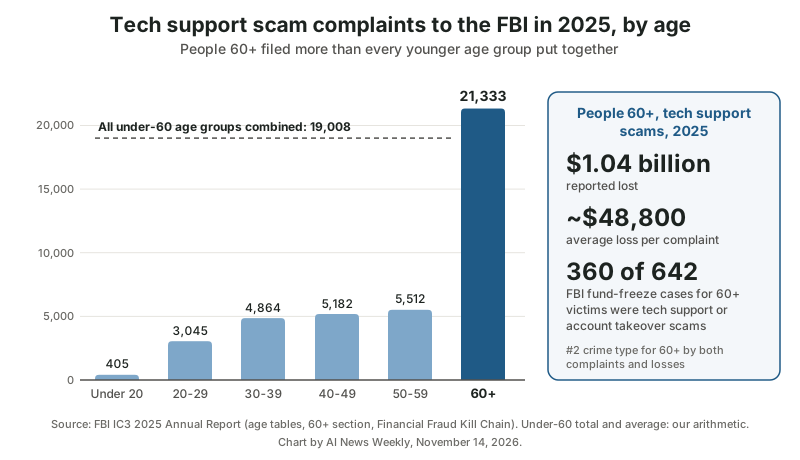
| Age group | Tech/customer support complaints, 2025 | Note |
|---|---|---|
| Under 20 | 405 | |
| 20-29 | 3,045 | |
| 30-39 | 4,864 | |
| 40-49 | 5,182 | |
| 50-59 | 5,512 | |
| All under 60 (our sum) | 19,008 | |
| 60 and older | 21,333 | About 53% of complaints with an age given; 3.9 times the 50-59 group; up from 16,777 in 2024 (+27%); losses $1,040,730,043, about $48,800 per complaint |
| All ages | 47,794 | Losses $2,134,675,818, about $44,700 per complaint; up from 36,002 complaints in 2024 |
The FBI’s Recovery Asset Team saw the same pattern when it tried to freeze stolen money: of 642 Financial Fraud Kill Chain incidents involving victims 60+ in 2025, 360 were tech support or account takeover scams. The report’s advice: If you discover a fraudulent transfer, time is of the essence.
Call your bank right away and file at ic3.gov. AI is creeping in here too — the report counts 574 tech/customer support complaints with an AI reference, with $19,457,078 in losses.
Microsoft’s support page Protect yourself from tech support scams
puts the main rule plainly:
Remember that real error messages from Microsoft, or other big tech companies, never include phone numbers for you to call them.
Microsoft adds that Microsoft and other legitimate tech companies will never cold call you to tell you that there’s a problem with your device
, and that scammers want you to let them access your computer remotely
. The FTC’s How To Spot, Avoid, and Report Tech Support Scams
(September 2025) agrees: Legitimate tech companies won’t contact you by phone, email, or text message
about a problem with your computer.
Can AI tell you whether a pop-up warning is real?
An AI chatbot can give you a useful second opinion on a pop-up: take a screenshot without clicking anything, upload it and ask Is this a real warning or a scam?
A pop-up with a phone number, a countdown or a demand to pay is a scam sign the AI should recognize — and the FTC’s rule settles it either way.
Treat the AI’s answer as a second opinion, not a verdict. A well-made fake can fool software, and a chatbot can’t check who is really behind a message. The steps that protect you don’t depend on the answer: don’t call the number, don’t install anything a stranger asks for, and if you’re worried, contact the company through its official website, typed in yourself, or the number on your bill.
Where can older adults get free tech help from a real person?
Free human tech help is easy to find: Senior Planet from AARP runs a free technology hotline at 888-713-3495, the device makers have their own support sites, and many public libraries and senior centers teach free classes. A person is the right call whenever an AI’s steps don’t match your screen.
- Senior Planet technology hotline
- 888-713-3495, Monday to Saturday, with specialists in English, Spanish or Mandarin; it can also book a free one-on-one Zoom session with a Senior Planet volunteer (AARP, Miriam Cross, March 19, 2026; seniorplanet.org)
- The maker’s own support
- support.apple.com, support.google.com and support.microsoft.com — type the address yourself rather than following a link from a message
- Local classes
- Public libraries and senior centers near you; Senior Planet lists its classes at seniorplanet.org
- A family helper
- The best tech support of all — and an AI chatbot is a great way to have the question ready before you call them
For a step-by-step version with one assistant, our sister site How To With Claude AI is publishing a matching seniors series with screens and prompts for Claude.
What are the key numbers on AI tech support and older adults?
The key numbers on older adults, AI tech help and tech support scams, gathered from AARP, Pew, Google, Microsoft and the FBI:
| Finding | Number | Source |
|---|---|---|
| Adults 65+ who use AI chatbots | 23% (all adults: 49%) | Pew Research Center |
| Adults 50+ who call themselves AI beginners | 42% (intermediates: 28%) | AARP Research |
| Gemini Live camera and screen sharing free on Android and iOS | Since May 20, 2025 | |
| Copilot Vision on Windows 10 and 11 in the U.S. | Since June 12, 2025 | Microsoft |
| Images per Claude chat | Up to 20 files | Anthropic |
| Tech support scam complaints from people 60+ | 21,333 (2025) | FBI IC3 |
| Tech support scam complaints from all under-60 age groups | 19,008 (2025) | Our sum from FBI IC3 |
| Tech support scam losses, people 60+ | $1,040,730,043 (about $48,800 per complaint) | FBI IC3; average ours |
| Tech support scam losses, all ages | $2,134,675,818 (47,794 complaints) | FBI IC3 |
| Fund-freeze cases for 60+ victims that were tech support or account takeover | 360 of 642 | FBI IC3 |
The surveys measure different groups — Pew counts adults 65+, AARP adults 50+, and the FBI counts complaints, not people — so compare numbers within a row, not across sources.
The short version for families: an AI chatbot makes a wonderfully patient tech helper for the settings and messages on your own screen, especially with a screenshot and a one-step-at-a-time request. Anything that comes at you first — a pop-up, a call, a number to dial — is where the AI steps back and a trusted person steps in.
So here’s your little toolkit for the week, gadget whisperer: practice your screenshot buttons twice, save the four-part question somewhere handy, and promise yourself you’ll never call a number from a pop-up. Next time the phone gets grumpy, you’ll fix it before the kettle boils.
Sources and further reading
- Older Adults Want AI to Show Up in Practical Ways (AARP Research, Brittne Kakulla) — Jan 13, 2026; technology guidance; "retirees like using AI for guidance with technology"; 42% beginners, 28% intermediates; 1,148 adults 50+
- How opinions and use of AI differ by age (Pew Research Center) — Jun 17, 2026; 23% of adults 65+ use AI chatbots vs 49% of all adults
- 2025 IC3 Annual Report (FBI Internet Crime Complaint Center) — tech/customer support complaints by age; 60+ 21,333 complaints and $1,040,730,043; all ages 47,794 and $2,134,675,818; FFKC 360 of 642; AI-related 574 / $19,457,078
- Gemini App: 7 updates from Google I/O 2025 (Google, Josh Woodward) — May 20, 2025; Gemini Live camera and screen sharing free for everyone on Android and iOS
- Copilot Vision on Windows with Highlights now available in US (Windows Experience Blog, Microsoft) — Jun 12, 2025; sees your screen in real time; "show me how" Highlights; Windows 10 and 11
- ChatGPT Advanced Voice Mode adding video and screen sharing input (9to5Mac, Zac Hall) — Dec 12, 2024; Plus, Pro and Team first; Share Screen from the three-dot menu
- Learn about what’s on your iPhone screen with Visual Intelligence (Apple iPhone User Guide, iOS 27) — screenshot then ask about what’s onscreen; Siri AI (beta) on iOS 27; iPhone 15 Pro or iPhone 16 and later
- Take a screenshot on your iPhone (Apple Support) — Oct 15, 2026; side + volume up (Face ID), side + Home (Touch ID)
- Take a screenshot on Mac (Apple Support) — Sep 14, 2026; Shift-Command-3, -4, -5
- Take a screenshot or record your screen on your Android device (Android Help, Google) — Power + Volume down; or hold Power and tap Screenshot
- Use Snipping Tool to capture screenshots (Microsoft Support) — Windows logo key + Shift + S; Print Screen to the clipboard
- Uploading files to Claude (Claude Help Center, Anthropic) — JPEG, PNG, GIF, WebP; up to 20 files per chat; paste images from the clipboard
- Protect yourself from tech support scams (Microsoft Support) — real error messages never include phone numbers; no cold calls; remote access; microsoft.com/reportascam
- How To Spot, Avoid, and Report Tech Support Scams (FTC Consumer Advice) — Sep 2025; pop-ups never ask you to call; change your password; ReportFraud.ftc.gov
- Senior Planet’s Technology Hotline (AARP, Miriam Cross) — Mar 19, 2026; free hotline 888-713-3495, Monday to Saturday, English, Spanish or Mandarin; free Zoom sessions
- The Senior Planet Hotline — Free Tech Help (Senior Planet from AARP) — the program’s own hotline page
- ReportFraud.ftc.gov (Federal Trade Commission) — report a tech support scam
Questions and answers
Can ChatGPT help me fix my phone?
Yes, for settings problems like Wi-Fi, Bluetooth, bigger text, storage or updates. Tell ChatGPT (or Gemini, Copilot or Claude) your phone model and system version, what you want to happen and the exact words of any message, add a screenshot, and ask for one step at a time. It can’t fix a broken screen, a locked account or a billing problem.
How do I show Gemini my phone screen?
Open the Gemini app, start Gemini Live and tap the screen-share or camera button; Google made Gemini Live camera and screen sharing free for everyone on Android and iOS on May 20, 2025. You can also take a screenshot and attach it to a normal Gemini chat.
Is AI tech support free?
Much of it is. Google made Gemini Live with camera and screen sharing free on Android and iOS, and Microsoft’s Copilot Vision launched for Windows 10 and 11 users in the U.S. on June 12, 2025. Uploading a screenshot works in ChatGPT, Gemini, Copilot and Claude. For a free human, Senior Planet from AARP runs a technology hotline at 888-713-3495.
Is it safe to share my screen with AI?
It’s safer if you close banking, email and message apps first and cover any passwords or codes before you share a screen or a screenshot, because the AI sees whatever is showing. Never share your screen with a person who called you out of the blue: Microsoft says scammers want you to let them access your computer remotely.
How do I know if a tech support call is a scam?
If they contacted you first, it’s almost certainly a scam: the FTC says legitimate tech companies won’t contact you by phone, email or text about a computer problem, and real pop-up warnings never ask you to call a number. Hang up, and report it at ReportFraud.ftc.gov. People 60+ reported 21,333 tech support scams to the FBI in 2025.