
Grandparents Are Using AI to Write Their Life Stories: How to Start Yours
Disclosure: this page contains Amazon affiliate links. As an Amazon Associate we earn from qualifying purchases, at no extra cost to you.
Oh, welcome, family storykeeper — grab the shoebox of old photos and maybe a cup of cocoa, because AI chatbots turn out to be wonderfully patient interviewers for the stories only you can tell, and I’ve worked out how to use them without losing a single word of your own voice! Grandparents have always told the stories at the kitchen table, and in 2026 more of them are getting those stories down in writing with an AI chatbot as the patient interviewer and typist. If you’d rather start on paper and bring the AI in later, guided memory journals for grandparents on Amazon give you a question on every page.
Short answer: Start your life story with AI by speaking or typing one memory a week and letting ChatGPT, Gemini, Claude or Copilot ask the follow-up questions — not write the story for you. Keep everything in one ChatGPT or Claude Project or Gemini Gem, check every name and date yourself, and keep private family details out.
The six facts that sum up writing a life story with AI in November 2026:
- 23% of Americans 65 and older use AI chatbots, against 49% of all U.S. adults (Pew Research Center, June 17, 2026).
- Free workspaces: ChatGPT Projects opened to free users on September 3, 2025, Gemini Gems on March 13, 2025, and Claude Projects are available on free accounts (up to five projects) — each one keeps a whole memoir and its notes in one place.
- Speaking works: Google Docs voice typing, Microsoft Word’s Dictate and the iPhone Notes app (record and transcribe, iPhone 12 and later) all turn spoken stories into text.
- Amazon KDP says you’re
not required to disclose AI-assisted content
— but text an AI wrote counts as AI-generated and must be disclosed if you publish. - U.S. Copyright Office (January 29, 2025): using AI to assist doesn’t stop your work being protected, but prompts alone aren’t enough.
- November 26, 2026 is Thanksgiving and the 11th anniversary of StoryCorps’ Great Thanksgiving Listen, which invites families to record an interview with an elder.
Why are grandparents using AI to write their life stories?
Grandparents use AI to write their life stories because the hardest parts of a memoir — knowing what to ask, getting started and typing it all up — are exactly what an AI chatbot is good at. It asks one question at a time, never gets tired of a long answer, and turns spoken memories into tidy paragraphs you can correct.
The idea of a guided life story isn’t new. AARP’s Telling Your Life Story Is Good for Your Health
(Megy Karydes, August 14, 2024) describes question-a-week services, recorded oral histories, memory books — and one daughter, Hope Bertram of Chicago, who planned to use AI to generate interview questions for her mother and stepfather. Her reason is the whole case for starting now: Why not share those stories with them while they’re still alive?
Research backs the instinct. A scoping review by Heekyung Chang, Youngjoo Do and Jinyeong Ahn, Digital Storytelling as an Intervention for Older Adults
(International Journal of Environmental Research and Public Health, January 11, 2023), screened 395 references and kept 19 studies. The most common effects it found were better mental health, more meaningful community connections, greater digital literacy, less negative ageism and enhanced intellectual ability; the authors call for randomized controlled trials to confirm them.
And there’s plenty of room to start. Pew Research Center’s How opinions and use of AI differ by age
(June 17, 2026) found that 23% of adults 65 and older use AI chatbots, and AARP Research’s January 13, 2026 report found that 42% of adults 50+ call themselves AI beginners. A life story is a gentle first project: there’s no wrong answer, and you’re the only expert on the subject.
Which AI tools help you write a life story in 2026?
The best AI tools for a life story are the ones that keep the whole project in one place: ChatGPT Projects, Claude Projects and Gemini Gems all let you save ground rules and earlier chapters so the AI remembers who’s who. For getting words down, the free voice typing in Google Docs and the iPhone Notes app let you speak instead of type.
| Tool | What it does for a life story | Who can use it | Source |
|---|---|---|---|
| ChatGPT Projects (OpenAI) | One folder for every chat and file in the memoir, with its own instructions; project-only memory controls | Free users since September 3, 2025 (up to 5 files per project on Free; 25 on Plus; 40 on Pro and business plans) | OpenAI on X; Engadget |
| Claude Projects (Anthropic) | self-contained workspaces with their own chat histories and knowledge bases; upload earlier chapters; set project instructions | All users, including free accounts (free: up to five projects) | Claude Help Center |
| Gemini Gems (Google) | A custom Gemini with your written instructions and uploaded files, to chat with whenever you want | Rolling out to everyone at no cost since March 13, 2025; 18+; created in the “Gems manager” on desktop | Google, Dave Citron |
| Copilot (Microsoft) | Can play interviewer in a normal chat; paste each finished story into your document | Any Copilot chat (we didn’t check a Copilot project feature for this story) | Our suggestion |
| Google Docs voice typing | Speak into a document; say period, “comma”, “new line” or “new paragraph” | Free; latest Chrome, Edge or Safari; voice commands in English only | Google Docs Editors Help |
| iPhone Notes (Apple) | Record audio in a note and get a searchable transcript you can add to the note or copy | iPhone 12 and later, in English, Spanish, Portuguese, Italian, French, German, Japanese, Korean and Chinese | Apple iPhone User Guide, iOS 27 |
| Microsoft Word Dictate | Home > Dictate, then speak | Microsoft 365 subscribers | Microsoft Support |
Sources: Anthropic’s “What are projects?”; OpenAI’s September 3, 2025 post, reported by Engadget; Google’s New Gemini app features, available to try at no cost
; Google Docs voice typing; Apple’s Record and transcribe audio in Notes on iPhone
; and Microsoft’s Dictate your documents in Word
. Plans and limits change; the maker’s page is the final word.
Can you speak your stories instead of typing them?
Yes — speaking is often the easiest way to write a life story, because most of us tell a memory better than we type it. In Google Docs, click Tools, then Voice typing, and a microphone box appears. On an iPhone, open Notes, tap the attachments button, then Record Audio, and the spoken words are transcribed into the note. In Word, it’s Home, then Dictate.
Then paste the raw transcript into your AI project with one instruction: fix the spelling and punctuation, split it into paragraphs, and change nothing else. The stories stay in your own words — the ums and the jokes included, if you like them. A simple digital voice recorder or a clip-on microphone for a phone helps when a grandparent tells stories from an armchair across the room.
How do you keep your own voice when AI helps write your memoir?
Keep your own voice by letting the AI ask and tidy, never invent: you speak or type every memory, and the AI only asks follow-up questions, fixes spelling and suggests an order. Tell it so in writing at the start of every project, and read every paragraph aloud before you keep it — if it doesn’t sound like you, change it back.
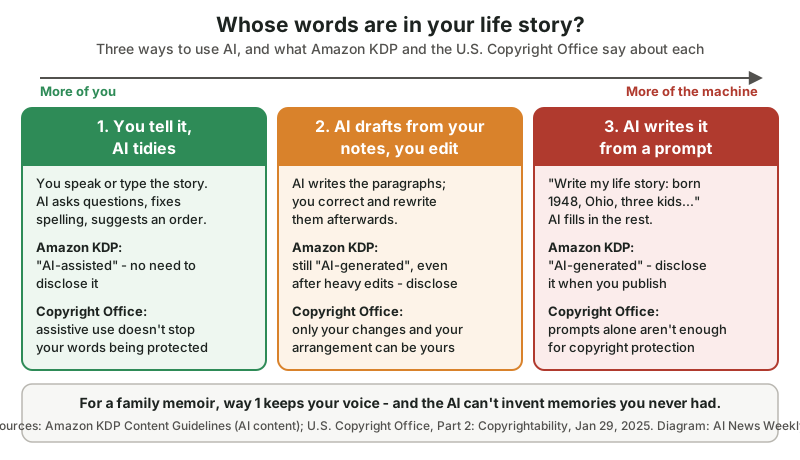
The diagram as text — Way 1, you tell it, AI tidies: you speak or type the story; the AI asks questions, fixes spelling and suggests an order. Amazon KDP: “AI-assisted”, no need to disclose. Copyright Office: assistive use doesn’t stop your words being protected. Way 2, AI drafts from your notes, you edit: KDP still counts it as “AI-generated” even after substantial edits, so disclose it; the Copyright Office protects only your own changes and arrangement. Way 3, AI writes it from a prompt: “AI-generated”, disclose it; prompts alone aren’t enough for copyright protection.
| How you used AI | Amazon KDP calls it | Disclose on KDP? | U.S. Copyright Office view |
|---|---|---|---|
| AI asked questions or brainstormed; you wrote or spoke every word | AI-assisted | No | Assistive use doesn’t bar copyright in your work |
| AI fixed spelling, punctuation or order in your own text | AI-assisted | No | Your expression stays yours |
| AI drafted paragraphs from your notes; you edited them | AI-generated, even if you applied substantial edits afterwards | Yes | Your changes, selection and arrangement can be protected; the machine’s text can’t |
| AI wrote the story from a prompt | AI-generated | Yes | Prompts alone don’t qualify for protection |
The Copyright Office’s announcement of its Part 2 report (NewsNet Issue 1060, January 29, 2025) quotes Shira Perlmutter, Register of Copyrights and Director of the U.S. Copyright Office:
Where that creativity is expressed through the use of AI systems, it continues to enjoy protection. Extending protection to material whose expressive elements are determined by a machine, however, would undermine rather than further the constitutional goals of copyright.
Our own ground rules to paste at the start of a ChatGPT or Claude Project, a Gemini Gem or a Copilot chat:
You are helping me write my life story for my family.
Your job is to ask questions and tidy, not to write.
- Ask me ONE question at a time about the memory I
  pick, then wait for my answer.
- When I paste my own words, fix spelling and
  punctuation and split them into paragraphs.
  Do not add facts, feelings, dialogue or details.
- If something is unclear (a name, a year, a place),
  ask me. Never guess or fill a gap.
- Keep my words, my sayings and my sense of humor.
- Mark anything you changed in [square brackets].
Can AI make up details in your life story?
Yes — an AI chatbot can invent details that sound right, such as a year, a street name or a feeling you never had, especially when it’s asked to “make it flow” or fill a gap. Google’s own footnote on Gemini says it plainly: Check responses for accuracy.
In a family memoir, an invented detail can become family “fact” for generations.
Three habits keep a life story true: tell the AI never to guess (the ground rules above do), ask it to mark every change in brackets, and check names, dates and places against the family Bible, old letters, photos or a relative before you keep a chapter. A photo scanner for old prints makes it easy to keep the evidence next to the story.
Can you publish a memoir written with AI on Amazon?
Yes — Amazon Kindle Direct Publishing (KDP) accepts books made with AI, but it asks you to say so when the AI wrote the text. KDP’s Content Guidelines define AI-generated content as text, images, or translations created by an AI-based tool
, and say: You are not required to disclose AI-assisted content.
The line falls at who created the words. If you wrote the story and used AI to edit, refine, error-check, or otherwise improve
it — or just to brainstorm — KDP counts it as AI-assisted. If the AI wrote it, it stays AI-generated even after your edits, and you tell KDP when you publish (or edit and republish). Either way, KDP says you’re responsible for checking that everything meets its content guidelines. A memoir printed only for family doesn’t need KDP at all.
How do you start writing your life story with AI? A 12-week plan
Start your life story with one small theme a week: set up one AI project in week 1, then speak or type about 500 words a week on one part of your life, with the AI asking follow-up questions. Twelve weeks at that pace gives you about 6,000 words — a real family keepsake — and you can keep going from there.
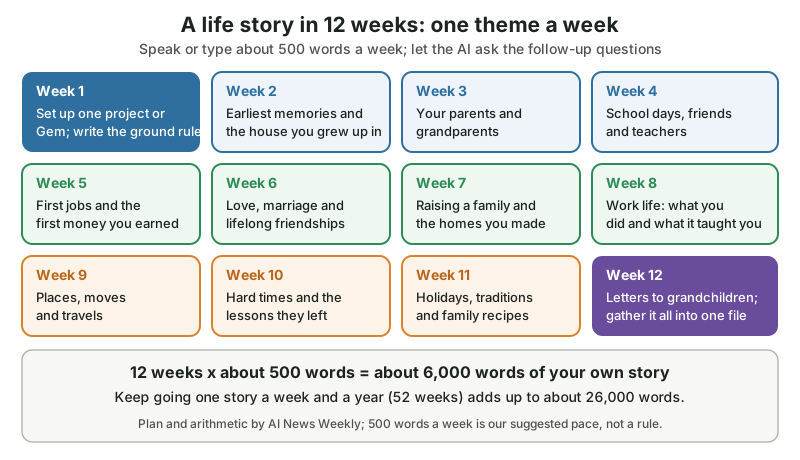
The plan as text (our own, with our suggested pace of about 500 words a week):
- Week 1 — set up one ChatGPT or Claude Project or Gemini Gem and paste the ground rules.
- Week 2 — earliest memories and the house you grew up in.
- Week 3 — your parents and grandparents.
- Week 4 — school days, friends and teachers.
- Week 5 — first jobs and the first money you earned.
- Week 6 — love, marriage and lifelong friendships.
- Week 7 — raising a family and the homes you made.
- Week 8 — work life and what it taught you.
- Week 9 — places, moves and travels.
- Week 10 — hard times and the lessons they left.
- Week 11 — holidays, traditions and family recipes.
- Week 12 — letters to grandchildren, and gather every story into one document.
The arithmetic: 12 weeks x about 500 words = about 6,000 words; one story a week for a year (52 weeks) = about 26,000 words. Miss a week and nothing breaks — the project remembers where you were.
What questions should you ask a grandparent about their life?
The best life-story questions ask for a scene, not a summary: a smell, a sound, a person, a day. Ten of our own to start with, whether a grandchild asks them at the table or an AI asks them in a chat:
- What did the kitchen in your childhood home smell like?
- Who was the funniest person in your family, and what did they do?
- What was your first job, and what did you spend your first pay on?
- Where were you when you heard big news that everyone remembers?
- How did you meet your husband, wife or best friend?
- What did a normal Saturday look like when you were ten?
- What’s a family recipe, and who taught it to you?
- What was the hardest year of your life, and what got you through it?
- What’s something you were proud of that nobody knows about?
- What do you hope your grandchildren remember about you?
Ask an AI to turn any answer into three follow-up questions (“What happened next?”, Who else was there?
, How did it feel?
), and a two-line memory becomes a page.
How can AI help you write a letter to your grandchildren?
An AI chatbot can help you write a letter to your grandchildren by asking what you want each grandchild to know, then helping you order your own words — not by writing the feelings for you. The letter that matters is the one in your voice, with the nickname only you use and the story only you can tell.
Can I tell you my favorite thing about this whole idea? The AI’s best job here is asking And then what happened?
Over and over, kindly, at any hour. It’s like having a grandchild who never runs out of questions and never has to leave for soccer practice.
A simple way in: tell the AI the grandchild’s name and age, three memories you share, one piece of advice and one hope, and ask it to put your notes in a sensible order and suggest what’s missing. Then write or read the letter in your own words. Our own prompt:
I want to write a letter to my granddaughter, age 12,
for her to read when she's older. Here are my notes:
[3 memories we share, 1 piece of advice, 1 hope].
Please suggest an order for these notes and ask me
3 questions that would help me say more. Don't write
the letter for me - I'll write it in my own words.
Some families seal one letter per grandchild with the finished life story, or record the grandparent reading it aloud in the iPhone Notes app or the StoryCorps app, so the grandchild gets the voice as well as the words.
What family details should you keep out of AI chats and published life stories?
Keep out anything a stranger could use to impersonate you or your family: full birth dates, your mother’s maiden name, Social Security and account numbers, home addresses, and the answers to your banking security questions. In a published story, a first name and a year are plenty; and keep recordings of family voices private.
The FBI’s public service announcement I-120324-PSA (December 3, 2024) explains why family details and voices matter: Criminals can use AI-generated audio to impersonate well-known, public figures or personal relations to elicit payments.
Its advice for families: Create a secret word or phrase with your family to verify their identity
, and limit online content of your image or voice, make social media accounts private
.
- Fine to share in an AI chat
- First names, rough years (
the summer of 1962
), towns, memories, feelings, family recipes - Keep out of AI chats and published stories
- Full dates of birth, Social Security, Medicare and bank numbers, home addresses, passwords, the answers to security questions (a first pet, a first car, a mother’s maiden name)
- Ask first
- Living relatives’ health, money or marriage details — it’s their story too
- Keep private
- Audio and video of family voices — share them with family directly, not on public social media
Can you record a grandparent’s story this Thanksgiving?
Yes — Thanksgiving, November 26, 2026, is StoryCorps’ Great Thanksgiving Listen, which invites people to record an interview with an elder, mentor or loved one using the free StoryCorps App or StoryCorps Connect. The recordings can join the StoryCorps Archive at the Library of Congress, and the conversation can become chapter one of a written life story.
StoryCorps’ Great Thanksgiving Listen page says it encourages people of all ages to create an oral history of our times by recording an interview with an elder, mentor, friend, or someone they admire
. It has run every year since 2015, hundreds of thousands of people have participated
, and interviews become part of the StoryCorps Archive at the American Folklife Center at the Library of Congress
— with the choice to share an interview publicly or keep it private. StoryCorps founder Dave Isay told Boise State Public Radio on November 12, 2026 that this Thanksgiving marks the program’s 11th anniversary.
- StoryCorps App
- For a phone, in the same room; StoryCorps says
It cannot record phone calls or long-distance conversations.
- StoryCorps Connect
- For a grandparent far away: a video conversation in a web browser, with nothing to install
- Who can take part
- Anyone 13 or older; under 18 needs a parent’s consent to register
For a step-by-step version with one assistant, our sister site How To With Claude AI is publishing a matching seniors series with screens and prompts for Claude.
What are the key numbers on writing a life story with AI?
The key numbers on older adults, AI writing tools and family life stories, gathered from Pew, AARP, the research literature, the AI makers, Amazon, the Copyright Office and StoryCorps:
| Finding | Number | Source |
|---|---|---|
| Adults 65+ who use AI chatbots | 23% (all adults: 49%) | Pew Research Center |
| Adults 50+ who call themselves AI beginners | 42% | AARP Research |
| Studies kept in the digital storytelling review | 19 of 395 references | Chang, Do and Ahn, IJERPH |
| ChatGPT Projects open to free users | Since September 3, 2025 (5 files per project on Free) | OpenAI; Engadget |
| Claude Projects on a free account | Up to 5 projects | Anthropic |
| Gemini Gems at no cost | Since March 13, 2025 (18+) | |
| iPhones that transcribe audio in Notes | iPhone 12 and later, 10 languages | Apple |
| Copyright Office report on AI and copyrightability | Part 2, January 29, 2025 | U.S. Copyright Office |
| StoryCorps’ Great Thanksgiving Listen | Every year since 2015; 11th anniversary on November 26, 2026 | StoryCorps; Boise State Public Radio |
| Words in 12 weeks / 52 weeks at about 500 a week | About 6,000 / about 26,000 | Our arithmetic |
The surveys measure different groups — Pew counts adults 65+, AARP adults 50+ — and the plan’s word counts depend on the pace you pick, so read each row on its own.
The short version for families: an AI chatbot is a wonderful interviewer and typist for a life story, as long as the memories, the words and the final say stay with the person who lived them. One theme a week, one project to keep it in, and a careful eye on names, dates and private details is all it takes.
So here’s your first chapter, storykeeper: set up one project this week, paste in the ground rules, and tell it about the kitchen you grew up in. One memory, five hundred words, your own voice — and if you can, record a grandparent on Thanksgiving while the pie cools. Somebody in your family is going to treasure this.
Sources and further reading
- How opinions and use of AI differ by age (Pew Research Center) — Jun 17, 2026; 23% of adults 65+ use AI chatbots vs 49% of all adults
- Older Adults Want AI to Show Up in Practical Ways (AARP Research, Brittne Kakulla) — Jan 13, 2026; 42% of adults 50+ call themselves AI beginners
- Telling Your Life Story Is Good for Your Health. Here’s How to Do It (AARP, Megy Karydes) — Aug 14, 2024; ways to tell a life story; Hope Bertram quote
- Digital Storytelling as an Intervention for Older Adults: A Scoping Review (Chang, Do and Ahn, IJERPH; PubMed) — Jan 11, 2023; 395 references, 19 articles; mental health, community connection, digital literacy, less ageism
- What are projects? (Claude Help Center, Anthropic) — available to all users incl. free; free users up to five projects; knowledge and instructions
- Projects in ChatGPT are now available to Free users (OpenAI on X) — Sep 3, 2025; up to 5 files for Free, 25 Plus, 40 Pro/Business/Enterprise; project-only memory controls
- OpenAI rolls out ChatGPT Projects to free users (Engadget, Ian Carlos Campbell) — Sep 3, 2025
- New Gemini app features, available to try at no cost (Google, Dave Citron) — Mar 13, 2025; Gems for everyone at no cost; 18+; upload files; "Check responses for accuracy"
- Type and edit with your voice (Google Docs Editors Help) — Tools > Voice typing; Chrome, Edge, Safari; punctuation commands in English
- Record and transcribe audio in Notes on iPhone (Apple iPhone User Guide, iOS 27) — iPhone 12 and later; 10 languages; Record Audio in a note
- Dictate your documents in Word (Microsoft Support) — Home > Dictate; Microsoft 365 subscribers
- Content Guidelines — Artificial intelligence (AI) content (Amazon Kindle Direct Publishing) — AI-generated vs AI-assisted; "even if you applied substantial edits afterwards"; no need to disclose AI-assisted content
- Copyright Office Releases Part 2 of Artificial Intelligence Report (U.S. Copyright Office, NewsNet Issue 1060) — Jan 29, 2025; assistive use does not bar copyright; prompts alone not enough; Shira Perlmutter quote
- Criminals Use Generative Artificial Intelligence to Facilitate Financial Fraud (FBI IC3, I-120324-PSA) — Dec 3, 2024; secret word; limit online content of your image or voice
- The Great Thanksgiving Listen (StoryCorps) — since 2015; StoryCorps App and Connect; StoryCorps Archive at the Library of Congress; 13+
- StoryCorps present The Great Thanksgiving Listen (Boise State Public Radio, Idaho Matters) — Nov 12, 2026; Dave Isay: 11th Great Thanksgiving Listen
Questions and answers
Can AI write my life story for me?
An AI chatbot can, but the result won’t be your story: it fills gaps with details that sound right, and Amazon KDP counts AI-written text as AI-generated even after you edit it. The better use is to speak or type your own memories and let ChatGPT, Gemini, Claude or Copilot ask follow-up questions and fix spelling.
What is the best AI for writing a memoir?
The best AI for a memoir is one that keeps the whole project in one place: ChatGPT Projects (free since September 3, 2025), Claude Projects (free accounts get up to five) or a Gemini Gem (free since March 13, 2025). Pair it with free voice typing in Google Docs or the iPhone Notes app if speaking is easier than typing.
Is it okay to use AI to help write a memoir?
Yes. The U.S. Copyright Office said on January 29, 2025 that using AI to assist doesn’t stop a work being protected, and Amazon KDP doesn’t require you to disclose AI-assisted content such as editing or brainstorming. If an AI writes the text itself, KDP asks you to disclose it when you publish.
How do I start writing my life story?
Pick one small theme a week — the house you grew up in, your parents, your first job — and speak or type about 500 words on it. An AI chatbot can ask you follow-up questions as you go. At that pace, 12 weeks gives you about 6,000 words.
What questions should I ask my grandparents about their life?
Ask for scenes, not summaries: what their childhood kitchen smelled like, how they met their spouse, what their first job was, what got them through their hardest year, and what they hope the grandchildren remember. StoryCorps’ Great Thanksgiving Listen (Thanksgiving, November 26, 2026) is a good moment to record the answers.